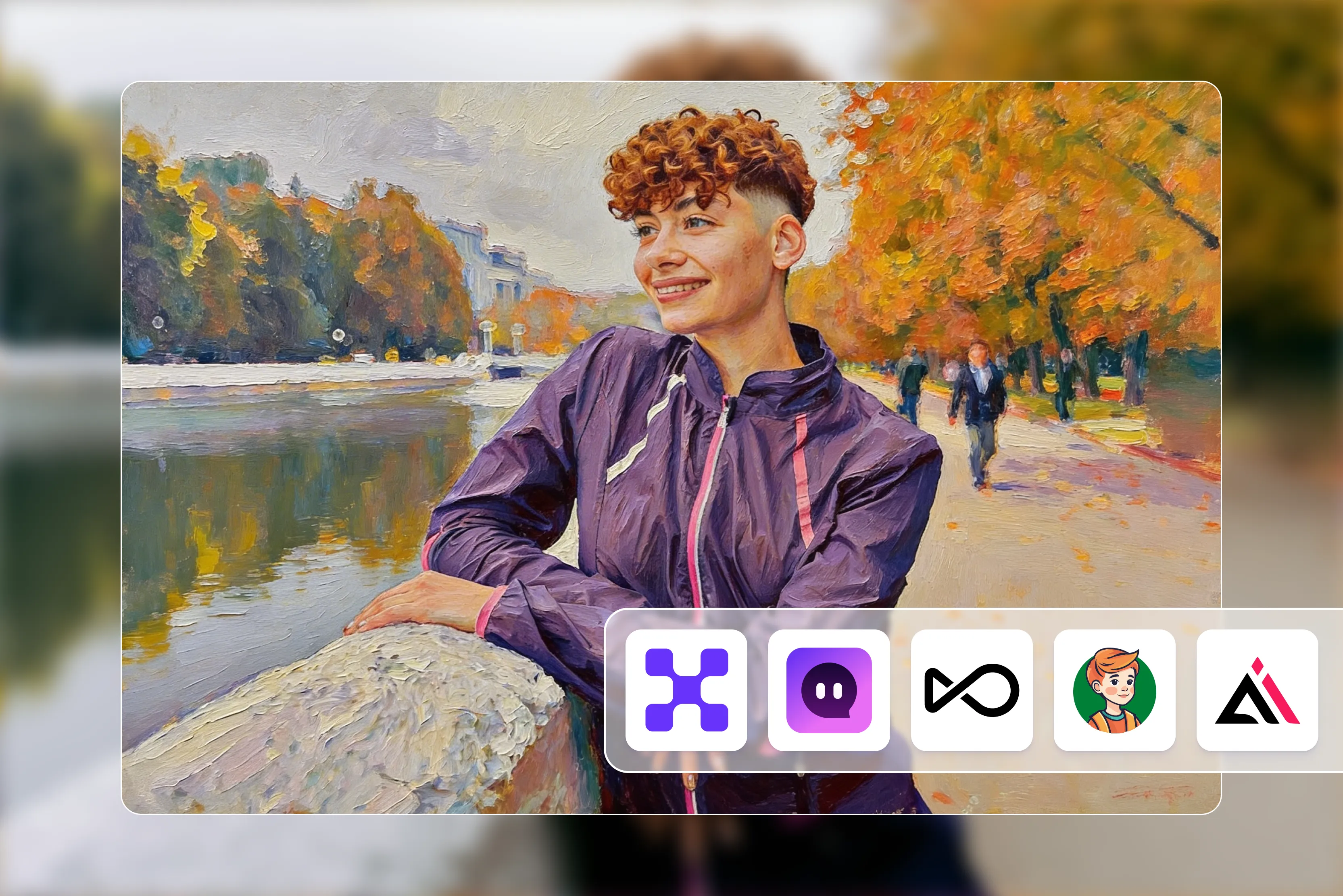


Turning a regular photo into an oil painting used to mean opening Photoshop, watching a dozen tutorials, and hoping you didn’t ruin the original image. Now? You can do it in a few taps. But here’s the catch: not every “Photo to oil painting” app actually delivers that rich, textured, brushstroke-heavy look you’re imagining.
I’ve tested a wide range of apps that are AI-powered online tools, which ones genuinely create art, and which ones just slap a generic effect on your image. Some tools are amazing for quick Instagram-ready edits. Others give you more control over texture, canvas style, and detail (which matters if you’re printing or creating digital art for clients).
In this blog, I’ll walk you through the best apps to convert photos into oil paintings: what they’re good at, where they fall short, and who they’re best for. Just practical insights based on real use. Whether you’re a casual creator, a content marketer, or someone experimenting with AI art, you’ll find an option that fits your workflow. So stay tuned.
Table at a glance
Best apps to convert a photo to an oil painting
I tested 13 different online tools to see how well they actually convert photos into oil paintings. Most of the tools mentioned here offer free trials or daily credits, so you can experiment before committing.
The experience varies, though. Some tools are prompt-based, where you describe the exact oil painting style you want. Others rely on one-click preset filters for quick results.
A few give you both options, which I personally prefer for flexibility. One thing to watch: several free versions add a watermark to downloads, so if you’re planning to print or share professionally, that detail really matters.
1. Pixelbin

Pixelbin’s photo-to-oil painting converter makes turning a photo into art almost effortless. You can do it right in your browser without installing anything.
The AI takes your uploaded image (JPG, PNG, or WEBP) and transforms it into an oil-painting style picture in seconds, complete with textured brush effects and depth.
Best of all, the first three conversions per month are free, and you download the results in HD without watermarks, no sneaky branding or hidden costs. If you find yourself using it more often, you can sign up for more credits or explore premium options. It’s fast, simple, and surprisingly capable for a free online tool.
2. EaseMate AI
EaseMate’s photo-to-oil painting converter lets you turn photos into stylized oil art with almost zero effort. You have to upload an image and click Generate.
The AI analyzes your photo’s tones and textures and applies a classic oil painting filter in seconds, giving you a vibrant, textured result you can download immediately.
Best of all, you get watermark-free downloads for free and up to four conversions daily once you log in, so you don’t feel rushed or limited. EaseMate is fast, beginner-friendly, and great for social posts or gifts, though it doesn’t offer deep customization like a full editor.
3. OpenArt
OpenArt’s photo-to-oil painting tool lets you transform photos into artistic oil painting, style images right in your browser without installs or downloads.
It’s completely free to use; you drop in your image, choose your style, and the AI generates your artwork in seconds. Because the tool is designed as an AI filter rather than a basic effect, the results feel genuinely painterly instead of just blurry.
There’s no automatic watermark on your download, and your uploads stay private and secure. It’s beginner-friendly and perfect if you want a quick, artistic result without fuss or hidden costs.
4. PortraitArt
PortraitArt makes converting a photo into an oil painting really approachable and creative, even if you’re not a designer. You upload your image, pick the oil painting style, and the AI generator turns it into art that reflects the essence of your original photo, whether it’s a portrait, pet photo, or landscape. The app even lets you preview results before you commit, so you’re not buying blindly.
There’s a free trial to test it out, and finished images are watermark-free, which is great if you want to download or print without branding. PortraitArt uses secure processing, and you can explore other art styles too, though high-res or premium downloads use credits. It’s friendly for quick artistic edits and fun creative experiments.
5. BeFunky
BeFunky turns your photos into oil paint artwork in a few clicks. You have to upload a photo, pick the oil painting effect from the Artsy section, and its AI-powered filters do the rest.
You can create textured, art-like images in seconds. However, the more advanced painting effects are part of BeFunky Plus, so full access requires a subscription.
You can try some effects for free without an account, but premium styles and deeper customization require a paid plan. The free version image contains a watermark, and you can use the editor on both desktop and mobile.
6. AILab Tools
AILab Tools’ photo-to-oil painting converter turns ordinary photos into artistic creations in a few clicks. You have to upload a JPG or PNG image, choose from creative painting styles like colorful oil textures or classic artistic looks, and the AI instantly transforms it into artwork. The tool gives you free tries for several styles, though there may be daily limits unless you use credits or upgrade.
Downloads are straightforward, and there’s no forced watermark, so you can share or save your art freely. Your uploaded images are also deleted from their servers after processing, which helps with privacy.
7. Fotor
Fotor makes turning a photo into an oil painting super easy and fun. You upload your image, pick from over 50+ AI painting filters (including oil painting styles), and the AI instantly transforms your photo into art in seconds.
The process works right in your browser, no software to install, and you can start without signing up. You can download your finished artwork in high resolution, but with a watermark for free. While Fotor is free to use for basic conversions, heavy usage or advanced features may benefit from a paid plan.
8. FlexClip
FlexClip makes it easy to turn your photos into oil-style artwork without downloading software or learning complex editing tools. You just upload your image, choose the oil painting effect, and the AI does the rest, often in just a few seconds.
What I appreciate is how straightforward the interface is; it feels a lot like having a creative assistant rather than struggling with sliders and settings. You can use the tool for free, though downloads may include a watermark at lower tiers.
For watermark-free and higher-resolution results, FlexClip’s premium plan unlocks better output quality. It’s a practical choice for quick artistic edits, but keep in mind the free version has its limitations.
9. PhotoFunia
PhotoFunia’s oil painting effect is one of the many fun, free online tools that turn your photo into a work of art without any downloads or software. You just upload your image, choose the oil painting effect, and the site generates a painterly version in a matter of seconds, and you can download it in various sizes (large, regular, small) right away.
Unlike some tools that slap on watermarks or hide basic features behind subscriptions, PhotoFunia’s effects are completely free to use, and the results don’t come with forced branding. There is no trial or sign-up required to try it out, making it the go-to tool for quick creative edits or playful social posts.
10. FaceWow
FaceWow’s photo-to-painting converter is a free, browser-based AI tool that instantly turns your photos into painting-style effects with just a few clicks.
You have to upload your image, pick the style you want, and the AI applies the artistic filter automatically, making the process feel more like creative play than complicated editing.
Best of all, FaceWow’s art filters are currently free to use with no sign-up required, and you can download HD results without watermarks, which is rare for a free tool. While it doesn’t offer deep brush-by-brush customization like some dedicated art apps, it’s fast, fun, and perfect for social media content or personal projects without hidden costs.
11. ArtGuru AI
Artguru AI approaches photo-to-oil painting conversion a little differently from basic filter apps. Instead of just clicking a preset, you can upload your photo, choose the style, and add a text prompt to guide the style.
For example, “Classic oil painting with thick brush strokes” or “Renaissance portrait style”, that extra prompt control gives you more creative flexibility and often produces richer, more artistic results.
The platform offers free daily credits, so you can test it without paying upfront. The free downloads typically include a watermark, and higher-resolution, watermark-free images require a paid plan.
12. LightX Editor
LightX turns your photos into artistic, Renaissance-inspired oil-style images right in your browser, no installs or design skills needed. You upload a picture, pick an art style, and the AI generates an oil-paint effect that adds depth, brush-like texture, and vibrant color to your image in seconds.
The basic tools are free to try, and you get a few free AI credits daily to experiment with different looks, though heavier use or higher resolution downloads may require a paid plan with more credits and expanded features.
There’s no forced watermark on images you download when you’re logged in, making LightX a practical option for quick artistic edits, social content, or creative experiments without surprises.
13. Cloudinary
Cloudinary’s Oil Paint Filter is a neat browser tool that turns photos into digital artwork with a painterly, oil-paint look. You just upload an image, apply the filter, and it transforms the photo with depth and texture, all without needing any design software.
Since this tool is part of Cloudinary’s broader image-management suite, you’ll need to sign up (free plan available) before you can use it. But once you’re in, there’s no forced watermark on your converted images. The free plan gives you basic access to upload and transform images, and you can explore more advanced filters or integration options as you go.
What makes a good photo-to-oil painting app?
After testing multiple web-based tools, I realized something quickly: not all “Oil painting effects” are created equal. Some just blur your photo and call it art. The good ones? They actually recreate the feel of paint on canvas. Here’s what I look for before recommending any tool:
1. AI realism (brush strokes, canvas texture, depth)
A solid app should mimic real brush strokes, layered paint, and subtle canvas texture. If the result looks flat or overly smooth, it’s probably just a basic filter. The best tools use AI to add depth and texture that hold up even when you zoom in.
2. Customization controls (intensity, classical vs modern style)
I prefer tools that let you adjust intensity, brush size, or choose between classical oil painting and modern art styles. One-click tools are convenient, but having some control makes a big difference in the final result.
3. Resolution output (HD, 4K support)
Suppose you plan to print your artwork; resolution matters. Some free versions cap exports at low quality, which looks fine on social media but not on canvas. Always check if HD or 4K downloads are supported.
4. Watermark-free downloads
Nothing ruins a beautiful painting effect like a giant watermark. I always check whether free exports include branding or not. Some of the tools mentioned in this blog generate watermark-free images, while some generate images along with a watermark.
5. Ease of use (one-click vs prompt-based)
If you want speed, one-click converters are great. If you like experimenting, prompt-based or adjustable tools give you more creative flexibility.
6. Free trial and pricing transparency
Clear pricing matters. I avoid tools that hide download limits or surprise you at checkout. A good app makes its free limits and premium features obvious from the start. Also, a good tool allows users to test its features for free.
In short, the best tool isn’t just about pretty effects; it’s about control, quality, and whether it fits your real-world use case.
Conclusion
After testing multiple web-based photo-to-oil painting apps, here’s my honest take: most tools can create a decent artistic effect, but only a few truly capture the depth, texture, and brush detail that make an image feel like real canvas art. If you’re posting on social media, a simple free tool will probably do the job.
But if you are printing or creating something meaningful, resolution and realism matter more than flashy filters; better to experiment with free trials first, paying attention to export quality and watermarks. The right tool isn’t the most popular one; it is the one that fits your purpose.
FAQs
There’s no single “best” for everyone, but several web-based tools stand out depending on your needs. Tools like Pixelbin’s Photo to Oil Painting, PortraitArt, Fotor’s AI photo to painting converter, and EaseMate AI Photo to Oil Painting Converter let you upload images in your browser and quickly generate oil painting–style art without installing software. Each one plays to different strengths; some are simpler and free, others offer richer styles and detail.
Yes! Many online tools offer free conversion options. For example, Pixelbin lets you try a few free conversions each month, and Fotor often includes oil painting filters without a sign-up requirement. Just keep an eye on free-use limits. Some only allow low-resolution downloads or a certain number of free conversions per month.
It depends on the tool and plan. Some simple online converters include watermarks on free exports, while others, like Pixelbin, let you save images without watermarks even for free use.
AI-powered converters tend to deliver the most realistic results because they mimic brushwork, texture, and color blending instead of just overlaying a filter. Tools like Pixelbin’s oil painting converter and PortraitArt’s AI art generators usually produce richer, more painterly results than simple filter-based editors.
Yes, but only if the app supports high-resolution exports. Some tools limit resolution on their free plans. Tools like Fotor and Pixelbin let you export high-definition files that are suitable for printing, framing, or canvas use, though premium plans sometimes unlock the highest quality exports.
Yes, reputable web tools with HTTPS encryption are safe for personal photos. Just avoid uploading highly sensitive images if you’re unsure about a tool’s privacy policy. Established platforms like Fotor, Pixelbin, and PortraitArt follow standard web security practices, but it’s always smart to read each site’s terms and privacy policy before uploading.