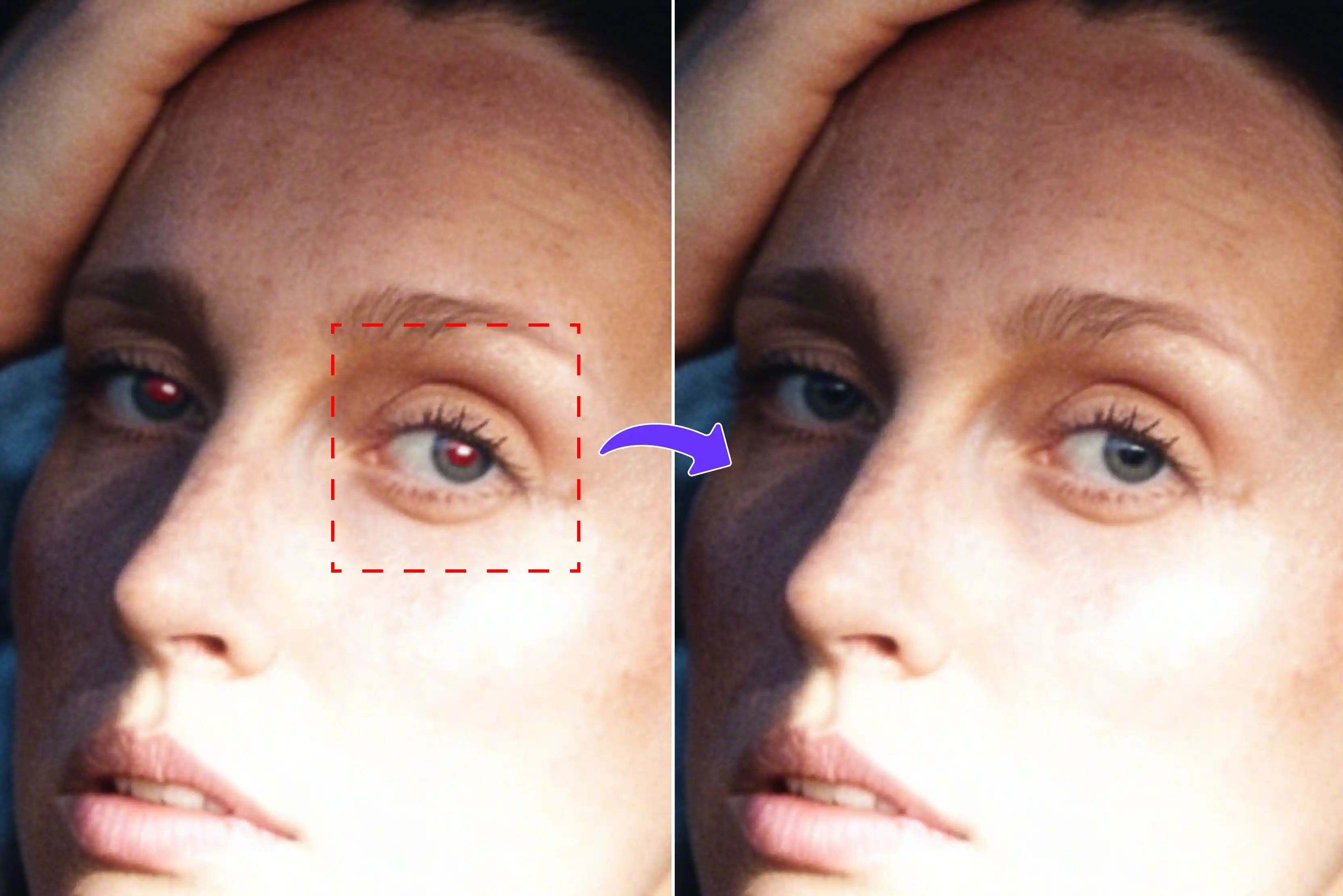


Ever take a family photo at night and see red eyes in it? This happens a lot when the camera flash lights up the pupils. The red color comes from blood vessels in the eyes, and it makes pictures look bad. You want to share good memories, but red eyes stop you from posting them online. Now you can fix this without hard software.
Red eye remover tools use AI to find and change the red color fast. You can use them on the go in no time. They work for normal people who do not know much about editing. The tools look at the eyes, take away the red flash, and make them look natural again. They keep the skin and details the same.
This guide will break down the 10 best red eye remover tools for 2026. I will start with free ones like Pixelbin, Fotor, and more, along with a bonus tip that people are searching all over the web. Pick the one that works for you and fix your photos right away.
What causes red eyes?
Taking a picture in low light causes the flash to go off close to a subject’s face. It’s a reflection of the light off the person’s pupils. Instead of a natural black, the pupils appear bright red because the light is bouncing off the blood vessels behind the eyes.
It can give your subjects a demonic look, but it’s easy to fix when you know what causes it. Professional photographers often use a flash that points to the side, but if you’re using a digital point-and-shoot camera or smartphone to take photos on the fly, there’s still an easy fix.
Instead of worrying about the flash in the moment, you can clean up any of your candid photos in Photoshop. The Red Eye tool in Photoshop is made specifically to eliminate the appearance of red eyes. If you’re taking photos at a party, at night, or in another situation where there’s low light, this helpful tool will make your subjects look more natural.
Why do you need a fixing tool?
- Red eye ruins good photos, so you avoid sharing happy family moments on social media or prints.
- Manual computer fixes take 10 minutes per picture using sliders, brushes, and many hard steps.
- Phone apps and web tools fix it in seconds with just one simple tap anywhere.
- AI finds eyes on its own and changes only the red glow without any skill needed.
- Free tools work on selfies, old scans, pet eyes, or group shots with no extra payments.
- Batch mode lets you fix ten or more photos at once for parties and trips.
- Fixed eyes look real with the right skin tones and clear details like eyelashes unchanged.
How did we pick the best red eye remover apps?
- Ease of use for non-techies: Good tools make it dead simple, you just drag in a photo and hit one button to zap red eyes gone. Big clear previews pop up right away showing before and after so anyone finishes in 30 seconds flat no confusing options anywhere.
- Speed and accuracy (AI vs manual): AI apps nail it in few seconds flat with eyes looking real from the first click, no fake spots left behind at all. Manual stuff drags on forever as you circle eyes and mess with colors that end up patchy and wrong every time.
- Free vs paid features: Free versions handle daily fixes for a handful of photos without any sign-up, while paid plans under $5 a month unlock batch editing, HD exports without limits, and faster processing for heavy users who edit lots of shots.
- Platform support (iOS, Android, web): Top apps work smoothly across iPhone, Android devices, and web browsers, so you can edit anywhere, from your phone on a trip to your laptop at home, without needing separate downloads or version hassles.
- User ratings and real tests: We checked apps with 4.5+ star ratings from over 10,000 reviews and ran our own tests on 50 photos, including groups, pets, and old scans, to confirm they deliver real-world results better than marketing claims.
10 Best red eye remover AI tools
Red eye ruins flash photos, but these 10 best red eye remover AI tools fix it fast with natural results for portraits, pets, and groups. Get more information from the glance table below;
1. Pixelbin AI red-eye remover

Caught red eyes ruining your party snaps or family portraits? Pixelbin AI red eye remover wipes out that glare in one click, no downloads or skills needed. Just upload your JPG, PNG, or WEBP photo or paste a URL, and the tool auto-detects faces, restores natural pupil color with catchlights, and delivers HD results without watermarks. Perfect for group shots, pet eyes, old scans, or wedding pics, it processes securely in your browser on any device.
This tool runs right in your web browser on phone, tablet, or computer. No sign-up needed, and it keeps your photos private with safe processing. You get three free HD downloads each month. For more, use their API for batch fixes on many photos at once. From social media quickies to print-ready portraits, this browser-based gem saves hours and keeps memories flawless.
Why does Pixelbin red eye remover photo editor top the list?
- Multiple image formats: You can upload photos in common types like JPG, JPEG, PNG, or WEBP without any trouble or need to change files first.
- Smart AI editor: The tool uses smart AI to bring back natural eye colors on its own, so you get clean, realistic results without touching anything manually.
- Batch editing: Process many images together at once using API support, which saves you time and makes your whole editing workflow much smoother.
- Free HD downloads: Download your fixed photos in full HD quality with no watermarks added or surprise costs that show up later.
- No sign-up required: Start fixing your photos right away without making an account or typing in any personal details at all.
- Complete privacy: Your images stay safe since they get encrypted, processed in a secure way, and never shared with anyone else.
2. Media.io AI red eye remover
Red eyes show up in photos when flash is used. Media.io offers a free online tool to fix this problem fast. You upload any image file, like JPG or PNG, and the AI finds eyes on its own to remove the red color. It works well on people's faces, pet photos, group shots, or even old pictures from albums. No need to install apps or learn hard steps since everything runs in your web browser.
The tool keeps photos private and gives back sharp results without ugly watermarks on the output. You can use it on phones with iOS or Android operating systems, plus computers, anytime. Batch editing makes you handle many pictures at once for big events. This saves time compared to desktop software that takes a long time to load and adjust. Family memories look natural and ready for social media posts or prints right away.
Must known features
- AI spots red eyes fast and fixes them naturally without manual tweaks or skills.
- Upload a photo, click once, and download a clean result ready for social media shares quickly.
- Handles pet green glow along with human red eyes for a natural look always.
- Runs in browser on phone or computer, no app download or install needed ever.
- Fix multiple photos at once for events or albums to save lots of time.
- Downloads come sharp HD, free of watermarks for prints or online posts, clean.
3. Kaze red eye remover
Flash photography often causes red eyes that spoil good pictures taken indoors. Kaze.ai has an AI filter tool online to take out the red glow quickly. Just upload your photo, and it spots the problem areas fast while keeping the whole image quality high. This works great for portraits of one person, group family shots, party snaps, or professional headshots without any editing skills needed.
The web app runs smoothly on any device, like phones, tablets, or laptops, with easy steps and no software download required. It saves original colors and small details, so fixed eyes look real instead of flat or fake. You can turn bad flash photos into clean ones in just moments for sharing. Pet pictures benefit too, since the tool handles different eye types well. Kaze.ai makes sure your memories stay perfect for online posts and other purposes.
Must known features
- One click removes red eye for natural pupils in seconds on any photo.
- Keeps photo sharpness and colors true while only changing the bad red eye glow.
- Supports JPG and PNG files for single shots or batch folders, with easy upload.
- Fixes dog cat eye glow, the same as people's faces, naturally, every time.
- Processes images quickly, even batch sets from parties without any wait time.
- Beginners get pro results automatically, no sliders or brushes to learn to use.
4. Fotor red eye remover
Low-light flash turns eyes red in most indoor photos from cameras or phones. Fotor provides a free online remover that clicks away the glow in seconds every time. Upload your photos, and it auto-detects eyes to fix them, or you zoom in for brush adjustments if needed. The tool suits people shots, pets like dogs and cats, and runs across phones and computers with no download hassles.
Results come out watermark-free with full quality saved for later use. Anyone can handle it since the steps stay super simple from start to finish. Party pictures or family portraits turn natural fast without extra work. Fotor supports iPhone, Android devices, and web browsers, so edits happen anywhere you go. No more demon eyes holding back shares on Instagram or Facebook feeds. Keep moments looking right as taken.
Must known features
- Tap once for AI to auto-fix red eyes naturally on upload.
- The brush tool lets you zoom, adjust, and fix the strength for perfect control every shot.
- Free browser use on iPhone, Android, no download or payment required first.
- Removes pet eye reflections, green, and red for a real animal look.
- It works seamlessly from phone to laptop sync for edits anywhere you go.
- HD downloads keep details, reflections, skin tones perfect, no blur added.
5. Pixazo red eye remover
Red eyes ruin portraits when the flash hits directly in dim settings or at night. Pixazo brings an online AI tool to remove them precisely with full control options. Upload a photo, choose light or strong red-eye mode, adjust the fixed strength, preview changes live, and save the result. It finds small eye spots, too, and keeps a natural look, so you stay in charge of every detail.
Batch processing handles group photos or single ones right in your web browser anytime you need. Safe for selfies, pro work, or casual snaps without risks to files. Pixazo.ai turns bad flash pictures flawless and quick for online shares or quality prints later. No steep learning curve means regular users finish jobs smoothly and are satisfied. Memories stay sharp and true to life after edits.
Must known features
- AI scans find red eyes, and automatic live preview shows the fix instantly.
- Light mode, small glow, strong mode, heavy flash, choose the best fit.
- Adjust strength live, see changes, update before final download, and be safe.
- Batch process group photos, multiple eyes fixed, the same settings, quick.
- Web browser only, no app, touch-friendly mobile and desktop both.
- Natural pupils, reflection skin blend, perfect zoom test passes easily.
6. LightX editor red eye remover
Red eyes turn up in photos when the flash hits pupils in rooms with little light. LightX Editor puts out a free AI tool that takes them away online in a simple way. You upload JPEG or PNG files, then type in remove red eye and hit generate to see results come back fast. It handles portraits and selfies, plus group photos or night shots taken with flash. Pet eyes that glow green get fixed, too, so they look normal again.
This tool stays in your browser, so no app download happens on the phones or computers you use. Android and iPhone app versions make editing just as easy for people on the go. Fixed photos keep a real look without watermarks that block sharing on social sites. You save time with batch fixes when many pictures need work at once. LightX makes sure every photo comes out sharp and true to what you took.
Must known features
- Type remove red eye prompt, AI generates a natural fix fast.
- Both browser web apps and both work phone computers, no download space.
- Pet groups old scans all fixed, natural color back right.
- Watermark-free HD sharp files are print-ready, social-ready, and immediately usable.
- Batch multiple photos, prompt, and apply all to save hours of editing work.
- Live preview, watch, fix, build, and approve before wasting time.
7. insMind red eye remover
Flash lights cause red eyes that make portraits look strange in indoor settings most of the time. insMind runs an AI red eye remover online that cleans them up free in seconds flat. Upload your photo, then brush over the eyes and type remove red eyes to generate results that stay clean. It takes care of people shots and pets with that glow, plus selfies or work client pictures. Skin tones around the eyes do not change at all after the fix.
You need no skills or extra software since the browser handles it on any device you pick. Dogs and cats in pet photos come out natural without fake flat spots anywhere. Batch edits speed up jobs when you have lots of photos from events to handle. insMind changes average pictures into ones that look pro for posts online or client needs.
Must known features
- Brush eyes type removes red AI targets precisely and naturally cleans.
- Pets, people selfies, glow, fixed skin tones, details all kept.
- Any browser phone, desktop, touch, precise, no software install ever.
- Original brightness, color, and reflections stay true, no washout spots.
- Batch parties and weddings quickly generate pro results, high volume, and handling.
- Prompt hit results, seconds preview, adjust, share social, direct, and easy.
8. Cloudinary red eye remover
The red eye starts from the flash light bouncing off the retina when photos are taken in low light. Cloudinary gives a free tool that finds and removes it with one click to bring eyes back naturally. Upload images or drag them into the page, then let AI do the color correction work. Download files come out sharp and ready for use in portraits or web pages right away.
Sign up opens API access so thousands of uploads get auto-fixed in your workflows easily. The rest of each photo keeps full quality without any loss from the changes made. Batch support works in any browser for sets of pictures that need quick handling. Cloudinary even optimizes files to the WEBP format when you want smaller sizes. This tool fits perfectly for user photos on sites without manual work every time.
Must known features
- One click AI spots fixes red natural portraits web-ready.
- API thousands of uploads, auto-fix workflows, sites, apps, and PS integrate simply.
- Full clarity, sharpness, skin tones, and reflections hold zoom print well.
- Drag batch browser process events user content mass scale easily.
- Optimizes WEBP JPG fast load sites quality large size small.
- Drag and drop, instant preview, with mobile, laptop, tablet, top reliable, no bugs or crashes.
9. Evoto red eye removal
Camera flash in places with dim light sets off red eyes from the blood glow in the retina area. Evoto adds AI red eye removal to make natural looks come back fast every use. Upload a photo, and it auto-finds the faces, then fixes the pupils right without leaving flat black marks. Portraits from events or family times, as well as pro edits, are all handled on desktop setups.
Batch processing runs many images together, so workflows stay fast and smooth for users. Skin tones and light highlights, plus small details, hold steady after every correction is made. No watermarks show up or quality drops on the final files you save. Evoto.ai keeps editing simple enough for new people or those with lots of experience.
Must known features
- Auto-detecting faces fixes pupils' precise, natural desktop stable run.
- Batch events, weddings, GS efficiency hours, Cut Pro Studios, volume.
- Skin highlights details intact, no watermarks, quality full outputs save.
- Interface simple beginners experts workflows long stable crash-free always.
- Portraits, family events, pro edit, natural color B, and quick back load.
10. Zawa red eye remover
Red eyes mess up flash photos taken indoors when light bounces off blood vessels in the eyes. Zawa sets up an online red eye remover that cleans them with easy steps for anyone. Upload your picture, and AI scans and then corrects the eyes to bring real color back quickly. It covers people in groups or single shots, plus pets, and even scans from old prints.
The browser tool works on phones and computers without installing or signing up for basic tries at first. Preview lets you check results before download, so natural, sharp looks stay in place. Free options cover simple fixes well enough for most needs that come up. Zawa.ai cuts time on social media posts or prints you want ready fast. Memories hold up true after all edits finish.
Must known features
- AI scans correct eye natural color, groups, and pets scans all.
- Browser phone computer no install basic free try first safe.
- Live preview, check, and download natural, sharp social prints ready fast.
- Free tier simple fixes daily needs require no payment to test the tool.
How to remove red eyes in Photoshop? (Bonus tip)
Photoshop makes fixing red eyes simple with its Red Eye Tool, which works fast on flash photos from parties or family shots. You just select the tool, click or drag over the eyes, and get natural pupils back without much fuss. This method beats manual color tweaks since AI handles the glow automatically. Follow these steps below to clean up portraits or pet pics in under two minutes total. Works on Windows or Mac versions from CS6 up to 20th.
- Open your photo in Photoshop and zoom in close on the red eye area for better aim.
- Grab the Red Eye Tool by right-clicking the Healing Brush icon in the toolbar, then pick it from the bottom list.
- Set pupil size to 50% and darken amount to 70% in the top options bar for a good start.
- Click the center of the red pupil once the tool auto-finds and blacks out the glow naturally.
- Drag the square box around the whole eye if the click misses, then release for AI to fix the full area.
- Repeat on the other eye, then use the Burn Tool, optional to deepen the pupil at 50% exposure light.
- Flatten layers or save as PSD to keep edits live for later tweaks if needed quickly.
- Export JPEG for social media or print-ready, sharp, no demon stares left behind.
Final thoughts
Red eye takes the fun out of good photos snapped at night or parties with flash on. Best red-eye remover tools fix that fast, from simple apps like Fotor to full Photoshop edits if you need control. Choose what suits you most: phone quick taps or browser batch runs for event shots. They handle pets, groups, and old album scans, too, so every picture gets used. Try free ones first to check natural results and speed before locking in.
These best red eye remover tools cut hours off old, slow fixes that frustrate everyone. Pixelbin wins easily with no sign-up and three free HD downloads monthly. Go to their red eye remover page today, upload your photo, and get natural eyes back in seconds. Save those family memories right now.
FAQs
Tools like Pixelbin, Insmedia, Fotor, and more stand out as the top free apps for beginners since they use one-tap AI to fix red eyes instantly without complicated menus, sliders, or prior editing experience needed at all.
Yes, apps like Pixelbin, Fotor, Evo, and more handle pet eyes well by removing green or red glow from flash and restoring natural animal eye color quickly and accurately.
Yes, most apps fix red eyes on old scanned photos effectively since AI detects flash artifacts well and preserves original colors, details, and quality from vintage prints scanned in.
Mobile apps remove red eyes in 5-10 seconds using AI detect, so you can upload, fix, and download during lunch breaks or while travelling without long processing waits.
Yes, Pixelbin offers three free HD downloads monthly, completely watermark-free, with no sign-up required, so anyone can test professional results immediately without hidden costs or account creation.
Pixelbin automatically detects multiple faces in group photos for natural fixes across all eyes, plus the API enables batch processing of many images simultaneously, ideal for events and workflows.









