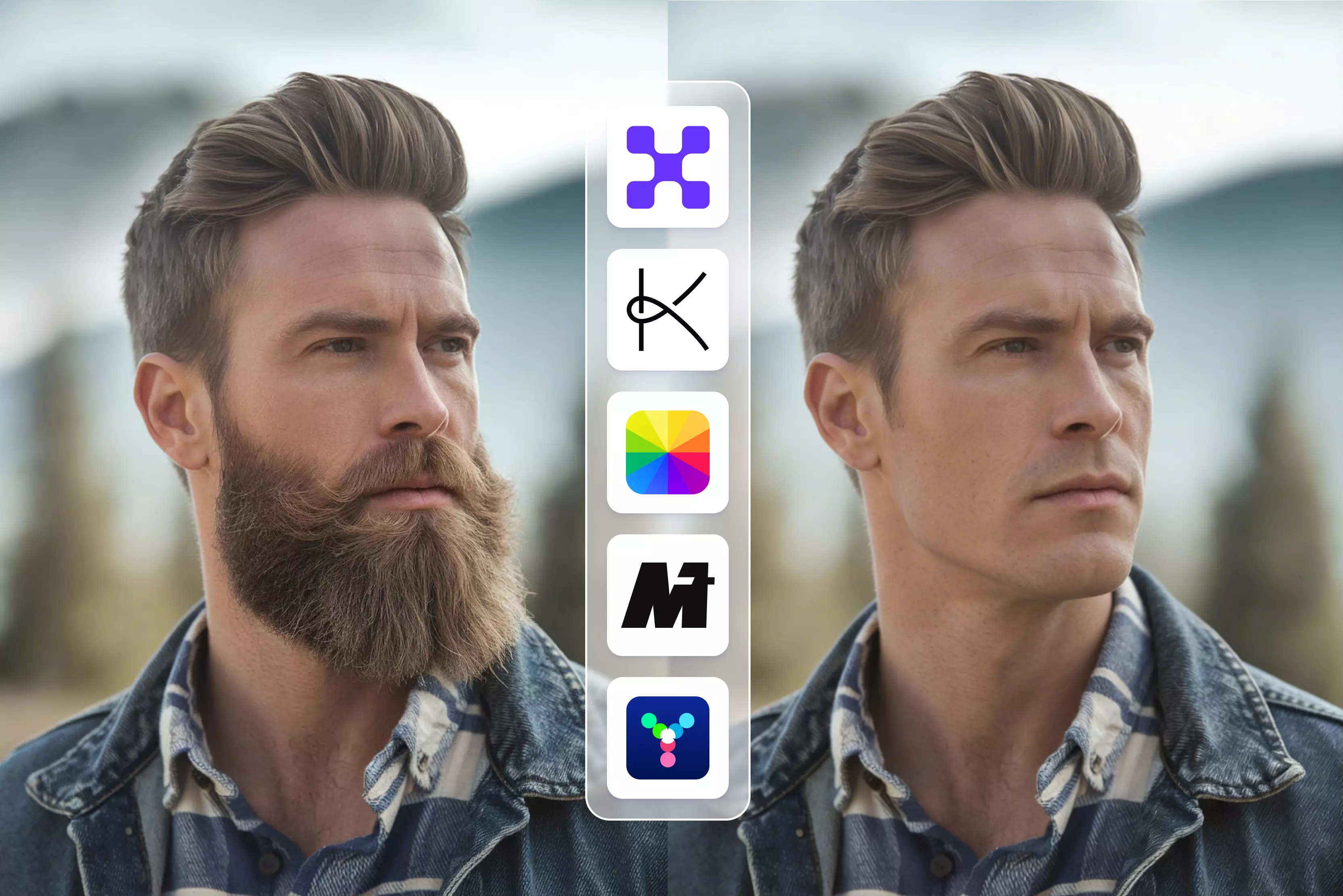


Scroll through your photo gallery, and you’ll probably spot at least one picture where everything looks right from the lighting, angle, and outfit, but the beard? Not so much. Maybe it feels too heavy, patchy, or just not you anymore.
That’s exactly why beard removal apps have quietly become popular. People aren’t just using them for jokes or filters anymore; they’re using them to fix profile photos, update professional headshots, or see how they’d look clean-shaven without actually picking up a razor.
Thanks to AI, removing a beard from a photo is no longer a clumsy blur job. Modern apps analyze facial structure, skin texture, and lighting to realistically rebuild the face underneath the beard. The result, when it works well, looks natural enough for LinkedIn, resumes, or dating apps. Of course, not every app gets this right, and some still over-smooth or leave strange patches.
In this blog, I’ve tested and compared the best apps to remove a beard, both free and paid. You’ll learn how these tools work, which ones deliver realistic results, where they fall short, and which apps are best for casual edits versus professional use. If you are curious, cautious, or just experimenting, this blog will help you choose the right tool without wasting time.
What is a beard remover app?
A beard remover app is exactly what it sounds like, but smarter than you’d expect. Instead of just blurring or smudging facial hair, these apps use AI to rebuild the skin underneath the beard while keeping your face recognizable. I’ve tested plenty of them, and the good ones don’t make you look airbrushed or plastic.
You upload a photo, the AI detects facial landmarks (jawline, lips, cheeks), isolates the beard area, and then fills it in with realistic skin texture that matches the lighting and tone. When it works, it feels like the beard was never there. When it doesn’t, you’ll usually see over-smoothing or odd patches, still a common limitation, especially in free tools.
How does AI beard removal work behind the scenes?
Behind the scenes, these apps rely on face segmentation models trained on thousands of bearded and clean-shaven faces. The AI learns what skin should look like under facial hair, then predicts and reconstructs it pixel by pixel.
More advanced tools also factor in shadows, skin grain, and face shape, which is why results vary so much between apps. This is also why clear, well-lit photos matter more than people think.
Difference between beard removal and face retouching
This is where many apps get confused. Face retouching smooths skin, removes blemishes, or brightens faces. Beard removal is more complex; it replaces missing visual data. Retouching can hide problems; beard removal has to invent believable skin. That’s why not every “Beauty” app is good at removing beards, even if it claims to be.
Free vs paid beard remover apps
If you’re just experimenting or fixing a casual photo, free beard remover apps can get you surprisingly far. Most free versions let you upload an image, run the AI beard removal once or twice, and download a preview-quality result.
That’s usually enough to see how the tool works and whether the results look natural on your face. The catch? Free plans may limit daily usage, add a visible watermark, or cap image resolution. From my testing, sometimes free outputs also tend to struggle with thick or uneven beards.
Upgrading is worth it if you need clean, high-resolution images, no watermark, or consistent results across multiple photos. If you’re updating a LinkedIn profile, resume photo, or ID image, paid tools save time.
List of Apps to remove beard
After testing and comparing 12 no-beard tools, one thing becomes very clear: there’s no single “Right” way these apps handle beard removal.
Some tools keep it dead simple with a direct, one-click filter that automatically removes facial hair for a clean-shaven look. Others take a more flexible route and use prompt-based editing, where you describe what you want and let the AI figure out the details.
A few go a step further and also offer multiple beard styles, so you can switch between stubble, a full beard, or a clean shave before deciding. The good news? Most of these tools offer a free trial or free usage, making it easy to test results before paying.
1. Pixelbin

Pixelbin AI beard removal is surprisingly simple: you upload a clear selfie, pick the “No Beard” tool, and the AI reconstructs the underlying skin texture to give a realistic, clean-shaven look in seconds.
Its retouching pipeline blends facial-structure awareness with texture restoration so results don’t look plastered-on, and it preserves image resolution for social use.
From my testing, it’s fast and practical for previews and profile photos, though very heavy stubble, odd lighting, or occluded faces can leave artifacts, so pick a straight, well-lit shot for best results.
2. Kaze.ai
When you upload a selfie to Kaze.ai’s beard filter, you don’t just get “Beard on” or “Beard off”, you get four distinct options to play with your look: Clean shaven look for a smooth face, beard removal effect to digitally remove existing facial hair, fresh face style for a subtle polished appearance, and AI shave filter that blends your skin texture realistically post-removal.
These choices let you preview different grooming outcomes without touching a razor. I found it especially handy for testing what suits you best before committing to a style, though lighting and photo quality still affect consistency.
3. Media.io
If you’re curious what you’d look like clean-shaven without touching a razor, Media.io’s AI beard removal feels like a clever digital hack rather than a complex editor. You have to upload your photo and use prompts to tell the AI what you want, like “Remove beard, keep natural skin.”
The underlying AI then distinguishes facial hair from skin and fills in the cleared space with a realistic texture,e so you don’t get weird smudges. You can even choose the final image’s aspect ratio before downloading, which is great for Instagram or LinkedIn. I’ve found it works best on well-lit, front-facing shots.
4. Youcam online editor
YouCam’s grooming features aren’t just about removing a beard; they’re about exploring grooming styles. Once you upload a selfie, you can jump into its Beard feature and choose from 15+ pre-set beard looks like goatee, anchor, circle, or mustache, he and yes, there’s a “Shaved” (clean-shaven) option that effectively erases facial hair for a smooth preview.
The AI uses smart face mapping and AR to apply or remove styles realistically, blending with your skin tone and contours. After testing it, I’ll say it’s fun and practical for quick experiments or style decisions before a real shave, though the results lean more stylized than ultra-photorealistic; it's great for social pics or inspiration, less so if you need professional-grade photo retouching.
5. Airbrush
.webp)
If you want to see your face before you actually commit to a shave or a new beard style, Airbrush AI beard tools are built exactly for that.
You upload a photo, and instead of guessing with brushes, you choose from multiple beard style options, including clean-shaven, stubble, goatee, and fuller beards. The AI maps your facial structure and blends skin texture naturally, so the result usually looks believable, not edited.
From regular testing, it works best on clear, front-facing photos; heavy shadows can throw it off a bit. It’s practical for quick experiments, not perfection-grade retouching, and that’s honestly where it shines.
6. FlexClip
If you want to digitally test a clean-shaven you without awkward manual editing, FlexClip’s AI Beard Remover is worth a try, but with a prompt-based twist. You upload a photo, then enter a text prompt like “Remove beard completely while keeping other features untouched,” and the AI intelligently identifies and erases facial hair, rebuilding skin texture for a natural look.
I’ve used it enough to see that it handles full beards, stubble, and mustaches fairly well, though lighting and image clarity still matter. After the beard removal, you can continue refining your portrait with FlexClip’s other AI photo tools, like blemish removal or background tweaks, all in one place.
7. Fotor
If you want to experiment before actually shaving, Fotor makes beard editing refreshingly straightforward. You upload a photo and choose from several beard style options: clean-shaven, light stubble, full beard, goatee, mustache, and more, rather than guessing with manual brushes.
The AI detects facial contours and blends skin texture so the result usually looks natural, not airbrushed. From long-term use, it works best on clear, front-facing photos; heavy shadows can still confuse the model. It’s practical for profile photos and quick style decisions, not high-end retouching, and that honesty is why it’s useful.
8. Pixelcut
If you’ve ever wondered what you would look like without a beard before committing to a real shave, Pixelcut has a surprisingly simple way to show you, and it’s all prompt-based.
Their AI Beard Remover lets you upload your photo and type a prompt like “Remove beard, clean-shaven” to instantly generate a smooth, clean-shaven version of yourself. From my testing, the results feel natural and high-resolution, but the quality still hinges on clear lighting and front-facing shots; shadows can confuse the AI sometimes.
9. Arting.AI
If you’ve ever wondered what you’d look like without facial hair, right in your browser, Arting.AI’s No Beard Filter is a delightfully quick way to find out. You upload a photo, pick an aspect ratio, enter the prompt, and the AI automatically removes beards while preserving your natural skin tone and facial structure, all without installing anything.
Arting doesn’t stop at a one-size-fits-all button, though. It is excellent for experimenting with a clean-shaven look before a real shave or creating professional ID or social media photos.
10. Pokecut
You have to upload a clear portrait, and the AI automatically erases the facial hair while preserving skin texture and jawline. You can also use its adjustable brush to target specific areas (like removing a mustache but keeping a goatee), giving you precise control over exactly what stays and what goes.
It supports image file formats such as JPEG, JPG, PNG, WebP, and BMP,, and outputs crisp results you can download instantly. From my testing, it’s fast, beginner-friendly, and particularly handy for headshots or resumes, though it doesn’t offer style switch presets like “Full beard” or “Stubble”; it’s all about removal and selective cleanup.
11. Bylo AI
With Bylo.ai, you can remove beards using a prompt-driven workflow: upload a clear photo (PNG, JPG, or WEBP; up to 5 MB, up to 10 images), type a short instruction like “remove beard, keep skin texture,” and the AI returns a clean-shaven result.
Choose an output format (PNG or JPEG) and pick aspect ratios (1:1, 9:16, 16:9, 4:5, etc.) before downloading. It’s fast and surprisingly natural in good lighting, though heavy shadows or blur can cause artifacts. Honest tip: use well-lit, front-facing shots for best results; they're perfect for profile photos, IDs, or quick style experiments and edits.
12. VideoPlus.ai
If you want to see a clean-shaven you without touching a razor, VideoPlus.ai makes it delightfully simple: upload a clear selfie, apply the No Beard (Beardless) Filter, and the AI detects and removes facial hair while reconstructing realistic skin texture. You also have a prompt box to enter any suggestions for removing the beard. All in your browser, and watermark-free.
You can preview results instantly and download; the tool accepts common image formats and needs no login, which is great for quick profile or ID photos. It’s fast and practical, though heavy stubble, harsh shadows, or low-res images can still confuse the model; use well-lit, front-facing shots for best results.
Key features to look for in a beard removal app
After testing a bunch of beard remover apps, I’ve learned that the difference between “Wow, that looks real” and “Why does my face look blurry?” usually comes down to a few core features. Here’s what actually matters when you’re choosing one.
1. Natural skin reconstruction
This is non-negotiable. The best apps don’t just erase hair, they rebuild believable skin texture underneath it. Look for tools that preserve pores, shadows, and skin tone. If the result looks overly smooth or plastic, that tool is taking shortcuts.
2. Face detection accuracy
Accurate face detection is what prevents weird results. The AI needs to understand where your jawline ends, where your lips begin, and how your cheeks curve.
When detection is weak, you will see missing patches, warped mouths, or uneven skin. Apps with stronger facial mapping handle thick beards and side angles much better.
3. Prompt-based vs manual tools
Prompt-based tools are great when you want speed; you describe the result and let the AI decide. Manual tools give you sliders or controls for fine-tuning, which helps if the beard is dense or uneven. Prompts are suitable when you want casual editing, while manual tools shine when realism really matters.
4. Image vs video support
Most beard-remover apps focus on still images because they are easier to process. Video beard removal is far more complex, since the AI has to stay consistent across every frame. A few tools offer it, but expect longer processing times and mixed realism, especially on free plans.
5. Watermark and export quality
This one catches people off guard. Many free apps limit resolution or add watermarks, making images unusable for professional profiles. If you care about clean, high-quality results, checking export settings before editing saves a lot of frustration.
Conclusion
The best tools don’t just delete facial hair; they understand faces, lighting, and texture well enough to make the result look believable. From my testing, free apps are great for quick experiments, but paid tools consistently deliver cleaner skin reconstruction, higher resolution, and fewer awkward artifacts.
The right choice really depends on how you plan to use the image: casual edits, social profiles, or professional photos. My advice? Try a couple of tools with the same photo, compare the results side by side, and stick with the one that looks the most human, not the most “AI-edited.”
FAQs
Yes, if the photo quality is good. Modern AI beard remover apps analyze skin texture, lighting, and facial structure to rebuild the face under the beard. Light or medium beards usually look very natural after removal. Thick, dense beards can be trickier and may leave slight smoothing or artifacts, especially in free tools.
Most reputable apps are safe, but it’s still smart to check their privacy policies. Some tools process images temporarily, while others store them to improve their models. If privacy matters, avoid uploading sensitive photos and prefer tools that clearly mention auto-deletion or private processing.
Many free beard remover apps add watermarks or limit resolution. This is common across AI photo tools. Paid plans usually remove watermarks and unlock higher-quality exports, which matters if you’re using the image professionally.
Some apps can handle group photos, but results vary. Tools with strong face detection may remove beards from multiple faces, while others focus on just one person per image. Accuracy also depends on lighting and face clarity.
A few advanced tools support beard removal in videos, but this feature is less common and often paid for. Video edits require frame-by-frame consistency, which is harder for AI and may look less natural than image-based edits.
Clear, front-facing photos with good lighting work best. Avoid shadows, low resolution, heavy filters, or extreme angles; these confuse the AI and reduce realism.


.webp)