


Support webp/jpg/jpeg/png, up to 10MB
/pixelbin_blogs/PB_2.0/Apps_New_design_graphics/AI_meme_generator/sample_image_3.webp)
/pixelbin_blogs/PB_2.0/Apps_New_design_graphics/AI_meme_generator/Sample_image_1.webp)
/pixelbin_blogs/PB_2.0/Apps_New_design_graphics/AI_meme_generator/funny_meme.webp)
/pixelbin_blogs/PB_2.0/Apps_New_design_graphics/AI_meme_generator/savage_roast.webp)
/pixelbin_blogs/PB_2.0/Apps_New_design_graphics/AI_meme_generator/gamer_meme.webp)
/pixelbin_blogs/PB_2.0/Apps_New_design_graphics/AI_meme_generator/relatiohship.webp)
/pixelbin_blogs/PB_2.0/Apps_New_design_graphics/AI_meme_generator/corporate_(2).webp)
/pixelbin_blogs/PB_2.0/Apps_New_design_graphics/AI_meme_generator/student.webp)
AI meme generator
Free AI meme generator online
Add your own image and simple prompts to create funny, relatable, and share-worthy meme posts in just a few clicks.
/pixelbin_blogs/PB_2.0/Apps_New_design_graphics/AI_meme_generator/generated_meme_example.webp)
/pixelbin_blogs/PB_2.0/Apps_New_design_graphics/AI_meme_generator/Sample_heding_image.webp)


How to generate memes using AI?
Upload your image
Start with a photo, screenshot, or meme base that fits the joke you want to make. A clear image usually gives the best result.

Write your prompt
Type the idea in a short, natural way. Mention moods, scenarios, and reactions to make the meme feel more expressive.
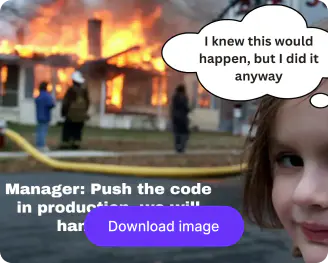
Generate & download
Pick the image ratio, image model, and click generate to make your meme. Check the result, pick the one you like most, and save it in HD.
Why use Pixelbin’s free AI meme generator?

Matches image & caption
Bring your image and text together so the joke feels like one piece instead of something forced together.

Optimized for all platforms
Create memes for Instagram, LinkedIn, X, Facebook, YouTube thumbnails, or community posts without quality loss.

Custom avatars
Prompt the AI meme generator to make specific personas, fantasy figures, or gaming NPCs, defining their clothes & mood.

Image upscaler
Enhance compressed or grainy images up to 8x resolution without pixelating or losing crisp details.

Creative backgrounds
Isolate subjects or place them into funny, dramatic, or trend-based meme scenes without manual editing.

Convert to video
Turn your meme into a short animated video with motion effects, sound, and dynamic captions.
Generate memes built for trends and engagement
Create relevant meme content around current trends, online culture, or workplace humor without needing any editing skills.
Browser-friendly
Access the meme generator AI across all modern browsers, such as Safari, Edge, Chrome, or Firefox.
Multiple meme styles
Create reaction memes, workplace jokes, relatable posts, or light brand content depending on what you want to say.
Watermark-free exports
Create memes from text online and export them in HD without any marks, labels, or text overlays.
Quick & instant results
Make a meme in seconds instead of spending time moving text boxes around or adjusting layouts by hand.
/pixelbin_blogs/PB_2.0/Apps_New_design_graphics/AI_meme_generator/browser_friendly.webp)
AI tools by Pixelbin
/pixelbin_blogs/PB_2.0/Related_apps_tumbnail/photo_to_naime.webp)
/pixelbin_blogs/PB_2.0/Apps_New_design_graphics/Ai_cartoon_Generator/thumbnail_(16).webp)
/pixelbin_blogs/PB_2.0/Related_apps_tumbnail/Thumbnail_(20)-transformed.webp)
/pixelbin_blogs/PB_2.0/Related_apps_tumbnail/Thumbnail_(8)-transformed.webp)
Key highlights of Pixelbin’s text-to-meme generator
Benefits of the meme generator AI
- Fast creation: Turn a quick thought into a meme in just a few seconds, which is really handy when something funny or topical shows up and you want to post it while it still feels fresh.
- Easy input: Drop in a short joke or caption, and let the AI meme generator from text handle the rest, so you don’t have to go around manually arranging text.
- Flexible creation: Begin with your own image, or use a simple prompt, depending on the kind of meme you’re aiming for.
- Ready to share: Download memes in HD quality that are easy to share in chats, feeds, or even campaign content.
- No design background needed: Anyone can make a meme using our free meme generator AI online without learning editing software or working through a complicated setup.
- Useful for quick content: It is a practical way to make light, reactive, or funny posts without slowing down your workflow.
Use cases for the free AI meme generator
- Social media posts: Take those trending thoughts, daily annoyances, or random internet punchlines, and turn them into quick posts people can get right away. Like, fast, relatable in seconds with our AI meme generator.
- Team and workplace humor: Toss in a bit of internal office humor for team chats, updates, or casual company mentions! No need to hire a “designer” for this, as you can do it on your own.
- Brand engagement: Add a playful post to your content so your brand feels more relatable on social channels.
- Community chats: Drop memes in groups, forums, or community spaces when you want something quick and easy to relate to, without overthinking it.
- Campaign support content: Use a meme alongside an announcement or event promo so it doesn’t read too official.
- Creator content: Create reaction posts with light, playful commentary with our meme maker and share them on your feed when you want to keep things fresh.
- Event promotions: Make themed memes for webinars, launches, or online events so people can remember them later, even if they scroll past fast.
How to get better results with the AI meme maker?
- Keep the idea short and easy to read.
- Use one clear image with a strong expression or subject.
- Write the prompt text the way a real person would say it.
- Avoid trying to force too many jokes into one meme.
- Test two or three versions and use the one that feels most natural.
FAQs


Edit images in seconds, not hours
Get pixel-perfect results just with your words
Start editing with AI