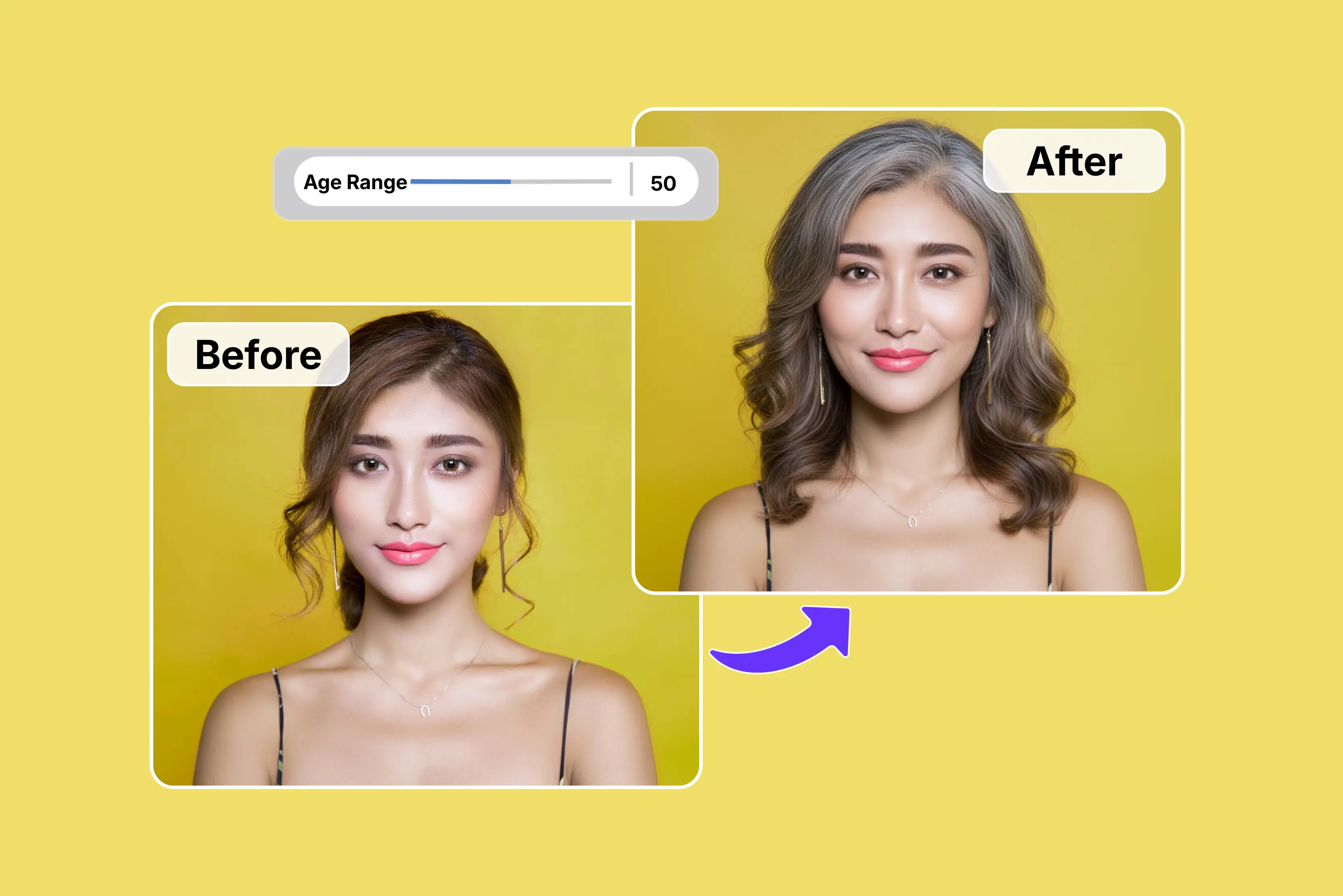


I see many photos every day, but sometimes I wonder how I will look at 40, 50, or even older. I began thinking about how I looked in my younger years and how I might look in the future.
Think about what you or a loved one would look like when they were old. I began by experimenting with Photoshop, applying grey to my hair, adding white highlights, creating wrinkles on my face, and incorporating various other effects.
However, it took too much time, so I tried an AI age filter that quickly generated an aged version of my photo. Day by day, I started and found many AI tools available that build on this, giving you a more realistic glimpse of what you'll look like years from now.
Additionally, some AI aging filters can simulate how you might have looked as a child. There are many tools available, but one platform I prefer is Pixelbin, which offers AI-powered image transformations such as wrinkle reduction and facial enhancement.
In this blog, I explain the meaning of the AI age filter, how to check age progression online, and present the 7 best AI age filters to transform your photos easily with their key features.
What is an AI age filter?
An AI age filter is a modern digital tool that uses artificial intelligence to change the way you look. This artificial intelligence filter uses sophisticated algorithms to examine your facial features and produce realistic age-related changes, letting you experiment with how you might appear at various stages of your life.
With a few clicks, you can easily experiment with many of these AI age filters that are freely accessible online. AI age filters provide a unique and interesting method to represent the aging process for entertainment purposes, whether on social media or in personal reflection.
At a glance comparison of AI age progression tools
7 Best AI age progression tools online
1. Pixelbin

First and foremost, one of my favorite tools is Pixelbin, which offers AI-powered image transformations that can simulate younger or older appearances. The process is simple: only describe the age progression.
For example, you can request to make the person 10 years old, show aging at 40, 50, or 80, and add natural details like wrinkles, grey hair, and subtle facial changes. You can easily use the Pixelbin AI age progression tool: just upload your image, write a prompt, and generate the result.
Upload images in popular formats such as JPG, JPEG, WEBP, or PNG, as needed. You can access tools without logging in or entering payment details. The tools use AI-based facial mapping to create natural-looking age progression images with smooth and believable transitions.
I tested with my photo and entered a text prompt of up to 2500 characters: "Create a realistic age progression of this person at age 60, keeping the same facial features and identity." Add natural aging details like subtle wrinkles, skin texture changes, and age-appropriate hair.
After creating a photorealistic image with great detail, I clicked on the “Generate” button. Within a few seconds, the result closely matched my prompt, showing age-appropriate hair and realistic facial details, no watermark, and much more. If you're not satisfied with the results, the platform may allow further AI-based image editing to refine the output.
Key features
- Multiple image formats
- Multiple age options
- No signup required
- Easy accessibility
- No technical knowledge needed
- No app installations
- Realistic results
- No watermark
2. Fotor
Are you curious about how your appearance will change as you age? The second tool on my list is Fotor AI Age Progression, and the process is very simple. The AI age progression free tool supports both male and female users by intelligently adapting to various genders.
You can precisely control the AI aging filter to see what you will look like as you age. The process is simple: upload a clear portrait and select the gender and intensity of the effect.
Then generate and preview how the age filter changes your face. Download the high-quality generated images in JPG or PNG format and share them with your friends. I tested and clicked on the “Upload and try age filter now” button.
On the left side, I selected the female option and other options such as adult, middle-aged, elderly, child, and teenager. I selected middle-aged and clicked on the Generate button.
I was disappointed with the Fotor AI Age progression tool; the result looked unrealistic and overly edited, with facial features that appeared totally different, and the processing time was slower than expected. Based on my experience, I found Pixelbin’s results more natural and easier to generate.
Key features
- Easy to use
- No technical knowledge needed
- Support multiple formats
- No watermark
3. Picwand
Picwand offers an AI tool that lets you see yourself younger or older, providing a creative way to explore possible past and future versions of your face. You can choose from various options, such as child, teenager, adult, middle-aged, or elderly.
The process is very simple: upload a photo you want to age, choose the specific age progression, and see the result before downloading. I tested the tool using a photo of a girl.
I saw various options like full redraw or head redraw, age selection, gender (male or female), and blending level (70% or 30%) according to your requirement, and clicked the generate button.
I waited a few seconds until the age transformation was complete. The result I received was totally different; the photo I uploaded had long hair, but I received it with short hair.
The clothing color also changed unexpectedly, which made the result look less realistic. Additionally, the processing time felt longer than expected. Whether you want an AI aging filter to envision the golden years of your teenage filters or relive your childhood, this Picwand AI age filter is helping bring your vision to life.
Key features
- Ease of use
- Multiple age options
- No watermark
- Multiple style formats
- No technical knowledge needed
4. Imagine.art
Fourth on my list is ImagineArt’s AI age progression feature, which aims to preserve key facial details while applying an aging transformation. Make it ideal for predicting family resemblance, comparing children's future looks, or studying age progression over time.
You easily apply multiple age ranges and see your features evolve naturally over decades. The process is simple: upload only a clear face photo and ensure the face is fully visible for accurate AI age transformation results. Click on the generate button to let AI create an aged version of the face.
Download the result if you are satisfied with it. I uploaded my photo, selected a 1:1 ratio, and clicked the generate button. I patiently waited for a few seconds, but the process took a significant amount of time; it took me at least one minute.
Instead of subtle wrinkles, the tool added heavy lines and unusual skin textures that did not match the original face. The person looks completely different, and the processing time is slower than expected.
Based on my experience, it may not be the best choice if you're looking for a highly realistic and subtle age progression result. However, the result can vary depending on the image used.
Key features
- Ease of use
- No watermark
- No technical knowledge needed
- No sign-up needed
- Support multiple formats
5. Media.io
Media.io is in fifth place on my list. It has a beginner-friendly and intuitive interface. It does not require any installation to use, and each filter generation costs only one credit.
You can easily see your younger or older self with AI transformation effects using Media.io tools. You can upload a portrait photo in various formats, like JPG, JPEG, PNG, BMP, or WEBP, according to your requirements.
The process is simple: upload your photo in one of the available formats, tap the age filter tool, and then drag the age slider to select the specific age. After choosing your preferred setting, click the Start processing button to apply the AI age filter. Some features may be available for free while others may require credits or a subscription.
Key features
- Ease of use
- Support multiple formats
- No signup needed
- Multiple age options
6. VisualGPT
You can change your age in photos to see your future self or to look younger or older using realistic AI. VisualGPT helps you recreate your portrait with studio-quality realism, ensuring every wrinkle and youthful feature looks authentic.
You can try multiple age settings, compare the results instantly, and download clean images quickly. It supports multiple formats like JPG, JPEG, PNG, and WEBP, up to 16 MB. The process is simple: upload your photo from your phone or computer.
Select your desired transformation mode: select "Old" to visualize your future appearance or "Young" to see a childhood version of yourself. Generate and download the result. I tested one of the images, selected the elderly, and clicked the generate button.
I noticed that uploading an image took longer than expected, and the additional processing time after clicking Generate added to the overall experience. I received the result with no watermark, and I had also tried middle age again, but the result I received looks like it has no effect on the photo, no perfection in the result.
Key features
- No signup required
- No watermark
- Ease of use
- No technical knowledge needed
- Multiple age options
7. AILabTools
Use the AI aging filter online for free with AILabTools: upload a portrait, select the target age, and instantly preview age progression. You can upload JPEG, JPG, PNG, and BMP files under 4 MB and 256-4096 PX, and use a clear face photo with a face area of at least 64x64 PX.
Its ability to identify while showcasing realistic skin texture, lighting, and emotion makes it perfect for marketing teasers, film previsualization, education, and social media storytelling.
The process is very simple: upload a portrait that meets the AI aging guidelines, and select the image that you like. You can select a target within the available range to simulate childhood, teenage, adult, or senior looks with a single click.
Generate photorealistic age progression or regression in seconds, then download the before-and-after comparison for sharing. I tested one image and waited a few seconds, but I did not find a perfect result, and it does not meet my expectations for a reliable AI age progression tool.
Key features
- Ease of use
- Support multiple formats
- No technical knowledge needed
- Multiple age options
- Bath processing
What can I use the AI age filter for?
AI age is available on platforms like Pixelbin AI that are used to realistically simulate aging or de-aging in photos. Various tools can, with just a few clicks, add wrinkles, grey hair, and skin texture changes or remove them.
Use the AI age filter for:
- Fun and social media: Use an AI age filter to create fun and engaging content for social media platforms like Instagram, Twitter, Facebook, and more. You can create entertaining and surprising old-age or young-age photos to share with your friends and family.
- Visualize your past/future: Quickly see how you will look in decades with added wrinkles, grey hair, and skin, or rewind to see a younger version of yourself.
- Prediction of child growth: Parents can upload photos of their children to see what they might look like as teenagers or adults.
- For creative content and storytelling: Artists, writers, and content creators can use these tools to generate character portraits at various life stages in films, games, or stories.
- Gaming character design: Gamers can also utilize AI age filters for character design. If your game features a character that ages over time you can use this AI age filter to create various versions of the character at various stages of life. This adds depth and realism to your game’s narrative.
FAQs
Quickly, you can see your future self with AI's age progression. The tool uses Pixelbin-like aging effects to show future appearances accurately, making it perfect for personal curiosity, planning, or creative projects. Explore various age ranges and see your future evolve naturally over decades.
Yes, the AI age filter is a 100% free online tool that allows you to upload your photos, apply aging or text prompts according to your requirements, and download the results.
You can predict your future appearance using AI powered apps, online aging filters or study your parents' aging patterns with famous tools like Pixelbin. You must upload your photo and respond to text prompts about wrinkles, hair color, gray hair, and facial structure.
Yes, some tools let you apply an AI filter in bulk to photos. With Pixelbin, you can create a batch process for multiple age filters.
Age progression is a technology that uses AI capabilities to predict how a person will look in the future. You’ll upload a photo of your subject, and then the program will use AI technology to scan the image and add old age filters.
That depends upon the AI aging tool question. Some apps can make you appear younger, while others can make you look older. Other tools can apply additional filters beyond the AI-aged ones.










