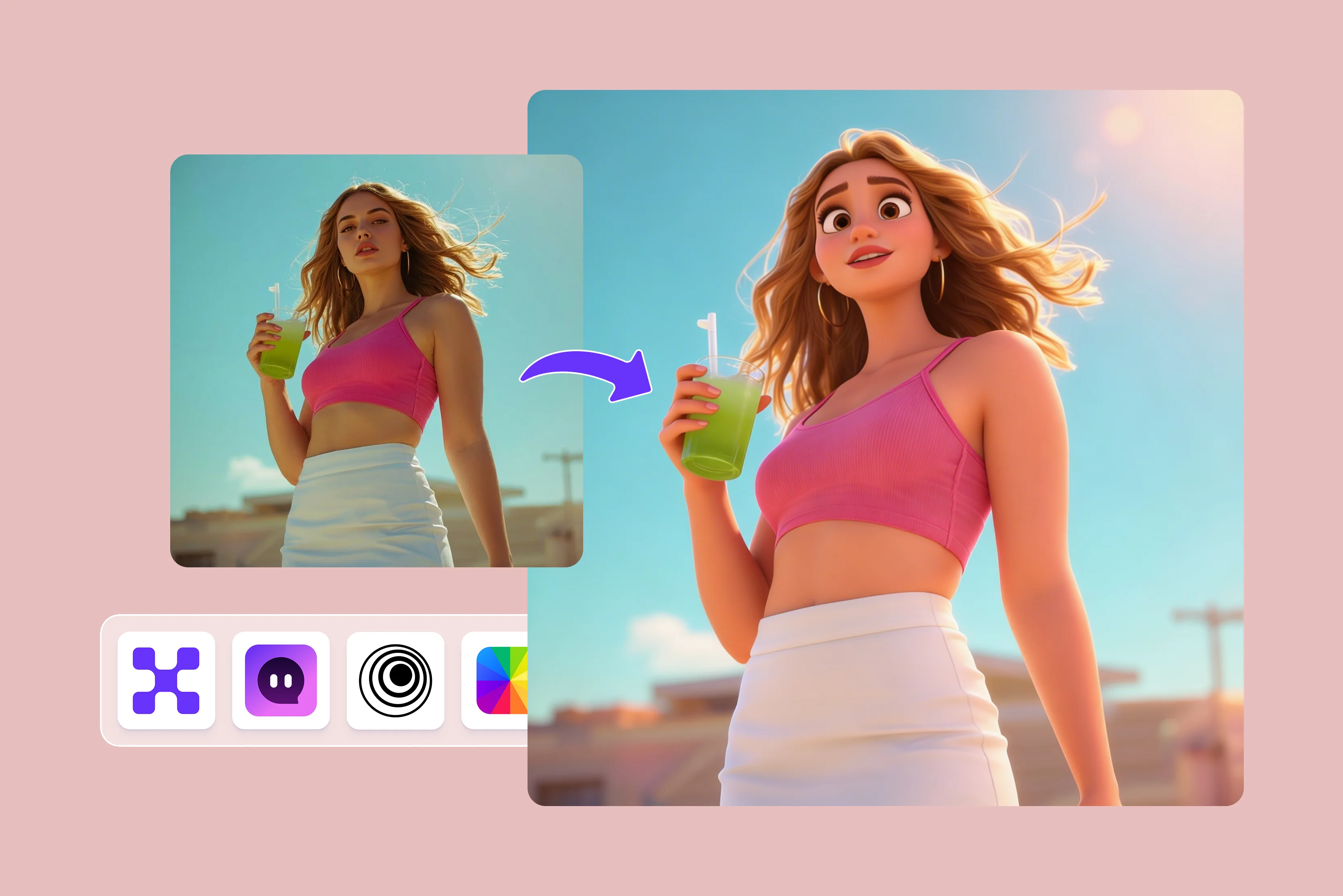


I snap tons of photos that end up looking dull and forgotten in the social media crowd super fast. That annoying feeling hits when your shot just doesn't shine, even with a cute dress or nice spot behind you?
Growing up as a girl, I used to get glued to Disney fairytales to Toy Stories, wishing for their fairytale glow on my own character until I found Pixar-style photo filters. Use AI image stylization models to create Pixar-inspired 3D cartoon effects, adding a princess flair with silky dresses, huge sparkly eyes, and that enchanted light like Ariel or Elsa.
By 2026, these tools will be blowing up on Instagram and TikTok since they're very simple and turn anyone into a content queen without fancy editing using simple Pixar-style photo filter tools.
In this blog post, I will share my favorite top 8 Pixar-style photo filter tools that I have tried out myself, from free options like Pixelbin, Fotor, InsMind, and others, which are perfect for princess vibes. You will get easy tips and step-by-step guides to help you pick the best one and create Pixar-style photos.
What are Pixar-style photo filters?
Pixar-style photo filters use AI to turn your normal pictures into fun cartoon characters like those from Toy Story or Frozen movies. They make your face have big, shiny eyes, smooth skin, and bright colors that pop.
Your selfie changes to look 3D with soft shapes and happy vibes, not like flat cartoons or anime with sharp lines. AI mixes Pixar magic on your photo fast, so it feels like you're starring in the film. It's great for Instagram to make boring pics exciting and get more engagement easily.
The magic behind the Pixar look
Pixar style filters take your normal photo and change it to look like something from movies such as Toy Story or Frozen, with a princess touch that I love so much. Here are the main things that make this style special.
- Big expressive eyes draw people in, just like Elsa looks at you with feeling and sparkle in her gaze.
- Smooth, perfect textures make skin feel soft without any marks or rough spots for a dreamy finish every time.
- Vibrant colors pop out strongly with deep blues like Ariel's tail and rich greens from forest scenes full of life and happiness.
This style differs from anime filters that have hard lines and crazy hair shapes because Pixar uses soft curves and friendly faces, more like a warm friend. Regular cartoon filters stay flat in two dimensions, while realistic ones only fix light and shadows, but Pixar turns you into a full three-dimensional character ready for the story.
How does AI power Pixar transformations?
AI acts like a magic helper that changes your selfie into a Pixar star without much work from you. Some tools use style-transfer-like techniques, and others use generative models trained to produce a Pixar-inspired look, almost like copying the charm from Toy Story character Buzz Lightyear to your face.
Diffusion models work by learning a step-by-step denoising process that can produce a Pixar-inspired cartoon look. You do not need to know hard math, just upload your pic and let it happen.
The whole process starts with your flat two-dimensional photo going into the AI, which adds real depth lighting and even small movements, like making a princess sketch turn into three-dimensional Belle who dances at her ball in smooth spins.
Apps like Pixelbin finish this fast in just seconds and give you files perfect for Instagram Stories right away. This is the reason I keep using them because even simple shots of my morning coffee become big fun stories everyone wants to see.
Why are Pixar-style filters trending now?
- Social media boom: Apps like Instagram and TikTok push fun videos that get quick shares and likes. Pixar filters turn photos into movie stars, so viewers watch longer. Viral challenges like princess dances hit millions of views fast. Brands use them for ads to sell more. This makes filters key for daily posts in busy feeds.
- Easy and fast AI: Phone chips run AI smoothly with no lags. Tools like Pixelbin finish in seconds on any device. Free web options cost nothing, so new users jump in weekly. Live previews add real-time fun for stories and calls.
- Disney movie hype: New Inside Out and Moana films made cartoons look popular again. Filters give that princess glow like Ariel or Elsa for selfies. Travel and party pics become epic cartoons that save memories well.
- Big engagement: Filtered reels grow followers three times faster per app stats. Likes jump from bright eyes and colors. Every day, pics like coffee shots get way more attention than plain ones.
- Low cost: Free apps let shops and students play without cash. Mix with Disney songs for mini movies. Over one billion uses this month prove the trend lasts.
Top Pixar-style photo filter tools (8 tested ones)
Want your selfies to sparkle like Pixar heroes? These AI filter tools transform your photo into a 3D Disney vibe fast. Check the table below for quick picks, then dive into the descriptives.
1. Pixelbin

Ever feel like your selfies need that extra movie-star sparkle to stand out online? Pixelbin AI Pixar filter turns ordinary photos into those cute 3D characters straight from Toy Story, Finding Nemo, and more, that are complete with big eyes, smooth skin, and colors that pop perfectly.
No apps to download, no editing know-how required; just upload and let the magic roll for fun profile pics or Reels that grab attention. It takes JPG, PNG, or WEBP files up to 10MB, even works with image links, and spits out crisp HD results without watermarks in moments.
You get three free uses a month, no login hassle, perfect for a pet portrait or turning yourself into a Disney Pixar. What I loved the most is that you get batch API power too, all safe and private. Jump in and make your photos like Pixar.
Why does Pixelbin’s Disney Pixar Filter tool top the list?
Here’s why this tool rocks for quick, fun photo edits that make you look like a movie star:
- Handles multiple image formats: Upload easily in JPG, JPEG, WEBP, or PNG, no hassle with weird file types.
- Super fast AI rendering: The filter hits your pic in seconds, no manual tweaks or waiting around needed.
- Batch editing power: Knock out lots of images at once through API if you need pro-level speed.
- Free HD downloads: Grab crisp results without watermarks or surprise fees every time.
- No sign-up hassle: Jump right in, no accounts or info to fill out upfront.
- Total privacy guaranteed: Pics stay safe on secure servers, never shared or stored long-term.
2. EaseMate
Ever wish your selfies jumped out like cartoon stars from a kids' movie? EaseMate's free online Pixar generator does exactly that, with pics turning into cute 3D folks straight from the Toy Story or Inside Out worlds.
Your smile stays put along with the pose and clothes, all wrapped in that soft Pixar shine. Just drag in JPG, JPEG, or PNG files from phone or laptop, click generate, and grab clean HD art, no watermarks.
Along with all, you can play with custom words to shift style outfits or feelings thanks to GPT-4 and Midjourney brains. Spot on for pet snaps, family shots, or fast shares on social spots. Runs smoothly on phones too, pumps out sharp stuff quickly for stories, gifts, or laughs. Give it a go today and turn plain clicks into tiny film scenes everyone loves.
Must known features
- Provides a free online tool that handles JPG, JPEG, and PNG files uploaded straight from phones or computers with simple drag-and-drop ease.
- Keeps the original smile, pose, and outfit perfectly intact while wrapping everything in smooth 3D Pixar charm for realistic fun results.
- Allows custom prompts where users can tweak style, clothes, or mood, powered by GPT-4o smarts to make each edit feel personal.
- Needs no sign-up and generates watermark-free HD art super fast, so beginners get pro looks without any login walls or delays.
- Stays mobile-friendly and spits out professional results ideal for pet snaps, family shots, or quick social media shares anytime.
3. insMind
Picture your face popping as some Pixar sidekick, ready for big-screen fun. insMind free AI Disney Pixar filter makes it real, zapping normal selfies to lively cartoon heroes full of true details, faces, and that cozy movie glow.
Works great on headshots, pets, wide views, or drawings too. Drop JPG or PNG files, choose a filter, adjust a bit if you like, then save and post the wonder. Super easy browser setup lets you build anywhere with no phone apps, no basic charges since low-resolution stays endless with HD steps up simply.
Make your aesthetics social feeds, build game faces, or make furry friends adorable enough to hug. Blast results in seconds with style picks for top-notch looks. Hook those scrollers and turn your page into Disney Pixar style.
Must known features
- Transforms selfies into vibrant animated characters packed with spot-on details, expressions, and that signature warm Pixar glow that everyone loves.
- Works great on portraits, pets, landscapes, or even illustrations using JPG or PNG formats for quick and versatile photo upgrades.
- Gives unlimited low-res edits for free alongside easy HD upgrades without needing app downloads or complicated setups.
- Operates as a mobile-ready browser tool perfect for creating gaming avatars, social posts, or fun content from any location.
- Delivers results in mere seconds with customizable vibes that lead to standout professional social media content every single time.
- Maintains a secure process where pics stay private.
4. Fotor
Think of your picture bursting alive as a Disney dream with huge eyes, sweet grins, and pure magic flow. Fotor's free online Pixar filter gets done with one tap.
Single shots, pairs, whole crews, pets, or tots shift to chatty 3D cartoons with zero know-how, zero marks on output. Toss any image, watch HD shine back speedily for TikTok waves or profile glow-ups. Web plus app paths fit Android, iOS, or desk setups, any spot, anytime.
Silky skin warm bursts are ideal for fun stickers, headshots, or share blasts that pile high. Hop the buzz across Insta and YouTube paths, even pups play princess. Straightforward top shelf wins each go upload fresh step into your cartoon tale waiting.
Must known features
- Handles one-click magic, turning solo shots, groups, pets, or babies into expressive 3D cartoons full of Disney-style personality.
- Returns HD quality results super fast with no watermarks, making it perfect for TikTok trends, avatars, or profile glow-ups.
- Offers web and app versions that fit Android, iOS, or laptops for easy access, no matter what device is at hand.
- Creates smooth skin and vibrant warmth ideal for stickers, profiles, or viral shares that pile up likes effortlessly.
- Requires zero skills, so anyone can upload a photo and get that full Disney magic boosting engagement right away.
- Makes group selfies pop alive with big eyes, cute faces, and complete scene fun, ready for instant online sharing.
5. LogoAI
Sick of flat photos that nobody notices online? LogoAI, a free Pixar-style tool, flips your snaps into lively 3D figures full of bright colors, big grins, and that fun movie feels like Toy Story buddies. Drag any picture, hit go, and watch AI remake it smoothly with no extra steps or downloads needed. Works fast for profile shots or quick shares that pop.
Grab HD outputs clean, no marks, and tweak styles if you want bulk runs too for pros. Perfect setup for social posts, gifts, or game icons keeps your look spot on. Runs in any browser easily and on the phone or laptop, spitting pro art quickly. Jump on no, we make feed friends jealous of your cartoon glow up today.
Must known features
- Flips every day, snapping into lively 3D figures bursting with bright colors, big grins, and that playful movie feel like Toy Story friends.
- Uses a simple drag-and-drop-and-go flow where AI remakes everything smooth without extra steps, downloads, or technical know-how needed.
- Provides HD outputs that stay clean while letting users tweak styles or run bulk jobs for professional needs on demand.
- Runs easily in any browser on phones or desks, delivering fast results for profile shots, gifts, or eye-catching social posts.
- Keeps the user's unique look spot-on, perfect for game icons, custom prints, or content that makes feeds stand out.
6. OpenArt
Dreaming of images that look ripped from Pixar flicks? OpenArt AI Pixar filters nail it, turning plain selfies into cute animated Pixar images with soft lights, expressive faces, and rich details straight out of big films.
Upload your shot, pick the vibe, generate, and download sharp HD files ready to post, no watermarks or sign-ups for starters. Super flexible for portraits, pets, or turning your family pictures into Disney Pixar-style, tweak prompts for custom twists like outfits or moods.
Browser-based, so create anywhere, on a phone, laptop, whatever. Free trials hook you, then upgrade for more power. Ideal for TikTok or Instagram-ready posts. Fire it up to transform boring clicks into storybook magic that everyone stops for.
Must known features
- Changes plain selfies into cute animated stars featuring soft lights, expressive faces, and rich details straight from Pixar films.
- Lets users upload, pick a vibe, generate, and download sharp HD files with no watermarks, especially for early free tries.
- Supports prompt tweaks for custom outfits, moods, or scenes, making it flexible for portraits, pets, or creative group ideas.
- Stays browser-based, so creation happens anywhere on phones or laptops with free starter tries and easy upgrade paths.
- Suits, reels, avatars, or prints that wow TikTok crowds, turning everyday clicks into storybook hits, people stop to watch.
7. Jogg AI
Tired pics need a fun kick? Jogg AI cartoon generator pumps them up to playful Disney Pixar looks with bouncy features, vivid hues, and adventure-ready poses with no skills or gear needed.
Load your image, select cartoon mode, let AI cook, then snag clean HD downloads for instant shares. Works slick on any device browser, only the free starter uses a pull you in upgrade for batch or fancy edits.
Great for social media profile glow-ups, pet antics, or viral clips, keeps quality crisp every time. Quick, fun way to jazz up social feeds: turn coffee runs into epic tales. Start playing now and watch the likes roll in the wild.
Must known features
- Pumps up pics into bouncy Disney Pixar looks with vivid hues, adventure-ready poses, and playful energy for all users.
- Loads images, picks cartoon mode, lets AI cook, then delivers clean HD downloads ready for instant sharing everywhere.
- Works slick through the browser only on any device with free starter uses and upgrade options for batch or advanced edits.
- Excels at profile glow-ups, pet antics, or viral clips while keeping quality crisp and details true throughout.
- Offers quick, fun ways to jazz up feeds, turning simple coffee runs into epic shareable tales that draw crowds.
8. DreamFace
Step your selfies into the Pixar world easily? DreamFace AI tool does the trick, morphing normal photos to adorable 3D characters rocking big eyes, silky textures, and movie shine like Inside Out pals.
Upload snap, generate preview, and grab watermark-free HD art with no login walls or slow waits. Custom vibes let you shift scenes, clothes, or feels perfect for personal avatars, gifts, or Reels magic.
Phone-friendly and web access spit results speedily for on-the-fly fun. Free testing gets you hooked on more, but to export, you have to unlock pro features. Turn dull moments into animated hits. Everyone loves to share their star turn today.
Must known features
- Morphs normal photos into adorable 3D characters boasting big eyes, silky textures, and classic movie shine like Inside Out stars.
- Follows upload, generation, preview, and snag watermark-free HD art flow with no login barriers or frustrating slow waits.
- Includes custom scenes, clothes, or mood shifts perfect for personal avatars, gifts, or engaging Reels content creation.
- Proves phone-friendly through web access with speedy results, it's ideal for on-the-fly fun and free rounds to get started.
- Changes dull everyday moments into animated hits that everyone digs, sharing their own star turns across platforms.
Final thoughts
After trying all these, even one of the best Pixar-style photo filter tools myself, I can say you have so many fun ways to make your pics pop like movie stars without breaking the bank or learning hard stuff. You will love how easy they work for selfies, pets, or group shots, turning boring feeds into places people stop and stare.
I spent hours uploading testing downloads, and sharing on my Insta stories, and each one brought something special, like quick HD results or custom tweaks that fit your vibe perfectly. Whether you pick free browser ones or apps with extras, you cannot go wrong when the goal is that warm Disney glow, everyone craves in 2026.
If you want simple steps and solid privacy, though, go straight for Pixelbin AI's Pixar portrait generator. I keep coming back to it because you just upload and get pro results fast, ready for Reels.
FAQs
Big shiny eyes, smooth, soft skin textures, bright, popping colors, rounded 3D shapes, and warm lighting create that signature Pixar movie magic and charm.
Clear front-facing portraits with good lighting, simple backgrounds, high resolution, and expressive faces give the best Pixar-style results every time.
Yes, pet photos work wonderfully, turning dogs, cats, or other animals into adorable Pixar-style characters with cute expressions and fur details.
Pixar filters add realistic 3D depth, soft shading, and movie-quality shine, unlike flat 2D cartoon filters that lack dimension and warmth.
Upload your photo in JPG or PNG format, click the generate button, preview the result, then download the HD version without watermarks instantly.
Yes, all images are processed on secure servers, stay completely private, never get shared, and are deleted automatically after your download finishes.









