


Support webp/jpg/jpeg/png, up to 10MB
/pixelbin_blogs/PB_2.0/Apps_New_design_graphics/caricature/erasebg-transformed_(23).webp)
/pixelbin_blogs/PB_2.0/Apps_New_design_graphics/caricature/erasebg-transformed_(22).webp)
Free AI Pixar filter
AI Pixar portrait generator
Reimagine yourself as an animated character in the signature style of Pixar and Disney films.
/pixelbin_blogs/PB_2.0/Apps_New_design_graphics/Pixar_filter/erasebg-transformed_(30).webp)
/pixelbin_blogs/PB_2.0/Apps_New_design_graphics/Pixar_filter/erasebg-transformed_(29).webp)


How to use the Pixar filter on Pixelbin?
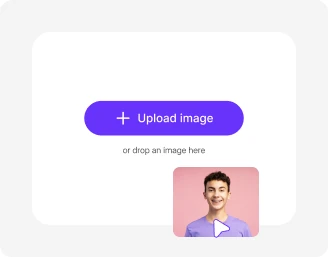
Add your image
Paste a URL or upload your image, in any of the following formats: JPG, JPEG, WEBP, or PNG.
Wait for AI processing
Pixelbin automatically applies the Pixar filter to your photo, without any manual editing required.
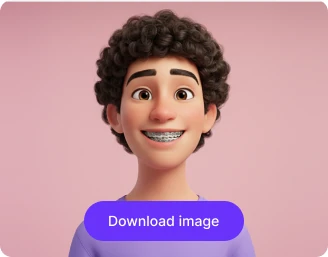
Download the output
Preview the filtered output & download it in HD, free from any watermark or additional costs.
Why use Pixelbin’s Disney Pixar filter app?

Multiple image formats
Upload images in common formats such as JPG, JPEG, WEBP, or PNG.

Fast AI rendering
Apply the Pixar-style filter to your images in seconds, without any manual editing required.

Batch editing
Edit multiple images at once with API support to save time and effort.

Free HD downloads
Download your edited images in HD without watermarks or extra costs.

No sign-up required
Start using the tool instantly without registering or entering any details.

Complete privacy
Your images are processed securely on protected servers and never shared with anyone.
Become a Disney Pixar star with just one click
Using Pixelbin, you can instantly transform your photo into a Disney-inspired character without downloading any software or mobile app.
Realistic Pixar-style effect
Recreate your photo with soft lighting, expressive eyes, and detailed shading inspired by Pixar animations, without any manual editing.
Browser-based editor
Access the Pixar-style filter directly from your browser on any device, including laptops, smartphones, or tablets.
Completely free to try
Use the editor up to three times a month for free and upgrade anytime for more credits or API access.
Unchanged picture quality
Preserve the resolution of your uploaded image, ensuring you get HD-quality results even after applying the Pixar filter.
/pixelbin_blogs/PB_2.0/Apps_New_design_graphics/Pixar_filter/features__realistic_pixar_style_effect.webp)
AI tools by Pixelbin
/pixelbin_blogs/PB_2.0/Related_apps_tumbnail/CARTOON_(2).webp)
/pixelbin_blogs/PB_2.0/Apps_Graphics/fairy_ai/Thumbnail_34.png)
/pixelbin_blogs/PB_2.0/Related_apps_tumbnail/photo_to_naime.webp)
/pixelbin_blogs/PB_2.0/Related_apps_tumbnail/Main_(1).webp)
Key highlights of Pixar style photo filter
Benefits of using our Pixar animation filter
Using Pixelbin, you can apply a Pixar filter for photos online and download them without watermarks or software installs. Here are some of the other benefits:
- Instant Disney-inspired look: Transform your photo into a Pixar character with soft, cinematic lighting and detailed animation effects.
- High-quality results: Our AI editor provides a consistent, high-quality cartoon transformation every time you use it.
- No watermarks: Download your Pixar-style photo in HD without any distracting watermarks.
- Privacy first: Your photos are processed securely and are not used for any other purpose.
- Cross-device access: Use our filter online from your phone, tablet, or computer, anytime you want.
- Batch editing: Using our API, you can apply the Pixar filter to multiple images simultaneously.
Use cases of our Pixar filter app
Pixelbin’s AI editor is perfect for creating social media content, visualizing yourself as a Disney character, or making unique gifts. Here are some common ways to use it:
1. Create social media profile pictures
Refresh your social media presence by turning your standard selfie into a Pixar-style character and using it as an eye-catching profile picture on Instagram, TikTok, or LinkedIn.
2. Make personalized gifts
Create unforgettable personalized gifts. Transform a favorite family photo into a cartoon portrait, and print it on a mug, t-shirt, or poster for a present that’s guaranteed to make them smile.
3. Animate your furry friends
Ever wondered what your dog or cat would look like in an animated movie? Our Pixar filter works great on pets, turning them into adorable, expressive characters you can share with other pet lovers.
4. Design custom gaming avatars
Forget generic avatars and create one that actually looks like you. Using Pixelbin’s online Pixar filter, you can design an animated version of yourself for Twitch, Discord, or your favorite gaming forums.
5. Make custom storybooks for kids
Turn photos of your child, family members, and even your home into Pixar-style illustrations. Arrange them into a unique, personalized digital or printed storybook for a magical bedtime story.
6. Design fun event invitations
Planning a birthday party or a fun get-together? Use our online filter to turn a photo of the guest of honor into a cartoon character and use it to create fun, personalized digital invitations.
How to get the best results from Pixar style photo filter online tools?
To make your cartoon photos look as vibrant as possible, follow these simple recommendations:
- Use a clear, front-facing portrait with your full face visible.
- Good lighting enhances the Pixar-style shading and detail.
- Avoid photos with heavy shadows or extreme angles.
- High-resolution images produce sharper Pixar-style transformations.
- Simple backgrounds keep the focus on your face and expressions.
FAQs
Here are some of the most common questions about our Pixar Filter. If you can’t find the information you need, contact us at support@pixelbin.io or refer to our documentation for more details.


Edit images in seconds, not hours
Get pixel-perfect results just with your words
Start editing with AI