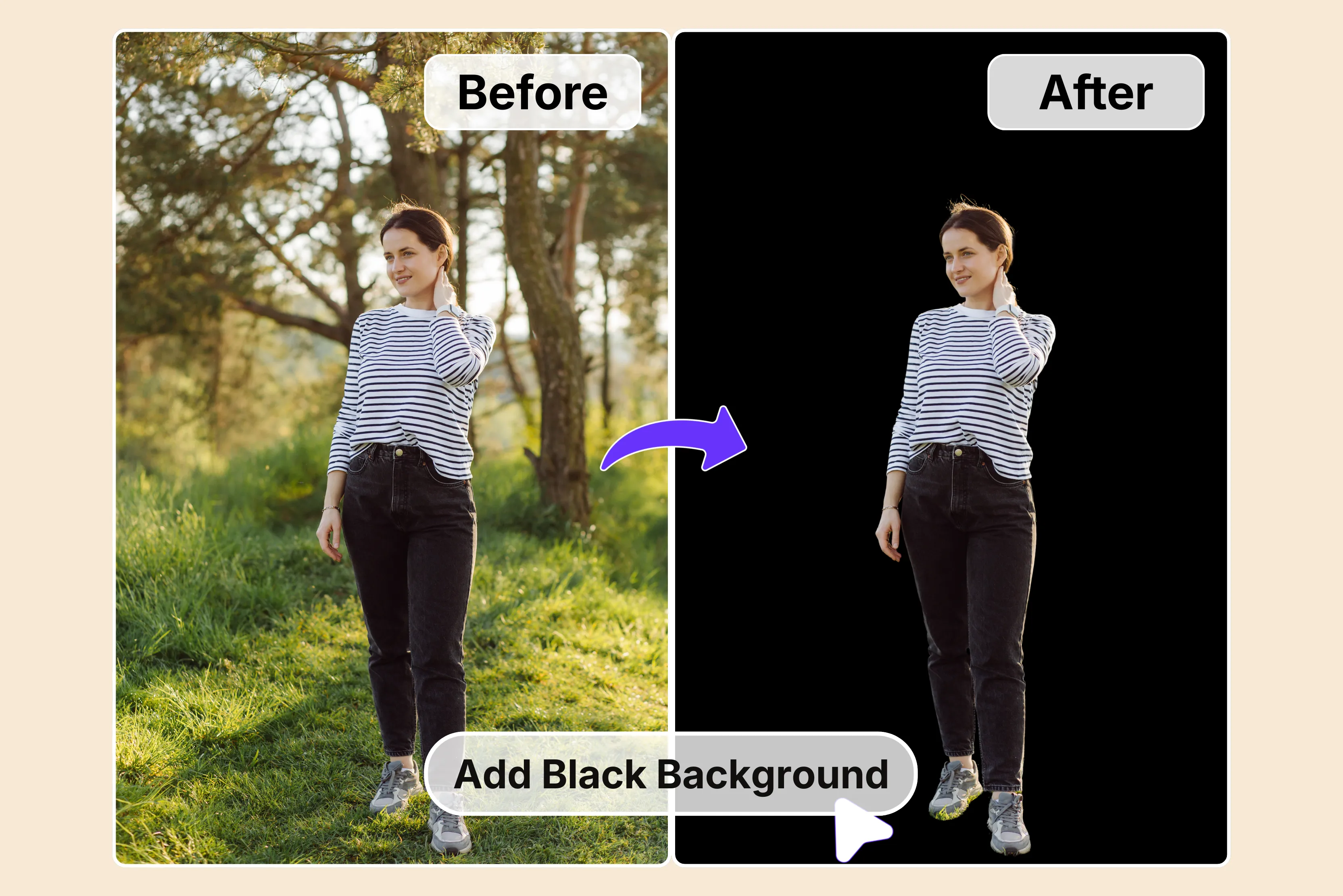


Ever snapped a photo that has a distracting background stealing the show? You know the trick. Busy streets buzzing behind your shot, cluttered rooms swallowing details, or plain walls yanking eyes off your main subject.
Those messy backgrounds just kill the whole frame, especially when you need clean images for product listings or social media posts. Swap in a solid black background, and everything changes fast. Suddenly, your subject's got sharp contrast and breathing room, with no chaos competing for attention.
Jewelry sparkles like crazy against that pure black. Portraits gain moody depth. Product shots look straight-up pro. It's the simplest trick to bump average pics into something sleek and polished without hours in editing software.
This guide runs down user-friendly AI tools to add a black background to a photo, plus tips for other colors or patterns too. Tools like Pixelbin, Fotor, Remove.bg, and more nail it in one click and save you tons of time. No fancy design experience needed. Upload your image, pick black, and hit download, and you're done. Know the full process in the sections below.
Why add a black background to a photo?
Ever notice how a messy background of an image turns a decent shot into chaos? Putting on a solid black backdrop fixes that quickly. It yanks viewer eyes straight to your subject, whether that's a shiny watch or a model's face. No more clutter fighting for attention.
Brands love it because black screams clean and upscale without saying a word. The contrast game changes everything, too. Light products or skin tones glow against that deep black void. Textures pop, colors deepen, and shadows add real depth.
Think of jewelry catalogs or tech gadgets; those shots look studio-fresh instantly. Social media posts grab double engagements since nothing distracts from the star. E-commerce sellers swear by it; conversions jump when listings are overdue for busy scenes for pure black simplicity.
Here's why it works across the board:
- Boosts subject focus: A black background eliminates distractions, and compilers lock onto your main subject instantly, whether it's a product detail or portrait face, without cluttered elements pulling eyes away.
- Minimalist vibe: Black delivers clean, modern simplicity that feels upscale. It strips away visual noise for that premium, professional look brands chase in ads and social posts every day.
- Enhances contrast & colors: Colors explode against pure black. Skin tones warm up, metals gleam brighter, and fabrics show true texture, creating depth and drama no white backdrop can match.
- Versatile for any use: Works magic across shoots. Product photography shines for e-commerce, portraits gain a moody edge, food looks gourmet, and even tech gadgets pop cleanly for demos or reviews.
- Quick editing win: Skip hours masking messy scenes. Swap to black in seconds with AI tools, then layer text, crops, or effects fast without fighting original backgrounds.
Best tools to add a black background to a photo
Tired of messy backgrounds ruining your product shots or selfies? Discover the best background tools to add a black background to a photo fast, AI magic like Pixelbin, Cutout.Pro, Photoroom, and many other tools that deliver pro results in seconds. For better understanding, you can glance at the glance table.
1. Pixelbin

Tired of cluttered shots where the background steals your subject's thunder? Pixelbin add black background tool lets you slap on a pure black backdrop in one click, no editing headaches.
Just upload a pic under 10MB or drop a URL, and watch it swap chaos for sleek black that makes products or portraits pop like studio pros. E-comm hustlers and social creators dig this for its dead-simple browser flow. Free for three images a month with HD downloads, no watermarks or apps needed. Turn average snaps into bold visuals that grab scrolls fast.
How to add a black background to a photo online using Pixelbin?
Step 1: Paste a URL or click "Upload Image" to grab your pic in JPG, JPEG, PNG, or WEBP formats right from your device.
Step 2: Pixelbin's smart AI kicks in automatically, swapping your messy background for a crisp black one with zero extra clicks needed.
Step 3: Check the side-by-side view to see your subject pop perfectly against that sleek black backdrop before saving anything.
Step 4: Grab your HD result instantly, 100% watermark-free and ready for posts, listings, or prints without hidden fees.
Why use Pixelbin add a black background to a photo?
- Multiple image formats: Upload images in popular formats like JPG, JPEG, PNG, or WEBP for smooth and hassle-free processing that handles all your files perfectly.
- Batch processing: Add black backgrounds to multiple photos at once using the bulk-editing API to save time and improve workflow efficiency for high-volume projects.
- Smart AI editor: Automatically isolate subjects and apply a clean black background without any manual cutouts or tedious masking work required.
- Free HD download: Preview and download your processed images in full HD without watermarks or extra charges eating into your budget.
- No Credit card login: Start using the tool immediately without signing up or entering credit card details for instant access anytime.
- Complete privacy: Your images stay encrypted, processed securely on protected servers, and never shared with anyone to keep your work safe.
2. Remove.bg
Stuck with portraits or products lost in wild backgrounds that kill focus? remove.bg changes that game with automatic swaps to black or anything else in a snap. Drop your image or link, pick black, done. No tracing edges or fiddling sliders.
Teams handling headshots or catalogs save hours daily here. Free web version handles singles fine, desktop apps crush batches on Mac, Windows, Linux, pro cleanups that look hand-edited but take seconds. Background drama gone for good.
Must known features
- Remove.bg's template replaces any photo background automatically in seconds with your choice of solid black or custom styles, handling uploads or URLs under their service terms effortlessly.
- Free web tools process single images instantly after agreeing to the privacy policy, while desktop apps enable batch workflows by dragging multiple files and selecting templates for bulk efficiency.
- Users love the 100% automatic tracing that skips manual object selection, delivering flawless subject isolation against new black backdrops over 100 million times already.
- Automate edits via Windows/Mac/Linux apps where you drag images, pick templates like black, and click start for hands-free processing, ideal for pros handling large volumes daily.
- Created for versatility, it updates regularly to ensure reliable background changes are shared easily for workflows in e-commerce or content creation seamlessly.
3. Picsart
Got social posts or ads buried under clutter that kills your subject dead? Picsart's changer rescues it quickly with AI swaps to black, wild colors, or fresh designs in seconds flat. Upload your shot, let AI strip the old bg, slap on black or browse their huge library, then export pro results.
Batch up to 50 images free that keeps creators pumping content non-stop, plus API hooks right into shop workflows smoothly. The gold tier adds extras, but free basics delivers big already. Thumbnails hook eyes, products scream "buy me" loudly. No design degree holding you back.
Must known features
- Picsart AI-powered tool replaces backgrounds in seconds via upload, auto-removal, and a vast library of choices, including black or custom uploads for flawless, fast results without manual tracing ever.
- Free access lets users change backgrounds monthly with 3x faster edits, boosting engagement while saving costs through an intuitive interface and batch processing up to 50 images.
- Explore thousands of solid colors, gradients, textures, or AI-generated designs easily, plus transparent PNG creation, color fine-tuning, and text-to-image customization for endless creative options always.
- Batch editor multitasks multiple photos at once, perfect for catalogs or headshots, with API integration for e-commerce automation, adjusting parameters seamlessly across systems efficiently.
- Ties into a full suite like object remover, AI enhancer, and PNG maker for complete workflows, earning rave reviews for consistent excellence in background changes across all projects reliably.
4. Fotor
Product pics flopping hard because backgrounds battle your item for attention? Fotor adds a black backdrop, clean and simple online for free, whether plain black, cool textures, or library picks, all work great. AI rips out the old mess, drops fresh black, and hands you drama-free shots ready to shine.
E-comm hustlers batch process easily here on the app or web, both solid options. The extender tool stretches the canvas infinitely for perfect crops. Headshots gain punch, food looks gourmet-rich. Ditch the Photoshop learning curve for good.
Must known features
- Fotor AI background changer auto-removes photo backdrops in seconds, then adds black, plain, textured, or creative library options to highlight subjects with pro contrast instantly for free.
- Handles intricate details like hair/fur perfectly regardless of complexity, boosting product photography professionalism and e-commerce sales by making items stand out vividly online always.
- AI tools extend infinitely with image extender or generate backgrounds via instant generator, supporting iOS/Android apps for on-the-go edits, plus text/stickers/effects for full creativity.
- The vast illustration library covers black, pink, Christmas patterns, or landscapes freely, with background replacer ensuring easy color swaps to match personality across all editing.
5. Cutout.pro
Ever shot a product photo where the busy background overwhelms every key detail and scares off potential buyers? Cutout.pro makes it incredibly easy to add a black background to a photo with one-click AI that automatically detects and removes clutter from products, people, animals, or landscapes, then layers on a clean studio black backdrop complete with realistic shadows, 4K upscaling, and batch support for files up to 2GB all browser-based with free daily credits and no watermarks on exports ready for Etsy listings or Instagram ads in moments.
Small shops and marketers grab this for visuals that look expensive without the price tag. Snaps turn listings ready for e-commerce platforms or social media in seconds. Low-cost edits nail your vision exactly, saving hours over slow manual fixes that frustrate every time.
Must known features
- Cutout.Pro AI auto removes any background to add a black background to a photo, one-click supporting products, people, animals, complex edges like fur, glass, fabrics, with shadow blending upscale 4K for studio real results, no quality loss.
- Manual brush eraser restores details, live preview, black drop batch uploads 2GB free daily credit,s watermark-free PNG exports API automation for e-store workflows, high volume, no hassle.
- Over 2000 templates, solid black bokeh shapes, color pops, lighting fusion, realistic reflections, DSLR effects, shape masks, so edits vanish pro not patched every single run.
- Batch processes dozens of files, uniform black backs, e-commerce perfect free plan, unlimited basics pro video depth maps, ad-free unlimited turning flats premium buy magnets.
- Free core swaps browser only JPG, PNG, WebP 10MB single 2GB batch real-time refine sliders glow vignette for luxe brand fits listings portfolios thumbs instantly.
6. Pixa
Ever captured portraits or product shots swallowed by chaotic backgrounds that make your posts look unpolished across social platforms? PIXA delivers a totally free browser tool to add a black background to a picture instantly, where AI background remover auto-detects and erases any clutter from images up to 10MB in JPG, PNG, or HEIC file formats, applies deep matte black with one click, offers live previews for edge-perfect tweaks like feathering or shade sliders from jet to charcoal background, and exports unlimited watermark-free PNGs ready for Instagram thumbnails, e-commerce listings, or blog headers without sign-ups, downloads, or quality loss.
Content creators grab it for nailing fuzzy hair, fine fabrics, and complex patterns on the fly, turning average snaps into pro standout visuals.
Must known features
- Pixa AI background remover lets you add a black background to a picture for free in seconds via browser, handling 10MB uploads across JPG, PNG, WebP with instant live previews and zero login for endless casual edits anytime.
- Generates transparent PNGs or solid black fills, keeping original colors and textures sharp. Hence, subjects pop boldly against the void with feathering sliders ensuring seamless blends for shop, social, or print use.
- Bulk processing races through multiple files under ten seconds each, customizing black-toned vignette glows for desktop-precise results that beat mobile apps on intricate scenes like crowds or reflections.
- Free forever tier unlocks all formats, tweaks no paywalls, supports edge refine tools for hairy details, fabrics without halos, while outperforming basics with studio-grade accuracy every export.
- Intuitive controls auto-match photo lighting, casting natural drop shadows on black foil eyes with authentic studio shots perfect for quick thumbnails, listings, or headshots anywhere fast.
7. Photoroom
Struggling with product photos where messy backgrounds hide your item's appeal and hurt sales? Photoroom offers the simplest online way to add a black background to a photo, letting you upload any image directly to their tool and select the solid black option where AI automatically detects and applies the backdrop in few seconds without drawing masks, editing layers, or needing Photoshop skills needed for instant professional results perfect for e-commerce listings on like Amazon or social media posts or advertisements.
It handles everyday products, clothing accessories flawlessly, preserving details, colors, and edges sharp, ready for download, share, and boosting click-throughs fast.
Must known features
- Photoroom AI instantly adds a black background to a photo after upload with one-click selection, auto-removing original clutter, no manual drawing layers or skills required, and processing products, clothing accessories, and sharp in seconds for e-commerce-ready PNGs.
- Solid black option applies uniform matte fill preserving subject colors, details edges without quality loss, supporting quick previews before unlimited free exports, watermark-free, ideal for Etsy and Amazon listings.
- Browser-based tool skips app downloads, handling single bulk images fast, turning smartphone product shots into pro studio looks, boosting sales clicks without photographers or setups.
- Free access unlocks core black background swaps, daily credits for high-volume stores, pro tiers add API batch automation, video edits, and advanced refinement for team workflows.
- Seamless integration with sales platforms auto-optimizes for listings thumbnails, ensuring crisp black BGs that pop on mobile and desktop, driving conversions effortlessly.
8. Phot.AI
Ever wrestled with cluttered product shots or portraits where the background muddies details and weakens your brand's punch online? Phot.ai delivers a free slick online fix to add a black background to a photo, where you upload any image pick from matte, deep charcoal, glossy, and 9 black shades.
AI generator auto-removes clutter seamlessly applies high-contrast depth, with full customization preview before download plus post-edit tweaks like object removal lighting fixes all browser-based no skills needed for pro e-commerce social or portfolio results that pop instantly.
Must known features
- Phot.AI black background maker lets you upload select matte, glossy, charcoal shades to add a black background to a photo instantly, generating high-contrast pro looks with seamless application preview customization for products, portraits, social media, and more.
- Auto-removes original clutter, preserving crisp details, colors, and edges while offering post-edit tools like object removal, lighting enhancement, and an AI art generator for further polish before watermark-free high-quality PNG and JPG downloads every time.
- User-friendly interface supports limited free use with subscription for unlimited powering 600K happy users delivering precise, efficient, professional results across e-commerce bold effects or sophisticated depth, no design skills required.
- Explore the black shades range, deep matte glossy via simple steps upload choose AI magic download, ready for listings, thumbnails, or prints, boosting visual impact effortlessly in seconds flat.
- Integrates full suite AI tools, background replacer, object replace, and image enhancer, ensuring a complete workflow from removal to elegant black backdrop creation, all online, fast, and intuitive for anyone.
9. NoteGPT
Ever feel your casual snapshots or product pics get lost in plain or busy backgrounds that kill their impact on social posts or notes? NoteGPT brings a free, no-sign-up AI background changer online to add a black background to a photo super quickly, where you upload images, drag and drop, and pick solid black.
You can also customize the Nano Banana model, which auto-removes clutter, handles hair and glass tricky edges perfectly, and offers batch processing for multiples, live preview,s and unlimited high-quality PNG downloads all browser-based, tying right into note-taking workflows for crisp embeds in decks, journals, or thumbnails without downloads, skills, or watermarks. Student creators love how it turns average shots into pro-focused visuals, saving tons of editing time daily.
Must known features
- NoteGPT.io AI background changer uses Nano Banana model to add a black background to a photo, free online, auto-masking complex scenes like hair, crowds, patterns with batch support for multiple images at once,ce and instant high-quality PNG exports, no sign-up needed.
- Drag-drop upload handles common formats quickly, generating solid black fills, gradients, or custom shapes while preserving subject details, colors, and edges sharp for seamless note embeds, presentations, and social media use.
- Free unlimited access skips app downloads, delivering consistent edits across files with live previews, ensuring natural looks without unnatural shifts or quality drops even on mobile devices.
- Ties into full AI suite for object removal enhancement extender, so youcan workflow from black swap to polished finals effortlessly, ideal for study visuals, thumbnails, or quick content overhauls.
- Beginner-friendly interface prioritizes speed and accuracy, maintaining real details through smart enhancements perfect for non-designers needing pro results fast without steep learning curves.
10. AIEase
Tired of gear watches bags, or portraits blending into messy rooms instead of popping premium on shops or profiles? AIEase streamlines adding a black background to a picture entirely online with precision.
AI that contours subjects, halo-free applies deep sophisticated black fills, auto-balances colors, saturation and exposure, adds studio rim glow depth maps supports batch 50+ images API for devs, videos, objects, shadow fusion all no installs free core tools delivering gallery-level results for e-tail catalogs, listings thumbnails in minutes.
Must known features
- AIEase.ai edge-aware AI contours watches bags, faces perfectly to add a black background to a picture, deep black, no halos, auto-fixing colors, saturation, exposure post-swap for vibrant, lifelike pops every upload.
- Batch mode processes 50+ images per minute, uniform black fills, A/B variants, free core API devs embedding workflows, enterprise scale handling massive libraries, no quality fade over volume.
- Simulates studio light,s rim glow depth maps on black dimensioning flat products realistically sliders custom shade blends natural integration fooling buyers pro-level buys instantly.
- Supports videos, objects, shadow fusion, unlimited free PNG PSD format,s complex transparencies, reflections, sub-second previews, privacy auto-delete, global fast loads for daily hustle.
- Pro unlocks ad-free unlimited advanced glam background ties full e-comm storefront overhauls, turning everyday snaps consistent catalog stars effortlessly.
How to add a background to a photo in Adobe Photoshop (Bonus tip)
- Open Adobe Photoshop and go to File then Open to load your photo; double-click your image file from the dialog box to bring it into the workspace ready for edits.
- Press Ctrl+J (Windows) or Cmd+J (Mac) to duplicate the background layer, naming it "Layer 1" so your original stays safe while you work non-destructively on the copy.
- Head to Select then Subject for AI to automatically outline and select your main subject, like a person, a product, oran object, refining edges if needed with Select then Select and Mask for hair details or fuzzy borders.
- With the subject selected, create a solid black background by going to Layer then New Fill Layer, then Solid Color, then picking pure black (#000000) from the color picker and hitting OK to fill the canvas behind instantly.
- Drag the new Solid Color layer below your subject layer in the Layers panel using the Move tool (V), ensuring the black sits perfectly behind while the cutout floats sharp and clean.
- Refine the mask on your subject layer using the Brush tool (B) set to black foreground for hiding edges or white for revealing with low opacity 20-50% and soft edges for seamless blending against black.
- Add realistic shadows if desired by duplicating the subject layer, Ctrl+J Cmd+J rasterize, then Filter, then Blur, then Gaussian Blur 5-10px position below subject and drop opacity to 30-50% for studio depth.
- Finally, flatten via Layer, then Flatten Image or merge visible Shift+Ctrl+, E, then File then Save As PNG for transparency or JPG for web use, your black background photo is now export-ready for blogs, shops, or posts.
Final thoughts
I've dug into these AI tools from Pixelbin, Remove.bg, to Photoroom, and they make adding a black background to a photo a total breeze, zapping clutter and dropping clean black in seconds without me sweating Photoshop layers or studio setups. You get edge-perfect cutouts, batch power, and free runs that turn my phone snaps into sharp product shots or moody portraits ready for Etsy, Insta, or shops, boosting clicks way faster than manual grinds.
Pixelbin, though, stands out when I need to add a black background to a photo. Its AI erases nails, tricky hairs, and glass every time with one-tap fills and natural shadows. I love the bulk flow for store runs. You should try Pixelbin, your visuals hit pro level, no hassle.
FAQs
AI tools like Pixelbin, AIEase, and Photoroom erase backgrounds and apply black fills in seconds with one click, no skills needed for instant pro results.
No, modern AI preserves sharp details, colors, and edges during black background swaps, outputting high-resolution PNGs identical to originals every time.
Yes, apps like Cutout.pro, Pixa, remove.bg, and Pixelbin handle black background edits smoothly on phones with AR previews and quick gallery uploads anywhere fast.
Most tools offer free tiers for single black background additions with watermarks lifted on basics, pro unlocks batches unlimited for daily use.
Pixelbin auto-detects subjects, erases clutter, and then layers pure black with natural shadows, blending for studio-fresh product shots effortlessly every upload.
The Pixelbin free plan allows 3-5 high-resolution black background edits monthly with watermarks removed, pro upgrades unlimited batch API for stores.









