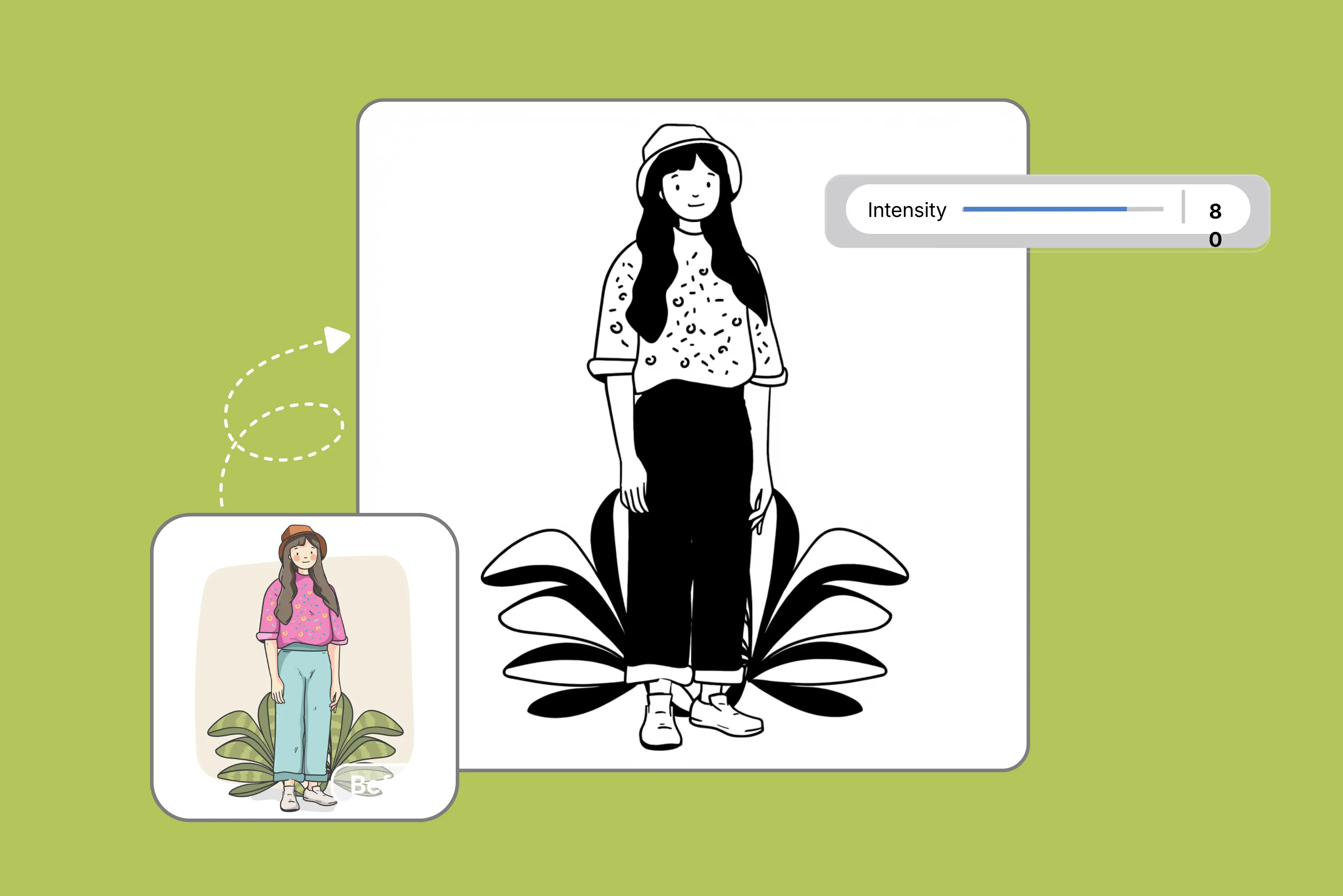


Got a photo you want to turn into a stencil for crafts or tattoos, but hate fiddling with software? The best free picture stencil makers online grab any snapshot and spit out sharp black-and-white outlines ready for cutting or painting, no installation or subscription required.
These tools simplify the busy backgrounds or dim lighting into clean templates perfect for social media and personal use. AI tools do the magic here, detecting edges and boosting contrast so your family pic or logo becomes a layered pattern that holds up under spray paint or vinyl knives.
Weekend warriors etching glass or mocking up T-shirt designs lean on them to skip hours of manual tracing, pulling pro results from phone grabs that print crisp on home setups or Cricut machines without a hitch.
This guide rounds up top free picks like Pixelbin, Fotor, and more, with steps and tips to nail durable stencils fast, upload today, and watch flat images jump into hands-on projects that last.
What is a picture stencil maker?
A picture stencil maker is a software tool or online application that converts digital photographs into high-contrast, black-and-white, or line-art designs suitable for cutting into stencils.
It grabs everyday photos and boils them down to high-contrast black and white templates perfect for cutting out and painting on wood, canvas, glass, or fabric.
Online versions run on AI or edge detection to peel away colors and gradients while cranking outlines into bold shapes so anyone can turn cluttered snapshots into workable patterns without breaking out tracing paper or slogging through design programs that demand real skills. Crafters snag them for wall hangings, tattoo outlines, or shop signs and skip the crooked lines or smeared graphite that wreck hand-drawn attempts every time.
How does it work?
These tools keep things stupid simple, so you finish in minutes flat.
- Upload kicks off with dragging any JPG or PNG file, and the engine locks onto edges fast.
- Processing ramps contrast to build solid black areas against clean white space with sliders if you want to bite.
- Many tools output a single-layer stencil; some advanced options can generate multi-layer stencils and add bridges to keep cut-out islands connected.
- Exports commonly include PNG or JPG (and sometimes PDF/SVG); those are right for printers, Cricut beds, or hand knives, complete with guides.
Why use AI stencil makers?
- Eliminates manual tracing effort: Beginners avoid time-consuming lightbox work or freehand sketching prone to inconsistencies; AI algorithms perform edge detection and thresholding automatically for precise stencil templates.
- Processes low-quality images effectively: Improves difficult photos (within limits): Many tools boost contrast and simplify backgrounds to make outlines clearer, but heavily blurred or noisy images may still need cleanup for a cut-ready stencil.
- Cost-effective accessibility: Many stencil makers work in a browser and can reduce the need for paid design software. Physical cutting/painting materials may still be required, and free plans often have limits.
- Supports multi-layer designs: Generates bridged stencil layers for multi-color applications, ensuring structural integrity during application and preventing paint bleed, which is ideal for professional-grade murals, apparel printing, or signage.
- Versatile across applications: Many stencil makers export PNG/JPG, and some also offer SVG/PDF. SVG is best for Cricut machines, laser cutters, or hand tools, serving woodworking, tattoo stenciling, glass etching, and graphic design workflows.
- Privacy depends on the tool: If privacy matters, choose tools that clearly state file retention/deletion practices and GDPR-related policies, and avoid uploading sensitive images when terms aren’t clear.
10 best AI stencil makers (Tested)
Here are the top 10 best AI stencil makers that pack neural edge detection and thresholding smarts to flip photos into crisp vinyl, Cricut, or spray-ready patterns. To know more, you can have a quick glance at the table.
1. Pixelbin

Pixelbin's simple free AI stencil maker that converts uploaded photos or image URLs (under 10MB) into high-contrast black-and-white stencils with one click, no prompts or manual edits needed.
Simply upload the image in these format JPG, JPEG, PNG, or WEBP, and the AI editor automatically generates a stencil from your image without requiring any manual edits. It highlights uses like wall art, spray painting, woodworking, tattoos, screen printing, and coloring pages, promising instant edge detection for clean printable PNGs.
The tool runs entirely in-browser on any device right from phone to laptop, offers three free credits monthly to export files without watermarks, and lets users upgrade to paid plan for more credits or API access while managing privacy with auto-file deletion post-process which shows its high level privacy.
Why Pixelbin’s AI stencil maker tops the list?
- Automated edge detection: AI processes uploads under 10MB into high-contrast stencils without manual tweaks, ensuring Cricut-ready precision for woodworking or tattoos.
- Browser-based: Runs on any device via web, no downloads needed, supporting file uploads or URLs for seamless cross-platform stencil creation.
- Freemium credits: Offers three credits for watermark-free PNGs monthly; scales to paid plans or API for high-volume e-commerce or design workflows.
- Optimized outputs: Generates print-ready templates for spray painting, screen printing, wall art, or coloring pages with live before-and-after previews.
- Data privacy: Auto-deletes files post-processing to protect client images or personal photos per privacy standards.
2. Fotor
Fotor stencil maker runs AI-powered image-to-stencil conversion that teams up with smart algorithms scanning thousands of pics to figure out creation tricks, flipping your JPG or PNG uploads into stencils, patterns, line drawings, or sketches by picking apart contrast and edges for outlines that hit exact. Just upload the file, select a sketch filter, and hit apply to see how the AI works and turns the image into a stencil pattern.
The browser tool cranks printable JPG/PNG files tuned for paint cans, wood burns, stained glass cuts, and art layouts, while iOS/Android apps bring easy screens and quick runs to phones. People also grab it for decor, letters, numbers or house addresses that land crisp every time, skipping hand traces or software fights.
Must known features
- AI sketch filters: Applies specialized filters for portraits/landscapes, preserving stencil-ready outlines with one-click thresholding.
- Cross-platform: Seamless web and app integration eliminates downloads for desktop/mobile workflows.
- Versatile output formats: Generates print-ready JPG/PNG files compatible with standard printers or cutting machines.
- Broad application support: Tailored templates for woodworking patterns, glass etching, and signage lettering.
3. Rapid Resizer
Rapid Resizer Free Picture Stencil Maker tool grabs photos and runs edge detection plus grayscale thresholding to flip them into printable stencil patterns, sliders letting you crank contrast and peel apart layers for wood pyro transfers, fabric paint jobs, and craft blanks after a quick login.
The web setup chews standard image types with live previews guiding every tweak, spitting scalable PDF/PNG files tuned tight for home printers, vinyl plotters, or hand-trace work that nails fine stuff like table inlays or yard signs without vector programs or pro licenses eating your time.
Must known features
- Automatic photo tracing: Edge detection converts photos to stencils, patterns, or line drawings optimized for painting, woodworking, stained glass, and art designs with color-based thresholding.
- Contrast adjustment sliders: Fine-tune black/white separation by selecting areas similar to chosen colors, ensuring precise outlines for complex subjects.
- Real-time previews: Live browser previews allow iterative adjustments before finalizing patterns for home printers or hand-tracing.
- Scalable PDF/PNG outputs: Generates print-ready files compatible with vinyl cutters, Cricut machines, or standard printers without resolution loss.
- Platform compatibility: Runs in updated Chrome, Firefox, or any other browsers; login enables multi-layer separation for advanced woodworking transfers.
- Versatile art applications: Supports furniture inlays, decorative signage, fabric transfers, and craft templates requiring high-fidelity line art.
4. InsMind
InsMind Picture Stencil Maker grabs photo uploads and slams AI contours to crank one-click black-and-white templates for tattoos, walls, or DIY crafts without login hassles.
Pure browser chews JPG/PNG fast, spits PNG downloads cut-ready for Cricut jaws, spray cans, or knife slabs, with live previews and auto edge tweaks nailing product mocks or personal jobs solid every drop. Crafters blast shirts clean, shops prototype vinyl quickly, artists score glass deep from drags that ditch vector nightmares or pencil grinds for good.
Must-know features
- Automatic photo tracing: AI edge detection converts photos to clean stencil outlines, patterns, or sketches perfect for tattoos, wall art, shirts, and DIY crafts with smart contrast thresholding.
- One-click processing: A single button generates high-fidelity black-and-white stencils without logins or tweaks, handling JPG/PNG uploads fast in any browser.
- Live preview adjustments: Real-time views let you boost edges, remove noise, or zap backgrounds before downloading crisp PNG files.
- Cricut-ready outputs: High-resolution PNGs slice precisely on vinyl cutters, knives, or plotters for ink, spray paint, or decor projects with no blur.
- Sketch effect presets: Built-in thick line styles nail bold designs for glass etching, fabric transfers, or sign making, first shot solid.
- Noise reduction tools: Auto-cleans busy images so stencils pop sharp from portraits, landscapes, or product shots every time.
5. Pixa
Pixa AI-powered Photo to Stencil Converter rolls out advanced algorithms that snap uploaded photos into high-contrast black-and-white stencil outlines, ditching manual tracing or bulky editing suites entirely.
Upload your portraits, travel images, or custom designs; just add a basic prompt like 'convert this photo to a black and white stencil, and with just one click, your custom stencil is ready to be saved as a high-resolution PNG file.
Built for high-resolution scaling, this browser tool fuels spray painting, airbrushing, wood burning, cake decorating, tattoo stenciling, apparel prints, home decor, arts & crafts, plus culinary patterns with pro-level accuracy.
Must known features
- AI-powered edge detection: Automatically analyzes uploaded images to extract precise contours and outlines using advanced neural networks for flawless stencil generation.
- Prompt-based customization: Users input simple text prompts to guide AI in refining stencil details, shapes, and contrast levels for tailored results.
- Two-tone thresholding: Converts photos to stark black-and-white patterns with adjustable intensity, ideal for high-contrast applications like spray painting or airbrushing.
- High-resolution PNG exports: Delivers scalable, print-ready files optimized for vinyl cutters, Cricut machines, wood burners, and large-format printers without quality loss.
- Instant browser processing: No downloads or logins required; processes JPG/PNG uploads in seconds directly in modern web browsers for seamless workflow.
- Multi-application versatility: Supports tattoo stencils, apparel designs, cake templates, home decor cutouts, and culinary patterns with professional fidelity.
6. VEED
VEED AI Stencil Maker cranks image editing smarts to flip uploaded pics into stencil designs via prompt-driven edge grabs and high-contrast scans, skipping graphic software hassles in a browser setup. Just sign up and upload a JPG/PNG image, type style cues like bold lines or mono patterns, pick an AI model, and describe the line art you want to see.
You can request a black and white stencil, a high-contrast outline, or a simplified design and snag scalable outputs for tattoo transfers, craft cuts, prints, video overlays, or prototypes with real-time tweaks for sharp pro stencils. Content creators need fast results tied to video flows without needing to download any software.
Must known features
- Prompt-based stencil generation: Text guides AI to craft custom black-and-white outlines or edges from photos.
- Multi-model selection: Pick AI types for best cuts, prints, or art jobs.
- Real-time preview controls: Tweak contrast and boldness live pre-export.
- Scalable PNG outputs: High-resolution files for vinyl, printers, or digital, with no pixel loss.
- Video editor integration: Stencils drop into timelines for thumbs or effects.
- No-signup accessibility: Instant browser runs for quick tests.
7. AIEase
AI Ease stencil maker has trained algorithms on millions of line drawing images, and it can instantly detect and extract the lines in any sort of image. Whether a human portrait, still life photo, animal, architecture, plant, or bridge photograph, our tool can draw out every single line and bring the sketch version of a digital image to life.
Web app only eats JPG, JPEG, PNG, and more with live views, lets you dial line thickness, noise cuts, layer bridges before SVG or high-DPI PNG exports for Cricut, lasers or hand cuts that ditch clean manual vectors.
To use AIEase Stencil Maker, upload your photo to the online tool, pick the presets like Trending, Anime and more from the left panel's premade library click on generate, watch it auto-apply edge detection for instant line drawings or stencil patterns, preview the minimalist output, then hit Download for high-resolution export ready for printing or crafts but you have to log in to download.
Must known features
- Neural edge detection: Grabs contours smartly with thresholding for multi-layer splits.
- Layer bridging tools: Links floaters to dodge cut fails on tough designs.
- Contrast and thickness sliders: Live tweaks bold stencils for paint or etch.
- SVG/PNG vector exports: Scalable with marks for Cricut or lasers.
- Noise reduction filters: Sharpens rough pics for clean drops.
- Batch processing support: Runs stacks quickly for production.
8. Kaze AI
Kaze AI Stencil Maker slams generative AI for photo-to-stencil swaps using contour cuts and adaptive binarization to spit print-ready templates from any image for street art, shirts, pyro, or etch jobs.
This stencil maker is a tool that transforms a regular image into a high-contrast, cut-out style design suitable for tracing, painting, crafting, or laser cutting. Kaze AI uses advanced algorithms to detect outlines, simplify details, and generate clean, sharp stencil-ready versions of any photo.
Just drag and upload the image, add style prompts like ‘convert photo into stencil art’, boost outlines, and once the AI had worked on the tool, grab the layered PNG, JPG, SVG for cutters or big printers with zoom previews.
Must known features
- Generative contour simplification: AI pares pics to bold minimal lines automatically.
- Adaptive Binarization: Shifts thresholds for light tweaks perfectly.
- Style prompt refinement: Words shape thickness or art vibes.
- Layered SVG exports: Vectors with kerning for colors or stacks.
- Preview magnification: Zooms fine bits pre-cut lock-in.
- Cutting machine presets: Tunes for Glowforge or xTool bleeds.
9. MockoFun
MockoFun Stencil Maker from Photo harnesses background removal algorithms and raster-to-vector conversion to transform uploaded images into flat ink-style vector illustrations mimicking stencil effects, ideal for spray paint templates, arts & crafts, and silhouette designs without Photoshop dependency.
Users upload photos via Replace Object in the Layers menu, apply Threshold filters alongside contrast adjustments for precise edge tracing, and leverage mask tools to hide unwanted areas. Premium accounts enable SVG vectorization for laser cutting or Cricut compatibility.
This online photo editor supports JPG/PNG/PDF downloads, but you have to have a paid subscription, multi-layer stencil generation through varied threshold settings, and integrated stencil font generators for text overlays in graffiti, posters, and many more.
Must known features
- AI background removal: Neural algorithms strip backgrounds instantly, converting photos to flat ink vector illustrations mimicking stencil aesthetics for spray paint templates.
- Threshold filter processing: Adjustable grayscale thresholding generates high-contrast edges, essential for silhouette extraction and multi-layer stencil separation.
- Contrast and mask adjustments: Real-time sliders refine detail levels; mask layers hide unwanted areas for clean, registration-ready designs.
- Multi-layer generation: Varied threshold settings create color-separated PDFs/PNGs for aligned printing or stacked craft applications.
- Stencil font integration: Pairs image stencils with customizable stencil fonts for text overlays in graffiti, posters, or apparel graphics.
10. LogoAI
LogoAI Stencil Maker cranks neural outline pulls and path simps to slam uploaded photos or sketches into high-contrast tattoo stencils with razor edges, smooth bends, and crisp bits. Users add the templates for custom starts, ditching hand vector grinds for brand signs or fab jobs.
Drag JPG/PNG drops, twist intensity sliders, or prompts to lock line guts and details via adaptive thresholds, then snag scalable SVG/PNG blasts tuned for laser beds, CNC spins, vinyl jaws, screen blasts, and reg marks baked in.
Must known features
- Neural outline extraction: Analyzes uploaded images to generate tattoo-style stencils with high-contrast black-and-white lines, sharp edges, and smooth contours automatically.
- Adaptive path simplification: Reduces complex photo details into clean, bold stencil paths optimized for cutting and printing without manual editing.
- Intensity slider controls: Fine-tunes line boldness, detail retention, and contrast levels for customized stencil thickness and clarity.
- Scalable SVG/PNG exports: Produces production-ready vector and raster files with bleeds and registration marks for laser cutters, CNC routers, and vinyl plotters.
- Custom template uploads: Users add their own image templates as stencil bases, integrating seamlessly with AI processing workflows.
- Brand-optimized processing: Preserves logo essence through intelligent detail prioritization for apparel, signage, and fabrication applications.
Final thoughts
Best free picture stencil makers online? Pixelbin stencil maker crushes the pack with neural edge grabs that flip any photo into razor vinyl decals, iron-on transfers, or Cricut cut files, no signup, bulk presets, and zero fuss on JPG drops that scale huge without blur.
Pixa nails tattoo outlines tight, VEED slots stencils into video mocks fast, and Rapid Resizer sliders stack wood pyro bleed-free while MockoFun thresholds dodge vector hell for shirt blasts. Tested these beasts across spray cans, glass etches, and sign-up issues, but Pixelbin lands the best after every use, ditching pencil grinds for good.
FAQs
Pixelbin stencil maker tops the list with neural edge detection for razor-sharp vinyl decals and Cricut files, without any signup, and bulk presets beat Pixa or Rapid Resizer hands down.
Upload JPG/PNG at any one of above tools, let AI run thresholding for high-contrast outlines, preview edges, download PNG in seconds, few tools may talk of premium subscription for downloads
Yes, Pixelbin, Pixa, and VEED run smoothly in mobile Chrome/Safari, drag photos, tweak sliders, export stencils directly for on-the-go Cricut or spray jobs.
Most handle JPG/PNG uploads, output PNG/SVG/PDF, Pixelbin nails high-resolution PNGs for cutters, MockoFun adds PDFs for layered prints no blur.
Yes its free, no login required, processes 3 photos for free in a month to stencils instantly, bulk edits included unlike freemium traps in other tools.
Neural edges crush complex pics cleaner than Pixa prompts, bulk speed laps VEED, no vector hacks like MockoFun works with vinyl/Cricut perfection on every use.









