


Support webp/jpg/jpeg/png, up to 10MB
/pixelbin_blogs/PB_2.0/Apps_New_design_graphics/stencil_maker/9419015.webp)
/pixelbin_blogs/PB_2.0/Apps_New_design_graphics/stencil_maker/2104.w030.n002.18B.p1.18.webp)
/pixelbin_blogs/PB_2.0/Apps_New_design_graphics/stencil_maker/fp9a_2gmu_230705.webp)
AI Stencil maker
Free AI stencil maker
Turn any photo into a ready-to-use stencil outline for art, crafts, or DIY projects.
/pixelbin_blogs/PB_2.0/Apps_New_design_graphics/stencil_maker/download_(12).webp)
/pixelbin_blogs/PB_2.0/Apps_New_design_graphics/stencil_maker/rose-flower-white-isolated.webp)


How to create a stencil using Pixelbin?
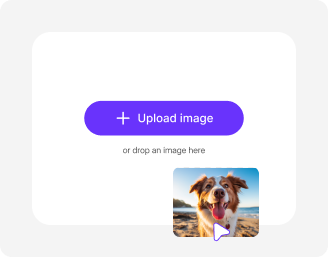
Add your image
Tap “Upload Image” and add your photo in any of the formats: JPG, JPEG, WEBP, or PNG.

Pick image model & style
Choose Nano Banana or Nano Banana Pro and select the aspect ratio you want.
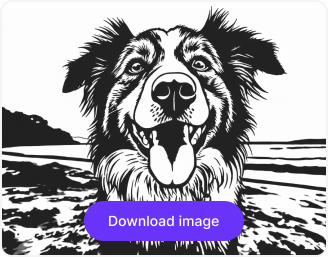
Generate & download
Click “Generate”, and your stencil art will be ready in a few seconds to preview, download, or share instantly.
Why use Pixelbin’s free picture stencil maker app?

Clean cut-out backgrounds
Remove backgrounds completely and turn your subject into a sharp, stencil-style cutout

Distraction-free designs
Get rid of unwanted objects or clutter so your stencil stays bold, simple, and easy to use

High-contrast control
Adjust brightness and contrast to create strong light and dark areas for that classic stencil look.

Flexible aspect ratios
Pick any formats that suit your needs: 1:1 for square posts, 4:5 for portraits, 3:2 for photos, or 16:9 for widescreen visuals.

Color simplification
Refine colors to reduce noise and help your image translate into clean stencil shapes.

Focused framing
Crop and resize your image to highlight the exact area you want as your stencil.
Create sharp, printable stencils directly from your browser
Generate clean stencils without manually tracing outlines or adjusting contrast settings in photo editing software.
Prompt-free conversion
Create detailed stencil line art automatically from your uploaded photo without writing descriptive prompts.
Perfect for any creative project
Generate high-quality stencils for wall art, spray painting, woodwork, tattoo designs, product photography, or digital graphics.
Monthly free trials
Create stencils for free each month and upgrade anytime for additional credits or API access.
Browser-based editor
Access the stencil maker directly from your browser on any device without downloading or installing software.
/pixelbin_blogs/PB_2.0/Apps_New_design_graphics/stencil_maker/Instant_studio-quality_results.webp)
AI tools by Pixelbin
/DynamicApps/thumbnails/AI_Image_Upscaler.png)
/pixelbin_blogs/PB_2.0/Related_apps_tumbnail/erasebg-transformed_-_2026-04-01T130755.340.webp)
/pixelbin_blogs/PB_2.0/Apps_Graphics/Sharpen_blurry_images_with_AI/image_sharpner/Thumbnail_(1).png)
/pixelbin_blogs/PB_2.0/Apps_Graphics/Recolor_image_online/Recolor_object/Thumbnail.png)
Key highlights of the free online picture stencil maker
Benefits of using the picture stencil maker
Design clean, ready-to-print stencils effortlessly and for free:
- Instant results: Create a printable stencil in just a single click with Pixelbin’s AI editor.
- Zero manual tracing: You don't need a light box or tracing paper. Our AI extracts lines automatically from your uploaded image.
- High contrast output: Generate clear black-and-white images that are easy to print and cut out.
- Cross-platform access: You can access our free stencil maker tool from any device (Windows, Android, iOS).
- No watermarks: Download your generated stencil image in high definition without any branding.
- Bulk-ready: Pixelbin’s API lets you convert multiple photos into stencils simultaneously.
- Cost-effective: Forget getting expensive design software or premium plugins for a simple stencil.
Use cases of our picture stencil maker online free tool
Produce clear templates for various physical art forms, from body art to home decor and more. Let’s check out some of the best use cases:
1. Create street art & graffiti
Turn your sketches or photos into multi-layered stencils for spray painting. Our tool creates the high-contrast black-and-white separation needed to cut out durable stencils for walls and canvas art.
2. Prepare patterns for wood carving
Using the AI editor, woodworkers and crafters can convert intricate images into simple patterns. Easily transfer designs onto wood or metal surfaces for scrolling saw work, laser cutting, or hand carving.
3. Create tattoo outlines
Generate clear, ready-to-trace outlines from portraits, objects, or reference photos – perfect for tattoo artists who want clean stencil designs without manual tracing.
4. Make custom T-shirt designs
Use our AI editor to prepare images for screen printing. By removing gradients and colors, you get a solid black design that burns perfectly onto silk screens for apparel printing.
5. Make coloring pages for kids
Turn family photos or pet pictures into fun, outline-only coloring pages. It’s an easy way to create personalized art activities for children using familiar faces and scenes.
How to get the best results from a free picture stencil maker?
Here are a few simple tips to generate clean, detailed stencil outlines every time:
- Upload a photo with a solid, contrasting background to help the AI detect edges.
- Ensure your subject is in sharp focus, as blurry photos result in unclear stencil lines.
- Avoid images with too many overlapping objects, as the lines may merge.
- High-contrast lighting works best to define the shadows and highlights clearly.
- Use high-resolution files so the final printed stencil isn't pixelated.
- Crop the image to focus strictly on the object you want to turn into a stencil.
FAQs
Here are some of the most commonly asked questions about our Free Picture Stencil Maker. If you still can’t find what you’re looking for, contact us at support@pixelbin.io or refer to our documentation for more details.


Edit images in seconds, not hours
Get pixel-perfect results just with your words
Start Editing with AI