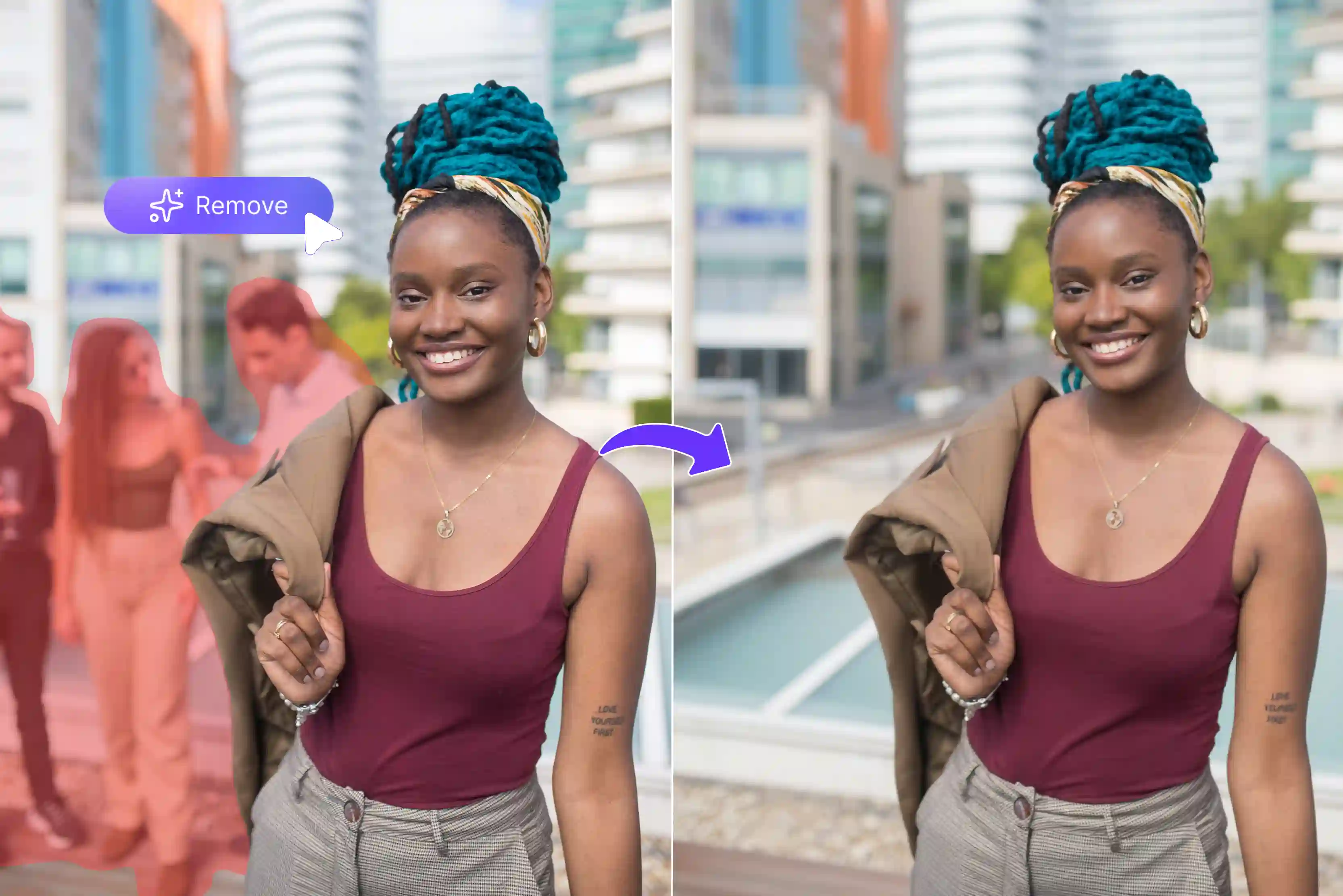


You finally snap that perfect vacation photo with a stunning sunset behind you. But then you notice a stranger walking right through the shot, or some random kid photobombing from the side. Moments like these happen all the time.
Those unwanted people in the background can ruin what should be a keeper, and fixing them used to mean hours spent learning complicated software like Photoshop. Today, things have changed fast with AI photo editors.
Tools like Pixelbin, Picsart, and others make it simple to wipe out those distractions in just a few clicks. You don't need to be a design expert anymore. These apps use smart technology to spot the person, erase them cleanly, and fill in the empty space with pixels that match the surroundings perfectly.
In this complete guide, we'll cover the 10 best apps to remove people from photo backgrounds, which will include Pixelbin and more, to guide you on how to clean up your images perfectly. Dive in to know smart ways to share spotless photos online.
What does removing people from the background mean?
Removing people from the background means using photo editing software like Photoshop or AI background remover tools like Pixelbin to erase unwanted individuals who appear in your pictures.
These could be complete strangers walking into your shot or even family members you didn't want in that particular frame. The software then fills the empty space left behind with parts of the actual background so nothing looks out of place.
You start by marking the person with a simple brush tool or by drawing a line around them in the app. The program studies the colors and patterns right next to that area very carefully. Then it removes the selected person and replaces that area with new pixels, so you never even notice anything was changed.
Why remove people from your photos?
It's perfectly reasonable to want cleaner photos by taking out unwanted people. Nobody should make you feel guilty about that. Here are some common situations where you might want to remove someone from the background of the photo.
- Removing strangers or tourists: Your vacation shots look great overall, but random people wandering through the background take away from the moment. Getting rid of those strangers makes the photo feel more personal and intentional. It also looks sharper when you share it on social media.
- Dealing with photobombers: You're capturing a nice portrait for a client in the park when a kid runs through the frame at the wrong moment. Simple editing tools can erase that interruption without much effort. The final image stays focused on what matters most.
- Cleaning up a landscape photo: Nature scenes work best when they show pure scenery without human figures cluttering the view. People in the distance can distract from the mountains, water, or fields you wanted to highlight. Removing them restores that calm, natural vibe.
- Editing reflections out of shots: Reflections add interest sometimes, but they often pull attention away from your main subject. When a reflective surface shows unwanted figures, you can edit those out easily. This keeps the composition strong and clear.
- Fixing product photos: You set up your item against a pretty outdoor backdrop, but passersby appear in the frame right as you click. Tools help erase those distractions so your products stand out cleanly. The result looks professional for online stores.
- Keeping the focus on yourself: A new profile picture for work or social profiles sometimes needs just your face without anyone else in the shot. Solo images feel more direct and confident. Editing out extras creates that polished, personal touch you need.
AI tools to remove people from the background
Jump to tools like Pixelbin, Picsart, Fotor, Pixa, Photoroom, AniEraser, and more below that remove photobombers from photo backgrounds instantly. Know them more specifically.
1. Pixelbin

Unwanted people showing up in your carefully taken photos can ruin the whole moment you wanted to keep. These often appear as strangers walking behind you or random figures cluttering the background of product images for your online shop.
Such distractions prevent you from creating clean and professional-looking content for social media posts, advertisements, or work you share with clients. The Pixelbin remove people from photo tool makes the cleanup process simple for everyone to handle.
You only need to upload JPG, JPEG, PNG, or WebP files onto our platform, and the artificial intelligence immediately identifies those figures before erasing them without leaving any marks or losing image quality.
The best part is that no account creation is required even for instant previews, which means you receive sharp and natural-looking results ready for sharing or selling in just moments and can download them in HD for free using its 1 free credit for more use of the premium version.
Why does Pixelbin remove people from a photo top the list?
- High-definition image output: Pixelbin delivers sharp, high-resolution photos after removing unwanted people from images you upload for editing. Results work perfectly for prints, websites, or social posts needing clear details.
- Works anywhere you go: Open Pixelbin globally with stable internet on phones, tablets, or laptops without location limits stopping your photo cleanup sessions during travel or daily routines.
- Results appear in seconds: Photos shed distractions instantly as Pixelbin processes uploads fast, keeping projects on track without delays from slow tools ruining tight schedules you face regularly.
- Original quality stays perfect: Removals preserve colors, sharpness, and textures exactly, while new backgrounds blend naturally, so finished images fool everyone checking closely for editing traces left behind.
- No experience needed: New users erase people professionally using simple brush clicks on Pixelbin without skills, tutorials, slow first tries, or practice runs, wasting valuable time upfront.
- Your files stay private: Uploaded images get full encryption, blocking outsiders completely, ensuring personal content is never shared or stored beyond secure edits you complete every session.
2. Picsart
Are those extra people always cramping up your favorite photos from trips or events? Picsart wipes them away cleanly through three simple steps that anyone can follow without trouble.
You just upload your image file, brush right over the unwanted parts with their adjustable tool, then download the cleaned-up version that looks perfect every single time without fail. The system processes everything super fast while giving you spot-on results for social media posts or personal albums that need to shine.
Their artificial intelligence takes care of common file types like JPG or PNG and fills in those empty spots naturally, so nothing looks fake or out of place at all. No apps to install or accounts to create means you jump straight into editing whenever the need hits you hard. This tool really stands out when you're fixing photos day after day for work or fun.
Must known features
- Adjustable brush sizes: Change brush size easily for tiny details or big areas when removing objects from photos quickly and accurately every time.
- AI object detection: Smart AI spots people, text, or clutter automatically while you brush, letting edits finish smoothly without extra effort needed.
- Eraser restore option: Accidentally marked too much while cleaning up your image file, so Picsart brings back parts instantly for perfect fixes.
- Text removal tool: Wipe out unwanted words, signs, or labels cleanly from pictures, keeping backgrounds natural for social posts or prints.
- Foreground selection: Picsart highlights main subjects separately, making object removal precise around people or items you want to keep safe.
- Quick preview mode: See changes live as you brush over distractions so final results match exactly what you pictured before downloading anything.
3. Pixa
Photobombers showing up uninvited and ruining your landscape shots or family portraits now and then? Pixa erases those people cleanly using three easy steps that work smoothly from any browser on your device.
Simply upload the photo file first, swipe across the distracting figures with their magic eraser, and download your perfect results every time with zero leftover mess behind. It delivers quick and precise cleanup, especially helpful for photographers sharing work online, where clean visuals grab all the attention right away.
The AI techniques support everyday formats like JPG or WebP while rebuilding backgrounds so seamlessly that viewers never spot the changes you made. No downloads required or signups to slow you down lets you start editing in seconds. This tool proves itself perfect for regular users handling batches of pictures without much waiting around.
Must known features
- Magic eraser swipe: Swipe across multiple photobombers at once as AI replaces them with realistic backgrounds for instant clean landscapes.
- Batch object removal: Handle several unwanted figures in one photo through the API without slowing down your editing workflow.
- Free online access: Use Pixa directly in the browser for wedding portraits, travel shots, or family pictures needing fast professional cleanups now.
- Shadow pattern matching: AI studies surrounding shadows and textures perfectly when filling erased areas, so nobody spots your edits easily.
- High-resolution output: Get sharp, detailed images after removing crowds while keeping original quality intact for prints or online sharing.
- No download needed: Edit photos straight from any device without installing software, letting you fix images anywhere the internet works fine.
4. Fotor
Strangers wandering into frames and spoiling your travel memories or product setups at the worst possible moments? Fotor clears everything out cleanly across three straightforward steps designed for total beginners and pros alike.
Add your image file onto their site, brush or auto-select the unwanted person quickly, then grab the download of flawless results every single time without any second-guessing needed.
Creators find it ideal for speedy erasures on everything from beach scenes to ecommerce listings that demand sharp focus throughout. Their artificial intelligence tackles JPG, JPEG, PNG, WebP, HEIC, and more files effortlessly and patches open spaces with such natural blends that photos stay looking authentic and pro-level crisp.
Skipping software installs or login hassles gets you editing right away, no matter where life takes you next. This tool shines brightest when ongoing photo tweaks fill up your daily routine without complications.
Must known features
- Quick select mode: Fotor auto-highlights people for instant removal, while manual brush offers edge precision across diverse photo types.
- AI brush erasing: Paint unwanted figures, and Fotor AI erases them, filling backgrounds naturally for flawless portrait cleanups every time.
- High-quality downloads: Export crisp JPG PNG images post-edit without watermarks, ensuring professional results ready for prints or online sharing.
- Multiple format support: Handles JPG, JPEG, PNG, WebP, and HEIC files, letting you process phone camera shots or scanned images without format issues.
- Magic eraser tool: Swipe across crowds or groups for batch removal, keeping main subjects sharp in busy scenes like events or travel.
- One-click previews: See live changes during brushing so adjustments happen fast before final save, matching your vision perfectly.
5. AniEraser
Unwanted faces popping into personal snapshots or work images and throwing off your whole composition unexpectedly? AniEraser handles the removal cleanly through three basic steps that deliver reliable fixes every time you need them most.
Bring in your photo to start, mark out the figure with their flexible brush tool precisely, and download the spotless version ready for immediate use anywhere online. Editors appreciate the efficient cleanup tailored for event coverage or online store visuals that require perfection upfront.
The artificial intelligence manages WebP or JPG formats with ease while restoring backgrounds so naturally that your audience sees only the story you wanted to tell clearly. No extra time wasting for setup or profiles to build means instant access whenever a quick edit saves the day completely. This tool excels particularly for anyone processing high volumes of photos throughout busy workdays.
Must known features
- Custom brush sizes: Adjust the brush for single-person or crowd removal up to 3840x2160 resolution, handling large, detailed photos smoothly.
- One stroke removal: Single swipe erases objects, text, or people with AI inpainting matching surroundings for invisible seamless edits always.
- Batch file processing: Upload multiple images simultaneously for bulk cleanup, saving time on portfolios, events, or social media collections.
- Nano AI model: Advanced AI understands complex scenes, delivering precise erasures while preserving textures and colors in backgrounds.
- Wide format compatibility: Supports JPG, PNG, JPEG, and WebP under 50MB, covering most smartphone and desktop photos for universal editing access.
- High fidelity output: Maintains original sharpness quality post-removal, perfect for professional prints, websites, or client deliverables.
6. Photoroom
Objects or people sneaking into your photos and throwing off the whole look you planned so carefully? Photoroom takes them out cleanly through three straightforward steps that keep things moving without holdups.
You upload your image file first, draw over the spot with their retouch brush for spot-on control, and then download the fixed version that turns out perfect every time you try it out.
It gives creators reliable cleanup for product shots or event pics posted across social platforms, where details catch every eye immediately. Their AI fills gaps from nearby areas naturally while working with standard formats like JPG or PNG for hassle-free handling. No extra software downloads or user accounts slow you down when time counts the most around deadlines.
Must known features
- Retouch brush tool: Paint precisely over objects, people for AI removal with size controls working on web, Android apps seamlessly.
- Layer-based editing: Target specific layers containing distractions, keeping main elements protected during focused cleanup operations.
- Auto background fill: AI generates matching textures and colors after erasure, blending naturally across product portraits or design files.
- In-app retouch mode: Dedicated mode launches instantly for object removal integrated within the full Photoroom editing workflow, smoothly.
- Cross-platform access: Available on web and mobile, ensuring consistent results regardless of the device used for professional or personal projects.
- Real-time previews: Watch changes appear live while brushing, allowing instant refinements before committing the final edited version.
7. Cutout.pro
Clutter like extra figures or blemishes, filling up space in photos you shot with real effort behind the lens? Cutout.pro clears it all away cleanly using three basic steps built for smooth operation from any spot online.
Bring your picture file into the site, highlight unwanted parts with the retouch selector accurately, and pull down the polished result that hits right every single time without question. Photographers count on it for precise fixes across portraits or commercial visuals shared widely, where quality pulls in views consistently.
It restores the background just like the original one and accepts files such as JPG, PNG, or WebP for broad compatibility across projects, big or small. Skipping installations or profile setups makes it easier for an instant workflow. This tool rises above others when it tackles stacks of retouches during peak workflow hours regularly.
Must known features
- Automatic AI detection: Cutout.pro spots unwanted persons, objects, scratches, or blemishes, automatically repairing images as if they never existed there before.
- Brush-based selection: Paint over distractions roughly, and AI reconstructs edges perfectly without needing pixel-perfect accuracy during quick edits.
- Superb edge details: Retouch delivers stunning cutout quality, keeping background removal precise for persons, objects, or imperfections seamlessly.
- Huge file limit: Upload JPG, PNG, WebP files up to 25MB for fast processing of standard smartphone or camera photos without size restrictions.
- Preview before download: See full resolution previews after AI erase, letting you check results and redo if artifacts appear before final save.
- No manual masks needed: Skip green screens, pixel picking, or path drawing as 100 percent automatic retouch handles complex scenes effortlessly.
8. Remove.bg
Background clutter or extra people messing with your photos after you already pulled off the perfect shot? Remove.bg's Magic Brush clears everything up cleanly through three dead-simple steps that save you tons of time every single day.
You start by uploading your image file, where it auto-strips the background first, then switch to their brush tool to paint over objects or people you want gone, and finally download the flawless version.
Content folks and designers grab it for lightning-fast fixes on portraits, product visuals, or social graphics that need to pop clean across platforms packed with picky viewers waiting to scroll past anything less than perfect.
Their artificial intelligence handles JPG or PNG files like a champ while filling in spots, so smooth nobody guesses you touched up the original scene one bit. No desktop apps or logins holding up your flow means you dive into work the second a file lands in front of you during crunch times. This tool crushes it, especially for high-volume editors banging out dozens of tweaks through long workdays without breaking stride.
Must known features
- Precise erase restore: Magic Brush lets you remove or restore image parts after background strip with AI handling precision every stroke automatically.
- Rough brush control: Brush roughly over objects, and AI refines edges perfectly without manual adjustments, saving time on detailed cleanups.
- Same quality output: Maintains remove.bg's high standards, delivering natural blends for selfies or product shots with unwanted figures gone.
- Post cutout editing: Edit after initial background removal, clicking cutout, then remove restore for full control over final composition layers.
- Seconds processing: AI completes work within seconds, even on complex areas like furniture, toys, or background crowds needing erasure.
- Two tool workflow: Combines background remover with Magic Brush, eliminating the need for multiple apps during single photo editing sessions.
9. StarryAI
Random strangers or crowds messing with shots you framed just right during outings or sessions? StarryAI removes them cleanly across three easy steps tailored for quick turnaround on the web.
Upload your photo file to kick things off, type a short description of what to erase, like unwanted people in the back, then download it. You can try the tool for free with 20 free credits. Artists and casual users lean on it for straightforward people removal in travel logs or creative pieces displayed publicly online.
Their artificial intelligence keeps edges sharp on JPG, PNG, and more formats while regenerating scenes so naturally nobody spots the tweak you applied. No programs to load or logins to bother with puts editing at your fingertips the moment an idea sparks up. This tool performs top-notch for individuals processing personal galleries amid full days packed tightly.
Must known features
- Text prompt removal: Type descriptions like "Remove people from photo," and AI erases strangers or crowds using generative fill naturally.
- JPG PNG support: Upload JPG PNG files into the edit tool, where AI detects unwanted people automatically for quick background reconstruction.
- HD downloads: Save polished high-resolution photos instantly after removal, perfect for social media, product shots, or personal albums.
- Photobomber eraser: Target random people, trash, or text overlays, erasing multiple people while keeping backgrounds sharp and realistic.
- No clone stamp: Skip Photoshop tricks as AI handles unwanted elements in seconds, filling spaces seamlessly for beginners easily.
- Three-step process: Upload an image, describe how to remove AI processes, and then download, letting simple prompts control complex people removals.
10. Pixlr
Distractions popping into view and disrupting photos you captured with purpose in mind? Pixlr's remove object tool erases them cleanly in three direct steps, perfect for hands-on control anytime needed. Open your image file inside their editor, pick source areas nearby with the stamp selector carefully, and save the blended finish that comes out right every attempt without fail.
Designers rely on it for detailed object removal in ads or web graphics circulated far and wide effectively. The clone method samples surroundings precisely for JPG, PNG, PDF, or WEBP files, ensuring fills blend seamlessly into busy compositions overall. No downloads demanded or accounts holding you back, start sessions fresh whenever urgent project demands come.
Must known features
- AI outline detection: Draw a cursor outline around objects, Pixlr AI detects and removes them with seamless blending.
- Multiple save formats: Download in JPG, PNG, PDF, or WebP, adjusting quality to match your needs perfectly.
- Generative fill add: After removal, use generative fill to place new objects or text creatively.
- Advanced AI algorithms: Pixlr's precise AI detects objects accurately for professional-looking edits.
- Free online access: An Absolute free tool and runs in a browser, ideal for beginners, removing unwanted items instantly without software costs.
- Beginner-friendly steps: Outline object AI removes the background and saves file, completing edits fast for anyone starting photo cleanup tasks from scratch.
Final thoughts
Choosing the right app to remove people from photo backgrounds can transform your photo editing workflow, ensuring clean, professional results without quality loss.
AI tools like Pixelbin, Picsart, Fotor, and more offer powerful AI-driven features such as brush precision, instant previews, batch processing, and natural background fills, making them ideal for creators, photographers, and marketers.
If you want our top recommendation, we suggest the Pixelbin Remove People Tool for its seamless browser access without any signup, batch removal using API, and precise AI inpainting that preserves image sharpness effortlessly.
FAQs
Pixelbin offers 1 free option for AI people removal from photos with sharp results and no signup needed. Picsart and Fotor follow closely for quick social media cleanups anytime.
Yes, Pixelbin handles groups through simple brushing with AI filling backgrounds naturally alongside Pixa and AniEraser. Perfect for crowded events or travel shots needing instant fixes.
Pixelbin's AI scans surroundings, detects edges accurately, and then generates seamless fills blending perfectly like Photoroom and Fotor. Natural results appear every time without visible artifacts left behind.
Pixelbin’s AI editor works flawlessly on iPhone browsers for photobomber removal, while YouCam Perfect and TouchRetouch offer native apps. You can also find more free background remover apps for iOS that deliver smooth mobile cleanups for portraits or vacations fast.
Pixelbin excels at ecommerce erasing distractions from product shots, keeping details crisp for listings without signup. Ideal for sellers needing professional cleanups ready for online stores immediately.
Pixelbin manages busy streets through precise inpainting, matching patterns naturally, plus AniEraser and Cutout.pro. Realistic outcomes shine even on urban crowds or detailed scene cleanups.









