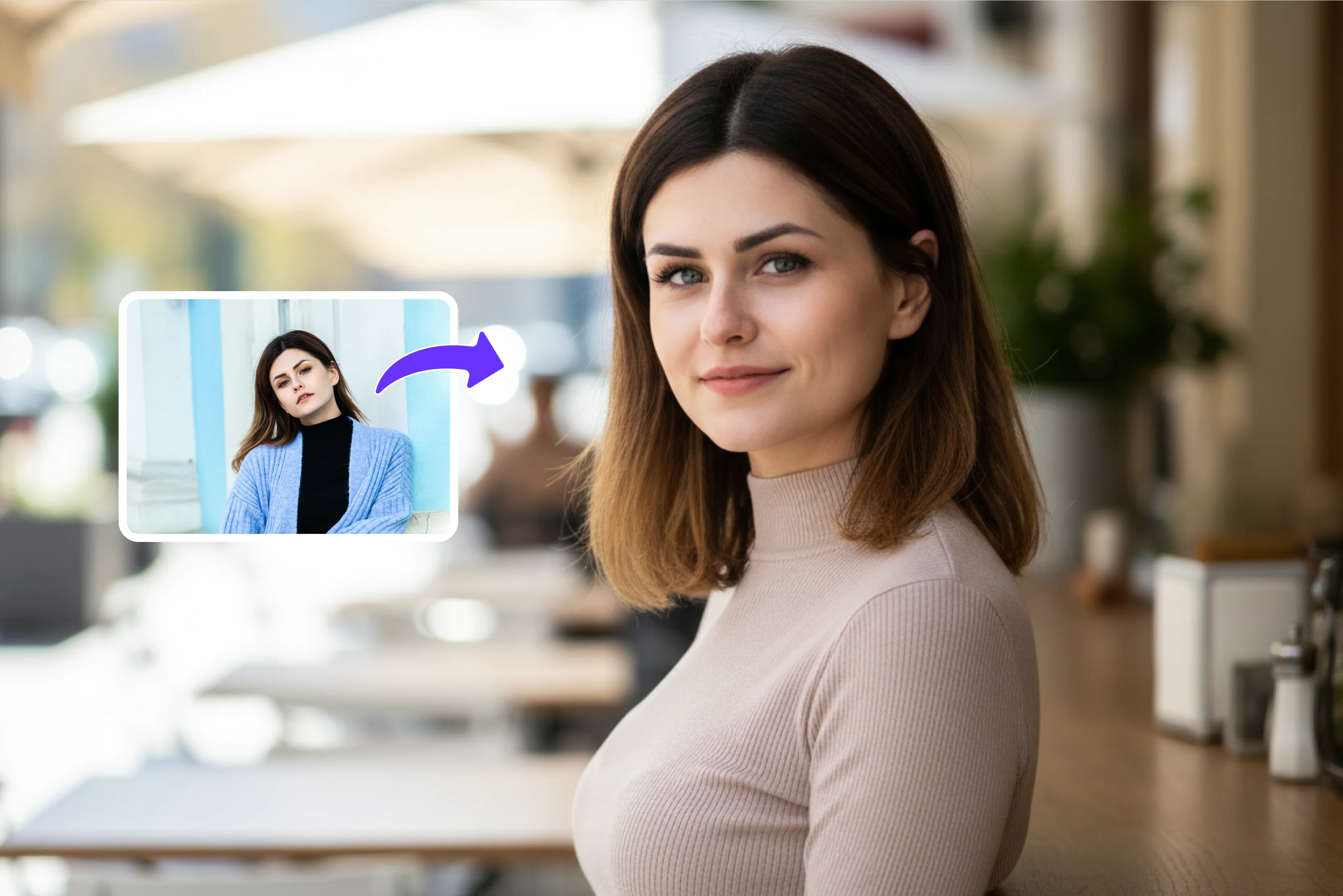


Many professionals face the same problem: they need a good headshot but do not know how to get one easily. Hiring a photographer can be costly, and doing your own photoshoot often gives dull or unprofessional results.
This leads to people using weak selfies or old office photos that do not match the image they want to show at work or online. A good headshot matters a lot for your professional purposes, like LinkedIn, resumes, company websites, and personal branding.
It is often the first visual impression people get of you, so it needs to look confident, clean, and trustworthy. A polished headshot helps you look serious about your career, makes you more memorable, and supports your professional identity across different platforms.
In this post, we will look at some of the best tools that can help, including Pixelbin and other popular AI headshot generators. You will see how each one works, what kind of results you can expect, and which option fits your needs best for creating professional headshots without needing a camera crew or a designer.
What is an AI headshot generator?
An AI headshot generator is a digital tool that uses AI to turn ordinary photos, like selfies or casual portraits, into clean, professional headshots. Instead of a studio shoot or manual editing, the system automatically improves lighting, background, facial details, and overall composition so the final image looks like it was taken in a studio. The goal is to give a natural but polished appearance that feels professional yet easy to relate to.
Professional headshots matter because they form the first visual impression people get of you online. A strong headshot on LinkedIn, a resume, a company website, or a personal portfolio helps you appear confident, credible, and serious about your work.
It supports your personal brand and makes it easier to stand out in job applications and networking. Choosing the right photos to upload to an AI headshot generator is just as important as the tool itself, since better source images lead to cleaner, more natural results.
AI Professional headshot generators vs Manual headshot generators
Why are AI for Professional headshots the best?
- AI makes professional headshots easy and fast without hiring a photographer or booking a studio session, which saves both time and money for most users.
- You can create multiple polished versions from a single selfie and choose the one that best fits your LinkedIn, resume, or company website profile.
- AI tools adjust lighting, background, and facial details so even simple indoor photos look clean, confident, and suitable for serious professional use.
- Headshots made with AI help you build a consistent personal brand across platforms and give the impression that you take your career image seriously.
- These tools are budget‑friendly and ideal for job seekers, freelancers, and small businesses that need strong visuals without extra design skills or editing effort.
Best AI professional headshot generators for free
Know the best AI professional headshot generators for free, including Pixelbin free headshot generator and others, help you turn simple selfies into polished headshots.
1. Pixelbin AI professional headshot generator

Pixelbin AI headshot generator helps you turn everyday selfies or casual photos into clean, studio‑style portraits in seconds instead of days. The tool works inside the Pixelbin tool and runs directly in your browser, so you do not need to install any extra app or editing software.
You can upload JPG, JPEG, PNG, or WEBP files and professional AI models like Nano Banana to improve lighting, soften distractions, and refine details while still looking like yourself. Our tool is built it for LinkedIn, resumes, websites, and personal branding, so outputs feel natural and professional.
Must known features
- Pixelbin offers multiple AI‑driven headshot styles tailored for corporate looks, so users can match their role, industry, or brand without starting from scratch.
- It shows how the headshot changes with each style choice before finalizing, which helps users pick the version that feels most natural and professional.
- The tool keeps the output resolution consistent and sharp, so headshots look clear on LinkedIn, websites, and print‑ready documents without extra resizing.
- Each headshot uses a fixed number of credits, making it easy for Pixelbin to track usage and plan for larger batches without confusion or hidden charges.
- The AI is tuned to emphasize corporate cues like proper posture, neutral tones, and minimal distractions, which keeps the focus on the face and expression.
- After download, the images are ready for direct upload to LinkedIn, HR portals, or company directories, reducing the need for extra editing or formatting work.
2. Dreamwave Free AI Headshot Generator
Dreamwave AI headshot generator helps people turn everyday selfies into professional‑style portraits without booking a studio. Users upload single or in bulk clear photos, and the tool builds a detailed model of the face, then creates multiple headshots with different outfits, lighting, and backgrounds. It works from the browser, so there is no extra software to install, and the process usually finishes in minutes.
The results are meant for LinkedIn, resumes, and company websites, where a clean, confident look matters. Users can tweak small details like skin, eyes, and teeth, but the tool keeps things simple so anyone can use it. It suits job seekers, freelancers, and small teams who want better visuals without extra cost or design skills.
Must known features
- Dreamwave focuses on creating realistic headshots that avoid the typical “AI look,” so the portraits feel natural and suitable for professional use.
- The tool lets users upload 4+ varied selfies so the system can build a detailed digital model of the face before generating studio‑style headshots.
- Each person can choose from multiple styles, outfits, backgrounds, and poses, giving different looks without needing new source photos.
- Dreamwave processes images on secure infrastructure and does not sell or share user data, which suits businesses and remote teams that care about privacy.
- Headshots come in high resolution and are ready for LinkedIn, company websites, HR portals, and team directories with minimal extra editing.
- The workflow is simple and fast, often delivering usable headshots in minutes rather than days, which helps people update their profiles quickly.
3. Canva AI headshot generator
Canva AI headshot generator lets users turn a simple selfie into a polished headshot inside the Canva editor. After uploading a photo and choosing gender and style, the system creates studio‑style portraits that look natural and professional. The main advantage is that you can drop the headshot into Canva templates for business cards, flyers, social posts, and presentations.
The tool is easy to use, needs no advanced editing knowledge, and fits well if you already use Canva for design work. It works for LinkedIn, resumes, and team pages, giving a clean look that matches the rest of your brand. Since it lives inside Canva, you can also adjust colors, fonts, and layout around the headshot without jumping to another tool.
Must known features
- Turns ordinary selfies into polished, studio‑style headshots without needing a photoshoot.
- Lets users choose from several styles, backgrounds, and lighting options to match personal or brand tone.
- Works inside the Canva editor, so the headshot can be dropped directly into designs for social posts, flyers, or presentations.
- Gives realistic results that look natural and suitable for LinkedIn, resumes, and business profiles.
- Runs in the browser and does not need extra software, making it easy for non‑designers.
- Keeps the workflow simple with upload, style selection, generate, and download in a few steps.
4. HeadshotMaster AI Headshot Generator
HeadshotMaster is a fast AI headshot generator that creates professional photos from a single selfie in about 30 seconds. The page focuses on speed and simplicity, offering one clear option that does not require signup or payment. Users generally upload a picture, wait a short time, and get a set of headshots ready for LinkedIn or other profiles.
The interface is minimal, with very few options, so the tool feels lightweight and easy to use. It suits people who want a quick upgrade from a casual selfie without learning complex settings. The outputs are tuned in JPG or PNG for general professional use, not heavy editing or deep customization. This makes HeadshotMaster a good choice for users who value speed and a no‑hassle workflow.
Must known features
- Creates professional headshots from a single selfie in about 30 to 90 seconds.
- Is free to use with no sign‑up or hidden charges, even for multiple generations.
- Produces highly realistic portraits that feel close to studio photography but without a camera crew.
- Does not store or share user photos, processing images securely and deleting them after use.
- Offers simple controls for lighting, background, and style so users can fine‑tune the look.
- Works on resumes, social profiles, and even passport‑style images without extra editing.
5. Media.io AI Headshot Generator
Media.io’s AI headshot generator converts everyday selfies into studio‑quality corporate portraits in a few minutes. Users upload a normal photo, and the system produces professional‑style headshots that look suitable for LinkedIn, company websites, and press material. The tool offers different background options and helps smooth out lighting and facial details automatically.
It is built for people who want better visuals without doing manual editing or hiring a photographer. The process of the headshot generator takes a bit longer than Pixelbin, but the final images still feel polished and professional. The style is geared toward business and corporate use, so the portraits look clean and serious rather than playful or artistic.
Must known features
- Turns everyday selfies into photorealistic corporate headshots in a short time.
- Uses facial‑analysis AI to preserve unique features while improving lighting and expression.
- Generates multiple headshots with different backgrounds, outfits, and poses from one photo.
- Is built for business headshots, LinkedIn, press releases, and official company material.
- Processes images online without installation, making it accessible from any device.
- Focuses on studio‑quality outputs that look professional rather than exaggerated or cartoon‑like.
6. NoteGPT AI headshot generator
NoteGPT’s AI headshot generator gives users a simple, no‑signup way to turn casual photos into cleaner, more professional portraits. The workflow is straightforward: upload a photo, choose a basic style, and let the AI generate a set of headshots. The results are designed to look natural and fit platforms like LinkedIn, resumes, and personal websites.
The tool keeps the interface light, with minimal options and no complex menus, so it feels easy for beginners. It suits people who want a quick visual upgrade without spending much time or money. The generated portraits are not hyper‑stylized, which makes them feel more realistic and appropriate for everyday professional use. Overall, NoteGPT focuses on accessibility and speed over deep customization.
Must known features
- Lets users upload or paste a photo and turn it into a professional headshot with one click.
- Supports JPG, JPEG, PNG, and WebP formats up to 20 MB for flexible use.
- Offers free daily slots plus a simple credit system for premium styles and extra images.
- Gives users some control over style with short prompts or mood inputs.
- Runs entirely online, with no login required for basic use.
- Emphasizes privacy by not storing photos and deleting them after processing.
7. Remaker AI headshot generator
Remaker’s AI headshot generator helps users create professional‑looking headshots by improving everyday photos automatically. After uploading an image, the system adjusts lighting, background, and facial features to give a cleaner, more polished look. It offers several style presets so users can match their headshot to different contexts, such as LinkedIn, resumes, or team pages.
The interface is simple and guided, so even non‑designers can use it without extra help. The tool is budget‑friendly and works well for people who want a quick upgrade without a full photoshoot. It does not require advanced editing skills, and the process is built to be fast and repeatable if you need multiple versions. The focus is on practical, realistic results rather than heavy artistic effects.
Must known features
- Upgrades casual selfies into clean, professional headshots with automatic editing.
- Adjusts lighting, background, and facial details so the person looks polished and natural.
- Provides several style presets tailored for LinkedIn, resumes, and team pages.
- Works in the browser and does not need extra software or design skills.
- Lets users generate multiple variants from the same starting photo.
- Focuses on practical, realistic outputs suited for everyday professional profiles.
8. Aragon free headshot generator
Aragon free headshot generator gives users a one‑time‑payment option to create studio‑style portraits. Users upload a few photos, and the tool delivers a set of professional headshots in about 15–45 minutes, depending on the process. The results are tuned to look natural and suitable for LinkedIn, resumes, and business websites.
The tool offers control over outfits and backgrounds, so users can choose a style that fits their brand or role. Unlike some platforms that run on subscriptions, Aragon focuses on a single payment for a bundle of headshots. This suits people who want detailed, realistic portraits without committing to a monthly fee. The interface is simple, and the process is designed to feel straightforward, so even beginners can get good results without extra effort.
Must known features
- Lets users create studio‑style headshots with a one‑time payment instead of a subscription.
- Delivers a set of professional portraits based on a few uploaded photos.
- Offers control over outfits and backgrounds so the headshots fit corporate or personal branding.
- Processes images quickly, often within 15–45 minutes depending on the plan.
- Keeps outputs high‑resolution and suitable for LinkedIn, websites, and print use.
- It is built for people who want detailed, realistic headshots without monthly fees.
9. Monica AI headshot generator
Monica’s AI headshot generator helps users turn simple selfies into clean, professional‑style portraits in a few minutes. The tool accepts JPG, JPEG, and PNG files up to 10 MB and uses advanced AI to improve lighting, background, and facial details while keeping the person recognizable. It offers six premium styles so users can choose a look that fits LinkedIn, resumes, or company websites.
The process is fast and runs in the browser, with photos automatically deleted within 48 hours for privacy. This makes it suitable for people who want better headshots without installing extra software or learning design tools. The focus is on natural‑looking results that feel close to studio photography but with a much simpler workflow.
Must known features
- Changes simple selfies into clean, professional‑style headshots in a short time.
- Accepts JPG, JPEG, and PNG files up to 10 MB for reasonable upload flexibility.
- Uses AI to improve lighting, background, and facial details while keeping the face recognizable.
- Offers several premium styles so users can match different professional contexts.
- Processes images in the browser and deletes them within 48 hours for privacy.
- It is designed for natural‑looking results that feel close to studio photography.
10. Vidnoz AI headshot generator
Vidnoz’s AI headshot generator is part of a larger AI video and avatar platform and creates realistic headshots from everyday photos. Users upload a clear selfie and pick a style, and the system generates professional‑style portraits that work well for LinkedIn, resumes, and digital profiles.
The tool gives access to more than 40 different backdrops and clothing options, so users can try several looks without changing the original photo. It is built to be simple and fast, often delivering results in minutes rather than hours. The outputs are tuned for lifelike avatars and professional use, though some users notice small differences in facial features compared to the real photo. It suits people who want a quick, budget‑friendly upgrade without a studio shoot.
Must known features
- Creates realistic headshots from a single selfie as part of a broader avatar and video suite.
- Lets users pick from many background and outfit options to try different looks.
- Generates portraits that work well for LinkedIn, resumes, and digital profiles.
- Runs online and does not need extra desktop software.
- Focuses on lifelike outputs that avoid obvious “AI” artifacts.
- Keeps the process simple and fast, with results usually ready in minutes.
11. Fotor AI headshot generator
Fotor’s AI headshot generator helps turn casual selfies into polished, studio‑style headshots inside the Fotor editor. After uploading a photo and choosing a style, the tool improves lighting, sharpness, and facial details to create portraits that look refined yet natural. The key advantage is that the headshot can be dropped directly into Fotor templates for social posts, business cards, and presentations.
The interface is simple, and the workflow is designed so even non‑designers can get good results in minutes. The tool can be used as a one‑time purchase with multiple edits, which suits people who want sturdy, professional images without monthly fees. It focuses on clean, realistic headshots that feel appropriate for LinkedIn, resumes, and company websites rather than heavily stylized or cartoon‑like looks.
Must known features
- Turns casual selfies into sharpened, studio‑style headshots with enhanced lighting.
- Works inside the Fotor editor, so users can combine the portrait with templates and branding.
- Gives realistic results tailored for business cards, social posts, and online profiles.
- Uses a pay‑once model instead of a subscription for many headshot packs.
- Lets users generate multiple headshot versions and pick the best one.
- Keeps outputs high‑resolution and ready for both web and print use.
12. Cutout.pro AI headshot generator
Cutout.pro AI headshot generator turns selfies into highly realistic, professional‑style portraits with a strong focus on fine details. The model is trained on large portrait datasets, so it reproduces skin texture, eye highlights, and hair strands in a way that feels close to DSLR‑quality photography.
Users can guide the style with simple prompts and still get natural‑looking results that avoid obvious “AI” defects. The platform also integrates background removal, photo enhancement, and old‑photo restoration, so users can complete the full workflow in one place.
This makes it useful for people who want not just a headshot, but also help with cleaning up the image afterward. The tool is designed for LinkedIn, resumes, and professional websites where a sharp, high‑fidelity look matters more than playful or cartoon‑style output.
Must known features
- Turns selfies into highly realistic, DSLR‑style professional headshots.
- Uses AI trained on large portrait datasets to reproduce fine skin and hair detail.
- Lets users guide the style with simple prompts while keeping results natural.
- Combines background removal and photo enhancement so users can clean the image in one place.
- Is tuned for LinkedIn, resumes, and corporate websites where high‑fidelity photos matter.
- Works online and does not require extra software or mobile apps.
How to understand which tool is best for you?
- Best for LinkedIn: Choose a tool that delivers clean, natural‑looking headshots with neutral backgrounds, good lighting, and subtle enhancements that match LinkedIn’s professional style and feel trustworthy to recruiters and peers.
- Best for corporate teams: Pick a tool that supports bulk uploads, consistent styling, and high‑resolution outputs so all team members get matching, polished headshots that align with company branding and HR or internal directory requirements.
- Best for creators: Opt for a tool that offers creative styles, diverse backgrounds, and some customization so photographers, influencers, and content creators can build a unique visual identity across platforms.
- Best for budget users: Select a tool that provides free or low‑cost options, free tiers, or one‑time payment plans so users can get quality headshots without committing to expensive subscriptions or complex pricing models.
- Best for beginners: Use a tool with a simple upload‑and‑generate flow, minimal technical steps, and clear guidance so anyone can create professional‑looking headshots without prior design or editing experience.
Final thoughts
Using an AI professional headshot generator can give your LinkedIn, resume, and website photos a neat, studio‑quality look without going for an actual photoshoot. That said, it is important to keep the image honest and close to how you really look, so people can still recognize you in real life.
When you are creating headshots for your own profile, we will suggest you try Pixelbin AI headshot generator keeps the process fast and simple, with no extra software or subscription to manage. Pick the tools above carefully, keep your portraits realistic and truthful, and always aim to share your professional image in a clear and respectful way.
FAQs
You can use clear selfies or casual portraits; the AI improves lighting, background, and details to make them look professional, so a studio setup is not necessary.
Yes, the tool lets you try different backgrounds and clothing styles from your upload, so you can match your headshot to LinkedIn, work, or personal branding.
Some tools support multiple people, but Pixelbin focuses on individual portraits; for teams, the same style can be applied to each person’s photo one by one.
You can upload JPG, JPEG, PNG, or WEBP files, usually up to around 10–20 MB, which is enough for clear selfies or casual portraits to turn into headshots.
It enhances lighting, softly removes distractions, refines facial details, and applies a studio‑style look so your selfie turns into a polished, LinkedIn‑ready profile picture.
You can create a limited number of headshots for free, then upgrade for more credits; all downloads are high‑resolution and ready to use without extra cost per image.









