

Summary
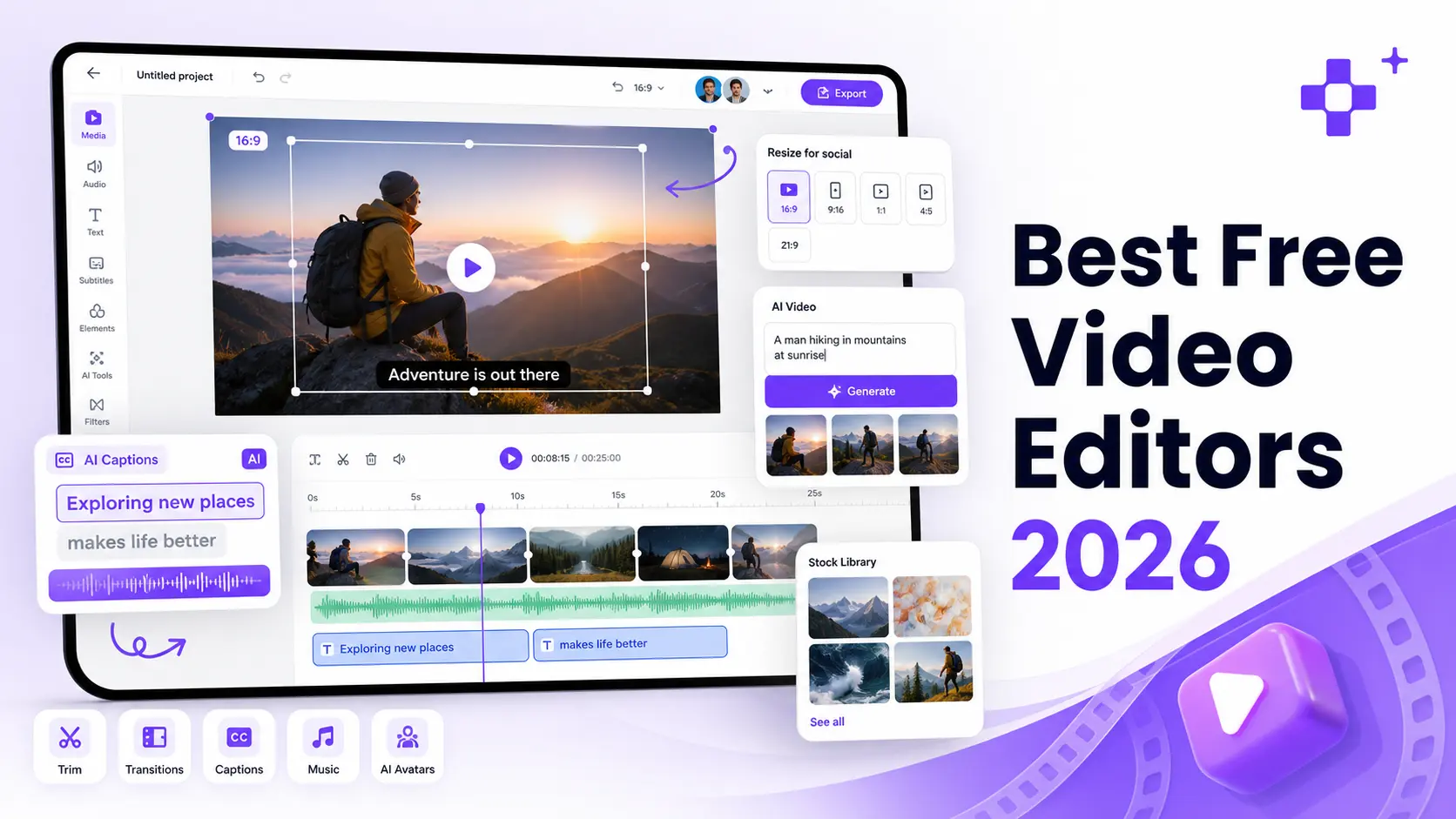
The best free video editor in 2026 depends on what you want to create. Pixelbin is best for quick browser-based editing and AI-assisted product or marketing videos. CapCut is best for Reels, TikTok, and Shorts. DaVinci Resolve is the strongest free desktop editor for advanced users. Clipchamp is the easiest free online editor for Windows users, while iMovie, OpenShot, Shotcut, and Kdenlive are strong no-watermark options for desktop editing. Before choosing, check the free plan limits, watermark rules, export resolution, device support, and whether you need generative AI, captions, templates, or a full timeline editor.
The best free video editor in 2026 is the one that fits your project, your hardware specifications, and your personal patience level. Some platforms are perfect for a twenty-second clip but completely fall apart if you attempt to string together a long-form timeline.
Choosing the wrong software ruins creative momentum. To keep you from wasting hours waiting on slow render pipelines, we have created this guide for you. We have tested and researched the tools on your behalf. Out of 50+ tools that we tried, we have only shortlisted the top 13 tools that are the best.
Let’s start.
Best AI video editor in 2026 (overall picks)
For pure generative power combined with quick browser-based functionalities, Pixelbin is an exceptional choice for text-to-video and image-to-video generation, making it incredibly easy to spin up marketing clips.
Other recommendations include:
- CapCut: Best for social-first assistive tools, auto-captions, and trending effects.
- VEED: Best for high-accuracy transcripts and talking-head audio optimization.
- Adobe Express & Canva: Best for AI-assisted graphic layouts and brand design elements.
How we chose these free video editors: Factors we considered
A list like this should not only say which tool is popular. Popular does not always mean useful for your exact job. We extensively researched and tested these platforms to find a free video editor that solves real editing needs:
- Can a beginner understand the editor without watching five tutorials?
- Can you crop, trim, resize, add text, add music, and export?
- Is the free version useful, or is it free only in name?
- Does the tool work well for YouTube, Shorts, Reels, TikTok, ads, tutorials, or product videos?
- Does it run in the browser, on desktop, or on mobile?
- Are the limits clear enough that users will not feel tricked at export?
- Is the tool still active and relevant in 2026?
We also looked at the kind of person each editor fits best. A student making a class project does not need the same editor as a YouTuber. A marketer making ads does not need the same editor as someone cutting a short family video. And a beginner should not be pushed into a complex editor just because professionals use it.
If you are hunting for the best AI video editor in 2026 has to offer, here’s a quick note you need to keep in mind:
Some platforms focus on generative AI (creating entirely new video clips out of thin air using text prompts or static images), while others focus on assistive AI (speeding up manual tasks like smart auto-captions, background removal, and audio noise isolation).
So check out the features accordingly before picking.
The 13 best free video editor tools breakdown
Let us now give you a walkthrough of each of the tools so you can make the best choice.
1. Pixelbin video editor – best for quick online editing
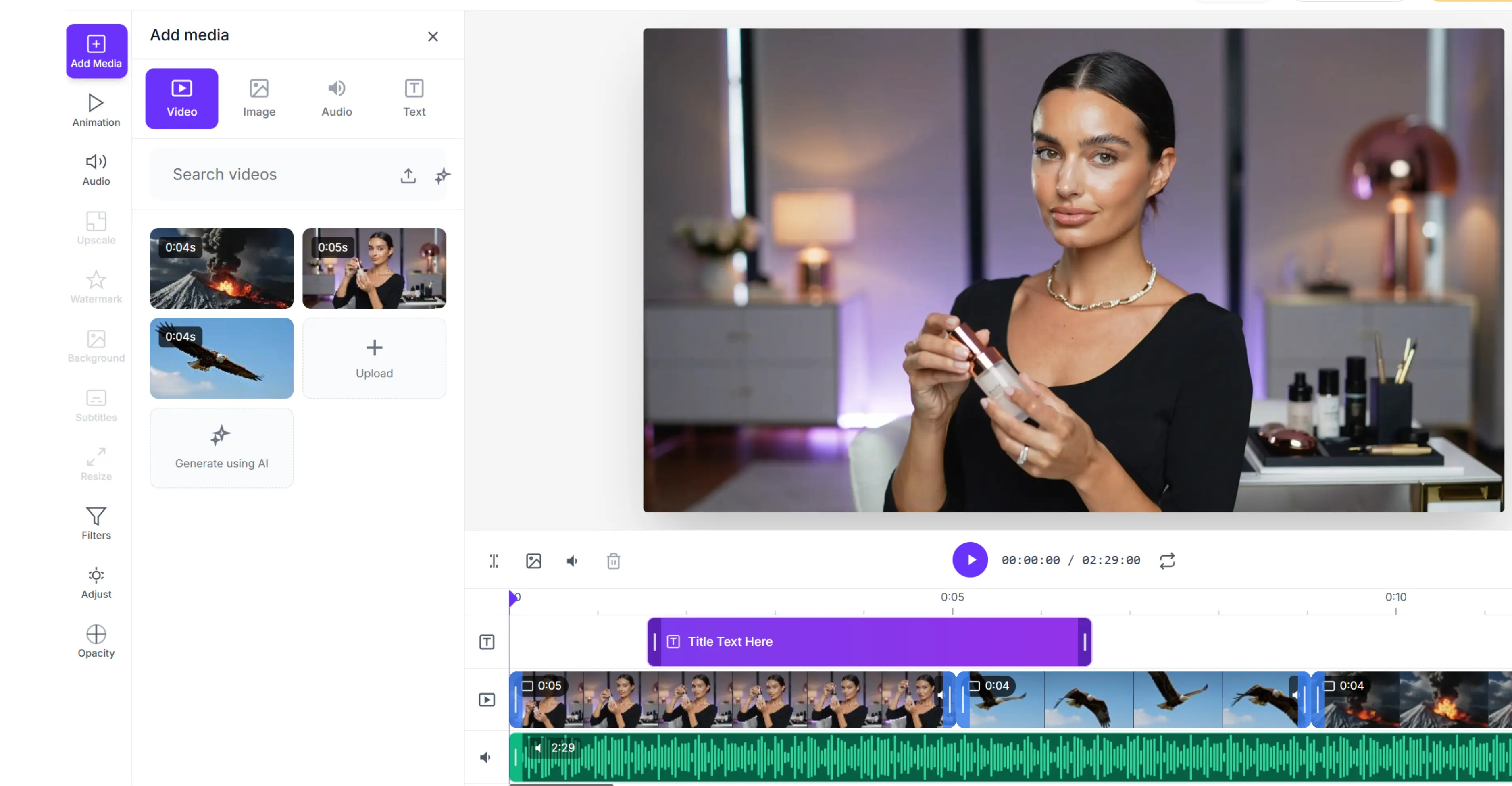
Pixelbin Video Editor is a strong choice if you want to edit a video in your browser without feeling buried inside a complicated tool. It excels at common editing jobs: upload a clip, crop it, add text, add audio, use subtitles, adjust the look, and export something ready to share. That makes it an incredibly reliable free online video editor for creators, marketers, ecommerce teams, and small businesses that need practical videos more than a full film-editing setup.
Why it stands out
Pixelbin's biggest strength is the way it fits into a larger visual content workflow. If your team already creates product images, social visuals, campaign creatives, or short video assets, this best online video editor keeps the work moving.
The best thing is that you can add a "Start image" and add an "End image" to set the exact path for your video's motion. If you don't have photos, you can just type a description into the prompt box, set your aspect ratio to a widescreen 16:9, and hit generate to get a crisp 5-second clip. It acts like a cheat code for creating fast marketing ads or product promotions without any manual trimming.
It also pairs naturally with Pixelbin's AI video generator. Pixelbin's video generator can create text to video and even clips from images, and the editor can then help shape those clips with text, crop, sound, and other finishing touches.
Best use cases
- Quick browser-based editing
- Social media clips
- Product videos
- Marketing videos
- Text overlays and simple audio edits
- Teams that want an easy tool instead of complex desktop software
What to watch (free-plan check)
The free plan has limitations on output quality, video length, and export capabilities, requiring a paid plan for serious use.
Simple verdict
Choose Pixelbin if you want a clean, free video editor to crop and trim videos while handling everyday edits like text, audio, subtitles, and rapid exports.
2. CapCut – best free video editor for reels, tiktok, and shorts
CapCut is one of the easiest recommendations for short-form content. It is built entirely around the way modern creators edit for social platforms: fast cuts, vertical formats, captions, music, effects, templates, and quick exports. If someone wants to make a social video today and does not want to learn a desktop editor, it is a natural choice.
Why it stands out & key features
In our testing, CapCut’s workspace made it incredibly simple to handle trimming, cropping, splitting, reversing, mirroring, text, stickers, effects, transitions, filters, resizing, captions, and background removal. We targeted common social use cases like TikTok videos, YouTube videos, Instagram videos, promo videos, slideshows, intros, and outros. It functions effectively as the best video editor for beginners who want modern, trend-ready visual styles right out of the gate.
Best use cases
- TikTok videos
- Instagram Reels
- YouTube Shorts
- Fast social edits
- Creators who like templates and effects
- Beginners who want results quickly
Where it may not be perfect
CapCut can feel very social-first. That is great for short clips, but it may not be the best fit if you are editing long interviews, detailed training content, or serious color-heavy projects.
Simple verdict: Choose CapCut if your main goal is short-form content. It is fast, friendly, and serves as an excellent vertical video editor where quick turnaround times matter most.
3. DaVinci Resolve – Best free video editing software for advanced users
DaVinci Resolve is the most powerful tool on this list. It is not the easiest one to pick up, but if you want serious, studio-grade tools without paying upfront, it is impossible to ignore. Our testing confirmed that the free version of DaVinci Resolve 21 offers an unbelievable amount of value, including deep timeline editing, legendary color grading, visual effects, motion graphics, audio work, collaboration, and high-quality exports up to Ultra HD for many formats.
Why it stands out (production studio build)
DaVinci Resolve is built like a full production studio. They have a lot of AI tools for video creation and editing abilities, such as cutting footage, working with sound, adjusting colour, creating effects, and finishing larger projects in one place. That is more than most free editors offer. It sets the absolute standard for the best free video editing software on the desktop market today, assuming your machine can handle the heavy hardware system load.
Best use cases
- YouTube creators who want to grow
- Short films
- Music videos
- Long-form edits
- Color-heavy work
- People who are willing to learn
Where it may not be perfect (learning curve)
DaVinci Resolve can feel heavy for beginners. If you only want to crop a clip, add text, and post to Instagram, it may be significantly more tools than you actually need.
Simple verdict: Choose DaVinci Resolve if you want the absolute best free video editor for PC, Mac, and Linux, and you are ready to spend some real time mastering its interface.
4. Adobe Express – Best free video editor for templates and branded videos
Adobe Express is a fantastic choice for people who want to make polished videos quickly without opening professional software. It works best when your video needs a heavy dose of design elements: text, icons, images, templates, music, brand visuals, and social formats. Our tests showed that you can easily jump in without a credit card, upload files up to 1GB, and immediately crop, trim, split, add soundtracks, add text, resize, and export as clean MP4s.
Why it stands out (design asset library)
Adobe Express is not trying to compete with heavy desktop timelines. Instead, it aims to help a normal person make a highly polished, professional-looking video without stress. That is incredibly useful for social posts, business updates, quick promos, school videos, and content teams that need speed. It ranks highly as a premium free online video editor option due to its tight integration with broader Creative Cloud asset libraries.
Best use cases
- Template-based videos
- Branded social content
- Quick promos
- Small business videos
- Beginners
- People already using Adobe tools
Where it may not be perfect
It is not the best pick for deep timeline work or advanced editing. If your video has many layers, heavy sound work, or detailed color needs, you will want to move to a dedicated desktop program.
Simple Verdict: Choose Adobe Express if you want a clean, template-friendly editor for social videos, marketing clips, and quick branded content.
5. Microsoft Clipchamp – Best free video editor for windows users
Clipchamp is a remarkably strong everyday editor, especially for Windows users, where it comes tightly integrated. Because it also runs directly in the browser, it is useful even if you do not want to install a single file. Our hands-on testing confirmed that free users can export in crisp 1080p HD without a watermark on the standard plan, as long as you stick to your own assets or the free library features.
Why it stands out (approachable browser/native flow)
Clipchamp feels incredibly approachable from the second you open it. You can record your screen, edit, use templates, trim, crop, add text, add audio, auto-generate subtitles, and export without getting lost in complex menus. It is a fantastic middle option between ultra-simple online utilities and advanced desktop software. It represents a baseline choice for users seeking the best free video editor for Windows that balances capability with simplicity.
Best use cases
- Windows users
- Browser editing
- Simple YouTube videos
- Business clips
- School projects
- Social videos
Where it may not be perfect
Some premium stock assets and advanced AI transitions require a paid plan tier. If you accidentally add paid stock to your timeline, your export options will prompt you to upgrade.
Simple Verdict: Choose Clipchamp if you want a friendly, built-in free editor for Windows or browser-based workflows with clear, unbranded export options.
6. Canva – Best free video editor for design-led videos
Canva is best when your video needs to look designed and branded, not just edited. We found it highly useful for slideshows, announcements, social posts, promos, event videos, product teasers, thumbnails, and short branded clips. Canva is not the deepest video editor here, but it is one of the easiest tools for combining video clips with heavy text layouts, graphics, images, and brand kits.
Why it stands out (graphic/video integration)
Because so many people already use Canva for graphics, the learning curve here is virtually zero. If your team already uses Canva for posts, flyers, presentations, or ads, dropping video assets into those same layouts feels completely natural. It holds a distinct position as a reliable best online video editor when structural asset layouts and graphic elements take priority over complex clip manipulation.
Best use cases
- Social media videos
- Marketing creatives
- Slide-style videos
- Announcements
- Simple brand videos
- Non-editors who already use Canva
Where it may not be perfect
Canva is completely unsuited for detailed, multi-track timeline work. It is designed for simple layout edits rather than complex, long-form video projects.
Simple verdict: Choose Canva if your video needs strong graphic design and you want to build it quickly from pre-existing templates, text, and visual brand elements.
7. VEED – Best for captions and fast online editing
VEED is a browser-based powerhouse with an incredibly sharp focus on captions, text editing, trimming, cropping, audio cleanup, and social-friendly edits.
During our review, it proved to be a lifesaver for creators and marketing teams who work with talking-head videos, podcasts, interviews, tutorials, or clips that absolutely require fast subtitles. Free users get access to all the core tools: trim, crop, resize, add text, and add music, though it is important to note that free exports do include a watermark.
Why it stands out (speech & subtitle tech)
VEED’s auto-captioning engine is where it genuinely blows most competitors out of the water. Captions, transcripts, subtitles, translations, and background audio cleanup are seamless and fast. Because it functions entirely in the cloud, you don't need a high-end computer to render out clean, subtitle-heavy timelines.
Best use cases
- Caption-heavy videos
- Talking-head content
- Podcasts repurposed into short clips
- Social media clips
- Marketing videos
- Teams that need browser collaboration
Where It may not be perfect
If you require completely free exports without a watermark for final publishing, VEED’s free tier might feel too restrictive for your daily workflow.
Simple Verdict: Choose VEED if top-tier auto-captions and rapid online editing matter more to you than avoiding a watermark on the free tier.
8. ScreenPal – Best free video editor for tutorials and screen recordings
ScreenPal is a practical, highly focused choice if you create tutorials, training videos, product demos, screen recordings, or educational content. It isn't trying to be a cinematic tool; instead, it bridges the gap between recording, editing, captioning, and quick hosting. Our tests across Windows, Mac, iOS, Android, and Chromebook proved that its free editing workspace is clean, intuitive, and leaves your final video completely watermark-free.
Why it stands out (record-to-edit workflow)
ScreenPal streamlines the workflow for anyone who teaches or explains things. If your process looks like: record your screen, add a picture-in-picture webcam, trim out vocal mistakes, drop in text callouts, add a voiceover, and share—ScreenPal keeps that entire pipeline in one simple loop.
Best use cases
- Screen recordings
- Product demos
- Online classes
- Training videos
- Tutorials
- Teachers and customer support teams
Where it may not be perfect
It is distinctly less stylish than tools built for TikTok-style trends. If your primary goal is flashy transitions and short-form social hype, CapCut will feel much faster.
Simple verdict: Choose ScreenPal if your videos are built around explaining, showing a screen, or recording step-by-step instructions across editing apps for Chromebook or desktop environments.
9. iMovie – Best free video editor for apple users
iMovie remains one of the cleanest, most reliable free choices out there for Mac, iPhone, and iPad users. While it isn't built for heavy, multi-layered professional productions, we found it excellent for simple personal videos, school projects, travel vlogs, family videos, and beginner YouTube edits.
Why it stands out (ecosystem integration)
iMovie’s core superpower is how beautifully it integrates across the Apple ecosystem. We were able to cut a rough timeline on an iPhone while traveling and seamlessly open the project on a Mac to finish the edit. Optimized perfectly for Apple silicon chips, it delivers lightning-fast render speeds and stands as the definitive, legacy baseline for the best free video editor for Mac.
Best use cases
- Mac, iPhone, and iPad users
- Family videos and travel vlogs
- School projects
- Beginner YouTube videos
- Simple edits without downloading extra software
Where it may not be perfect
iMovie is intentionally structured to be simple. If you need advanced color tracks, complex visual effect nodes, or heavy multi-cam editing, you will outgrow its features quickly.
Simple verdict: Choose iMovie if you live in the Apple ecosystem and want a built-in, beautifully optimized tool that is easy to understand from day one.
10. OpenShot – Best free open-source video editor for beginners
OpenShot is a completely free, open-source, cross-platform editor for Windows, Mac, and Linux. It is designed specifically to give beginners an easy on-ramp to traditional timeline editing without throwing a wall of professional terminology in their face.
Why it stands out (no-subscription desktop software)
OpenShot stands out because it offers a true desktop timeline workflow without any of the commercial catches: no hidden paywalls, no watermarks, and no subscription pop-ups. It gives you unlimited tracks, clean video transitions, and a built-in title editor, making it an incredibly accessible best open source video editor entry point for users moving away from cloud-dependent apps.
Best use cases
- Beginners who want true desktop software
- Open-source and Linux enthusiasts
- Simple YouTube videos
- Basic trimming and multi-track timeline edits
Where it may not be perfect
Open-source tools can occasionally feel a bit less polished or sleek compared to major commercial software, and their timeline scrubbing performance depends heavily on your local computer specs.
Simple Verdict: Choose OpenShot if you want a straightforward, open-source desktop editor that is much easier to learn than advanced professional suites.
11. Shotcut – Best free open-source editor for format support
Shotcut is another powerhouse open-source editor for Windows, Mac, and Linux. While its user interface might look a bit basic or dated when you first launch it, underneath lies an incredibly robust engine that handles a massive array of video and audio formats.
Why it stands out (wide file and 4k engine)
Shotcut shines when you are working with odd file types, mixed frame rates, or heavy 4K projects. It doesn't require you to import files into a proprietary library; you just drag your media straight to the timeline. It gives you incredible control over audio mixing, filters, and custom export profiles without charging a single penny.
Best use cases
- Editors who want deep custom control without paying
- Mixed-format or multi-codec projects
- Crisp 4K timeline projects
- Cross-platform desktop users
Where it may not be perfect
The interface has a steeper learning curve than browser tools. If you want a smooth, automated workflow with pre-built social media templates, you will likely prefer a browser alternative.
Simple Verdict: Choose Shotcut if you want a resilient, open-source desktop app that handles any file format you throw at it and gives you full control over your render settings.
12. Kdenlive – Best free video editor for linux users
Kdenlive is a highly advanced, open-source non-linear video editor that runs beautifully on Linux, Windows, and macOS. It is highly favored by desktop purists who want deep custom layout options and a highly capable multi-track timeline.
Why it stands out (active 2026 timeline development)
Kdenlive features a highly active development cycle, with stable, modern updates running straight through 2026. It includes advanced features like auto-saving, proxy editing (for smooth playback on slower machines), dual video monitors, and an extensive effects toolkit. It is widely recognized by the community as the premier best Linux video editor on the market today.
Best use cases
- Dedicated Linux power users
- Fans of open-source software
- Multi-clip, highly structured projects
- Advanced timeline editing with custom shortcuts
Where it may not be perfect
It can feel incredibly daunting for absolute beginners. If you just need to put text over a 15-second clip, the sheer amount of options and windows here will slow you down.
Simple Verdict: Choose Kdenlive if you love open-source desktop tools and want a traditional, feature-rich editing workspace that won't limit your creativity.
13. VSDC free video editor – Best free windows editor for offline editing
VSDC Free Video Editor is a feature-packed Windows-only tool built for offline editing. Unlike standard linear editors, it allows you to place clips and objects anywhere on the timeline in any order, opening up incredible flexibility for layers and visual masking.
Why it stands out (subscription-free offline pro tools)
VSDC is a goldmine for Windows users who don't always have a stable internet connection for cloud apps. Even on its completely free tier, it supports 4K, HDR, advanced chroma key (green screen tools), color correction wheels, and built-in screen recording, offering a massive suite of tools without a subscription.
Best use cases
- Windows desktop users
- Strict offline editing setups
- YouTube videos and long-form vlogs
- Complex visual layering and slideshows
Where it may not be perfect
The non-linear editing interface can feel incredibly busy and confusing for beginners who are used to simple drag-and-drop tracks.
Simple verdict: Choose VSDC if you are a Windows user looking for a deep, offline editing suite packed with advanced visual tools.
Deep-Dive buyer's guides (By category & use case)
Which free video editor should you choose?
If you are still unsure, start with the type of video you make most often. Match your target format directly to the tool strengths listed in our breakdown above.
Best free video editor without watermark
If avoiding a watermark is your top priority, you need to check the export rules before you spend hours editing.
Based on our practical timelines, desktop applications like DaVinci Resolve, iMovie, OpenShot, Shotcut, and Kdenlive stand out as the best free video editor no watermark solutions because they function as local desktop apps rather than freemium web tools.
For cloud-based options, Clipchamp supports clean 1080p exports on standard timelines without branding overhead, and ScreenPal keeps your final video completely unbranded.
Be highly cautious with certain online platforms; VEED explicitly places a watermark on free tier exports, and Canva will require payment at export if you accidentally use premium assets instead of free ones.
Best video editor for YouTube
When launching or running a channel, your ideal tool depends heavily on your production workflow. For creators who want a dedicated best free video editor for YouTube, we break down the ideal paths based on your content type:
- For Rapid YouTube Shorts: CapCut or Pixelbin.
- For Serious, Long-Form YouTube Production: DaVinci Resolve (unmatched track control and color grading).
- For Fast, Beginner-Friendly YouTube Vlogs: Microsoft Clipchamp or iMovie.
- For Software Tutorials & Walkthroughs: ScreenPal (seamless screen + webcam capture pipeline).
- For Highly Styled Intro/Outro Design: Canva or Adobe Express.
- For True Open-Source Timeline Control: Shotcut or Kdenlive.
Best free video editor for reels and tiktok
To dominate short-form vertical feeds, your software needs to make mobile aspect ratios second nature. You want a tool that effortlessly handles 9:16 cropping, rapid text placement, auto-captions, and instant music sync. Choosing a dedicated best free video editor for social media minimizes post-processing compression errors.
Our top recommendations for short-form video:
- CapCut: The undisputed champ for trend-based, fast-paced short-form edits.
- Pixelbin: Outstanding as a best short-form video editor for quick browser-based ad creatives and text or image to video generation.
- Canva / Adobe Express: Excellent when your social clips require heavy brand templates, custom text layouts, and design graphics.
- VEED: Ideal if your social strategy is built around talking-head videos that need fast, accurate auto-subtitles.
Best gopro video editor
Action camera footage demands software that can handle high frame rates, image stabilization, rapid speed ramping, and dense file formats like HEVC without crashing.
- DaVinci Resolve is our top free choice if you want serious cinematic control over your action footage.
- For Windows users editing offline, VSDC offers dedicated action-camera optimization parameters, including built-in GPS telemetry tools.
- If you prefer lightweight, subscription-free open-source software that handles raw 4K camera files seamlessly, Shotcut and Kdenlive are excellent choices.
- Use CapCut if you just want to trim a quick action clip on your phone to post straight to social media.
Best AI video editor for ads and campaigns
When creating high-converting ad spots, speed, clarity, and format flexibility are everything. You need to show your product early, keep text highly readable for muted feeds, and adapt your aspect ratio for different ad placements.
Pixelbin is an exceptional asset for ad campaigns because its AI tools allow you to take flat product photos and instantly turn them into dynamic, 5-second video ads tailored for 9:16, 1:1, or 16:9 formats. Canva and Adobe Express are incredibly useful for wrapping those video assets in branded ad templates, while CapCut ensures your promotional clips look and feel completely native to social media platforms.
Best video editor app for iphone and android (Overview)
When moving your production entirely to a smartphone or tablet, finding the best video editor app means balancing touch-screen speed with deep feature availability. CapCut stands as our top cross-platform mobile recommendation; its touch interface makes slicing clips, adding keyframe animations, and dropping in trending audio tracks incredibly fluid on both iOS and Android.
Best iPhone & iPad video editor
For absolute beginners on Apple devices, iMovie is a fantastic, lightweight, and completely free ad-free starting point. However, if your target is highly engaging social media editing, CapCut is the preferred choice for vertical mobile content.
If your project requires heavy design work, graphic borders, or promotional text layouts, Canva and Adobe Express turn your iPhone or iPad into an agile marketing studio.
Best Android video editor
If your mobile videos are built around tutorials, mobile gaming captures, or step-by-step app walk-throughs, ScreenPal offers an incredibly clean, direct record-to-edit mobile pipeline.
For Android power users, CapCut provides the most familiar, highly optimized timeline experience for generating quick social content on the go.
What makes a free video editor actually good in 2026?
Free is never enough if the software makes the editing process painful. Through our hands-on testing, we found that a truly useful platform must nail these core benchmarks:
- An Intuitive Timeline: You must be able to view your video clips, audio tracks, text layers, and cuts clearly. If the workspace feels cluttered or laggy from the start, it will kill your creative momentum.
- Seamless Cropping and Resizing: In 2026, content is multi-platform. A video may start as a 16:9 YouTube project, but needs to be instantly resized to a 9:16 vertical clip. Look for a free video editor to crop and trim videos that preserve focal clarity when changing aspect ratios.
- Smart Text and Captions: With a massive percentage of mobile users watching video completely on mute, text overlays are non-negotiable. Finding a free video editor with text and music tools out of the box saves you multiple production steps.
- Clean Audio Controls: At an absolute minimum, you should be able to drop in a music track, adjust independent volume sliders, and ensure background audio never overpowers clean speech.
- Transparent Export Rules: This is where poor software tricks users. Always verify the export resolution caps, watermark rules, and hidden length limits before spending three hours on an edit.
- Speed vs. Power: The most advanced tool isn't always the best tool for the job. For a fast social clip, the best free browser video editor will beat a heavy desktop production suite simply because you'll finish and publish the job sooner.
- Room to Grow: If you plan on making video creation a long-term project, pick a tool that won't feel incredibly limiting after a couple of weeks. Pixelbin, CapCut, Clipchamp, and Adobe Express are optimized for daily speed, while DaVinci Resolve gives you a professional canvas to grow into over time.
FAQs
The best free video editor 2026 offers depend completely on your specific goal. Pixelbin serves as a lightning-fast browser utility for rapid visual assets. CapCut dominates the field for vertical social media clips. DaVinci Resolve is the unrivaled choice for professional, multi-track desktop timeline mastery. Windows users can jump right into Clipchamp natively, while iMovie delivers classic out-of-the-box value for Apple hardware.
If you want a completely clean, unbranded export, your safest bets are offline desktop installations like DaVinci Resolve, iMovie, OpenShot, Shotcut, and Kdenlive. For cloud-based workflows, Microsoft Clipchamp supports full 1080p exports without a watermark on standard timelines, and ScreenPal keeps your final video completely free of platform branding.
Pixelbin, CapCut, Clipchamp, Adobe Express, and Canva completely eliminate steep technical learning curves. They strip away complicated production terminology and boil editing functions down to intuitive, single-click choices for trimming, adding text, and exporting.
Yes, absolutely. Blackmagic Design keeps an incredibly robust, professional-grade version of the software accessible without licensing fees. The free tier provides advanced color grading wheels, multi-track audio engineering, and full timeline controls that satisfy 95% of non-Hollywood production needs without forcing an upgrade to the paid Studio edition.
CapCut offers a massive, highly capable suite of free tools specifically optimized for modern social media platforms. However, certain advanced transitions, specialized AI filters, and premium template categories are locked behind their "Pro" subscription model, depending on your device version.
Pixelbin and Clipchamp provide excellent timeline-based online environments, while Adobe Express and Canva focus heavily on template design assets.
.webp)