

Summary
AI image generation is transforming marketing by helping brands create campaign visuals faster, test more ad creatives, personalize content for different audiences, and maintain brand consistency. From social media ads and product photos to landing pages and email campaigns, marketers can use AI-generated images to reduce production time and improve creative performance. This blog explains the benefits, real use cases, risks, and best practices for using AI image generation in marketing.
Introduction
AI image generation is changing marketing by helping teams create campaign visuals faster, test more ideas, personalize creative for different audience groups, and keep brand style consistent across channels. The real shift is not that machines are replacing creative teams. The shift is that marketers can now explore more visual directions before they spend serious time, money, and media budget on one idea.
In everyday campaign work, the bottleneck is rarely the first idea. It is the eighth version of the same idea: one for Instagram Stories, one for a product landing page, one for a festive email, one for a regional audience, one for a paid ad test, and one that still needs to feel like the brand. That is where AI-generated images are starting to matter.
Used well, AI image tools make the creative process faster and more flexible. Used carelessly, they can make a brand look generic, fake, or untrustworthy. The difference comes down to human taste, strong brand direction, clear review, and honest use.
Quick answer: How AI image generation is transforming marketing
How AI image generation is transforming marketing is by converting slow, high-cost asset production into an agile, data-driven test-and-learn ecosystem. Modern marketing departments leverage these systems to rapidly prototype campaign concepts, automatically adapt dimensions for multi-channel distribution, deploy hyper-targeted personalized marketing visuals, and continuously combat creative fatigue on paid networks.
By utilizing an AI image generator for marketing, businesses systematically reduce their reliance on generic, overused stock photography. To achieve sustained search and engine visibility alongside high user conversion rates, these automated assets must be rigorously paired with human stylistic direction, strict geographical compliance protocols, and transparent usage disclosures.
Why AI image generation matters now: The 2026 landscape
Visual media has long been one of the most resource-intensive and logistically challenging components of any comprehensive cross-channel strategy. A standard enterprise campaign requires an extensive portfolio of creative assets: high-resolution product photography, lifestyle backdrops, video thumbnails, social media banners, dynamic display ad creatives, editorial blog illustrations, and dedicated e-commerce landing page hero images. Every individual digital touchpoint demands precise pixel dimensions, specific file formatting, distinct audience expectations, and unique conversion performance goals.
The sheer volume of content required to stay competitive continues to scale exponentially. Global industry data from HubSpot’s 2026 Marketing Strategy Report reveals that roughly 75% of forward-thinking marketing organizations now actively deploy generative media platforms within their standard content creation pipelines.
The commercial justification for this shift is supported by deep macroeconomic research. The McKinsey 2025 State of AI global survey highlights that measurable financial returns and direct revenue gains from generative intelligence implementations are most heavily concentrated within global marketing, digital sales, and localized commercial strategy.
In plain economic terms, visual automation has moved past the phase of speculative novelty and is delivering clear, measurable bottom-line impact. It reduces the overhead costs of traditional commercial photography while drastically improving speed-to-market metrics for fast-moving consumer brands.
What marketers can actually do with AI image generation
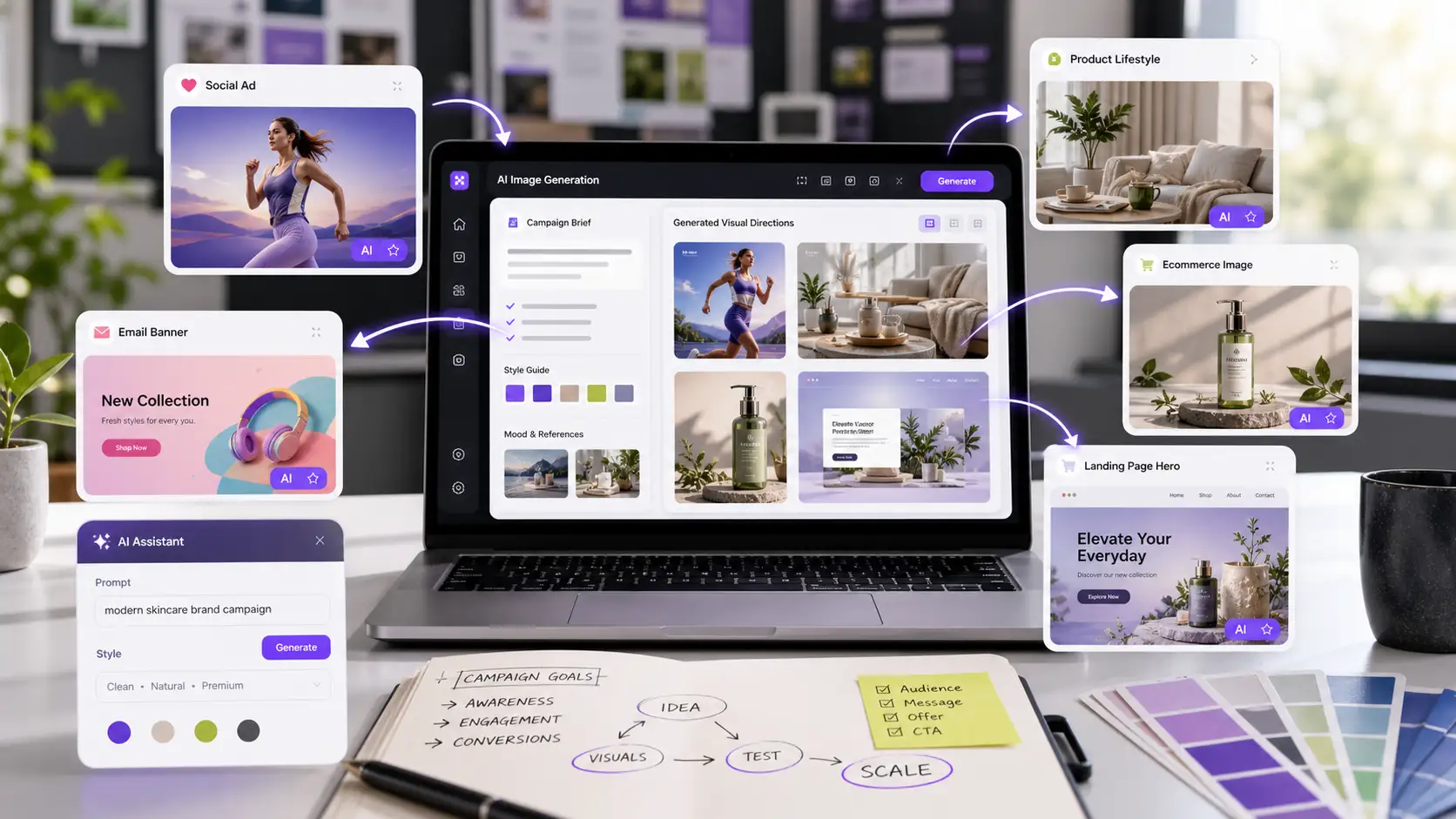
Marketers can use AI-generated images for social media ad variations, product lifestyle mockups, email banners, blog graphics, landing page hero concepts, display ads, thumbnail ideas, seasonal campaign visuals, creative mood boards, ecommerce category images, and pitch deck visuals.
For a paid social campaign, a team can create ten visual angles around the same offer and test which one earns the lowest cost per lead. For an ecommerce brand, the team can show one product in different contexts such as travel, gifting, home use, or festive shopping. For a B2B company, the same product story can be adapted for healthcare, finance, retail, and education buyers without designing every visual from zero.
The best starting point is low-risk content: blog images, internal concepts, ad tests, social posts, and campaign mockups. Once the team has a review process, AI images can support bigger campaign work, but product accuracy and disclosure need more attention.
1. Campaign concepts move faster
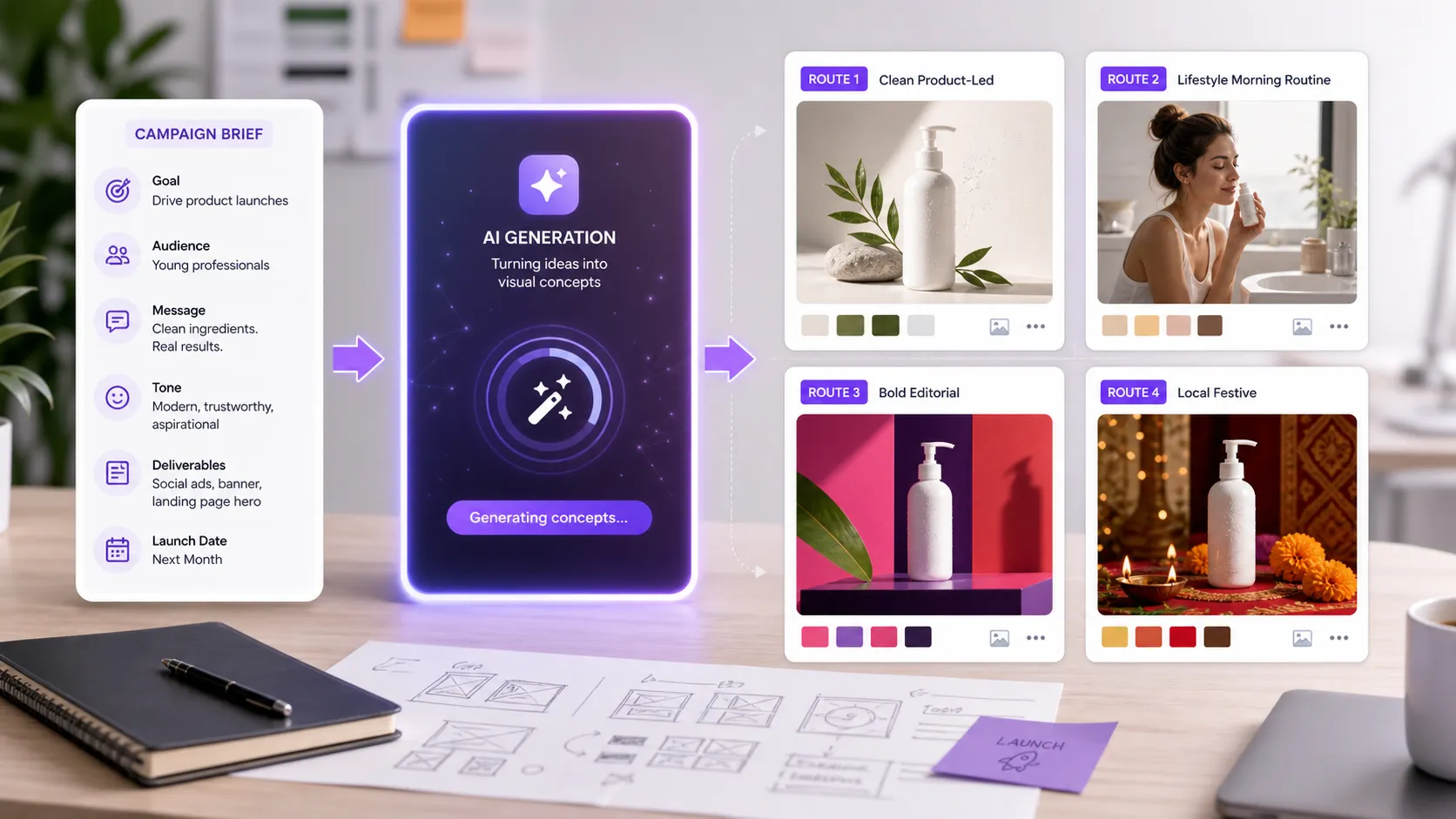
Before AI image generation, a marketer might wait days for a designer to turn a rough campaign idea into something visual enough to discuss. A product launch, seasonal offer, or social campaign could get stuck at the mood-board stage because no one could see the idea clearly.
Now a team can turn a written brief into several visual routes in a single working session. They can compare a clean product-led direction, a lifestyle direction, a bold editorial direction, and a more local or festive direction before choosing what deserves design time.
This does not remove the need for designers. It makes their input more focused. Instead of spending hours making early drafts that may never be used, designers can guide style, improve composition, correct details, and polish the chosen direction.
2. Creative testing becomes easier
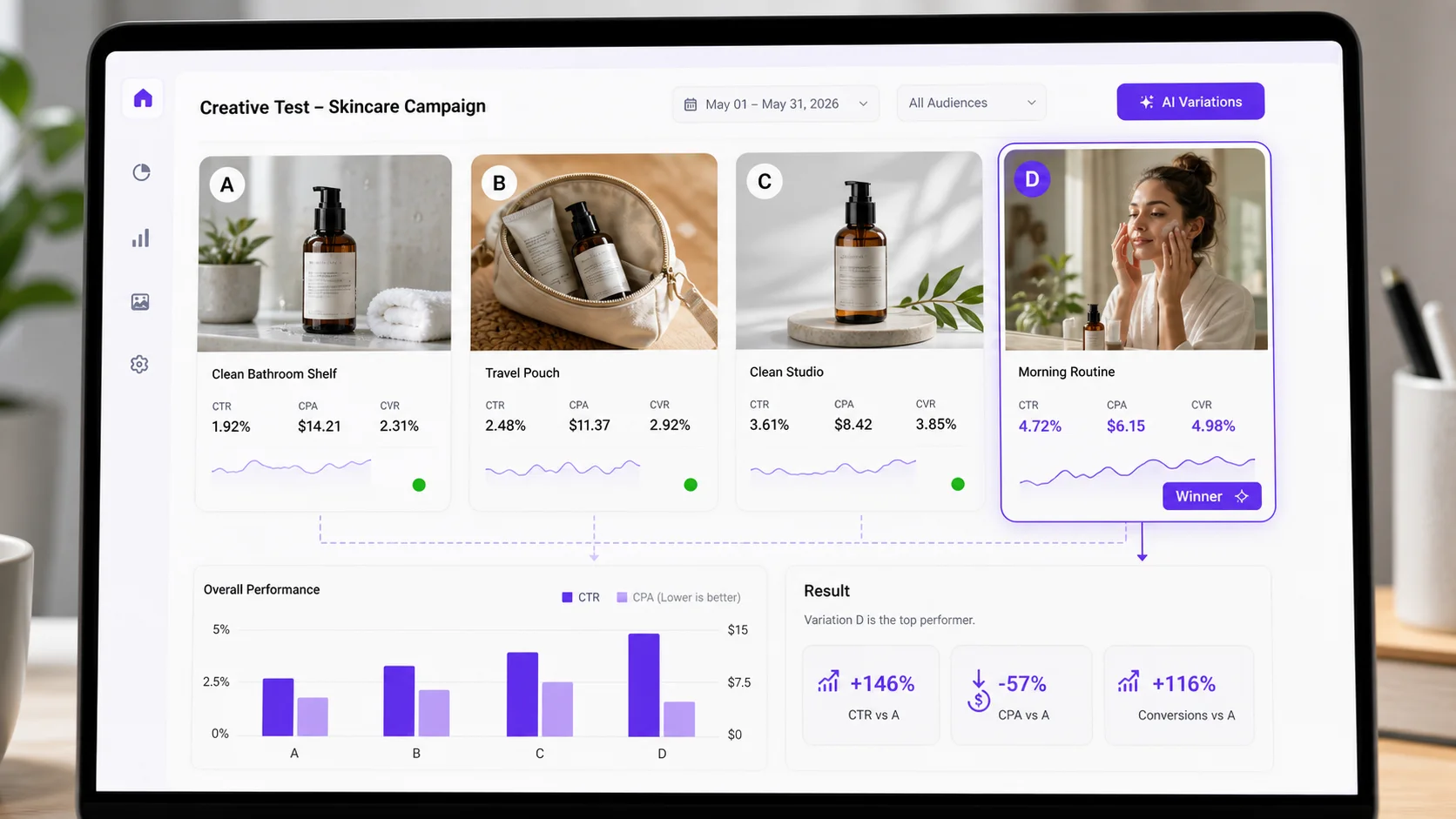
Good marketers do not want one beautiful asset. They want to know which idea gets attention, which message earns clicks, and which visual helps people take action. AI image generation makes it easier to create controlled variations for testing.
A brand can test different backgrounds, product angles, seasonal themes, emotional tones, or audience contexts without starting from scratch every time. For example, a skincare brand could test a bathroom shelf visual, a travel pouch visual, a clean studio product visual, and a morning routine visual for the same product. The message stays consistent, but the visual story changes.
This helps performance teams move beyond guesswork. Instead of arguing over which image "feels right", they can test which version improves click-through rate, conversion rate, cost per acquisition, add-to-cart rate, or return on ad spend.
3. Personalization gets more practical
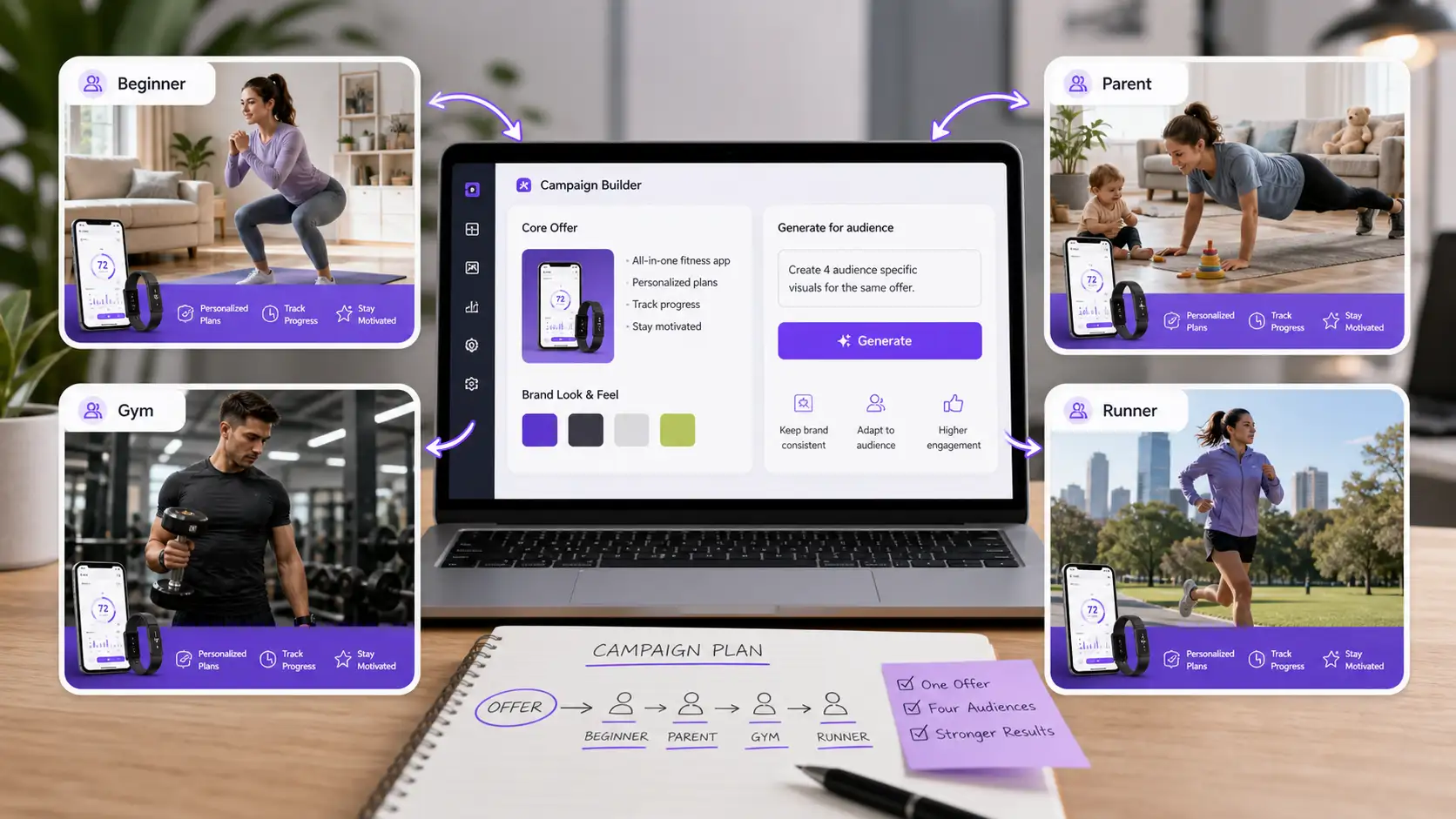
Personalized marketing used to be easier in copy than in visuals. Changing a headline or email subject line is simple. Creating different images for different buyer groups is harder. AI image generation is closing that gap.
A fitness brand can create separate visuals for beginners, busy parents, gym regulars, and runners. A travel company can show the same destination in family, luxury, adventure, and budget-friendly contexts. A B2B software company can create industry-specific hero images for healthcare, finance, education, or retail without running a new photoshoot for every page.
The goal is not to trick people into thinking every image was made only for them. The goal is relevance. People respond better when the creative reflects their situation, their style, and the problem they are trying to solve.
4. Brands can produce more without looking messy
One of the biggest risks in fast content production is that the brand starts looking different everywhere. The website has one style, the ads have another, the social posts have another, and the sales deck looks like it came from a different company.
AI image generation can help when the team uses approved references, brand colors, photography rules, product angles, and clear visual guardrails. AWS has shown a technical approach where historical campaign assets can be used as references for new marketing image generation, helping teams maintain brand guidelines and learn from past campaign patterns.
For a marketing team, the practical lesson is simple: do not ask an AI image tool to invent your brand from nothing. Feed it your brand system. Use approved examples. Keep a reference library. Review outputs against the same standards you would use for a human-made campaign.
5. Smaller teams can compete with bigger creative calendars
Small businesses and lean marketing teams often have good ideas but limited production time. A founder may need product photos, ad creatives, blog images, marketplace banners, and social content in the same week. Hiring a full studio for every campaign is not realistic.
AI-generated images give smaller teams a way to create early visuals, test campaign angles, and keep publishing without waiting for a large production setup. That does not mean every final asset should be AI-generated. It means the team has more options before deciding where to invest in photography, illustration, design, or video.
This is especially useful for mockups, concept visuals, background images, social variations, educational graphics, and internal campaign planning.
Where AI-generated images work best in marketing
To maximize your return on investment, position generative visual tools where their speed and flexibility offer a distinct competitive advantage. The technology excels at producing:
- Dynamic ad creative variations for paid social networks (Meta, TikTok, LinkedIn).
- Contextual blog illustrations, article feature images, and newsletter banners.
- Background variations for high-fidelity AI-generated product images.
- Prototyping mockups for consumer packaged goods (CPG) packaging.
- Localized campaign variations tailored to specific geographic markets.
Conversely, generative tools are less reliable when an asset requires absolute mathematical accuracy, strict medical compliance, or the depiction of un-altered real-world events.
A reliable operational rule of thumb: if a visual asset's primary job is to inspire a feeling, illustrate a concept, or test a creative direction, it is a perfect candidate for AI assistance. If the asset’s job is to prove an empirical fact, show an unedited product specification, or document a real historical event, you should rely on traditional photography and manual design.
Where marketers should be careful
The Cost of Deceptive Imagery: Replacing physical photoshoots with synthetic media solely to cut production costs is a high-risk strategy. A single misleading visual that alienates your audience or triggers a regulatory investigation will cost vastly more in legal penalties and permanently damaged consumer trust.
Absolute High-Risk Categories: Generative visual engines should never be deployed casually to fabricate core evidentiary marketing assets. Avoid using synthetic media for:
- Synthetic customer profile pictures or fake testimonial avatars.
- Simulated "unboxing" sequences or artificial user-generated content (UGC).
- Fabricated "before-and-after" product transformation proofs.
- Manipulated event photos or inflated attendance graphics.
- Substantiating sensitive medical outcomes or financial performance claims.
- Deceptive, un-buildable real estate mockups and property visuals.
- Product imagery that invents features, materials, or structural details the physical item does not possess.
The Consumer Perception Benchmark: The moment a visual asset has the potential to persuade a buyer that a real individual endorsed the brand, a factual result occurred, or a concrete product feature exists, you must step away from an unguided creative loop.
The Review and Remediation Protocol: High-risk visual assets require an aggressive, multi-layered internal review. If an image blurs the line between fiction and reality, you must enforce one of two corrective actions:
- Explicit Labeling: Add a clear, unavoidable digital disclosure marking the asset as synthetic or digitally altered.
- Traditional Replacement: Completely swap out the generative asset for verifiable, real-world commercial photography.
The trust problem marketers cannot ignore
AI-generated visuals can save time, but trust is the part marketers cannot afford to damage. The IAB's 2026 research found a clear gap between how advertisers think consumers feel about AI-generated ads and how consumers actually feel. In that study, 83% of ad executives said their company had deployed AI in the creative process, but consumer sentiment was more cautious, especially among Gen Z.
The same IAB research found that disclosure can help. Among Gen Z and Millennial consumers, 73% said knowing an ad was created with AI would either increase or make no difference to their likelihood to purchase. That does not mean every AI-assisted image needs a loud warning label. It does mean brands should be honest when AI materially changes what people are seeing.
Marketers should be especially careful with AI influencers, synthetic testimonials, fake before-and-after images, and images that imply a real person used a product when they did not. If a visual could reasonably mislead someone, disclose it or do not use it.
In the United States, the FTC's endorsement guidance says endorsements must be honest and not misleading, and material connections should be disclosed clearly when they would affect how people judge the recommendation. For AI-generated marketing, that makes fake customer-style content and synthetic testimonials especially risky.
Trust also matters for SEO. Google's guidance is clear that content should be helpful, original, reliable, and made for people first. Google has also said SEO remains relevant for generative AI search experiences, and that unique, useful, non-commodity content is more likely to stand out than content that simply repeats what is already online.
A practical workflow for using AI images in marketing
1. Start with the campaign brief. Define the audience, offer, channel, emotion, product details, and action you want the viewer to take.
2. Build a reference folder. Include approved campaign visuals, brand colors, past high-performing ads, product photography, typography rules, and examples of what not to use.
3. Generate rough directions, not final answers. Ask for several creative routes so the team can compare options.
4. Review like an editor. Check the image for brand fit, product accuracy, cultural sensitivity, visual quality, and anything that could mislead the audience.
5. Let designers refine the winning direction. Fix details, add real product elements, adjust typography, and prepare the asset for each channel.
6. Test against a control. Compare AI-assisted visuals with existing human-made assets instead of assuming the new version will perform better.
7. Document what works. Save winning prompts, creative notes, audience context, and performance results so the next campaign starts smarter.
A simple 30-day starting plan for marketing teams
Week 1: Tool Selection and Parameter Definition
Select a core platform that matches your team's workflow needs (e.g., Adobe Firefly for commercially safe enterprise use, Midjourney for premium aesthetic concepting, or Stable Diffusion for custom brand models). Assemble a small, highly secure internal reference library containing your official brand styles, core color palettes, and past high-performing visual assets.
Week 2: Low-Risk Production Prototyping
Apply your chosen tool to a low-risk internal channel, such as feature images for your corporate blog or early-stage mood boards for upcoming campaigns. Generate 20 to 30 unique visual concepts based on existing marketing briefs, and have your core design team audit the output for brand consistency.
Week 3: Controlled Performance Testing
Launch a small, highly controlled split-test on a live paid social channel. Hold your target audience, core ad copy, and landing page URLs completely constant while testing your new AI-assisted visuals against your historical control assets.
Week 4: Performance Review and Workflow Integration
Analyze your conversion metrics to measure changes in cost-per-click (CPC) and ad fatigue cycles. Document your successful prompt strategies, refine your negative constraints lists, establish clear disclosure rules, and decide how to expand your workflow into more complex channels like landing page graphics or personalized email assets.
How to measure the Impact
AI image generation should be judged by marketing outcomes, not by how impressive the image looks in isolation. Track production speed, cost per creative, number of tested variations, approval time, click-through rate, conversion rate, cost per lead, cost per acquisition, return on ad spend, engagement rate, and brand feedback.
For organic content, measure scroll depth, time on page, saves, shares, newsletter clicks, and assisted conversions. For paid ads, measure creative fatigue and refresh speed. If AI helps a team replace stale ads faster, that alone can improve campaign health.
The best teams will not ask, "Did AI make this?" They will ask, "Did this creative help the right person understand the offer faster?"
FAQs
AI-generated images can be used in social media ads, display ads, blog graphics, landing pages, newsletters, thumbnails, pitch decks, product mockups, and campaign planning. Regulated or proof-based content needs stricter review.
Disclosure is wise when the image could make people believe something real happened, a real person endorsed a product, or a product result is proven. Rules vary by country and platform, but transparent use protects trust.
The best use cases are ad variations, blog graphics, social media visuals, email banners, landing page concepts, product lifestyle mockups, thumbnails, mood boards, and campaign storyboards. These are useful because they need speed, variety, and testing.
Start with one low-risk channel, create brand rules, generate a small batch of image variations, review them manually, test against existing creative, and save what works in a shared prompt and asset library.
Yes, but only if it adds more value than competing pages. A strong article should include current research, practical use cases, original examples, clear FAQs, internal links, author expertise, and trustworthy sources. Publishing generic AI content is not enough.
Common tools include Adobe Firefly, Canva, Midjourney, DALL-E, Leonardo.Ai, and Stable Diffusion-based tools. The right choice depends on whether the team needs brand safety, artistic quality, editing control, text in images, workflow integration, or custom brand consistency.









