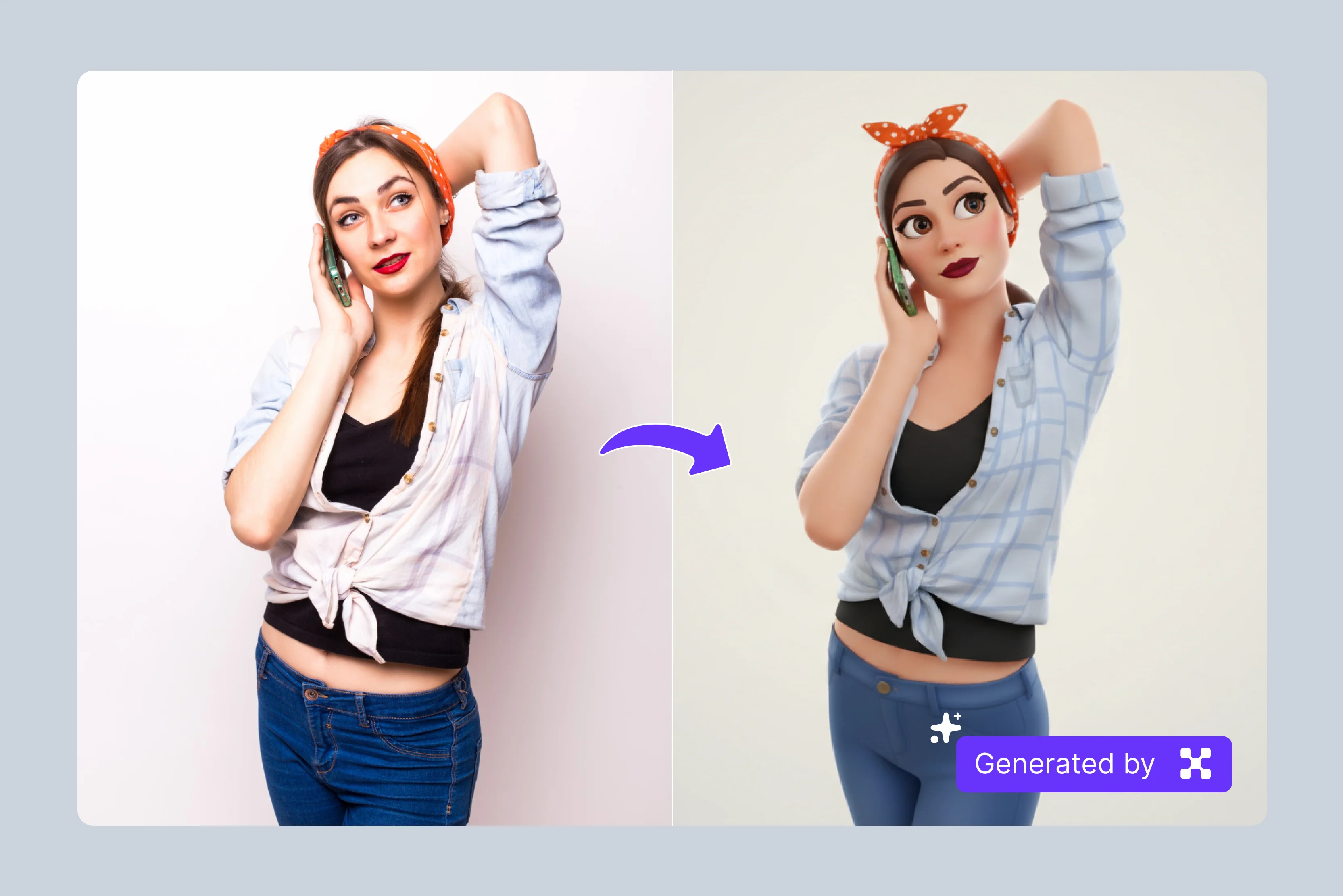


Standard emojis work for simple reactions, but they can't capture your personality, your pet's goofy expression, or your brand's identity. Custom emojis solve this: they turn your photo into a crisp, personalised icon that reads clearly in Discord pings, Slack messages, WhatsApp chats, and social posts.
The good news is you don't need design experience or expensive software. AI-powered tools can automatically crop, enhance, and simplify your photo into a stylised emoji with transparent edges, making it ready to use in seconds. All you need is a clear photo of yourself, your pet, or your logo, and a browser-based converter.
In this guide, we will cover the full rundown on how to turn a photo into an emoji, and then talk about the best tools, like Pixelbin converter, plus a few solid alternatives. You will get a complete idea to make your chats pop with custom flair that feels effortless and sharp.
What is an emoji?
An emoji is a small digital image or icon used to express emotions, ideas, or objects in digital communication. Emojis have grown in popularity to use in texts, social media posts, and even emails, just to add a little fun or personality. They first appeared at the end of the 1990s in Japan and then quickly rolled over the entire world. Nowadays, everything is an emoji.
With so many options, emojis are used to add humour, put emphasis on a message, or simply make something more dramatic in a picture or post. It is the simplicity and the playful expressions that have made emojis part of everyday communication.
Why use an emoji filter?
Emojis add a layer of expression to digital communication.
- Enhancing Text Messages: Emojis can convey emotions and tone that plain text might miss, making messages more engaging.
- Social Media Posts: They help capture attention and add personality to posts, increasing user interaction and engagement.
- Marketing Campaigns: Brands use emojis to create relatable and fun content, which can boost customer connection and loyalty.
- Emails: Adding emojis to emails can make them feel more personal and less formal, fostering a friendly tone.
- Feedback and Reviews: Emojis can quickly convey satisfaction or dissatisfaction, making it easier for businesses to gauge customer sentiment.
General steps to turn a photo into an emoji
Step 1: Upload the photo
Grab a clear photo with solid lighting and a straightforward subject, like a face, pet, or logo that holds up when shrunk down small. Head to any online image-to-emoji converter, spot the upload zone, and drag your JPEG, PNG, or drop in a URL. It pulls up a fast preview right away, letting you confirm everything loaded smoothly before you keep going.

Step 2: Click on Generate & wait for AI processing
After uploading, click the Generate button. The AI will take a few seconds to transform your image into a custom emoji. During this step, the tool automatically enhances the design so it stays clean and recognizable even at small sizes.
Step 3: Hit Download
When the emoji is ready, click the Download button to save the PNG file with a transparent background. Your custom emoji is now ready to use in chats, social posts, or anywhere you want a personalized touch.
8 Best AI tools to turn photos into emojis
AI tools turn everyday photos into custom emojis for Slack, Discord, or social posts without design skills or software downloads needed. Explore options like Pixelbin, insMind, and many more that deliver crisp PNG results fast from simple uploads.
1. Pixelbin image-to-emoji converter
Pixelbin image-to-emoji converter takes your snapshots and spins them into custom emojis that pop in chats or posts, all done in seconds without manually touching a design tool. It works entirely in your browser with no app installation, accepting JPG, JPEG, PNG, and WEBP files up to 10MB, and the output is an HD PNG with a transparent background, ready for Discord, Slack, or WhatsApp.
Pixelbin works best for brand logos, repeated conversions, or low-resolution photos needing upscaling. Workflow: prepare a front-facing photo with even lighting, upload at 1024×1024px or higher, select "Nano Banana" model and aspect ratio, boost contrast on key features, export transparent PNG. Before: selfie with background and low-contrast eyes. After: background removed, features sharpened, expression cleared just like an emoji.
What features make the Pixelbin emoji converter lead the list?
- Add design elements: It can boost your emoji with shapes, icons, or graphics layers on top for bolder expressions that grab attention in any chat.
- Selective editing: Target eyes, mouth, or key spots to fine-tune details precisely, crafting the exact mood without changing the overall look.
- URL-based transformation: It adjusts size, format, or quality instantly by tweaking the image URL, skipping re-uploads for quick real-time changes.
- Custom backgrounds: Layer solid colors or fun patterns behind your emoji to make it pop sharper and feel complete in messages.
- Color and tone adjustment: It plays with hues, brightness, and contrast until colors pop, balanced and clear for lively yet eye-friendly results.
- Image upscaling: Bump resolution 2x, 4x, or 8x to sharpen fine details, ensuring your emoji stays crisp everywhere it appears.
Practical applications of the Pixelbin image-to-emoji converter
2. insMind image-to-emoji converter
insMind’s image‑to‑emoji converter turns your photos into fun custom emojis for Slack, Discord, or social media in seconds without design work or extra software. You can upload JPG, PNG, or WEBP files directly in your browser and get clean emojis with transparent edges that fit anywhere in chats or posts.
Whether it is a selfie, pet picture, or logo, the tool gives quick one‑click results that match your style for branding or casual fun without needing editing skills.This free online photo‑to‑emoji maker keeps everything simple and easy to use. You upload your image, pick the emoji style you like, and download the result fast for messages that stand out. There are no installations or logins, just ready‑to‑use stickers that capture real expressions like smiles, winks, or laughs clearly and consistently every time.
Must known features
- One-click photo transform: Upload a photo and convert it to a clean emoji instantly with no skills needed for speed and dead-simple results every time.
- Cartoon emoji conversion: It turns real images into cute cartoon emojis with smooth lines and bright hues, perfect for playful chats or profiles.
- 3x3 emoji set creation: Generate a full 3x3 grid of moods and poses from one photo for expressive sets covering every fun situation fast.
- Social media emoji maker: Craft custom emojis from pics for Instagram, TikTok, or X posts and avatars that make content stand out personally.
- Mobile-friendly design: Access the emoji maker on phone browsers or grab iOS/Android apps for on-the-go photo conversions with easy flow.
- Quick browser processing: Runs directly in Chrome or Safari, turning photos into shareable emojis without installs or waits for instant use.
3. OpenArt photo-to-emoji
OpenArt photo-to-emoji tool converts any photograph into custom emojis suitable for messaging applications, social media profiles, or online communications, without requiring design expertise. Users upload JPG, PNG, or WEBP files directly into the browser interface, adjust the creativity level, select an emoji style, and generate high-definition results in seconds.
The process ensures privacy with secure, non-stored edits and eliminates the need for software installations or account creation. This free browser-based service provides rapid drag-and-drop functionality to produce multiple emoji variations, enhancing user engagement across digital platforms.
Must known features
- Drag-and-drop upload: Simply drag and drop JPG, PNG, or WEBP files into the upload area to begin the emoji conversion process automatically.
- Emoji style selection: Choose from various emoji styles and adjust the creativity slider to tailor the transformation to specific visual preferences.
- Creativity level adjustment: Use the slider to control creativity, balancing between faithful photo recreation and artistic emoji interpretation.
- Multiple versions generation: Select the number of emoji outputs to generate, providing several options from a single photo upload.
- Privacy assurance: All edits are processed privately with no external access to images, maintaining user data security throughout.
- Social avatar creation: Produces unique emojis from photos for social media avatars, enhancing personal online profiles effectively.
4. Neural.love convert image to AI emoji
Neural.love offers a simple tool that changes regular photos into custom emojis using AI. You upload your picture and pick a style, and it creates fun emoji versions right away. This works well for anyone wanting personal touches in messages or social media without needing design programs. The process stays in your browser, so no extra software comes into play. Results download fast for use on different platforms.
This free service handles various image types and gives clear outputs every time. Users find it easy because the steps stay basic and quick. It suits both casual chats and small projects where standard emojis fall short. Overall, it saves time while adding unique flair to digital talks.
Must known features
- Style options: Pick from different emoji styles when uploading to get custom looks that fit your needs without extra editing steps.
- Quick AI conversion: Upload photos and AI turns them into emojis fast with free access for anyone wanting simple results right away.
- Browser processing: The tool runs directly in any web browser so no downloads or installs slow down your emoji creation process.
- Multiple outputs: Generate several emoji versions from one photo upload to choose the best match for your messages or profiles.
- No skills needed: Create pro emojis from regular pictures without design experience since AI handles all the technical work.
- High-quality downloads: Download clean sharp emoji files ready for use in chats social media or other digital platforms immediately.
5. Media.io AI Emoji Generator
Media.io provides an online AI tool to make custom emojis from photos or text ideas. Just upload a picture or type what you want, and it builds the emoji in seconds. No art skills help needed since the AI does all the work. Perfect for social posts, stickers, or reactions that look personal and sharp.
The generator supports many file types and runs without downloads. You will get high-quality files ready to share right after creation. It keeps things straightforward for beginners while delivering pro-level results. This makes it handy for daily use in apps or online content.
Must known features
- Text prompts: Type ideas or descriptions to generate custom emojis alongside photo uploads for more creative options available.
- Photo to emoji: Convert uploaded images into polished emoji graphics using AI for stickers reactions or social content easily.
- Instant results: Get custom emojis seconds after input with no waiting around for processing to finish completely.
- Multiple formats: Supports various image types for upload and delivers outputs ready for different apps and platforms.
- No editing required: AI creates professional emojis without manual adjustments so beginners get good results every single time.
- Free online use: Access full features without payments or subscriptions through the web-based platform anytime needed.
6. Fotor Emoji Maker
Fotor's emoji maker lets users create custom designs for Discord, WhatsApp, or other apps. Use AI by describing your idea, or build manually with stickers and colors. Adjust sizes, add faces, or mix elements until it fits just right. Everything happens online with no install required.
This tool combines easy AI generation and hands-on editing for full control. Outputs work directly on popular platforms without tweaks. Free access means anyone can try it for fun reactions or profile icons. It stands out for blending speed with detailed customization options.
Must known features
- AI text creation: Describe your emoji idea and AI generates designs instantly with variations to pick from easily.
- Manual building: Combine sticker faces and colors using editing tools to craft exactly what you envision step by step.
- Platform optimized: Exports work directly on Discord WhatsApp Twitch without format changes or additional tweaks required.
- Element library: Browse faces reactions stickers for quick assembly into custom emojis with drag drop simplicity.
- Adjustment controls: Fine-tune size rotation transparency for precise control over final emoji appearance and style.
- Free access: Use all creation editing features online without costs for personal or project emoji needs.
7. ImageHub AI Emoji Maker
ImageHub turns photos of faces, pets, or objects into ready emojis for Slack or Discord. Upload your image, and AI removes backgrounds while styling it as an emoji. No cropping or editing needed on your end. Results come out clean and expressive for instant use.
The tool processes fast and handles different subjects well. Download options make sharing simple across apps. It focuses on automatic work so users skip technical steps. One of the best choices for quick personal stickers that match your style perfectly.
Must known features
- Auto background removal: AI detects subjects and strips backgrounds automatically for clean emoji styling on any uploaded image.
- Drag & drop upload: Simply drag photos into the interface for instant processing without complicated file handling steps.
- Multi subject support: Handles faces pets objects drawings turning each into consistent emoji style results reliably.
- Platform ready: Generates stickers formatted for Discord Slack Twitch use right after creation completes.
- No cropping: AI positions and styles subjects perfectly so manual cropping adjustments never become necessary.
- Instant downloads: Grab finished emojis immediately with direct links for sharing across apps or online.
8. Imagine.art AI Emoji Generator
Imagine.art taps smart AI in its emoji generator to shape custom pieces from photos you upload or notes you type out easily. Process runs smooth turning pictures into emojis that look fit for messages or profile pics all safe in your browser.
No software setup is required means you pull it up on whatever device sits nearby as long as internet connects. Standout part comes from style shifts and mood reads that match what you picture close enough for most needs.
Files drop quick in sharp formats set to go live across sites or apps without extra steps usually. Puts easy use first with solid tech behind it so anyone personalizes chats online through fresh emoji designs.
Must known features
- Photo prompt input: Upload images or type prompts for AI to create custom emojis matching your description accurately.
- Style variations: Offers different emoji styles moods for versatile outputs from single input source material.
- Browser only: Processes everything online without software installs for access from any internet-connected device.
- Privacy secure: Keeps uploads and edits private with no data storage or sharing during generation process.
- High resolution: Downloads come in sharp formats suitable for profiles messages or content across platforms.
- Quick generation: Transforms inputs to finished emojis fast so results appear without long waiting periods.
Final thoughts
Using AI tools to turn photos into emojis helps create custom icons that bring a personal touch to messages on Slack, Discord, or social media without requiring design experience or special software. However, it remains important to select clear images with proper lighting and simple backgrounds so the resulting emojis appear recognizable and clear on all devices.
When you decide to make your own emojis, Pixelbin's image-to-emoji converter offers a simple process with no applications or subscriptions needed. Select tools carefully from those listed above, check results at small sizes, and ensure your custom emojis stay clear and suitable for effective communication.
FAQs
PNG stands as the top choice for custom emojis due to its support for transparent backgrounds and crisp display at tiny sizes like 32x32 pixels across Discord, Slack, or WhatsApp platforms.
Low resolution originals or incorrect scaling leads to blur since emojis show at 28-32 pixels only, so begin with high quality source images and check at true display size first.
Yes, AI converters handle pet photos, objects, and logos well when main subjects stay clear under good lighting, yielding sharp custom emojis that work across all kinds of platforms.
The maximum file size allowed for a single upload is 10 MB. But it should be in the formats supported by the tool.
The Pixelbin image to emoji converter delivers one-click browser uploads with automatic styling plus instant PNG downloads, removing the need for apps, accounts, or design skills to produce pro results every time.
No design background is required since Pixelbin AI manages cropping, styling, and optimization from any photo upload, creating ready-to-use, crisp emojis via simple steps in seconds flat.









