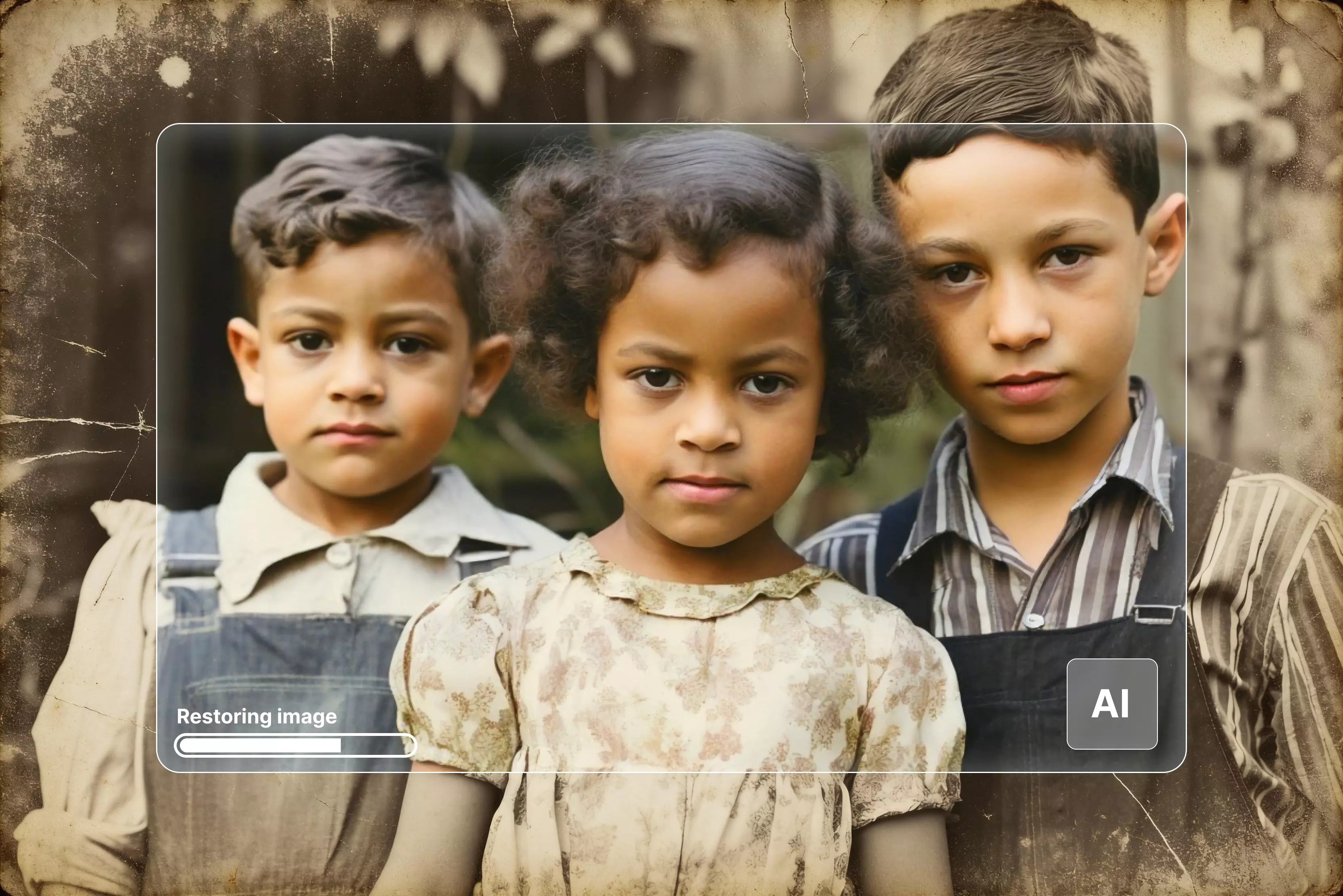


Restoring old photos has always felt emotional to me—almost like bringing forgotten memories back to life. But as powerful as today’s AI tools are, they still struggle with something very human: understanding the real context behind an old photograph.
Anyone who has tried restoring a faded family picture knows this. AI can remove scratches, sharpen faces, and even add color, but it often gets confused about what those colors should be, how the background originally looked, or whether a facial feature is part of a person’s natural appearance or just age damage on the print.
With so many modern tools—like AI-powered inpainting generative fill, and historical color prediction—restoration has become easier than ever. Yet the biggest challenge remains the same: helping the AI understand the story behind the photo.
For example, if you're restoring a 1970s family portrait, the AI might guess the clothes in the wrong shades or smooth the face too much, making it look artificial. That’s where context comes in.
The more clues you give the AI, the more accurate and emotionally true the restored photo becomes. In this blog, we’ll explore practical ways to help AI “Learn” the real context so your restored photos look authentic, respectful, and alive again.
Why does understanding context matter in photo restoration?
When I restore an old picture, I remember that it is not just about making the picture look better; it's about keeping a memory that was important to someone. That's why it's so important to give AI the right context. The restored picture looks good without it, but it might lose the memory's soul.
1. Restoring faces, clothes, and objects accurately
Old photos often have tiny details that tell a story: a traditional outfit worn only during festivals, a hairstyle that was popular in the 70s, or a small object someone loved.
If the AI doesn’t understand these things, it may guess the wrong colors or change features that shouldn’t be changed. But when you give the AI clues-like what the person was wearing or where the photo was taken—it does a much better job of keeping everything natural and true.
2. Preserving historical or emotional significance
I’ve seen how a single detail can bring a memory alive. A 1960s hairstyle, a wooden chair from a grandparent’s home, or a favorite saree pattern—these small things matter. When AI knows the background, the final photo doesn't just look restored; it feels familiar and emotionally honest.
3. Avoiding unrealistic or anachronistic results
Without any context, AI sometimes adds modern colors or makes faces look too smooth, which can make the photo feel fake. However, if you provide the AI with proper guidance, the image remains closer to the time it belongs to.
4. Preparing old photos for AI restoration
Before you even upload an old photo into an AI tool, a little bit of preparation can make a huge difference in the final result. Let us find out what the key points are to keep in mind.
5. Scanning or digitizing old photos at high resolution
Try to scan your photos in the highest resolution possible—300 DPI or more. A high-quality scan gives the AI more details to read, like textures, edges, and tiny patterns. If you are using a phone camera, take the photo in good lighting and keep it steady. The clearer the starting image, the better the restoration.
6. Basic cleaning: removing dust, scratches, or stains
Before using any AI tool, gently wipe the original photo with a microfiber cloth. This won’t fix big damage, but it will remove surface dust or marks that might confuse the AI. Even small cleaning helps the tool focus on the real problems.
7. Identifying damaged areas
Look at the photo carefully. Check for tears, missing corners, or fading. When you tell the AI where the damage is, either by marking it or writing it, the tool understands what needs fixing. This makes the restoration more accurate and natural.
How to restore old photos in general?
Restoring old photos means carefully repairing faded, damaged prints so they feel closer to their original state while keeping the people and setting true to the original picture.
It starts with a clean scan, proper framing, and using a tool, whether it be an old AI photo restoration tool or complicated software, so the final image still looks like the same old memory, not a generic remake.
Know the general steps below:
- Cropping and straightening the image to remove torn edges and fix any tilt or awkward framing around the main subjects.
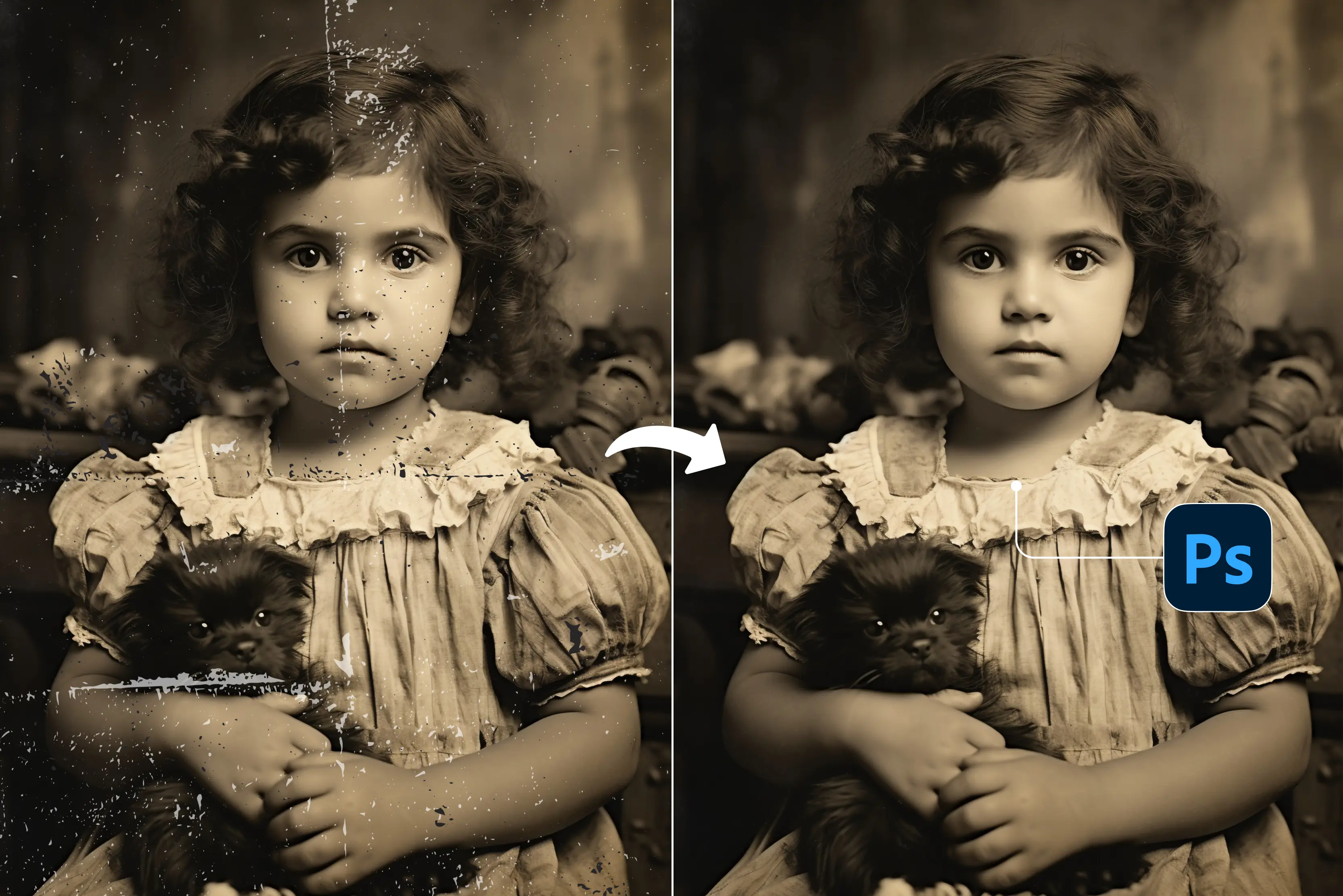
- Fixing spots and marks using AI‑assisted or manual tools to soften scratches, stains, and dust so the repairs blend naturally with the surrounding area.
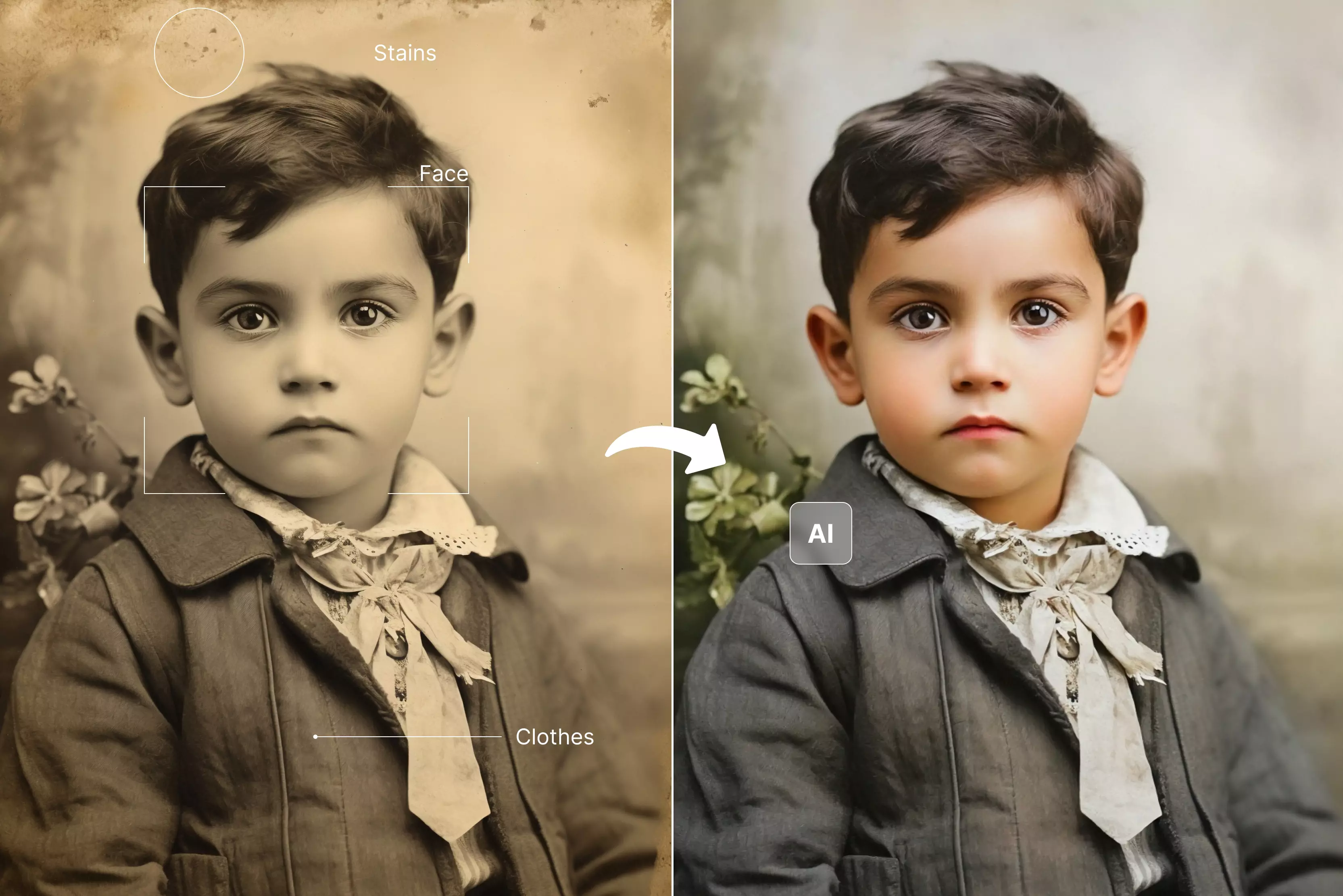
- Correcting tones and color to reduce yellowing, patchy fading, and washed‑out areas, and bring back more realistic skin tones and backgrounds.
- Adding gentle sharpness to key features like eyes, hair, and clothing to make the image look clearer without making it look harsh or artificial.
Key features to look for in AI restoration tools
There are different kinds of AI tools. Some only know how to get rid of scratches, while others are smart enough to see the finer points in an old picture. Here are the features that really matter when choosing a restoration tool:
1. Context-aware restoration
Look for tools that try to figure out the setting, the clothes, the objects, and the whole scene. This helps the AI fix photos in a way that looks real and true to the time.
2. Colorization features
A lot of old pictures are black and white or faded. Good AI tools can colorize things in a way that looks natural and matches skin tones, clothes, and the environment without making them look fake or too modern.
3. Noise reduction and sharpening
Old photos often have grain, blur, or rough textures. A tool with strong noise reduction and sharpening can clean up the photo while keeping important details like facial lines, hair texture, and fabric patterns.
4. Face recognition/object detection
AI tools that can detect faces, clothing, buildings, or objects can restore them more accurately. This helps the tool avoid mistakes like changing natural features or altering important items in the background.
5. Manual editing options for fine-tuning
Sometimes AI does not get everything right. Tools with manual sliders, brush tools, or editing options let you fix small mistakes and adjust the results until the photo looks just right.
AI tools for photo restoration tools at glance
Popular AI tools for photo restoration
In this section, I have mentioned the top ten AI tools for old photo restoration. Most of them allow you to test the feature without paying in a few attempts. Later, if you find the result favorable, you can opt for the paid version. So, explore them one by one.
1. Pixelbin

Pixelbin is a tool that uses AI to make it easy to fix old, blurry, or damaged photos. It can fix broken parts, get rid of scratches, make the picture quieter, and bring back faded details while still looking natural.
Pixelbin can also make pictures clearer and sharper without losing important details like faces or backgrounds. In addition to fixing photos, it has other useful features like automatically fixing colors, making backgrounds better, and making images look better for print or the web.
You don't have to be an expert to get great results with this tool. It also lets you change a lot of photos at once, which is useful for photographers or businesses that have a lot of photos. With Pixelbin, you can easily turn old memories, blurry photos, or professional photos into clear, high-quality, and colorful pictures.
2. Remini
Remini is an app for your phone that uses smart AI technology to bring old, blurry, or low-quality photos back to life. It can make your pictures sharper, get rid of scratches, lower noise, and bring back faded faces while still looking natural.
You can also use the app to add color to black-and-white photos, make group photos look better, and even make videos look better. There are no special skills needed to use it. Just a few taps will make your old pictures look new again.
Remini allows you to share your restored photos directly on social media or save them to your device. The app is great for keeping personal memories alive, fixing old family photos, or improving pictures for professional use.
With its easy interface and powerful AI tools, Remini makes photo restoration simple and fast, giving anyone the ability to enhance images without complicated software or editing knowledge.
3. Luminar Neo
Luminar Neo is an editing tool that restores old, unclear, or damaged photos. Its smart AI can remove scratches, clean up marks, reduce noise, and bring back faded details while trying its best to keep the photo looking natural.
It also makes pictures sharper and clearer without making them look unnatural or overly edited. Luminar Neo can do a lot more than just restore photos. For example, it can change the sky in a photo, make portraits look better, and change the colors. You can also change a lot of pictures at once, which is useful for people who take a lot of pictures or are photographers.
The app is simple enough for beginners to use and get good results, but it also has advanced tools for professionals who want more control. Luminar Neo makes it easy and powerful to edit photos, whether you want to bring back old memories, make work photos better, or make creative images.
4. LightX editor
LightX is an AI image editing tool that improves and fixes photos that look old or damaged. With its simple editing tools, you can retouch your photos by cleaning up marks, adjusting colors, reducing noise, and improving clarity, helping your images look fresh and polished again.
LightX also offers AI-based enhancement tools that sharpen images without making them look fake. Besides photo restoration, the app comes with many helpful features like background removal, color correction, filters, blending effects, and portrait retouching.
You can change the brightness, contrast, and colors to make your photos look better and more balanced. LightX lets you do simple edits and also more detailed changes, so it works well for both beginners and skilled users.
You can also make collages, add stickers, and use pre-made templates for social media. LightX editor has everything you need in one easy-to-use app to bring back old memories, improve your selfies, or make creative images.
5. Picsart
Picsart is a popular app for editing photos that makes it easy to fix old, blurry, or damaged pictures. Its AI tools help get rid of scratches, clean up spots, lower noise, and add back details that were lost, so your pictures look clear and natural again.
You can also enhance faces, brighten colors, and improve the overall picture with just a few simple steps. Picsart offers many creative tools besides photo restoration, including removing backgrounds, adding filters, changing colors, and retouching photos.
It also offers tools for creating collages, adding text, making stickers, and designing social media posts. While the app is straightforward for beginners, it stays powerful for advanced editors. Picsart is an easy-to-use app that offers everything you need to restore old photos, enhance everyday pictures, or create stylish designs.
6. Fotor
Fotor is a photo editing tool that helps you fix old or blurry pictures. It can remove scratches, clean marks, reduce noise, and bring back faded details so your photos look clear and nice again.
You can also use Fotor to sharpen images, make colors more vibrant, and fix lighting issues with just a few clicks. Fotor offers a variety of other tools besides photo restoration. These include background removal, applying filters, retouching for beauty, color correction, and creating design templates for social media posts.
You can also quickly improve your photos by making collages, adding text, and using pre-made effects. The interface is simple, so both new and experienced users can easily make changes. Fotor gives you all the tools you need in one easy platform to restore old memories, improve everyday photos, or make creative designs that look attractive.
7. PicWish
PicWish is a simple photo editing program that uses AI to help you fix old, blurry, or broken photos. It removes scratches, cleans up spots, lowers noise, and brings back faded details to make your pictures look new and clear again.
With just a few clicks, PicWish can also sharpen faces, fix colors, and make lighting better. This makes it easy for even beginners to use. In addition to restoring photos, it has other useful tools like removing backgrounds, enlarging images, getting rid of objects, and improving photos for use on the web or social media.
You can process several pictures together, which is a big time-saver for users with many photos. The platform is very simple to use, so you don’t need any editing skills to get good results. PicWish gives you all the basic tools in one place to fix old photos, improve normal pictures, or get images ready for work.
8. Phowd
Phowd is a platform where real experts help fix and restore your aged, unclear, or damaged pictures. Instead of using AI, skilled retouchers manually work on your photos to remove scratches, fix torn or faded areas, clean up marks, and make the picture look clear and natural again.
This human editing gives better and more accurate results, especially for photos that are very old or heavily damaged. Along with photo restoration, Phowd also offers other useful services such as portrait retouching, color correction, background changes, and product photo enhancements.
The process is simple: you upload your photo, choose an editor based on their skills and reviews, and get the edited image once it is done. You can also ask for changes if needed. Whether you're restoring old family memories or preparing photos for work, Phowd delivers high-quality results with the care and attention of expert editors.
9. Nero AI
Nero AI is a photo editing tool that uses smart AI to fix old or blurry photos. It can remove scratches, clean spots, reduce noise, and bring back faded details so your pictures look clearer and more natural.
It also makes photos sharper, brightens dark areas, and fixes colors by itself, making even very old photos look fresh and bright again. Along with restoration, it also offers tools like background removal, AI upscaling, object removal, and portrait enhancement.
It is easy to use for beginners, but it's also helpful for people who edit photos a lot. You can upload your picture, let the AI work on it, and then download the better one in just a few seconds. AI Nero is a simple and quick platform that has all the tools you need to save old memories, improve everyday photos, or get images ready for work.
10. HitPaw
HitPaw is a photo editor that uses AI to repair old, blurry, or damaged photos. It can remove scratches, clean marks, reduce noise, and restore faded details, helping your pictures look clear and natural again.
HitPaw also provides powerful image-enhancing tools that sharpen faces, brighten dark areas, and fix dull colors with just one click. In addition to photo restoration, it features helpful tools like background removal, AI upscaling, object removal, and cartoon or sketch effects.
You can also improve portraits by smoothing skin and enhancing facial features. The platform is simple and beginner-friendly, so anyone can edit photos without needing advanced skills.
You need to upload your photo, pick the tool you want, and HitPaw will do the rest. Whether you’re fixing old memories, improving simple photos, or getting pictures ready for work or social media, HitPaw gives you all the basic tools in one place.
Tips for best results
It can be fun and emotional to restore old photos, but it's also easy to get carried away. These are some easy tips that have helped me get more natural and meaningful results:
- Avoid over-restoration to preserve authenticity: It is tempting to make the photo look perfect, but too much smoothing or color correction can erase the warmth of the original picture. Try to keep the natural texture and feel so the memory stays real.
- Work in small sections for better control: Instead of changing the whole picture at once, change one part at a time, like the background, clothes, or face. This helps you see small details and stops the AI from making big changes that you don't want.
- Combine AI with manual touch-ups: AI does most of the hard work, but it can miss small mistakes or read something wrong. A little bit of manual editing, like fixing a corner, changing the color, or sharpening a feature, can make the final picture look more real.
- Regularly save progress and compare with the original: Keep saving your work as you go. Switch between the edited version and the original photo to make sure you are not losing important details. This helps you stay close to the true memory while still improving the picture.
Conclusion
Restoring old photos with AI is not just a technical process—it’s a way to bring precious memories back to life. The results look more natural and meaningful when you give the AI the right context, get your photos ready, and use both automatic and manual tools.
The goal is not to make the picture perfect, but to keep the memories and feelings alive. If you take the right steps, AI can help you keep family stories alive, relive old memories, and make a version of the photo that feels real, beautiful, and full of life again.
FAQs
AI scans the image for missing pixels, noise, scratches, and faded spots, then compares them with patterns learned from thousands of photos to fill in the gaps.
AI can guess colors based on patterns, objects, and historical data, but the results may not be 100% accurate. It’s still an intelligent color approximation.
Clear instructions, reference photos, or telling AI about the time period, clothing style, location, or people involved helps it restore more accurately.
Yes, Many tools like Photoshop, Remini, and VanceAI let you edit manually after the AI restores the photo.
Provide clear prompts, avoid over-editing, use manual adjustments, and review each version to keep the photo natural.
For the best results, scan old photos at 300–600 DPI. This gives AI enough detail to detect fine textures, edges, and damaged areas accurately. If the photo is very old or heavily damaged, scanning at 600 DPI or higher helps the AI restore it with more clarity and fewer artifacts