

Before anyone reads any resume or visits any websites, your photo has already made a first impression. We live and work in a world where digital recruiters spend an average of seconds scanning a LinkedIn profile before deciding whether to continue.
Poor-quality photos can create a negative impression. Blurry images, old photos or casually cropped selfies may make you look unprofessional or less serious about your career and personal brand. It may give the impression that personal branding and professional presentation are not a priority.
A professional headshot helps build trust and confidence instantly. A clear, well-lit and professional photo makes you appear more approachable confident and credible. It helps people feel comfortable connecting with you even before the first conversation.
In this blog, we will explain what a professional headshot is, why you need one, and how to create a polished, professional-looking photo. We will also explore the best way to generate a headshot with modern AI-powered solutions to make the process faster, easier and more affordable. We’ll also share the top 5 tools for generating professional headshots, helping you create high-quality photos without expensive equipment or professional photographers.
What is a professional headshot?
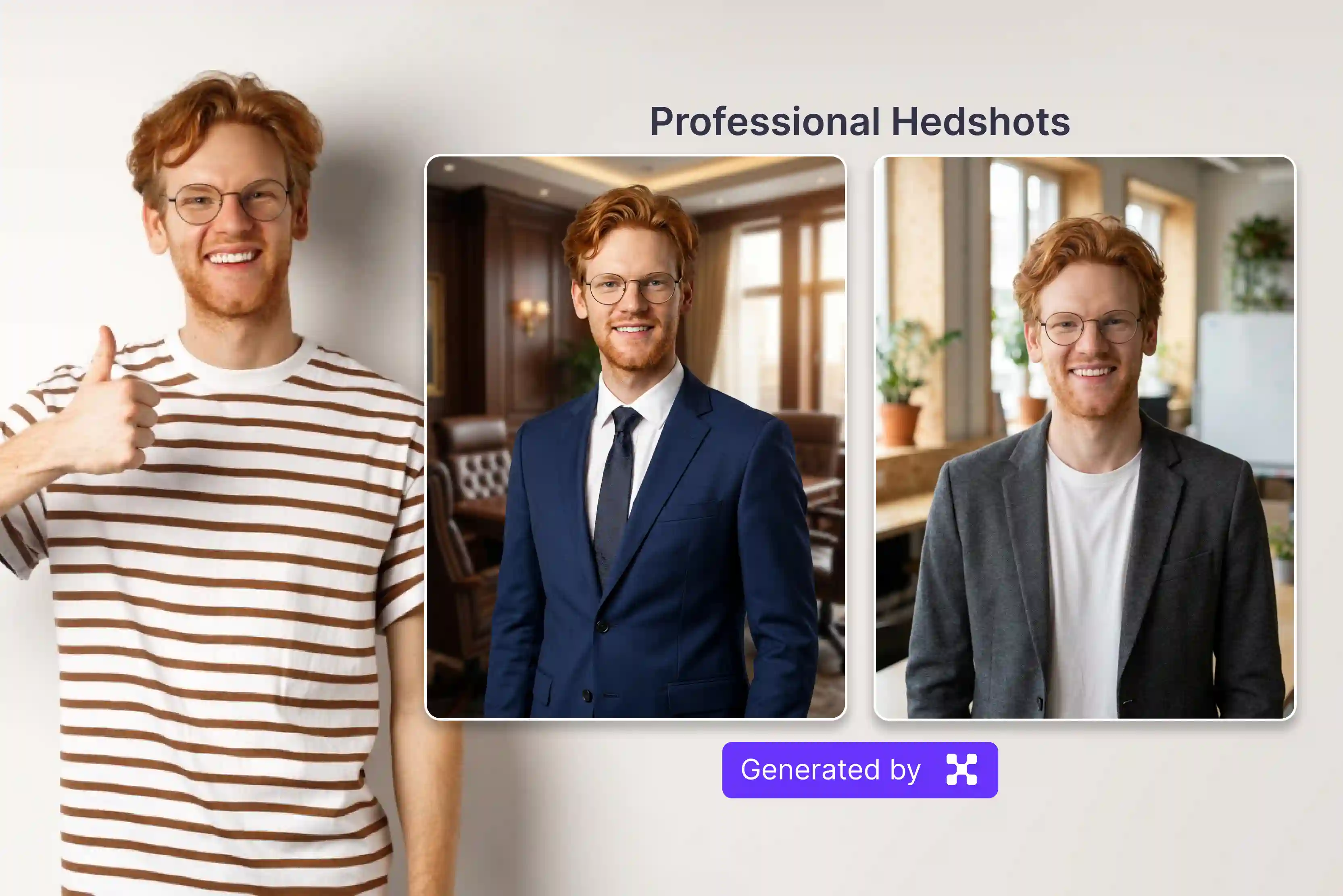
A professional headshot is a modern cropped portrait focused on your face and upper chest that is designed specifically to create your professional identity clearly and credibly. Professional headshots are used to create a polished, first impression.
The headshots are mainly used for LinkedIn profiles, resumes, corporate websites, and professional networking. Professional headshots are very different from casual selfies, as they highlight good lighting, clear visibility, clean backgrounds, professional attire and confident expressions. Professional headshots can be produced fast and affordably using advanced AI tools like the Pixelbin AI headshot generator.
Professional headshot vs. selfie real difference
Why do you need a professional headshot?
A professional headshot is more than a photo it is a key part of your personal brand and professional identity. It is present on your different professional platforms like LinkedIn, company websites, resumes, email signatures, profiles for social media and much more. A strong headshot helps to create a positive first impression and builds trust before any conversation even begins.
- Career growth and job applications: Professional headshots can improve profile engagement and visibility on platforms like LinkedIn. Moreover, High-quality photos receive more profile views, connection requests and attention from recruiters.
- Business trust and client confidence: A professional headshot creates familiarity and helps build stronger first impressions during networking events, meetings or online interactions. Occasionally, a client making a high-value purchasing decision seeks evidence that the person they are working with is competent and serious.
- Strong online presence: Using the professional headshot across various platforms like LinkedIn, websites, portfolios and social media creates a consistent personal brand. This consistency allows people to identify and remember you across different platforms.
- Media, speaking and professional opportunity: Journalists, podcast hosts and companies often require professional photos for promotions or publications. Having a high-quality headshot ready allows you to respond quickly and maintain a professional image.
- Use AI headshot tools for easy professional results. Modern AI tools such as the Pixelbin AI Headshot Generator make it easy to create studio-quality professional headshots quickly and economically. You can produce polished realistic photos without expensive photography sessions while maintaining a professional look across all platforms.
How to get a professional headshot
Getting a great headshot is an equal part of preparation, technical execution and the right mindset on the day. Each step below gives you a proper guide on how to get a professional headshot.
- Selection of proper styles: Before selection of any tools, you should have clarity on what you need the headshot for. A LinkedIn profile may need a formal business look, while a personal brand or creative portfolio may allow a more casual and modern style. A more relaxed posture, modern smart-casual attire, and a softer or environmental background fit perfectly for portfolios and agency websites. Setups with natural lighting are ideal for bloggers, modern social media platforms, and more.
- Choose the right clothing and colors: Before selecting any tools or taking photos, first decide the purpose of your headshot. A LinkedIn profile might call for a formal business look, while a professional brand or creative portfolio might call for a more casual modern style. Having clarity about your goal helps create a headshot that matches your professional identity. Stick to solid colors avoid busy patterns stripes or large logos that draw attention away from your eyes and smile. Professional headshots use neutral shades like blues, black, white, and more.
- Perfect background: The background that you select should frame you, not compete with you. A simple and uncluttered background creates a more professional appearance. Plain white, grey, office-style, soft, blurred background is excellent because it avoids distractions and makes the subject stand out clearly.
- Get the lighting right: Lighting is the secret ingredient to a high-quality photo. Natural daylight or soft front-facing lighting helps create clear, balanced and flattering lighting photos. Avoid harsh shadows or dark environments that decrease image quality.
- Use AI tools for fast, affordable results: If you don’t have the budget or time for a professional studio session, modern artificial intelligence has made high-end headshots incredibly accessible. AI generators instantly apply professional clothing, fix lighting imbalances, swap out distracting backgrounds for studio-grade backgrounds, and deliver multiple style variations in minutes.
Best AI tools to get a professional headshot
AI headshot generators have become highly advanced and are now a reliable option for creating professional photos. They are especially useful for platforms like LinkedIn, company websites, resumes, portfolios and speakers profiles.
There are various AI tools available and used to turn your regular photos into professional-quality headshots. The platforms mainly ask you to upload 10-25 clear photos of yourself from various angles. The AI examines your facial features, expressions, skin tone and overall appearance to create professional portraits.
With just a few clicks you can generate multiple headshots with professional lighting, studio-style backgrounds, business outfits, various poses and styles and more. The five AI headshot tools listed below are among the best available right now. The tool offers many features and styles so understanding their strengths can help you select the best option for your personal and professional needs.
1. Pixelbin
Pixelbin is fundamentally different from the other tools on the list. This service is designed for professionals and teams who need to generate or process headshots at scale for company team pages, large group updates, or enterprise HR use cases. Pixelbin allows bulk processing that no other tool in this list can match.
The process of using Pixelbin is very simple, with 3 easy steps to get started. Select and upload at least four clear selfies to begin the process. Select the style that you like the most, as tools create professional portraits automatically from the uploaded images.
The AI transformation suite includes background removal, background replacement, enhancement, upscaling and object removal, all accessible through a clean browser. I used the Pixelbin AI professional headshot tool to create high-quality professional photos, and the results were impressive. The image received looks natural, sharp, and of studio quality, without the need for a professional photoshoot. It saved time, was easy to use, and provided multiple polished headshots suitable for LinkedIn resumes and professional profiles.
Key features
- High-quality headshot
- Ideal for business
- Ease of use
- Support multiple styles
- Bulk processing
- No watermark
- Background removal and studio replacement
- Multiple background options
- Save time, effort and cost
2. Fotor
AI photo editing platform that helps you turn your selfies into professional one is Fotor’s online AI headshot generator. You can create business headshots for resumes, company profiles and personal branding within a few minutes.
The process is simple: click on the "Generate a headshot" button. Select the male or female to get started creating headshots. Select the style that you like and next upload one of your life photos or selfies. Finally, preview and download the result that you received.
Once you receive your AI headshots, you can immediately refine them using Fotor's broader suite, including retouching, background editor, color grading, and more. I tried Fotor AI professional Headshot but the results were disappointing. The result looks unrealistic and over-edited and lacks natural facial details, and the customization option felt limited and it provided a watermark afterward.
Key features
- Ease of use
- Multiple portrait styles
- Background replacement
- Browser-based
- No login required
3. Media.io
Media.io is Wondershare’s all-in-one browser-based media platform, and its AI headshot generator is one of the most accessible and well-rounded tools available in 2025. You don't need to download the software or create a complex account you only need to understand AI to get the best results. Upload your photo, pick the style and Media.io does the rest, delivering polished, studio-quality professional headshots within a few minutes. Compared to the Pixelbin AI headshot generator Media.io felt slow and less reliable.
The image quality was average and many results lacked sharpness and realistic details. Pixelbin AI delivered much faster processing and high-quality professional headshots and more natural-looking ones making it a better choice for creating polished LinkedIn and professional photos.
Key features
- Precise manual brush for pixel-level control
- 4K output support on paid plans
- No installation required
- Create multiple headshots with various backgrounds, outfits and poses from one single photo
- No technical knowledge required
- Works on desktop and mobile
4. Dreamwave
The Dreamwave AI headshot generator helps you turn your selfie into professional-style portraits without any booking a studio. For the professionals who want authentic, studio-style portraits, Dreamwave helps. Balance realism and simplicity making it a top choice for job seekers, entrepreneurs and remote teams who need polished online profiles.
There is no extra software to install and the process usually finishes in a few minutes. Dreamwave is built for one purpose: headshots that look like they were taken in a real studio, not generated by a machine. The result lands directly on LinkedIn profiles, company websites, resumes, and HR portals without needing extra editing or design work.
It is designed to be usable by job seekers, freelancers, and small teams with no design skills and no extra cost beyond the tool itself. The tools specifically offer highly accurate background removal and studio-quality replacement, along with intelligent skin tone correction that works across a wide range of complexions.
Key features
- Ease of use
- No technical knowledge required
- No sign-up required
- Secure processing
- High-resolution output
- Need fewer selfies
- Works on desktop and mobile
- Multiple styles, outfits, background
5. Canva
Canva has also entered the AI headshot space by adding AI generated profile photo features into its platform. The Canva AI Headshot Generator makes it easy for you to create a professional-looking profile pictures with a clean and polished appearance directly within Canva’s design ecosystem.
Canva has a more convenient workflow Its AI headshot quality may not be as realistic or detailed as specialized AI headshot tools. But it prioritizes simplicity, uniform design and all-in-one creative functionality for everyday professional use. Unlike platforms dedicated only to AI headshots Canva focuses more on overall branding and content creation. There is no need of any more technical knowledge to use it or you can refine and publish your professional portrait within one platform.
Key features
- Ease of use
- Photo editingg and retouching
- Background removal and replacement
- Support multiple styles
- Works on mobile and desktop
- No technical skills required
FAQs
While selfies can work in casual situations, professional headshots are more polished, higher quality, and suitable for business use.
Yes, AI headshot generators are affordable and fast and can create professional-looking portraits without a traditional photo shoot.
Pixelbin is the best AI tool for professional headshots, as it depends on your editing and style needs.
Yes, for most professional use cases, AI headshots from quality tools are entirely appropriate for LinkedIn. There are various AI tools that produce AI headshots for LinkedIn.
You can use any clear and well-lit photo for your headshot. You should be sure that your face is centred in the picture for a professional look. Select selfies where your face is clear of obstruction, so the image should be clear to get a perfect headshot.
Wear solid colors and professional attire, and avoid distracting patterns or overly birght colors.