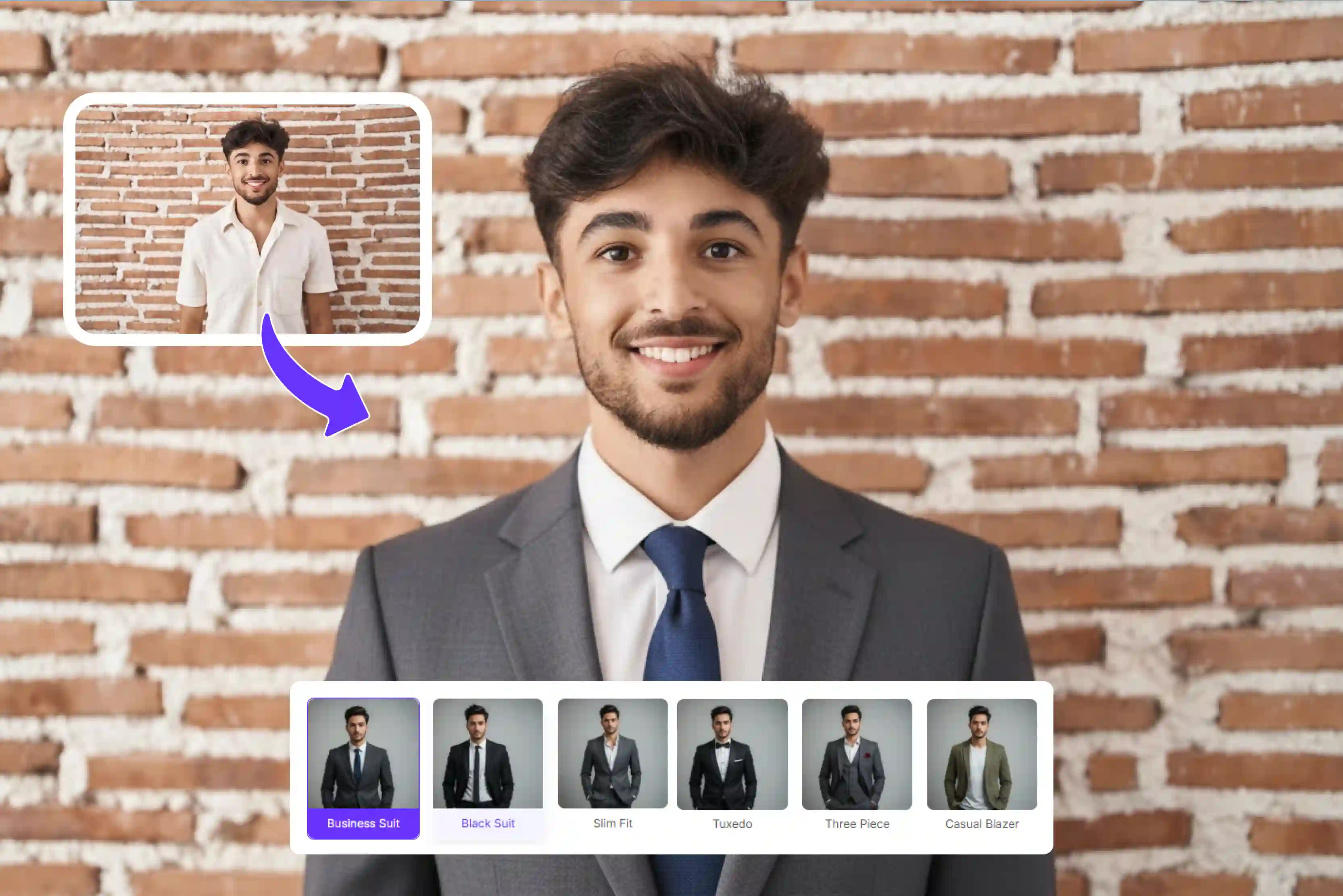


First impressions are formed before you say anything. Whether it's a recruiter scanning LinkedIn, a hiring manager reviewing your resume, or a client looking for your business profile, your photos speak first. A clean professional look makes an instant impression. Not everyone owns a suit or can afford a studio session.
The way you present yourself visually can shape how others perceive your professionalism, credibility, and attention to detail. Not everyone has the time, money, or access to professional photoshoots, formal clothes, or studio setups.
Finally, many people end up using casual photos that may not align with professional expectations. You all need simple and easy solutions. AI technology is making photo editing and enhancements much easier.
Many tools can help you improve your photos, like adding a suit, lighting, and making the image look more professional with just a few clicks, often for free. Pixelbin adds suits to photos using AI, placing formal attire on your photos realistically.
The results are remarkable and natural; the lighting, fabric, texture, and fit all adapt to your body shape and the original photo. It combines ease of use with impressive results, making it a go-to choice for anyone looking to create a professional image quickly.
In this blog, you'll learn what it means to add a suit to a photo and where it can be useful. We'll also cover a simple step-by-step guide to the 6 best free tools, along with the pros and cons of AI suit generators. Plus, you'll see a quick comparison between traditional photoshoots and AI tools.
What does "Add suit to photo online free" mean?
Adding a suit to a photo online for free means using a free online tool or an AI-powered tool to digitally place a formal blazer or tie on a person in a casual photo without needing real clothing, a studio, or visitors.
This process requires no manual editing skills or expensive software allowing you to transform casual pictures into professional headshots, typically for free. The process is quick automated and accessible to anyone.
The tools analyze your uploaded image, detect the person in the photo and overlay a suit that matches the lighting and posture of the original image. You upload a photo and select a suit style and the AI handles the blending, often allowing for additional edits like changing the background, upscale, etc.
Use cases
- Job applications: Various tools that help to create a professional-looking photo for resumes and CVs without the need for formal clothing, a studio visit, etc. This approach can improve first impressions when applying for a job online or through recruitment platforms.
- Profile: You can upgrade your profile pictures to match a business or corporate environment. Quickly updating the profile picture to appear more formal and trustworthy. A clean formal image builds credibility and makes profiles appear more polished.
- Social media: You can often try different styles and looks to match your needs, making it a flexible option for improving your image.
Why do you use an online AI tool to add suit to photos?
Without spending money on clothes or studio equipment the tools provide a quick way to look professional. The tools are easy to use and deliver quick results, saving time and money. You can also try various styles and looks to match your needs, making it a flexible and proper solution for improving your image. It can help keep your photos looking neat and professional across various platforms. It is a simple way to improve your photo without any required skills.
Step-by-step guide to add a suite to a photo online for free
Follow these simple steps to transform any casual portrait into a professional suit in a few seconds.
Step 1: Visit Pixelbin -> AI tools -> search for "Add suit to photo."

Step 2: Upload a photo. Click the "Upload image" button, then select your image in formats like PNG, JPG, JPEG, or WEBP, up to 10 MB.
Step 3: After uploading, select a suit style for men/women, color, model, background, and aspect ratio or use a custom prompt.
Step 4: Click the "Add suit" button and then preview or download the result.
Best free tools to add suit to photo
1. Pixelbin
Using cutting-edge AI Pixelbin adds a suit to photo tools so that any image may be instantly dressed in a professional suit without the need for a photo shoot, a designer, or manual editing. It also supports various a suit styles for women/men in various colors and cuts making it ideal for corporate headshots, LinkedIn profiles, job applications, resumes and more.
Simply upload a photo in PNG, JPG, JPEG or WEBP format up to 10MB. Next step select styles like business suits, casual blazers, tuxedos and more for men and women or write a custom text prompt. Select the models and aspect ratios that suit your needs, then click the generate button.
Turn a casual photo into a professional portrait within seconds. The editor automatically handles adjustments like cropping, lighting, and background. One of the best features is the before-and-after result preview which lets you see the transformation clearly and pick the look that suits you best.
Key features
- Ease of use
- Batch processing for bulk headshots
- Multiple suit styles, color options
- Aspect ratio
- No signup needed
- No watermark
- Multiple model selections
- No editing skills required
- Before/after results
- Cross-device support
2. Fotor
Not everyone is a designer. Fotor uses AI to analyze facial features intelligently, and the image and some tools allow you to modify clothing or generate a suit-style look with minimal effort. Some tools allow you to edit specific areas or adjust the overall outfit for a more professional look.
The AI suit changer offers a variety of styles, including business, casual, minimalist and more. You can freely choose and apply your favorite styles to your photo. With this tool quickly transform your image into a smart business outfit. Open the Fotor website, an AI photo editor, and upload your portrait in JPG, PNG, or WEBP format.
Select the area you want to change, use the built-in styles, and upload your suit image or generate one with AI. In some cases, you can apply outfit changes with minimal steps. If you are satisfied, you can download the image; high-resolution or watermark free versions may require a paid plan. It is perfect for showcasing your company image, creating business cards, a LinkedIn profile photo, and more.
Key features
- User-friendly interface
- High-quality export
- Wide range of suit styles
- High-quality export
- Background change options
3. Picsart
Picsart is another free way to add a suit to a photo online. Its AI-driven features make even the most difficult editing tasks simple and its easy-to-use tools give beginners the freedom they need to get professional-looking results.
But occasionally it's necessary to manually edit the changes as you see fit. Picsart is free and flexible but it takes some more time and effort to get a natural look. Unlike some specialized AI outfit generators, Picsart may not automatically tailor the suit to your body as precisely. The process is simple.
Open Picsart in your browser, upload your portrait photo in JPG or PNG format, and go to the AI outfit or style transfer section. There are business suits, tailored blazers, tuxedos and other options in the suit collection.
If the current styles don't work for you, you can use a text prompt to create a range of looks. A paid plan may be a better option if you want access to more editing and styling controls. Watermark behavior can depend on the export type, asset licensing, and plan level. This is too absolute a state to be safe.
Key features
- Ease of use
- Multiple style selection
- No signup required
- No watermark
- Text prompt-based
4. Media.io
Media.io helps you upgrade your image in seconds with an AI suit editor. AI understands body posture, lighting and proportions to create a natural fit that meets your needs. Depending on the tool you may be able to generate styles ranging from business suits to more modern looks.
The tool supports multiple image formats including JPG, JPEG, WEBP and HEIC with a maximum file size of 50MB. No editing skills are required simply upload your photo, select a clear image or drag and drop it into the AI suit editor, and the system will instantly detect your body and face.
Select the preferred suit or blazer style, then let the AI do its magic. In short time, your casual photo can be transformed into a more professional-looking image. You can download the result if you like the suit photo. Whether you need a professional LinkedIn profile, a resume photo, or a stylish portrait for Instagram or TikTok, the AI suit editor gives you the proper look.
Key features
- Ease of use
- Multiple styles, unlimited creativity
- Support multiple image formats
- No installations
- Realistic textures and lighting
- No watermark
5. Kaze.ai
Kaze.ai offers to transform the uploaded image into a professional portrait by dressing the subject in a well-fitting formal suit. You can refine overall image quality by refining lighting, smoothing minor imperfections, and improving sharpness while keeping the subject natural.
Look professional in seconds; no need for any Photoshop, no tailor, just smart AI styling. Process a simple image upload, and the tool automatically matches your body shape, pose, and angle to generate realistic, perfectly fitted suit images.
It aims to simulate fabric textures, shadows, and lighting to make the suit blend more naturally with the original photo. If you are required to change the background, adjust it to match a professional setting, such as an office or studio environment.
Key features
- Ease of use
- No manual editing
- No signup needed
- Multiple style formats
- Text to image generation
- Background removal
- Beginner friendly
6. insMind
Last one in the list. insMind is an AI-powered online tool that lets you add a formal suit to your photo with no technical knowledge required. It works on any browser, so there is no need to download software.
No requirement to dress up formally or go to the studio for expensive photo sessions. You can upload images in different formats like JPG, PNG and WEBP depending on your requirements. You can experiment with various blazer styles for various use cases to create a more polished image.
The simple step is to upload a photo after that choose from various suit styles, colors and background scenes. Once the style is selected, click "Generate" and wait for the AI to apply the suit to your photo. You can convert an outfit into a suit or blazer with minimal steps. Add a suit to your photo to give you a realistic, professional look for your resume, LinkedIn, and other profiles.
Key features
- Ease of use
- Diverse suit styles and colors
- Realistic results
- Support multiple formats
Tips for the best result
A high-quality, well-framed, and well-lit image is essential for getting the best results when adding a suit to a photo online using AI tools. The quality of your output depends significantly on the quality of your input photo.
Keep these practical tips in mind to achieve the most natural result.
- Select a clear, front-facing photo: When you select your images, the faces and shoulders should be visible and well-lit. Sometimes blurry or cropped images confuse the AI and yield unrealistic suit results. Good lighting and a natural pose help the AI place the suit more properly.
- Simple background: Use only a simple, plain background to make it easier for the tool to detect your body outline. Avoid messy rooms, trees, or crowded scenes, as they make it difficult for the AI to process. This helps avoid mistakes and makes the suit look more natural in the photo.
- Select a suitable style: Select formal and natural colors, such as black, navy, or gray, for the best results. Selecting the right styles enhances realism and suits professional use, such as LinkedIn profiles, resumes, and more.
- Adjust and refine the final image: You can adjust the suit alignment around the neck and shoulders if needed, brightness, contrast, and sharpness to make the image look polished and natural.
Pros and cons of AI suit generators
AI suit generators, which use generative AI to generate designs for garments like business suits or specialized costumes, offer a blend of rapid innovation and technical limitations.
Like any technology, virtual suit tools offer clear benefits and a few limitations to keep in mind when using them for important work.
Pros of AI suit generators
- Easy and free to use, no watermarks: Most platforms let you use the tool for free up to a limit, create final images with no watermarks, and get results ready to use instantly, with no signup required.
- Quick results: You can upload your photo and get a finished image within a few seconds, depending on the image size. It saves you time compared to traditional photo shoots.
- No skills needed: You don't require any design knowledge or tools like Photoshop; the AI does everything automatically.
- Cost saving: You are not required to purchase a suit or hire a professional photographer this makes it a budget-friendly option.
- Multiple styles support: There are various suit styles, colors, and looks, giving you the flexibility to match a range of professional needs.
- Work on any device: As needed, you can use it on your tablet or computer via a browser; no special software download is required.
- Highly realistic results: Modern AI creates images that look very close to real photos; in some cases, you cannot tell whether AI generates them.
Cons of AI suit generators
- Limited free usage: Free versions often limit the number of images you can create. For instance, some tools limit users to only a few photos per month or use a credit system.
- Quality depends upon the input photo: The final output depends heavily on your original image. Poor lighting or low-quality photos can lead to visible AI errors.
- Commercial use: Usage rules depend on the platforms. You should always check the terms and conditions using images for ads or business purposes.
Comparison of Traditional and AI tools
FAQs
Yes, you can easily add a suit to your photo online for free using AI-powered tools like Pixelbin, which replaces your current clothing with a suit. This helps create professional headshots for LinkedIn, resumes, and profile pictures without any technical knowledge.
Based on the current AI suite editing tool, Pixelbin is the best free tool for adding a suit to a photo, delivering the best results without manual work.
It is generally safe if you use trusted platforms and review their privacy policies.
No, most of the platforms are designed for beginners with simple interfaces.
A suit does not properly fit, meaning poor lighting, incorrect angles, not proper resolution.
Yes, Pixelbin is a free app for suit photos.










