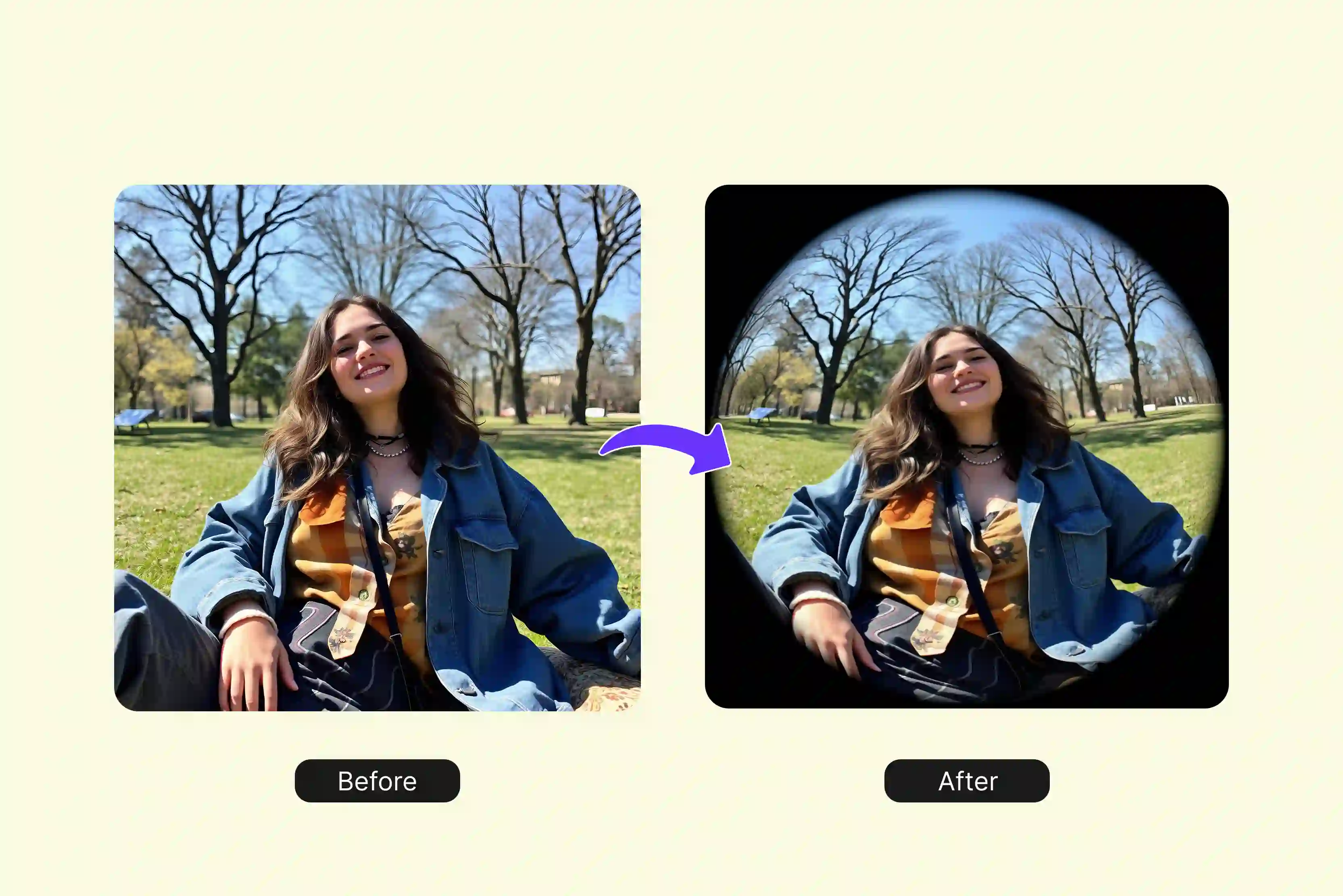


Ever snapped a photo that just sits there, flat and forgettable, even when the moment was perfect? You know how it goes, only regular shots with their straight edges and boring angles can drain the life out of a good selfie or that landscape you captured on vacation. It's frustrating when your pics don't grab attention, and you're left thinking they need some kind of twist to stand out from the crowd.
That's where the fisheye effect comes in handy, giving your images that wild, curved bulge like you shot through one of those goofy wide-angle lenses from back in the day. No more pricey camera add-ons required. Grab free tools such as Pixelbin, Fotor, and many more on your desk setup, and you can work on that playful distortion in minutes, warping faces for fun or stretching horizons into something dramatic.
This guide walks you through the easy process with those apps and a couple more, so anyone can jump in without any pro skills needed. Try it on portraits, outdoor scenes, whatever you've got, and watch your photos turn into conversation starters with that cool, bent perspective people can't ignore.
What is the fisheye effect?
The fisheye effect is a type of photo distortion. It makes most straight lines curve outward, especially near the edges of the image. This gives the image a wide, rounded look. A fisheye lens or filter causes this change, and the center of the photo looks bigger and bulges forward.
The edges stretch and bend away from the center. This lets the photo show a very wide view, up to 180 degrees. Normal lenses keep lines straight. Fisheye changes how light bends to create the curve. It works on photos of people, places, or objects.
How does it work?
The fisheye effect happens because of the lens design or software in photo apps. Normal lenses bend light to keep straight lines looking straight, so buildings and roads appear normal. Fisheye lenses bend light differently, which creates barrel distortion in the image. In this distortion, the middle of the photo gets bigger while the sides spread out wide.
There are two main types of fisheye effects. A full-frame fisheye fills the whole image frame while bending straight lines near the edges. A circular fisheye forms a round circle in the center, leaving a black area around it. AI tools can copy this effect without the need for a physical lens.
Why use it in photos?
People slap the fisheye effect on pics to grab attention and make them pop. Selfies turn fun with bigger faces and tiny backgrounds that fade way back. Landscapes get that wild, curved horizon wrapping the frame for drama.
Sports action or cramped rooms fit more in without cutting off edges. Apps like Pixelbin or Fotor let anyone add it for free, no fancy gear needed. Regular shots suddenly look bold and alive.
Best AI tools for the fisheye effect (10 tested ones)
If you want curved, eye-popping photos fast? These top AI tools add a fisheye effect to selfies, landscapes, or PFPs with one click, no lenses needed. Try out the tools below.
1. Pixelbin AI Fisheye PFP Maker

Want a profile picture that pops with that wild fisheye twist? Pixelbin fisheye filter tool makes it super simple to turn any snapshot into a striking circular portrait full of curve and energy. Upload a JPG, JPEG, PNG, or WEBP file under 10MB, or drop in a URL, and the AI jumps to work right away.
You get no-fuss automatic processing with zero sign-up, no watermarks, and crisp HD downloads in moments. It delivers a full 180-degree warp framed neatly in a circle, grabbing eyes fast across all your favorite spots. Perfect for Discord, Instagram, TikTok, YouTube, or gaming profiles, this browser tool sizes everything just right without downloads or extra software.
Process single shots or batches through their API, keep things private on secure servers, and snag up to three free PFPs a month (more with credits). Whether you want goofy friend pics, sleek avatars, holiday flair, or cute pet shots, Pixelbin nails the quality on any device for quick, standout results every time.
Why is Pixelbin AI Fisheye PFP Generator at the top of the list?
- Supports JPG, JPEG, PNG, and WEBP uploads smoothly without any format conversion hassles or issues.
- Smart AI applies fisheye distortion automatically, skipping all manual editing steps entirely for quick results.
- Batch editing via API handles multiple images fast to streamline your daily workflow and save time.
- Download crisp HD results for free with zero watermarks or surprise extra charges attached.
- No sign-up required at all, just load the tool and use it instantly without barriers.
- Keeps full privacy by securely wiping your files right after processing finishes completely.
2. insMind Fisheye Filter
Got tired of profile pics that just fade into the background on social media? insMind's free fisheye filter online fixes that quickly by warping your photos into cool circular portraits with a solid 180-degree curve. Drop in a JPG or PNG file, let their AI do the work, no account needed, and grab HD downloads without watermarks. Works smoothly on any device; for instance, people notice right away.
You can use it for Discord avatars, Instagram stories, or TikTok thumbnails, sizing everything perfectly with no extra apps to mess with. Free lets you do a few each month, API for bigger batches if you're cranking out lots. Turns regular selfies or pet shots into fun, distorted stuff that gets shares fast.
Must known features
- Upload portraits, selfies, pets, group pics in JPG or PNG for instant fisheye processing.
- AI auto-adjusts the filter for a smooth, wide-angle curve without any manual adjustments needed.
- One click transforms photos into bold, rounded visuals for social media fun.
- Works on all image types from landscapes to memes with natural distortion results.
- Free online access creates viral content like funny edits or profile pics easily.
- No editing skills required, as the tool presets a perfect fisheye lens style every time.
3. Fotor Fisheye Filter
Photos feeling too plain for your feeds? Fotor's fisheye filter online adds that warped lens look straight in your browser, great for goofy selfies or artsy edits. Upload your pic, click go, and it spits out HD curved versions with the center bulging big and edges flaring out. No login, no marks, runs on phone or laptop easily.
Fits right into Instagram reels, TikTok trends, or meme-making with text overlays they throw in. Free trials cover most fun, grab credits for more heavy use. Keeps files safe and wipes them quickly, so you focus on posting those eye-grabbers without worry.
Must known features
- Applies barrel distortion to selfies, drawings, and memes for HD curved photo outputs fast.
- The browser-based editor adds text stickers alongside fish-eye for complete meme creation.
- Supports generous free trials with credit upgrades for frequent high-volume users daily.
- Secure processing deletes uploaded files quickly after generating your distorted images.
- Mobile desktop compatible for on-the-go edits, turning flat shots into trendy visuals.
- Preset filter strength delivers a consistent wide lens look without slider adjustments needed.
4. LogoAI Fisheye Photo Effect
Need fisheye warp for logos or profile pics without the hassle? LogoAI's free online tool twists images into sharp circular frames with full distortion that pulls focus to the middle. Drag your JPG or PNG, AI handles it, download clean HD no fuss or sign-up. Hits right on desktop or mobile for pro vibes.
Suit gaming profiles, brand headers, or social graphics, batch via API if volume calls. Free basic runs cover daily stuff, upgrade opens unlimited. Makes basic shots bold and clickable for marketing or personal use every time.
Must known features
- Generates curved wide-angle PFPs from uploads in seconds with AI-driven precision mapping.
- A free tool produces clean HD results ideal for logos, avatars, and branding without watermarks.
- A simple drag-drop interface skips complex steps for instant fisheye photo transformations.
- API support enables bulk processing for designers handling multiple client images efficiently.
- Works across devices, delivering pro fisheye effects for gaming social media profiles.
- Automatic processing ensures quick turnaround on distorted photo creations.
5. ImageTool Fisheye Effect Online
Flat photos not cutting it? ImageTool's free fisheye online adds a barrel curve for wide, rounded views that stand out on feeds. Load JPG or PNG, whatever, process button, HD circle out fast, browser only, no downloads. Keeps the main subject clear while backgrounds bend as wild as real lenses do.
Handles PFPs, memes, pets, landscapes, smooth on any screen, full privacy, no sharing. Free for usual edits, API bulk ready. Auto mostly, but sliders if you tweak the strength, beat desktop programs on speed.
Must known features
- Customize distortion intensity, center position, and scale for tailored fisheye lens applications.
- Add an optional vignette to enhance the classic fish-eye look on processed images perfectly.
- Live preview shows real-time changes during drag-and-drop upload and effect adjustments.
- Free browser tool applies classic barrel curves to photos without software downloads.
- Supports standard formats for quick edits on portraits, landscapes, or creative projects.
- No account needed for instant HD outputs, ready for social sharing immediately.
6. Media.io AI Fisheye Lens Filter
Want that hot TikTok fisheye warp on your photos or short clips? Media.io's AI fish-eye filter hits it with one click, pumping up faces while shrinking backgrounds for killer selfies or wild landscapes. Just load up JPG, PNG, or MP4 files, toss in a style prompt like old-school VHS or skate park grit if you feel like it, and pull HD downloads fast.
Runs clean in your browser, skips app logins or hardware, with servers locking down your stuff and wiping it quickly. Squares perfect for PFPs, reels for vertical posts, even doodle-style outputs with punchy colors. Hits Instagram, TikTok, and YouTube trends spot on. Free gives solid generations to start, premium rolls unlimited, plus batch power. Folks dig how it nails real lens curves, flipping boring shots into scroll-stopping shares anywhere on phone or computer.
Must known features
- Handles photos and videos with style prompts like VHS skate for custom fisheye warps.
- Outputs square PFPs vertical reels drawings with vibrant grading for platform fit.
- Free generations scale to premium unlimited batches for creators' heavy daily use.
- Secure servers delete files within days, ensuring complete user privacy protection.
- AI mimics real lens curves for hyper-real distortion on selfies, landscapes, and memes.
- Browser-based on all devices turns ordinary content into viral, shareable trends.
7. Somake Fisheye Filter
Bored with straight-on photos that nobody notices? Somake free AI fisheye filter flips them into trippy spheres with sharp-center 180-degree bends that make edges explode outward. Drag your JPG or PNG, dial the warp strength or frame shape, and boom, pro results hit your screen in browser seconds, no downloads or tech smarts required. Nails' actions snap, face close-ups, city streets, even goofy pet pics with crystal clarity across tablet, phone, or laptop.
Tailor-made for social PFPs that rack likes, marketing banners with a wow factor, or that skater edge. Free slots come with content checks, premium, and API kick it up for heavy lifting. Download ready for TikTok drops or Insta stories, edit wherever life takes you.
Must known features
- Adjustable strength aspect ratio sliders control fisheye warp for precise image edits.
- Processes action portraits, cities, and pets with pro clarity across phone, tablet, and laptop.
- Free safe generations include content checks for reliable creative outputs always.
- API unlocks high-volume batch for marketers social managers workflow needs.
- Mobile-friendly downloads prep files for TikTok Insta stories instant sharing.
- Smart AI maps 180-degree bends, keeping the centers' sharp edges dynamically curved.
8. Kaze AI Fisheye Lens Filter
Dreaming of fisheye shots without wasting cash on lenses? Kaze AI filter layers in exact wide-angle twists to photos, cranking perspectives for sharp portraits or deep scene pulls that feel movie-real. Handles JPG, PNG, HEIC files with auto-fit mapping, no cuts or fiddles needed. All browser action on whatever device, spit HD clean files, keeps your uploads private and safe.
Cuts through for social blasts, travel logs, skate reels, or raw creative vibes, users buzz over the solid depth. Free covers the everyday grind, simple bump-up for more. Mix with their other AI bits for complete overhauls, everyday pics to feed fire-starters in no time.
Must known features
- Auto-maps JPG to HEIC files for precise wide-angle distortion, no cropping required.
- Delivers HD clean outputs, securely private on any browser device combination.
- Pairs with other AI tools for full photo overhauls beyond basic fisheye effects.
- Free Basics covers everyday edits with easy upgrades for more advanced usage.
- Creates edgy portraits and immersive scenes mimicking pro movie fisheye lenses accurately.
- No tweaks needed as AI handles perspective pulls for natural depth results.
9. FlexClip Fish Eye Filter
Crank plain photos into a fish-eye effect without any learning curve? FlexClip's AI fish-eye filter spots your upload and bends it wide with curved punch, all one-shot browser magic on JPG PNG files. Portrait PFPs, video thumb grabs, vlog teasers in seconds to HD private downloads, static to motion if you want.
Free entry point rocks for most plays. Locks in Insta selfie glow, YouTube clickbait, fun angle experiments minus manual grind. Stays private unless you share it. Pro tier adds extras, but base crushes viral basics, desk or mobile smooth.
Must known features
- Auto-detects uploads, applies wide curves, turning photos into motion-ready visuals fast.
- Generates PFPs thumbnails, vlog teasers in HD, and private browser-exclusive downloads.
- Free starter tier supports viral trends without manual distortion adjustments ever.
- Compatible desk mobile skips apps for quick fish-eye experiments, social-ready.
- Handles static to video conversions alongside fisheye for complete content creation.
- Privacy-first, no public share ensures control over edited files full-time.
10. Picwand Fisheye Effect
Street fisheye on videos minus Photoshop pain? Picwand.ai's AI generator mangles clips into skater-urban fire with heavy, wide warps, raw motion that screams energy. Upload your footage, slap the effect, and export edgy images instantly without any bulky setups or steep learning.
Browsers roll on phones and computers, retro grit baked in for social punch. Power TikTok dancer drops, Insta move highlights with curve overload. Free fast hits for tests, pro scales volume. Lands that scroll-freeze twist crowds eat up every drop.
Must known features
- Twists video clips into skater urban warps with raw motion energy instant export.
- Browser tools on phones and computers deliver retro grit fisheye without gear setups.
- Free quick tests scale pro volume for TikTok Insta creator content pipelines.
- Applies heavy curves highlighting moves and dances for scroll-stopping social media impact.
- Skips Photoshop steps, generating edgy gold from footage with a simple upload.
- Powers viral twists crowds love with wide-angle distortion baked right in.
Final thought
To sum things up, I've broken down fisheye effects for you so you can warp photos into cool curved shots without hassle. Tools like Pixelbin, InsMind, Fotor, FlexClip, and more. All handle AI distortion fast, HD downloads for free, no sign-ups, batch jobs, on any device.
I know you'll like how they flip selfies, landscapes, and memes into viral posts for Instagram or TikTok. Test a couple and find your go-to. For the easiest start, grab Pixelbin AI Fisheye PFP Generator. You'll love its quick AI PFPs and free HD files.
FAQs
The fisheye effect comes from special lenses or AI software that bend light rays outward from the photo's center. This turns straight lines into a curved barrel shape across the entire image. It squeezes a wide 180-degree view into a normal photo frame for dramatic results.
Close-up portraits and selfies produce the strongest fisheye impact with bulging faces against tiny backgrounds. Action shots capture motion with warped energy around edges. Landscapes create sweeping curved horizons that draw eyes right in.
Fisheye handles pet photos well by giving animals funny, oversized faces and playful distortions. Group shots squeeze more people into the frame with curved edges pulling everyone toward the center. Keep main subjects near the middle for the clearest results.
Fisheye curves every straight line heavily into rounded shapes across the full image. Regular wide-angle lenses keep most lines straight with only minor edge bend. Fisheye packs a wider 180-degree field but adds extreme barrel distortion everywhere.
Upload any JPG, PNG, or WEBP file under 10MB directly to Pixelbin's site. Their AI automatically applies perfect fisheye distortion and circular framing. Download your HD profile picture instantly without sign-up or watermarks.
Pixelbin uses secure servers that delete your files quickly after processing finishes. No watermarks appear, and nothing gets shared publicly. Your images stay completely private during the entire automatic editing process.









