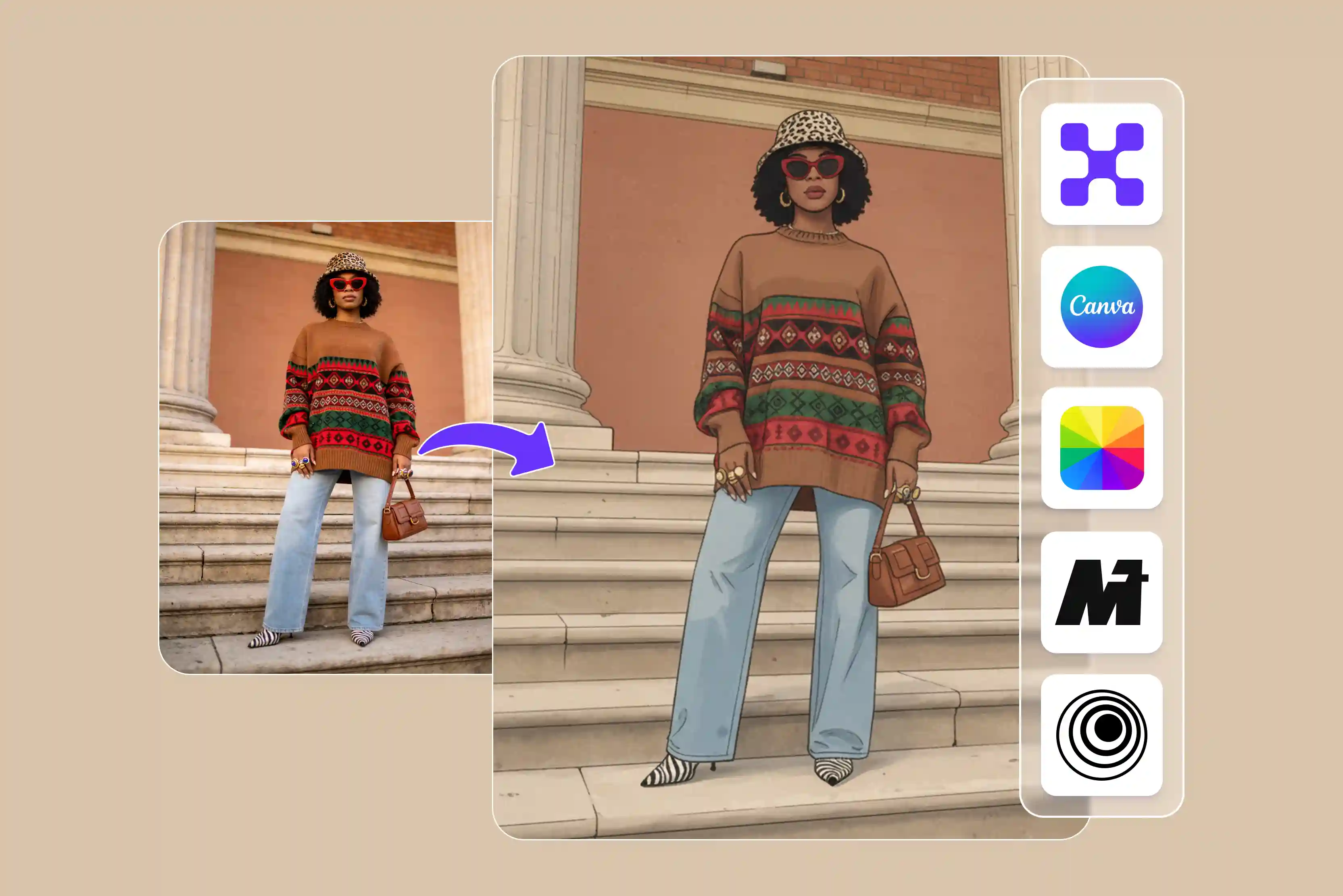


There are some anime characters that get more appreciation and love. There are many who like to watch fantasy anime movies and seasons; I also enjoy watching them. Many anime lovers like me wish to convert photos into anime.
Anime faces are a fun way to get creative with your photo edits and give yourself a new look. I tried turning my photo into anime using traditional methods like basic filters and editing apps, but the result I got was not satisfying.
The result looks unrealistic and blurry and didn’t really capture the true anime style I wanted. It was frustrating to spend too much time without getting proper results. That’s when I started looking for a better photo-to-anime converter that could provide more accurate, creative, ve and high-resolution results with less effort.
I tested many tools, and from those I selected 7 tools, and my all-time favorite is Pixelbin. Using Pixelbin AI tools, the online photo-to-anime converter, I changed my photo into colorful, creative anime art with just a few clicks. These tools can make it simple to turn your unprocessed photos into anime.
If you don't know any of the popular photo-to-anime converters, don't worry, I'm here to guide you. In this blog, I'll explain what a photo-to-anime converter is, how it works, and how you can easily turn your photos into anime-style images. I'll also share seven popular tools that can help you create anime art, along with all the important details you need to know.
What is a photo-to-anime converter?
A photo-to-anime converter is an AI-powered tool that converts real-world photos into anime-style images. It analyzes facial features, actions, haircuts, colors, and backgrounds using deep learning models and artificial intelligence before recreating them in anime art.
Pixelbin offers an AI-powered image transformation tool that can help convert real-life photos, selfies, and landscapes into anime and cartoon-style artworks.
Without requiring any knowledge of technology, the application creates styled, high-quality photos for avatars, social media, or creative projects by analyzing facial traits and image compositing.
Steps on how to convert a photo to Anime
Step 1: Visit Pixelbin -> AI tools -> online photo-to-anime converter.

Step 2: Upload your image. Paste the URL or click “Upload image” to select your picture in the following formats: JPG, JPEG, PNG, WEBP.
Step 3: AI processing. Wait for a few seconds while the Pixelbin AI editor automatically converts your photo into anime art.
Step 4: Download your image. Preview and download your anime-style image in high resolution, with no watermarks or extra cost.
Comparison table of the best tools for photo-to-anime converter at a glance
Best tools for a photo-to-anime converter
The best photo-to-anime converters include Pixelbin, Fotor, Media.io, Pixlr, and more, which use AI to transform portraits, pets, scenes, and more into various anime styles. Let's check one by one.
1. Pixelbin
With the help of Pixelbin, you can turn photos into anime art online for free. With the help of a few steps, you can now experience magic and turn your photos into expressive anime art with realistic detail and clarity.
There’s also no need for any technical skills; you can upload images in various formats like JPG, PNG, JPEG, and WEBP, according to your requirements, and wait a few seconds while AI automatically converts your photo into anime art. You may be able to preview and download your anime image in high resolution, depending on the plan.
You don’t need to sign up or create an account to use it. Access the tool instantly without creating an account or entering payment details. Pixelbin is designed for everyone, so anyone can easily create cool anime art of various photos without any hassle.
How to animate yourself with Pixelbin
The process is basic. Paste a URL or click "Upload image” to select your picture in the following formats: JPEG, JPG, PNG, and WEBP. AI processing waits for a few seconds while the Pixelbin AI editor automatically converts your photo into anime art. Download your image.
Sharing my personal experience
I tested the online photo-to-anime converter with Pixelbin, where I clicked on the "Upload image button and selected the image that I wanted to convert. As soon as I upload the AI, it automatically starts the process of generating crisp line art, smooth cell-shading, and soft backgrounds.
I'm really impressed with the Pixelbin photo-to-anime converter, which saves a great deal of time because it's simple to use and doesn't require a sign-up. The result looks sharp and well-defined, making anime art look professional and high-quality and giving photos a smooth, polished finish that really stands out.
If required, ed you can also use AI techniques to alter the image. I tested this with anime meme-type photos, and the results were really amazing with a polished finish and an eye-catching style.
Pros
- Ease of use
- Multiple image formats
- Browser-based platform
- Quick result
- No design skill required
- High-quality output
- No signup needed
- No manual effort required
2. Canva
Turn your picture into an anime-style image inspired by your favorite manga or series. Create a world of anime with your photos using the Animeify picture-to-anime converter on Canva. Just upload a photo and let the Animeify image-to-anime converter work with AI magic.
At the time of writing, the anime converter app offers eight free credits to transform a photo into anime art. You have to purchase additional credits by clicking the link at the bottom of the app page within the editor.
How to use
Let's learn how to use Canva to convert a photo to anime. Open Canva to start your project, select a template, or start from a blank canvas. Click the apps on the side panel of the editor and search Animeify to open the AI photo-to-anime generator. Select the photo that you want to convert and wait for a few seconds. You can add text, borders, and anime-style graphics; adjust the colors and apply filters to images.
Sharing my personal experience
I tested one of my photos by clicking on "Convert photo to anime" and then on the "Upload your image" button. Select the image that you want to convert from your PC or laptop. Wait for a few seconds, and new windows will open where you have to select a style like lively, classic, vibrant, or soft.
I selected Soft and clicked on the Animeify image button. The processing time was longer; as a result, I received something that was too blurry and lacked fine details. It didn't deliver the sharp, high-quality anime effect that I was hoping for.
Pros
- Ease of use
- No signup needed
- No technical knowledge needed
- No watermark
- Multiple style formats
3. Fotor
Fotor is a popular tool that ranks third on my list and can help you turn photos into anime online. Powered by advanced deep learning algorithms and style transfer technology, the Fotor picture-to-anime converter allows you to turn any kind of image into anime style.
Whether it's your selfies, portraits, pet images, or landscapes, it can convert your photos to anime. The process is easy: drag and drop your images to the picture-to-anime converter, and the AI anime filter will automatically complete the conversion.
How to use
The process is simple: click the “Try free anime conversion” button to switch from Fotor images to anime converters. Upload the image that you want to convert, select an anime style, and click on "generate." Wait for a few seconds to turn the photo into an animation. Free to regenerate if not satisfied with the result. Preview and download your anime pic.
Sharing my personal experience
I tested one of the images by clicking on the "upload image" button; thereafter, I selected the anime style and waited for a few seconds until the AI transformed my image into an anime-style version. I received a result with the watermark “Fotor generated with AI,” and in my experience, the result looked sharper compared to Canva. You can download the image if you are satisfied with the result.
Pros
- Ease of use
- No signup needed
- No technical knowledge needed
- Support multiple styles
- No manual editing
4. Media.io
Media.io allows you to convert your photos into anime-style images using a variety of AI-powered cartoon effects. Media.io AI Cartoonizer helps create personalized cartoon avatars within seconds, depending on processing time.
With just a few taps, you can now experience magic in your media content. Media.io also offers a 3D cartoon face maker for stylized character transformations. The tool is highly compatible with many image formats like JPG, PNG, and more. For free credits, you have to sign up.
How to use
The process of using Medio.io to upload your photo is to select the photo you want to convert into an anime-style image. Choose a photo from your device or drag and drop it into the designated area. To improve the uniqueness of your converted image, select from a variety of anime filters to obtain your preferred style, like classic, modern, or fantasy themes. Take advantage of the real-time preview features to see how changes affect your photo in real time and download the result if you are satisfied with it.
Sharing my personal experience
I tested one of my favorite images by clicking the "Photo to Anime Now" button. You have to select which anime art style you want; there are various styles given, such as puppet, digital illustration, game style, pencil style, Minecraft style, and more. I selected the puppet and clicked on the "go create" button.
It supports various formats, such as JPG, PNG, JPEG, WebP, GIF, and HEIC, at a resolution of less than 4000x4000 pixels, and you should click the generate button. Waited for a few minutes, and the estimated wait time of 2:21 was written. I received a result that looks more like a horror than a puppet with no watermark, but the process was too time-consuming.
Pros
- Ease of use
- Multiple style support
- Support multiple formats
- No technical knowledge needed
- No watermark
5. AIEnhancer
Turn your favorite moments into stunning anime art with AIEnhancer. AIEnhancer's photo-to-anime converter supports selfies, portraits, group photos, and even pet photos. There is no need to sign up; you can work online simply by uploading, converting, and downloading the result.
Whether you want to turn a selfie into a manga character, create a unique profile picture, or experiment with various anime styles. No design skills are required; just upload an image and let AI bring your anime vision to life.
How to use
The process of using AIEnhancer's photo-to-anime converter is to upload a clear selfie or portrait directly from your device. Select the style you want, then click the convert button. The AI analyzes your photo and recreates it in anime style within seconds. Your anime-style image is ready. Download the result and share it anywhere on social media, as an avatar or in creative projects.
Sharing my personal experience
I tested one of my group photos, where five people are sitting near a river in green grass. I uploaded the image, selected the style as manga, clicked on the Convert your photo button, waited for a few seconds, and received the result: the colors were vibrant, and most facial features were recreated accurately.
But in my group photo, one person was completely missing from the final anime converter, which was disappointing. The tools work well for individual portraits, but they may struggle with more complex group images.
Pros
- Ease of use
- No signup needed
- No technical knowledge needed
- No watermark
- Support multiple formats
- Support multiple styles
6. InsMind
Transform your photo into anime-style characters using InsMind's AI photo-to-anime converter. The tool scans your face and applies various anime styles to make your photos more enjoyable, allowing you to choose from different character designs and backgrounds to enhance your anime transformation experience.
If you are looking for a fun anime version of yourself or your friends, InsMind's AI tool allows you to convert images easily.
How to use
The process of using InsMind is very simple: go to the InsMind website and find the AI anime maker tool. Select and upload the photo you wish to convert to anime. Choose the anime filter from the available options to transform your photo into an anime-style image. Once processing is complete, you can download or share the result (watermark policies may vary).
Sharing my personal experience
I tested one of my images by clicking the “upload image” button, and five members were sitting in the green grass. There are various styles available, so I selected Anime1 and clicked on the generate button.
I waited for a few seconds until the process reached 100% completion, which took longer than anticipated. I received a result with no watermark, but the clothes the person wore were completely different in the result, including the colors. You can also switch the original one, and the result looks like the comparison.
Pros
- Ease of use
- No technical knowledge required
- Different anime style
- No watermark
- No signup needed
7. AirBrush
Convert your photo into anime-style images using the Airbrush AI anime generator. Simply upload your photo and let AI transform your regular images into captivating anime masterpieces.
You can go with the Airbrush AI anime converter for profile pictures, the gaming anime generator, Ghibli art, and more according to your requirements. Airbrush supports popular image formats like JPEG and PNG, making it easy to upload and transform your photos.
How to use
The process is simple: simply upload your photo and select the image from the library you want to convert. Now, click on the anime generator and let AI transform your image into art. Please review the result, and if you are satisfied, proceed to download it.
Sharing my personal experience
I tested one of the images by clicking on the upload image button. A girl is standing in the gallery, holding a mug, and near green leaves. As soon as I uploaded, the process started.
I received a result, but it was not proper; it was a girl holding a mug. I did not see the gallery or anything; however, there was no watermark, and many details were still missing. The image quality was clear, but the overall result wasn't perfect.
Pros
- Ease of use
- No editing skills required
- Hand-drawn style
- Support multiple styles
- No signup needed
- Support multiple formats
- No watermark
Benefits of using a photo-to-anime converter
Anime-style images have become increasingly popular online. You've probably noticed that people use their anime characters as profile images. Are you wondering why it occurs? Have a look below to see why using anime as profile pictures is better.
One of the biggest is how easily it turns ordinary photos into stylized anime portraits, providing your image a unique and eye-catching look without the need for any technical knowledge. Compared to making anime art in mutually beneficial ways, the tool saves time and effort by allowing you to quickly experiment with different artistic techniques.
The photo to anime art converter allows you to create a custom profile picture, a standout social media post, or a fun gift for a friend. Converting a photo into anime art adds a memorable touch. It also encourages experimentation, letting you see yourself or others in various anime-inspired themes and moods.
The converters are typically user-friendly and accessible, making professional-looking artwork available to everyone. With just a few clicks, you may produce striking results rather than devoting hours to studying illustration skills.
FAQs
The best way to convert a photo to anime is to use AI-powered online tools like Pixelbin. Simply upload your photo, and the rest of the things will be done by AI, which can be downloaded if you want.
You will receive free credit for your first three uses of the Pixelbin AI photo-to-anime converter online. Thereafter, you will be charged credits for each use.
You can upload images and support various formats like JPG, JPEG, PNG, and WEBP according to your requirements.
The working of the photo-to-anime converter using Pixelbin is simple: upload a photo or paste a URL that you want to, and now wait for a few seconds; you will receive the result very quickly with no watermark, no manual editing, and more.
Yes, you can upload a photo and ask the photo to transform it into an anime-style character using our AI anime generator from the photo feature. This is a great way to create a unique anime version of yourself, your friends, or any subject you choose.
While you cannot edit the generated anime art in the same tool, you can try the Pixelbin AI image editor to make further improvements.










