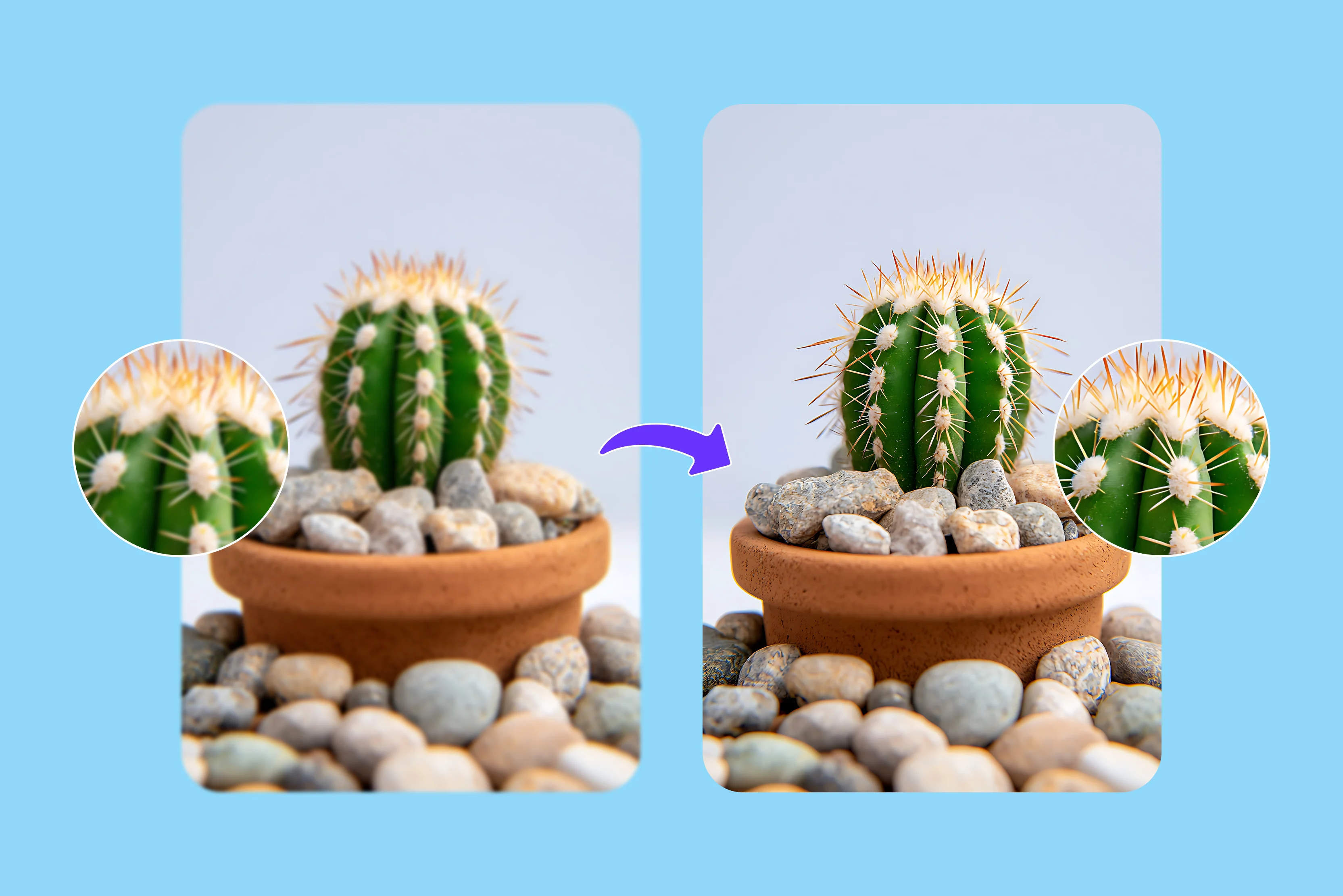


I found some old photos that were blurry and unclear, but they meant a lot to me, so I decided to try improving their clarity. But how? So I began by searching and tried traditional Photoshop, which requires several steps like adjusting sharpness with filters, reducing noise, and carefully enhancing details.
For just one or two images, this process can take time and often requires some editing experience to achieve good results. This process took me 2-3 days, so I reconsidered whether there was an easier way, and then I found a modern AI image sharpener that automatically improves clarity and resolution in just a few seconds.
Instead of spending more time on manual adjustments, AI tools analyze the image and enhance it, making photo improvement faster and more convenient. I searched for the best AI image sharpeners. While researching, I came across several tools, including the Pixelbin AI image sharpener, which I decided to test.
It is effortless to use; simply upload the image and let the AI process it. However, there are many AI sharpeners available. I tested several of them and shared my experience below. Based on my testing, Pixelbin stood out for its ease of use and results.
This blog explains what an AI image sharpener is, why you should use it, and highlights the top tools for image sharpening. In order to help you select the greatest solution for your goals and budget, I'll also compare how user-friendly different programs are. Prepare to turn those blurry photos into crisp, attractive photographs.
What is an "AI image sharpener"?
AI picture sharpening is a state-of-the-art method that improves the clarity and detail of photos by utilizing artificial intelligence. Various tools are available that use AI algorithms to enhance the detail of your imagea, and analyze the image data, and use sophisticated techniques to remove blur to enhance the overall quality, frequently producing clearly better results, ts particularly for low-resolution or unclear photographs.
AI image sharpener tools are designed to deliver quick and consistent results, often making them easier to use than traditional manual editing methods. Because of this, they are quite helpful for applications where clear images are important, such as social media, e-commerce products, photography, and more. In the sections below, we’ll also explore tools like Pixelbin that can help unblur and explain images using AI.
Best AI image sharpener for free
1. Pixelbin

Pixelbin is a popular AI-powered image optimization platform that offers tools for sharpening and enhancing images with flexible features. Use Pixelbin's AI image sharpener to reduce blur and enhance portraits, landscapes, and text within seconds. The tool is known for its simplicity and ease of use, but it still doesn't compromise functionality.
You can skip manual editing tools or complex sliders. With Pixelbin, you simply upload your image and apply AI-based sharpening with minimal effort. Get started with easy image upload, or paste a URL to import your photo in JPG, JPEG, WEBP, or PNG format.
In just a few seconds, Pixelbin AI automatically enhances your image. You can download the enhanced image, though usage may depend on your plan or free tier limits. The image sharpener is ideal for photographers, designers, artists, and content creators who need HD output quickly. Pixelbin offers image enhancement features, including noise reduction, subject to its pricing or free tier limits.
I tested one of the blurry images, clicked the upload image button, and selected the image from my device that I wanted. Wait for the result; Pixelbin AI will take a few seconds to automatically enhance your image. Genuinely impressed with the results.
The tool uses AI to enhance image clarity and reduce blur within seconds. The image looks noticeably clearer and more detailed. The processing is fast the final image maintains good quality without looking overly edited. If you need a quick way to improve the sharpness of your photo, Pixelbin may be worth trying.
Key features
- Ease of use
- One-click image sharpening
- Multiple image formats
- Fast process
- Batch processing
- No credit card login
- No watermark
- Browser-based, no installation
2. Canva
No one likes blurry images in their work, whether on websites, social media, personal photographs, or more. Canva offers online tools that help enhance and sharpen images, improving their clarity for digital content. In my list, the tool at position 2 is Canva. In seconds, automatically enhance blurred edges and clarify your image, recovering every final detail.
How to sharpen an image in Canva: open the image, then click the Apps icon in the editor side panel. Select the type of image upscaler in the search bar to sharpen the image with AI for free. Select the image you want to change again. Under the upscale amount, select an option, then click the upscale image to enhance your photo clarity with AI. If any editing is needed, modify elements with Magic Eraser Pro and erase objects.
I tested my old photos, which were blurry, and made the necessary changes. After a few seconds of processing, the result still appeared slightly blurry, and some fine details were missing. The image does not look natural. Another downside is that some advanced features require Canva Pro, limiting what free users can do.
Key features
- Ease of use
- No technical knowledge needed
- Multiple image formats
- No watermark
- Browser-based, no installation
3. OpenArt
OpenArt is an AI-powered platform that offers tools for enhancing and upscaling images. With an advanced image sharpener, you can turn your blurry photos into crisp, clear images that are perfect for enhancing professional graphics and preserving precious memories. Image sharpeners can enhance logos, illustrations, and other design elements, ensuring they look crisp and clean when printed or displayed on various devices.
The process is easy to use. Click on the drop file here and select the image that you want to change. After receiving the message that the image has been successfully updated on the left side, select Creative Upscale, adjust the enhancement level to your requirements, and click the Create button.
The final output didn't meet expectations, especially compared to other AI image enhancement tools available online. The tool is easy to access, but the results were quite disappointing. For the images that were moderately blurry, the improvement was minimal.
Key features
- Ease of use
- No technical knowledge needed
- No signup needed
- Multiple style support
- No watermark
4. Media.io
Media.io is an AI-powered tool that allows users to sharpen and enhance blurry images with just a few steps. This tool can assist in removing blur in images and increase overall image clarity by automatically and effortlessly enhancing image details, edges, and colors using an AI algorithm.
The tool supports various formats like JPG, PNG, JPEG, and BMP according to your requirements; it's up to 2,5MB, and the resolution is under 6000x6000. The process is simple: please click on the upload image button to upload your blurry photos, or simply drag and drop your images into the area.
After uploading, Media.io will automatically sharpen your image, which takes a few seconds depending on the image's size. If you are satisfied with the result, then download it. I tested one of the images by clicking the upload image button, which only required fixing a slightly blurry photo, and I waited a few seconds for the process to complete.
The results were really disappointing. The tool added a visible watermark to the entire image, which didn’t look much clearer; it still appeared blurry, and the edges looked unnatural. The upload and processing were also slower than expected. I expected better sharpening quality and a clean export, free of watermarks, from the free version.
Key features
- Ease of use
- No signup needed
- Support multiple formats
- No technical knowledge needed
- One-click image sharpening
5. TopazLabs
TopazLabs offers AI-powered tools that can sharpen images, enhance details, and reduce blur to improve overall image quality. Use powerful free AI sharpening tools to smooth your photos instantly right from your browser.
The process is basic, effectively sharpening the photographer who needs precise control over complex blur issues. Depending on their requirements, users use the sharpened images for e-commerce product photos, real estate listings, social media content, professional photography, and more.
The process is very simple; with a few clicks, you can receive the result. Click on the upload button to start from your device and wait for a few seconds; you will see the result. I tried one image that was blurry and received the result after hearing too much hype about the powerful tool. The result really disappointed me. First, processing a single image takes too long and is far longer than expected. Details weren’t properly restored, and edges looked unnatural.
Key features
- Ease of use
- Multiple style support
- No signup needed
- No technical knowledge needed
- No watermarks
6. Picsart
Picsart offers AI image sharpener tools that can help to reduce blur, enhance details, and improve photo clarity. The AI image sharpener automatically increases your image resolution and makes it clearer with just a few clicks. It's simple to use and quickly improves blurry photos. It's not just about clearer photos; it's about improving them pixel by pixel. It can be useful for improving low-resolution images or enhancing older photos, although the result may vary depending on the image quality.
How to make a photo clearer using Picsart: simply upload the photo you want to enhance from your laptop. Thereafter, you need to do nothing; the AI does everything automatically. Wait for a few seconds; you will see the result in the third step and download it.
I tried to check one image by clicking on "Browse Files" or by dropping, pasting, or adding a URL. Received the result: the image clarity makes blurry photos look much sharper and cleaner. One thing to notice is that the tool is easy to use, but the processing time is longer, and you don't need any editing skills to get good results.
Key features
- Ease of use
- No technical skills needed
- Support multiple formats
- No signup needed
- No watermark
7. Fotor
Fotors offers an AI-powered image sharpener that can help improve image clarity and reduce blur within seconds. Powered by advanced AI algorithms, our tool automatically analyzes and sharpens blurred edges, making images clearer for you. By uploading an image, the tool attempts to enhance details and improve the edge sharpness within a few seconds.
The process is very easy to use with the AI image sharpener in Fotor; simply click any blue button on this page and upload a PNG or JPG file. You can upload anything from portraits and landscapes to pet images. The tool will automatically start sharpening your photos, and you will see the result ready for download. For further improvement, you can click Basic adjust to adjust settings such as sharpness, contrast, brightness, saturation, and more.
I tried one of the images for better results, but the experience was disappointing. In some areas, photos still looked blurry, and colors appeared slightly washed out instead of clearer. Another major issue is that the resulting image includes a watermark, which is less useful for all purposes. The tool didn’t deliver the sharp, natural-looking result I expected from an AI image sharpener.
Key features
- Ease of use
- No signup needed
- No technical knowledge needed
- Additional editing tools
- Support multiple formats
- Easy export
8. LetEnhance.io
LetEnhance.io is an AI image enhancement tool that helps improve image clarity and reduce blur online. Without the need for technical expertise, it can unblur images and improve details in just a few seconds using advanced machine learning algorithms.
Without requiring advanced editing knowledge, the tool improves image resolution and helps with blurry photos. Using the tool is easy: simply upload an image, and the AI will automatically improve its overall appearance and sharpness. I tried the LetEnhance.io AI image sharpener, but the results weren't very impressive.
There was not much editing, and several parts of the image still appear blurry and incorrect. The minimal credits offered by the free edition limit the number of images you may test, which is another drawback, as you can only go so far with Pixelbin.
Key features
- User-friendly interface
- No technical knowledge required
- Multiple format support
- Batch processing
Why use an AI image sharpener?
An AI image sharpener helps improve the clarity and quality of digital images. AI image sharpeners automatically fix blurry images, improve image resolution, and more. By enhancing clarity and highlighting features in your photos, an image sharpener can improve your visuals.
- Fix blurry: Some AI tools can detect certain types of blur, like motion blur or camera shake, and attempt to improve image clarity.
- Graphic design: Logos, illustrations, and other design components can be sharpened with image sharpeners to appear clear and sharp when printed or displayed across a variety of media.
- Social media: Using a photo sharpener can make posts stand out in crowded feeds, increasing interaction and attracting more followers.
- Restore old photos: By improving clarity and details, AI image sharpeners may help in the restoration of outdated or poor-quality images.
List various reasons to get good results with this image sharpener
Understanding an image sharpener's capabilities and following best practices are important for achieving the best results.
- Select high-quality photos: To ensure the sharpening process increases detail without introducing unwanted artifacts or noise, start with a high-resolution image.
- Adjust the settings: To find the right balance between sharpening details and preserving the image's natural appearance, try experimenting with different sharpening settings.
- Making the final decision: Preview the results before saving or exporting them to ensure that they meet your expectations and avoid oversharpening.
- Gain knowledge from experience: Make a note of the settings that work best for various types of images so you can use the image sharpener more frequently. Apply what you've learned to future projects to ensure consistent outcomes.
Why choose Pixelbin AI image sharpener?
Pixelbin offers a free AI image sharpener that uses advanced AI technology to fix blur and improve image quality with no effort. The tool refines details across the entire image so you get clearer edges and better contrast. With Pixelbin, you can
- Sharpen images online instantly
- No signup required; use freely and download your sharpened image immediately
- Recover fine details in portraits
- Fix Pixelated images
- Enhance clarity of product images
- Improve personal photo, family photos, and old photos
- Supporting multiple formats according to your requirements
- Get a clean, enhanced photo without weird artifacts
FAQs
Pixelbin is the best AI for sharpening images with advanced machine learning algorithms. It can unblur images and enhance details in seconds and needs no technical skills. An AI tool that sharpens blurry images and enhances details instantly.
Pixelbin AI-powered sharpening delivers superior image quality. Unlike basic sharpening tools, it analyzes your image to apply precise enhancements, resulting in a clearer, more detailed photo without unwanted artifacts. Select a tool tailored to your image type, whether it’s portraits, landscapes, or product photos.
The Pixelbin AI image sharpener is free to try on up to 10 images with no watermark. To access an unlimited number of renders, you can upgrade to a subscription plan.
Yes, AI is excellent at cleaning up photos by automatically removing unwanted objects, text, and distractions and restoring old or blurry images, making complex edits simple with just a few clicks or brush strokes.
While sharpening an image on Pixelbin does not affect the resolution of images, it does increase their details. Thus, the quality remains intact while the output looks visibly better.
You can upload various image formats like JPG, JPEG, PNG, and WEBP.










