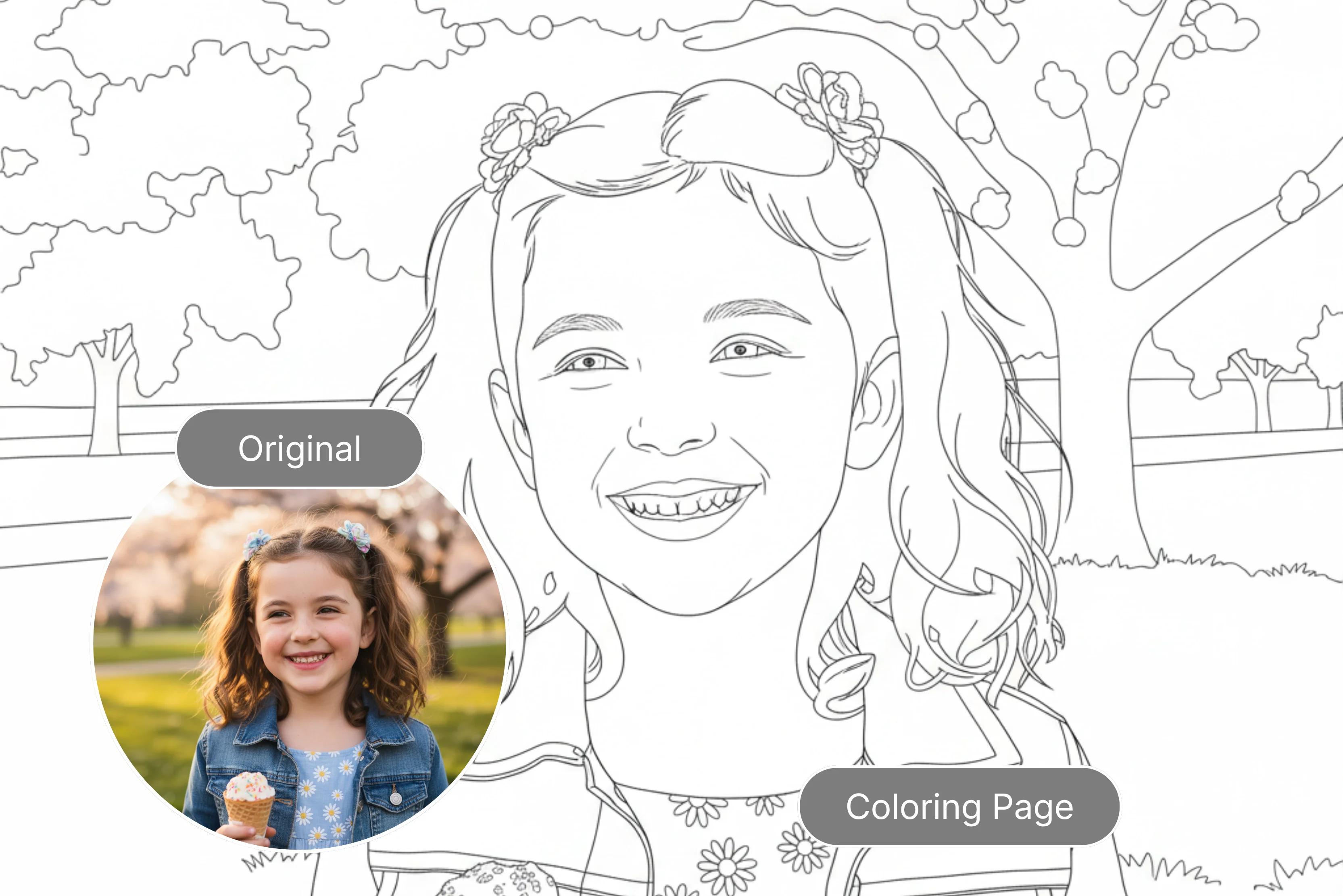


My child tried several common coloring pages, and I started thinking about offering something more unique this vacation to better stimulate his creativity. Coloring pages have played a big role in childhood development, making them fun and creative. But in today's AI-powered world, parents, teachers, and content creators no longer have to rely on some common books.
Today, digital tools offer a wide range of creative possibilities. Many AI tools can convert images into black-and-white line art suitable for coloring pages. Changing your favorite photos and illustrations into fun projects has never been easier. I want to look at tools that can enable me to color pages that are truly unique.
I found various tools that help create custom coloring pages, making personalized coloring fun for kids, adults, or anyone. Of those tools, my favorite is Pixelbin. Pixelbin offers a comprehensive suite of AI tools to streamline your image management process. Easily remove backgrounds, remove watermarks, generate images, remove objects from them, and much more.
The Pixelbin AI coloring page is very easy to use. Simply upload an image, apply the desired transformation, and within seconds, you can download the result. In this blog, I have selected 7 of the best, easy tools that can help you create custom coloring pages. Learn how these tools simplify the process of creating coloring pages and help you bring any idea to life.
What is the meaning of coloring pages?
Coloring pages are printed sheets containing black-and-white line art, designed for individuals to add colors using crayons, markers, or paints. Children can use them as creative and enjoyable activities, and adults can use them as relaxing, soothing, and sometimes even thoughtful tools to enhance focus and reduce stress. Coloring pages can help children develop fine motor skills, color recognition, and patience while also providing a sense of accomplishment.
How to make coloring pages
Easily create high-quality coloring sheets with the Pixelbin AI coloring page generator. Let’s check step by step how to use it.
Step 1: Visit Pixelbin -> AI tools -> search for the Pixelbin A-coloring page generator.

Step 2: Add your image or paste a URL. Click the “Upload image” button and select your file. Pixelbin supports JPG, PNG, JPEG, and WEBP formats.
Step 3: Wait for a few seconds. Pixelbin AI automatically converts your image into a black-and-white page within seconds.
Step 4: Preview and download your coloring page for free without any watermark or hidden charges.
Why use a coloring page generator?
A coloring page generator allows users to quickly create customizable, printable black-and-white line art without requiring drawing skills. With the coloring page generator, you may express yourself creatively and uniquely.
The tools save time, offer a wide variety of design options, and allow personalized themes. Many provide free versions or trial plans and may be suitable for educational purposes, printable activities, or low-content books, depending on the licensing terms.
- Educational tools: Educational tools provide kids with activities that enhance their fine motor abilities and help adults feel less stressed and anxious, such as interactive games, arts and crafts, and mindfulness exercises. Engaging coloring images can support children's creativity, fine motor abilities, hand-eye coordination, and color recognition.
- Instant customization artwork: Creators can create personalized or themed designs with unique AI coloring pages tailored to your interests and preferences.
- Easy access and sharing: Many coloring page generators are accessible from any device and allow rapid creation. Some platforms also offer bulk-processing options for content creators.
- Cost-effective: Many tools offer free versions or affordable plans, allowing you to print only the pages you need, helping reduce costs and paper waste.
Table at a glance
Various tools that help make coloring pages
1. Pixelbin
Create black and white coloring pages from your photos in just one click using Pixelbin. With these tools, you can quickly turn your favorite pictures into creative outlines in seconds. Turn your images into kid coloring pages fast with AI, without writing long prompts or requiring manual editing.
You can create outline-style pages suitable for kids and adults, depending on the image you upload. You can also create educational-themed colored pages (letters, numbers, or concepts) by uploading suitable source images.
How to use
To use the Pixelbin AI coloring page generator, paste the URL or click the "Upload image" button to select your file. Pixelbin supports JPG, JPEG, PNG, and WEBP formats. Wait a few seconds; AI automatically converts your image into a black-and-white coloring page. Preview the result and download it.
Sharing Experience
I tested one of my favorite images, which I need in black-and-white format. Click on the upload image button. I uploaded one image and waited for a few seconds. Wonderful! I got the result within seconds in my test, I had no watermark, and the lines looked clear and sharp. Moreover, the tool allows you to convert an image to a video, edit an image with AI, or export an image.
Key Features
- Ease of use
- Zero quality loss
- One-click result
- No watermarks
- Ability for bulk creation
- No signup required
- No technical skills required
- Multiple image formats
- Batch processing
- No credit card login
2. iColoring
Easily create high-quality coloring sheets with the iColoring AI coloring page generator. Just upload a photo or text and get your unique creation instantly. iColoring page generator also offers classic, cartoon, and pencil sketch styles, turning your memories into beautiful coloring in seconds.
A coloring page can be generated according to your description in just a few seconds. It is compatible with various platforms, including computers and smartphones, and it synchronizes and operates in the cloud, enabling you to create at any time and from any location.
How to use
I tried to upload a photo by either dropping it here or clicking Upload, but it only supports PNG, JPG, and WEBP formats. Select styles such as cartoon, Snoopy, sketch, or default based on your requirements. Click on the generate button and wait for a few seconds for the result.
Sharing Experience
I had tried with one of the images and clicked on the upload image button. Select the classic cartoon style and click on the Generate button. Wait a few seconds until the process completes; I received only half the result.
You can download the image in PNG and PDF formats if you are satisfied. There is no watermark in the result, and you can add your coloring if you want.
Key features
- Ease of use
- Available on multiple platforms
- No signup needed
- No watermark
- No technical knowledge needed
3. ColorifyAI
Create high-quality coloring sheets for free with the Colorify AI coloring page generator. ColorifyAI uses AI technology to transform text prompts or photos into coloring pages, typically within seconds.
The tool provides you with two options: text to a coloring page or a photo to a coloring page. You can go with it according to your requirements. The platform is designed to be easy to use and allows users to generate coloring pages for kids using either option.
How to use
The process is simple: upload the image into the coloring page converter and then take the next step. Click the “Generate” button and wait a short while for the result. Download and save your creation. With the text-to-coloring page, you have to enter a text prompt in the text box, select various styles and aspect ratios, and click on the generate button.
Sharing experience
Key features
- Ease of use
- No signup needed
- No technical knowledge required
- No watermark
- Support multiple formats
4. PortraitArt
Crafting coloring pages is a fun and creative way to engage kids with art. PortraitArt is the only service that uses advanced AI algorithms to transform a photo into professional-quality line art coloring pages. You can transform special memories into unique works of art.
The tool allows you to customize your images into creative sketches, lovely oil paintings, dreamy watercolors, and many other styles, in addition to coloring pages. It's good for parents and teachers looking for educational and sentimental crafting activities. You can also frame or gift your finished coloring pages.
How to use
The process of using PortraitArt coloring pages is very easy. Click "drop a photo here" or "load one," then upload the image you want to upload. Choose your preferred option, such as a coloring page, and proceed by clicking on the "Generate" button.
Sharing experience
I tested one of my photos with a green background. Wait until the process completes; the process is taking too much time, as I received a result that was not perfect, only a greyish type, which does not look like a pure white format.
Key features
- Ease of use
- No technical knowledge needed
- No watermark
- No signup needed
- Support multiple styles
5. ColorBliss
ColorBliss is an AI coloring page generator that lets you create custom coloring pages, full coloring books, or quick line art from photos. The tool allows you to enter information in both ways: by typing text or by uploading photos.
Type any text prompt like “A girl sitting near the Taj Mahal” and get a print coloring page in seconds. In the uploaded image, you have to upload the image, and AI removes the background, cleans the noise, and creates crisp line art ready to print. The system is compatible with both JPG and PNG formats.
How to use
The process is simple: sign up for free (no credit required). Enter your prompt or upload a photo that you would like to use as a coloring page. After uploading, wait a few seconds while your coloring page is created. Download your coloring page as a PNG or a PDF according to your requirement. Print or share your coloring page.
Sharing experience
I tested one of my images, which offers many options, such as text prompts, word art, photos, and more. I have selected a photo from which you can choose the one you would like to color. The supported formats are JPEG, PNG, JPG, or WEBP, depending on your requirements.
I selected my image, chose one style from the various options given, selected default, and clicked on " Make my coloring sheet (using 4 credits). After a few seconds, I received the result, but half of it was blurry and not in the proper format.
Key features
- Ease of use
- No technical knowledge needed
- Available in multiple styles
- Support multiple formats
- No watermark
- Batch processing
6. Crayola
Create mindful and meaningful coloring pages using AI prompts that are unique to your students. The process is very simple; you can add your photo and create your own coloring page.
How to use
The process is simple: click on the Add photo button and pick a photo for your coloring page. As soon as the image is uploaded, step 2, which is written, asks you to pick the best look for your photo and then click the next button. Step 3: Zoom, rotate, or drag the image until the print, download, and start over options are clearly visible.
Sharing experience
I clicked on "Add photo" and uploaded the photo, which needed coloring pages, and waited for a few seconds, and got a result that was not proper. Step 2 displays 3-4 options for selection, with a message urging you to choose the one that best complements your photo. The result was too blurry, not perfect according to me; avoid it; this is a waste of time.
Key features
- Ease of use
- No signup needed
- Support multiple formats
- Support various styles
- No watermark
7. iPage
iPage offers AI-powered coloring page generators designed to help users create custom pages. The tool is useful for finding and creating your own coloring pages for kids' art and images using AI.
The process is simple; you can easily create pages as needed. We offer powerful AI coloring page tools like text-to-coloring-page and photo-to-coloring-page generators. Every coloring page generated by iPage.ai is designed for commercial use, fully compliant, and ready for you.
How to use
Upload your image and convert it into a coloring page using the available options. You may have options such as removing the background, upscaling, preserving faces, etc., depending on your requirements. Click the generate button and wait for the result.
Sharing experience
On the generate button, I tested one of my images, which had a green background and a girl with a purse hanging from her hand. After waiting a minute, I received a clear, almost flawless result that did not include a watermark.
You can download the image in PNG format and possibly PDF, depending on the platform’s features or plans.
Key features
- Free to use
- Beginner-friendly
- No signup needed
- No watermark
- Batch processing
Choosing the perfect coloring pages platform
Thanks to the amazing tools we've looked at, making customized coloring sheets has never been simpler. Whether you're a parent, teacher, therapist, or just looking for an enjoyable and creative outlet, there is an ideal solution for everything from robust design platforms and specialized printing services to AI-powered instant generation.
There are some important points to be considered, such as the budget, the level of customization you need, and whether you prefer digital or physical copies when making your decision. For AI-driven creation, Pixelbin may be a suitable option due to its simple interface. Depending on the current platform requirement, you may be able to upload an image and generate a result without a complex setup.
This is a possibility for creating unique, engaging, and therapeutic custom coloring pages. So, are you ready to transform your ideas into beautiful personalized coloring pages? Turn your photos into custom coloring style pages using Pixelbin’s AI tools. Processing time may vary depending on the image.
FAQs
Yes, you can easily turn photos into coloring pages using free AI tools like Pixelbin, Colorify AI, etc. These platforms allow you to upload images and convert them into black and white in just a few clicks.
According to my choice, Pixelbin is best used for coloring pages.
The common formats for coloring the pages are JPG, JPEG, PNG, and WEBP.
Create coloring pages with the AI generator in Pixelbin. Create custom coloring pages that kids will love; with a simple photo upload and a few clicks, you can generate them.
Yes, you can process multiple images simultaneously with the Pixelbin bulk editing API, available in premium plans.
Yes, you can use Pixelbin for an AI coloring page generator for free. Sign up any time to redeem ten free credits and continue using the tool.










