

If you routinely upload a thumbnail or blog graphic to a content dashboard, copy the image URL, and paste that URL into your live blog, you are already using a small part of an image CDN workflow.
However, a true image CDN does far more than host files: it can compress, resize, transform, cache, and deliver images faster. It optimizes your visual media assets on the fly for every user screen.
This comprehensive guide will provide a practical explanation of what an image CDN means, how it works, why it matters for page speed and SEO, how everyday bloggers, sellers, or developers use it, and how Pixelbin supports this workflow with Storage and CDN URLs.
What is an image CDN?
To understand an image CDN, it helps to break down the two components of the term. A Content Delivery Network (CDN) is a distributed network of servers globally deployed to serve web content to users based on their geographic location. A standard CDN caches static assets like HTML pages, JavaScript files, stylesheets, and media files at edge locations, reducing the physical distance data must travel between the origin server and the end user's device.
An image CDN is a specialized content delivery network designed specifically for images and media delivery. While a traditional CDN simply delivers whatever static files you upload to your origin server, an image CDN adds an intelligent middle layer. It can store, resize, compress, transform, and deliver images through optimized URLs. This means the network does not just fetch and serve an identical, heavy file to every user; instead, it looks at who is requesting the image, what device they are using, and where they are located, then modifies and optimizes that asset on the fly before delivery.
How does an image CDN work?
The operational mechanics of an image CDN follow a distinct lifecycle from the moment an asset is created to the point it renders on a user's screen. This workflow combines server-side computing power with edge caching to maximize efficiency.
Step 1: Upload or connect the source image
The workflow begins when an administrator, editor, or user uploads a high-resolution master image into the system, or when the image CDN is connected to an existing external server or cloud bucket.
Step 2: The image gets stored in a storage system or a connected data source
The master file is saved securely in a central repository, acting as the single source of truth. This preservation of the original quality allows you to generate endless variations without degrading the original file.
Step 3: The image CDN generates or uses a CDN URL
The network creates a structured, addressable URL that points directly to the asset. This web address contains specific paths, identifiers, and placeholders for optimization directives.
Step 4: Website, blog, app, or ecommerce store uses that URL
Developers or content creators embed this URL into their codebase or content management system (CMS) image tags, ensuring the frontend points to the network rather than the local host.
Step 5: The CDN serves the image from a nearby edge server
When a visitor loads the web page, their browser requests the image. The network intercepts this request and serves the file from the closest geographic edge server, or points of presence (PoPs), eliminating latency.
Step 6: Optional transformations resize, compress, convert format, or adjust quality
If the URL contains specific parameters or if the edge server detects a mobile browser, the CDN alters the file dynamically. It trims dimensions, applies modern compression algorithms, shifts formats, and delivers a modified version, caching it for subsequent users in that same region.
Normal image hosting vs image CDN
Why do image CDNs matter for blogs and websites?
Content-rich websites rely on diverse visual elements to engage audiences, including blog thumbnails, featured images, detailed tutorial screenshots, complex infographics, review images, and landing page visuals. Managing these visual assets manually across hundreds of articles creates a significant operational bottleneck.
When a blogger uploads unoptimized screenshots or graphics, page speed deteriorates. Slow loading speeds increase bounce rates and harm core user metrics. An image CDN mitigates this by compressing file sizes automatically while preserving clear visual fidelity, achieving major bandwidth savings for site operators. This optimization proves especially vital for mobile performance, where users browse on unstable cellular networks and require fast, lightweight page assemblies to remain engaged.
However, an image CDN does not replace good SEO basics like alt text and descriptive filenames. Search engine crawlers still read textual descriptions to understand the context of an image, meaning clean file naming conventions and descriptive alt attributes must be maintained within your CMS alongside backend delivery systems.
Why do ecommerce sellers use an image CDN?
In digital commerce, high-quality visuals directly influence conversion rates. Online merchants manage vast digital ecosystems consisting of product images, multi-angle catalogs, marketplace listing images, targeted ad creatives, social media variants, and immersive product detail pages.
Sellers face the challenge of adapting a single product photograph for multiple layout areas. They must maintain consistent image dimensions across product grids, remove distracting backgrounds, and resize files so category pages load seamlessly. Doing this manually for thousands of Stock Keeping Units (SKUs) is highly inefficient.
Sellers with many SKUs need repeatable workflows, not one-by-one manual editing. An image CDN allows them to upload a single, pristine master image and automatically deploy perfectly cropped, optimized variants across web stores, mobile apps, and third-party marketplaces using simple adjustments embedded within the image links.
Why do developers and teams use an image CDN?
Engineering groups and cross-functional creative teams handle complex media challenges that transcend simple file uploading. Platforms that accept user-uploaded media—such as social apps, forums, or review portals must process millions of unpredictable, unoptimized uploads daily. Developers rely on image CDNs to sanitize, standardize, and scale these inputs automatically. By leveraging APIs, software development kits (SDKs), URL parameters, and automated presets, development teams can build dynamic resizing layouts effortlessly.
They can connect custom domains to keep delivery URLs branded and link external storage systems to their delivery network. This programmatic flexibility means engineering teams can keep one source image and generate multiple delivery versions dynamically, avoiding storage bloat and eliminating redundant asset management tasks across corporate repositories.
Common image CDN features
Modern image CDNs provide a comprehensive suite of utilities that optimize media lifecycles from initial ingestion to end-user rendering:
- Image storage and folder organization: Built-in digital asset management interfaces allow teams to group files into logical folder trees, simplifying internal file discovery.
- CDN URLs: Structured web links that serve as accessible entry points for real-time asset delivery.
- Compression and quality optimization: Algorithms that strip hidden metadata and re-encode pixel arrays to shrink file footprints without reducing visual quality.
- Resize, crop, extend, and format conversion: Real-time geometry tools that alter height, width, and bounding boxes on demand.
- WebP/AVIF support where available: Automatic format switching to modern file types that offer superior compression performance compared to legacy JPEG or PNG configurations.
- DPR support for high-density screens: Device Pixel Ratio alignment that delivers crisp, high-resolution assets to Retina or OLED screens while serving standard definitions to baseline displays.
- Presets for repeated transformations: Saved configuration shortcuts that apply consistent sizing and filtering parameters across matching design groups.
- Zones, datasources, external storage, custom domains, and bulk jobs: Advanced administrative controls that integrate external storage environments, mask network hostnames, and execute large-scale processing workflows simultaneously.
Image CDN URL algorithm
An image CDN uses a structured URL format to interpret optimization directives in real time. To understand how these networks decode instructions, it helps to examine a generic URL template:
How Pixelbin supports image CDN workflows?
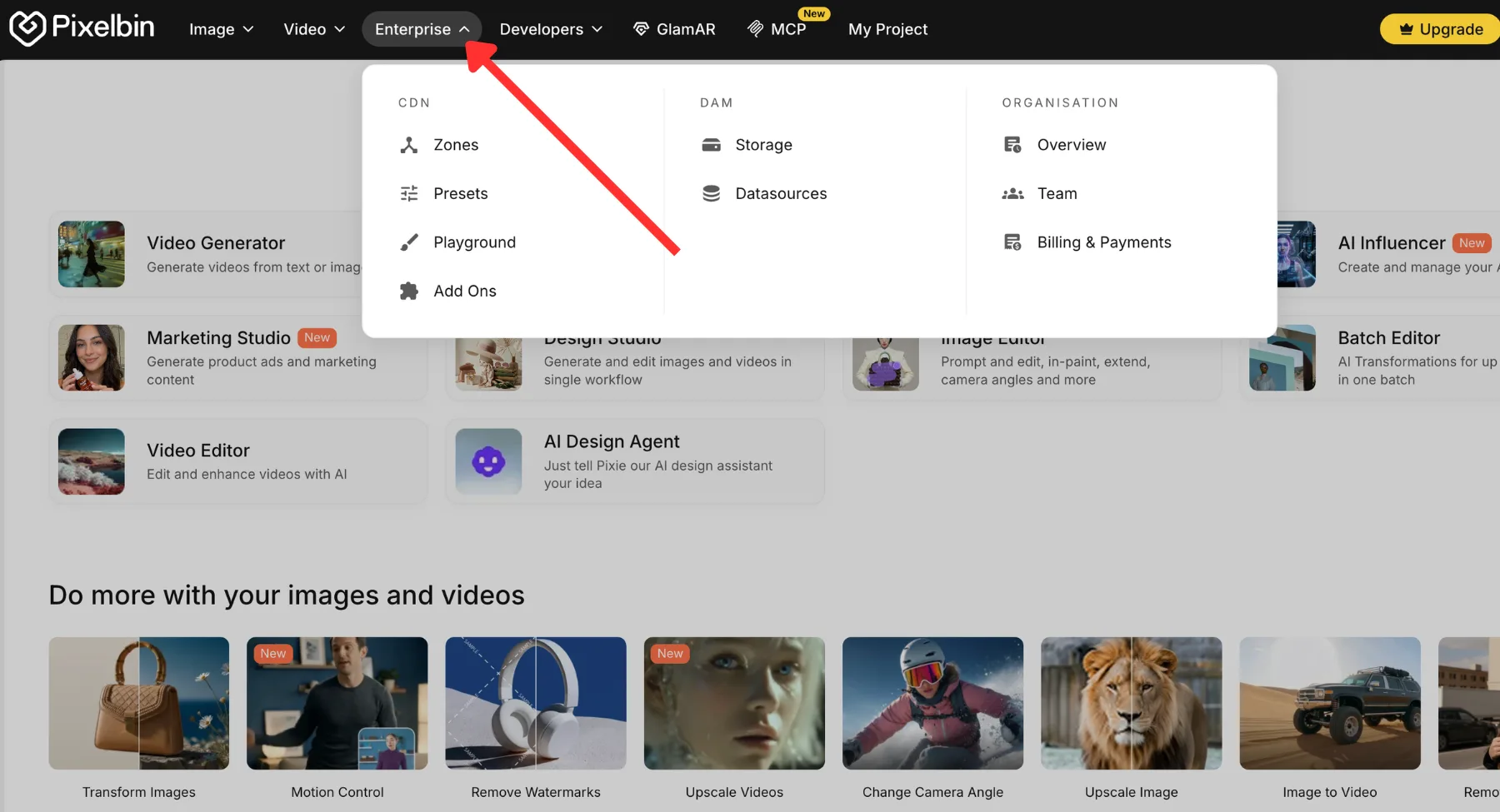
Pixelbin streamlines file management by unifying cloud storage, programmatic transformation systems, and high-speed distribution assets into a single dashboard. Rather than forcing users to pair independent storage buckets with separate optimization tools, the platform provides a cohesive environment built around real-world digital asset management. The intuitive console groups critical management functions systematically:Pixelbin Storage sits under the Enterprise/DAM modules, while optimization configurations can be refined using Zones, Presets, and the interactive Playground.
If your blog workflow already depends on uploaded image URLs, Pixelbin Storage can help you store images and use their CDN URLs across blog graphics, product pages, or website assets.
The practical implementation workflow follows a sequential, accessible path:
- Log in to Pixelbin and open the console: Access the centralized cloud management space.
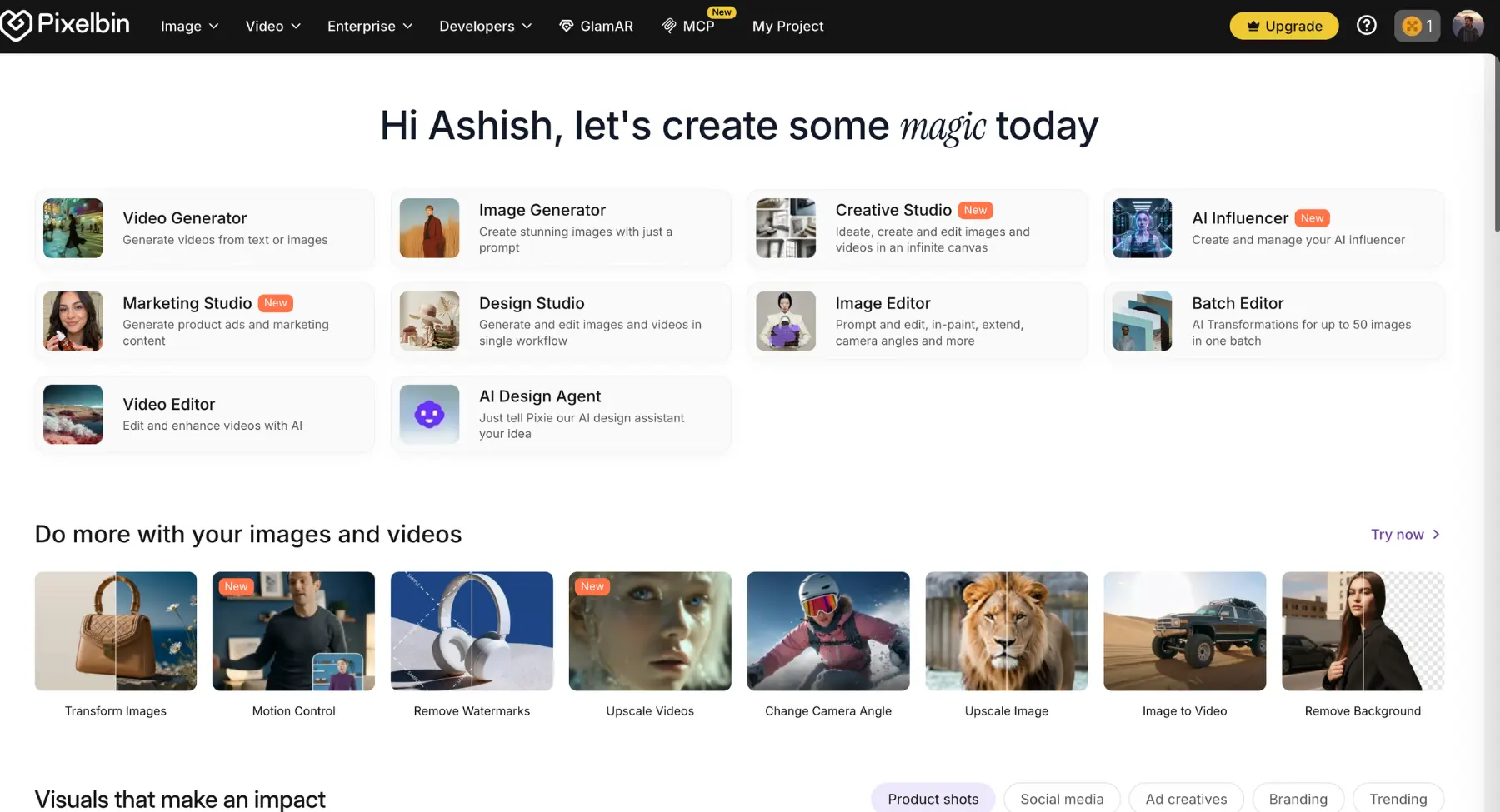
- Go to Enterprise/DAM Storage: Navigate to the core asset repository pane.
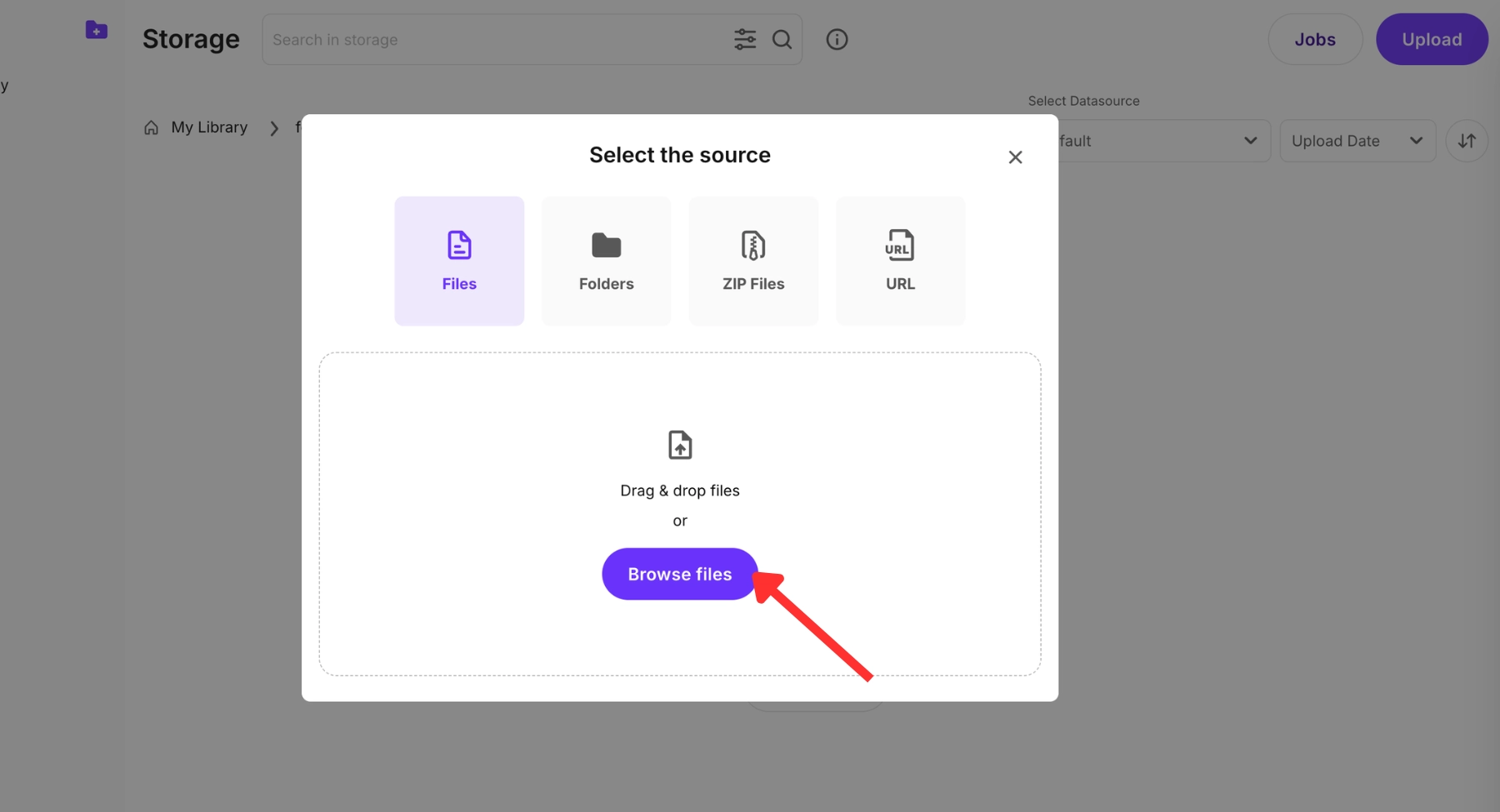
- Upload images, folders, or ZIP files: Batch-import media assets directly into the cloud.
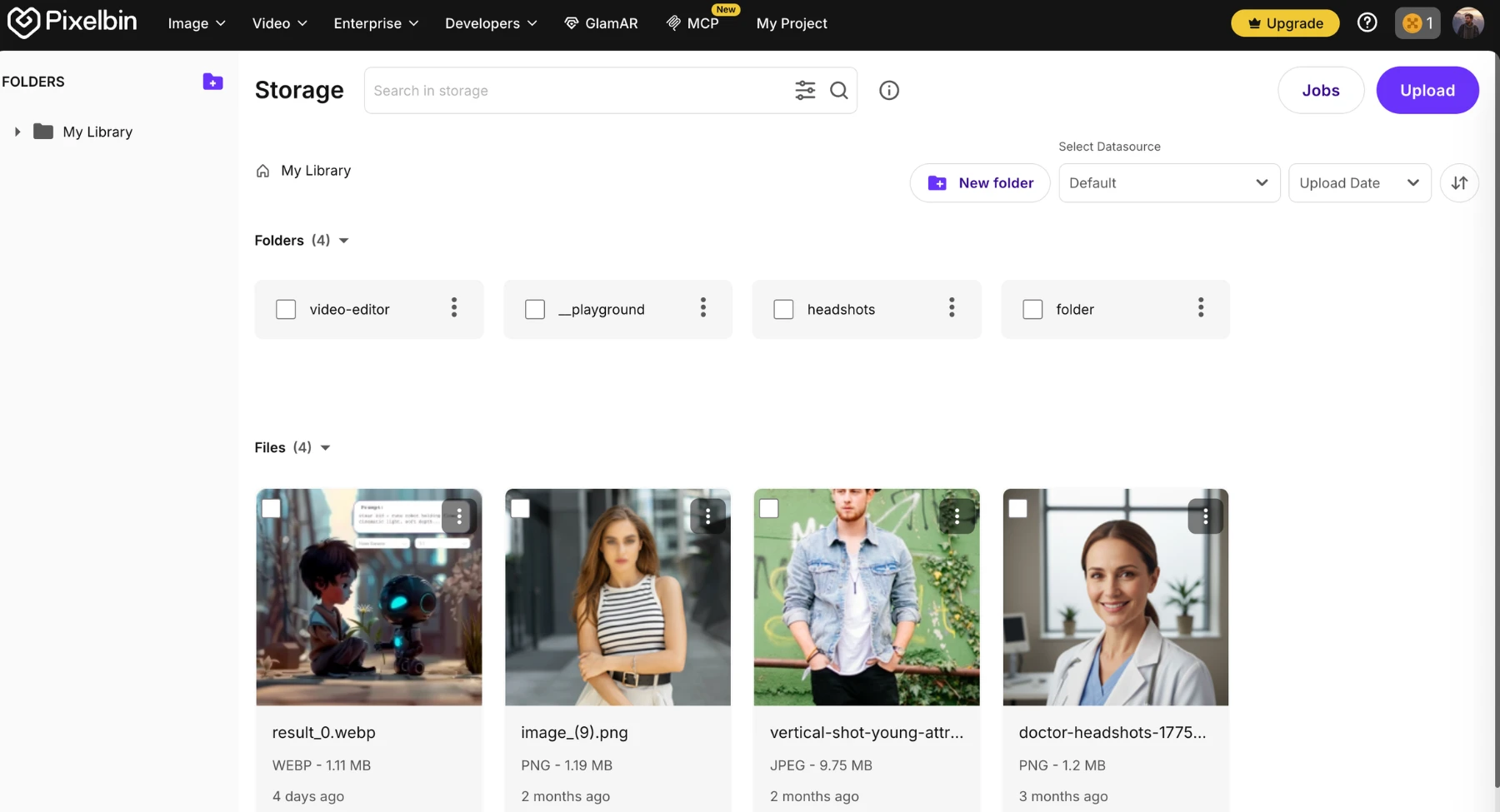
- Organize assets in folders: Categorize media elements clearly to maintain cross-team visibility.
- Copy the generated CDN/image URL: Capture the optimized web paths for deployment.
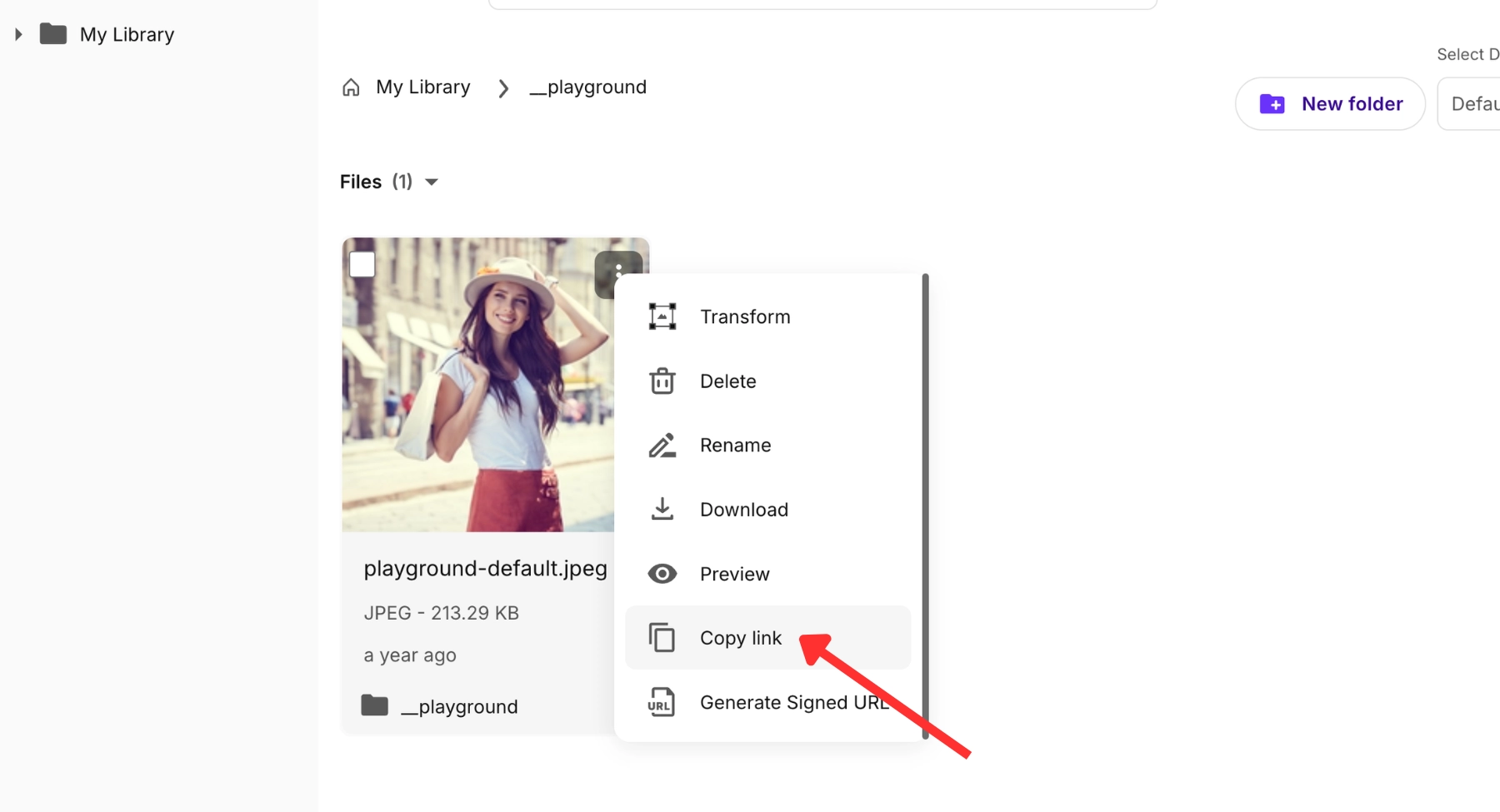
- Paste that URL into a blog, CMS, website page, or product page: Embed the link directly into target display areas.
Beyond basic delivery, users can apply advancedimage transformations, run automated presets, inject real-timequality optimization directives, and use AI editing tools depending on the specific demands of their workflow. However, operational efficiency requires active resource management. Users should track storage parameters, monitor transformation volumes, and stay aware of plan limits instead of assuming resources are unlimited. Tracking account consumption ensures long-term workflow predictability.
Image CDN SEO benefits and cautions
Images represent a large percentage of the data transferred on modern web pages, making media optimization crucial for search engine positioning.
Strategic benefits
- Faster page load speed: Shaving milliseconds off loading times reduces overall page abandonment.
- Lower image payload: Smaller page footprints allow web browsers to parse, construct, and render page layouts quickly.
- Better mobile experience: Fast delivery over cell networks ensures a smooth user experience on mobile devices.
- Core Web Vitals support: Drastically improves metrics like Largest Contentful Paint (LCP) and reduces Cumulative Layout Shift (CLS) by serving properly dimensioned media containers.
- Smoother browsing: Keeps visitors on your site longer, increasing session depth and engagement signals.
Important cautions
- Indirect ranking factors: A fast CDN supports SEO indirectly by improving speed and user experience, but it does not replace alt text, descriptive filenames, explicit layout dimensions, or valuable page content.
- URL stability: Keep image URLs stable where possible. Changing image URLs too often can cause search engine crawlers to re-index assets repeatedly, which can create image SEO and migration issues.
Best practices for using an image CDN
To get the most out of an image CDN, implement consistent operational guidelines across your creative and technical teams:
- Use descriptive file names: Name source files clearly (e.g., blue-running-shoes.jpg) before uploading, ensuring search engines can easily index your visual assets.
- Add alt text in the CMS: Always populate alt text fields within your website builder or HTML code to ensure web accessibility and context verification.
- Use the right image dimensions: Match your layout requirements exactly. Do not request a 3000-pixel wide file if the container on the page only displays at 600 pixels.
- Serve modern formats where possible: Take advantage of next-generation formats like WebP or AVIF to achieve superior file compression without degrading visual clarity.
- Use presets for repeated sizes: Define standardized transformation rules for thumbnails, banners, and previews to keep presentation layouts uniform across your site.
- Organize assets into folders: Group assets by project, year, or department to prevent file duplication and streamline team workflows.
- Avoid uploading unnecessarily huge raw files: Crop out dead space and compress excessively large photography assets prior to upload to save central storage space.
- Monitor your usage: Regularly audit your account dashboard to track storage space, monthly bandwidth, transformation volumes, and credit consumption against your current plan limits.
Common mistakes to avoid
Even with powerful optimization tools available, improper configurations can create performance bottlenecks. Be sure to avoid these common mistakes:
- Uploading heavy images and never optimizing them: Assuming the network will fix everything automatically without applying optimization parameters or presets leaves files bulkier than necessary.
- Using one giant desktop image for mobile users: Forgetting to apply responsive design principles forces mobile browsers to download excessive desktop-scale pixels over slow cellular connections.
- Changing image URLs too often: Frequently altering file paths breaks active image indexes, harms image search traffic, and creates broken links across external sites.
- Forgetting alt text: Relying solely on automated asset delivery while neglecting your HTML accessibility tags undermines your site's overall search context.
- Using random filenames: Leaving camera-generated strings like IMG_9482.jpg intact misses a valuable opportunity to provide context to search indexing bots.
- Ignoring storage and credit costs: Neglecting your billing dashboard can lead to unexpected service limits or overage fees when traffic spikes or bulk assets are processed.
- Not checking how images render on mobile: Failing to preview live mobile layouts can result in awkward cropping, text overlaps, or unreadable details on smaller screens.
FAQs
An image CDN is a specialized network of geographically distributed servers built to optimize, transform, and deliver images. Unlike standard CDNs that simply deliver static files, an image CDN modifies images on the fly resizing, compressing, and changing formats based on the user's location and device type via optimized CDN URLs.
No. Standard image hosting simply stores your files and serves them exactly as they were uploaded. An image CDN combines cloud storage with an intelligent processing engine and global edge servers, allowing you to dynamically resize, compress, and reformat images in real time via URL parameters.
It improves speed in two key ways: by routing requests to the closest geographic edge server to reduce latency, and by dynamically compressing file sizes, adjusting quality levels, and converting images to lightweight modern formats like WebP or AVIF before delivery.
Yes. It is an excellent way to manage blog thumbnails, featured graphics, screenshots, and embedded infographics. Using an image CDN ensures your pages load quickly on mobile devices, which helps reduce bounce rates and improves the reader experience.
Yes. Ecommerce businesses use image CDNs to manage extensive product catalogs across diverse SKUs. It automates resizing, applies consistent presentation dimensions, removes backgrounds, and speeds up product detail pages to help boost conversion rates.
A CDN image URL is a structured web address that points to an asset hosted on a delivery network. It contains specific components including the delivery domain, cloud identifier, transformation parameters (like width or quality adjustments), and the internal file path.
Yes. It strips out unnecessary metadata and applies advanced compression algorithms to minimize file weights significantly, maintaining crisp visual presentation quality while requiring less bandwidth.
Yes. By adding specific width or height parameters directly to the delivery URL or applying pre-configured design presets, the system dynamically generates a perfectly sized image variant at the network edge.
It supports SEO indirectly by boosting page speed, reducing mobile payloads, and optimizing Core Web Vitals like Largest Contentful Paint (LCP). However, it must be paired with on-page SEO best practices like descriptive alt text and clean filenames.
Pixelbin is a comprehensive digital asset management and image optimization platform. It combines robust cloud storage with powerful real-time transformations, automated presets, and high-speed global delivery, providing an efficient media workflow rather than just a basic content delivery pipeline.