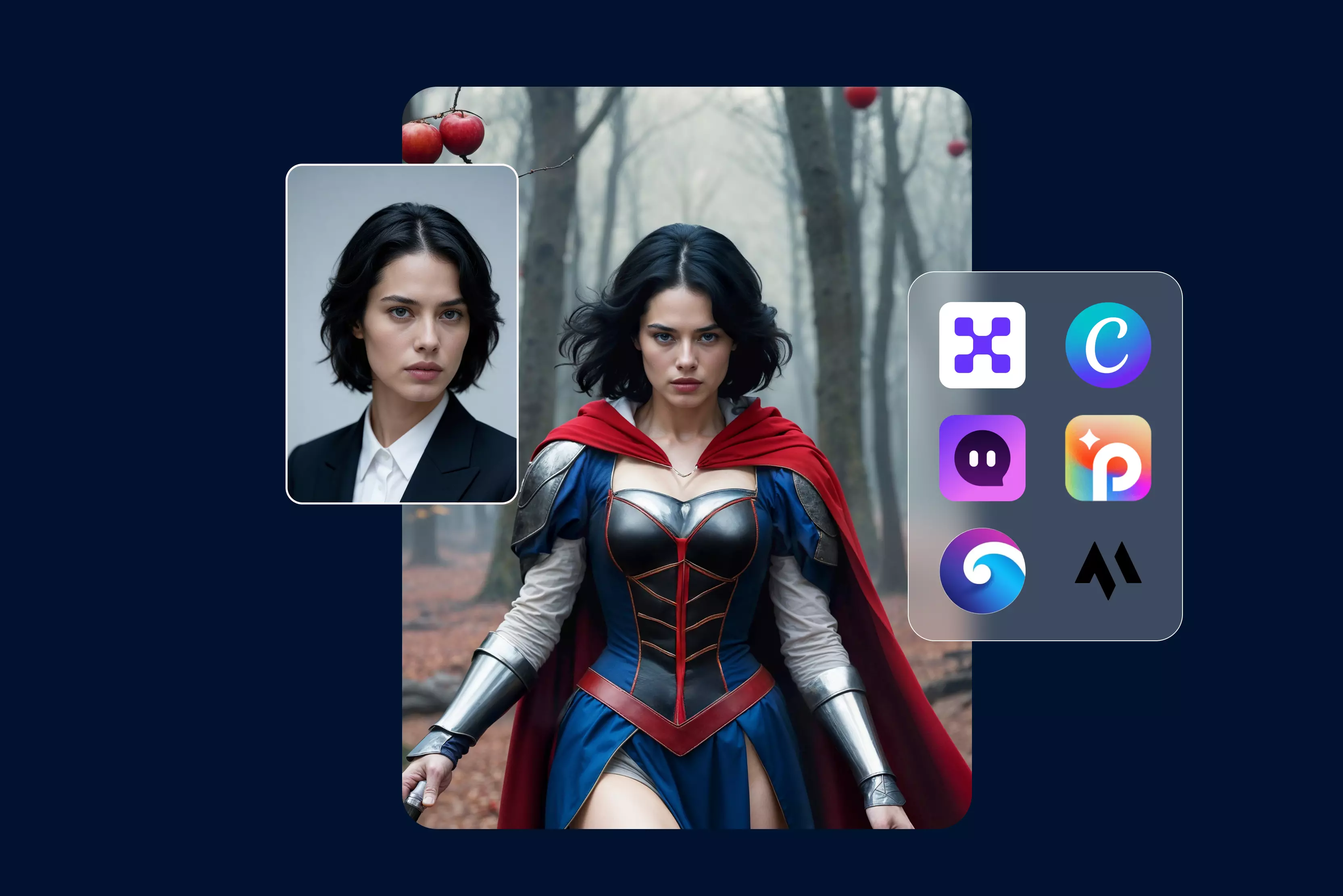


Face swap tools used to feel more like a fun trick - good for a quick laugh, but rarely good enough to use seriously. That’s changed fast. Today’s AI face swap tools can create surprisingly realistic results that work for everything from social media content and marketing campaigns to demo videos and creative experiments.
And no, you don’t need editing skills or expensive software to use them. I’ve spent a lot of time testing face swap tools - some impressive, many disappointing. The reason face swapping is trending right now is simple: modern AI is finally good at understanding faces.
It can match expressions, lighting, and skin tones well enough that swaps don’t instantly scream “Edited.” That makes these tools genuinely useful for creators, marketers, and even small teams trying to move fast without big budgets.
In this guide, I’ll walk you through the best AI face swap tools available right now - what they’re good at, where they fall short, and Key features to look for in the best AI face swap tools. By the end, you’ll know exactly which face swap tool makes sense for your photos, videos, and workflow, and which ones you should skip.
What is an AI face swap tool?
If you’ve ever wondered how people swap faces so cleanly that it doesn’t look fake, that’s where AI face swap tools come in. An AI face swap tool uses machine learning models to detect facial features such as eyes, nose, expressions, skin tone, etc., and then intelligently replace one face with another while keeping things natural.
We’re not talking about simple cut-and-paste here. The good tools understand lighting, angles, and expressions, so the final image or video actually looks believable.
I’ve tested face swap tools on everything from casual selfies to professional marketing creatives, and the difference between basic tools and AI-powered ones is obvious within seconds.
How do AI-powered face swaps differ from traditional face swap apps?
Traditional face swap apps are usually rule-based. They detect a face, map a few landmarks, and overlay another face on top. That works for quick fun, but it breaks down fast, especially with side angles, expressions, or uneven lighting.
AI face swap tools take a different approach. They study facial structure, expressions, and movement. Based on it, they reconstruct the new face so it blends naturally into the image or video. This means:
- Better alignment with facial expressions
- More accurate skin tones and lighting
But if your source image is blurry, badly lit, or shot from an awkward angle, even the strongest tools can fall short. From my testing, starting with clean, well-lit inputs still makes a big difference. Common use cases across industries.
AI face swap tools are no longer used for fun filters only. Let us have a look at some of the common use cases of face swap tools:
- Content creation and social media: Creators use face swaps to make memes, reels, parody videos, and creative content without setting up a full shoot.
- Marketing and advertising: Brands use face swaps to try different versions of ads and visuals by changing faces instead of doing new photo or video shoots.
- Entertainment and media: Used for concept visuals, dubbing experiments, and creative storytelling, especially in short-form video.
- Education and training: Some teams use face swaps for role-based simulations, presentations, or demo content.
- Personal and casual use: From fun photos to nostalgic edits, casual users still make up a big part of the audience.
One thing I always look for is control - the ability to adjust realism, expressions, or output quality. Tools that don’t give you that flexibility often feel limiting pretty quickly.
List of the best face swap tools in 2026
I’ve tested 12 different face swap tools over time, and honestly, most of them follow a similar core pattern. They work across images, GIFs, and videos, and handle everything from single-face swaps to multi-face swaps in group shots. In day-to-day use, that flexibility matters more than flashy features.
Almost all of these tools offer a free trial or free credits, which is great, you can test the quality before committing. That said, results vary a lot.
Clear images make a huge difference, and video swaps are still hit-or-miss on realism. My takeaway? These tools are genuinely useful for creators and casual users, as long as you know their limits and don’t expect movie-level perfection.
1. Pixelbin

Pixelbin’s AI face expression changer lets you transform the emotion in a photo without sitting in Photoshop for hours. You upload any JPG, PNG, or WebP portrait, type a simple instruction like “Add a smile” or “Make a surprised look,” and Pixelbin’s smart AI analyzes facial features like eyes, mouth, lighting, and texture to generate a new expression that stays true to the original image.
It's a fast, browser-based platform, and doesn’t require editing skills, making it ideal for quick emotional tweaks, headshots, or creative edits.
2. Remaker AI
With Remaker AI, you can change facial expressions by swapping faces in a photo or video with another. The system tracks movements and adjusts features so smiles, surprised looks, or neutral expressions feel natural rather than pasted on. It supports multiple face swaps in group photos and even multi-character video swaps, which is huge when you’re editing clips with several people.
The platform also offers templates and presets from fun themes to professional headshots, so you don’t start from a blank slate. It’s approachable for creators and pros alike, although ultra-fine expression tweaking can still vary with source quality.
3. Magichour.ai
Magic Hour AI isn’t just another face swap sit; it lets you remap and edit faces in photos and videos with surprising ease. Its tools automatically detect facial features and replace them frame-by-frame in videos or stills, preserving lighting and motion so expressions stay believable rather than pasted on.
You can even swap multiple faces in one shot, which is perfect for group clips. What stood out in my long-term testing is the library of ready-made templates from viral memes to cinematic transitions, so you don’t start from scratch.
It’s not perfect for ultra-complex edits yet, but for most creators, it’s a fast, fun way to generate expressive, social-ready visuals without a steep learning curve.
4. SeaArt AI
This face swap tool analyzes your photo or video’s facial geometry and lighting, swapping in new faces for natural-looking results with minimal effort.
You can replace multiple faces in a group photo at once or upload a clip and let SeaArt’s video face swap tech handle the rest in just a few clicks. There’s even a library of templates and GIF presets to jumpstart fun or cinematic edits, so you’re not always starting from scratch.
It’s surprisingly usable for both playful memes and more polished content, though hyper-realistic expression fine-tuning still depends on your source quality.
5. Canva
If you want a simple way to swap faces, Canva has you covered, but with a twist, instead of a one-click AI face-swap like some dedicated tools, Canva’s strength lies in combining face-swap apps (like Reface or FaceSwapper from its Apps Marketplace) with its intuitive editor so you can place, align, and blend faces inside your design.
You upload your photos, use the face swap app to replace faces, then fine-tune positioning, background, and effects with Canva’s drag-and-drop tools. It is useful for social graphics, memes, and creative visuals.
6. ImagineArt
If you want to swap faces without wrestling with Photoshop, ImagineArt’s AI Face Swap tool is refreshingly simple and surprisingly effective. You upload a photo, choose another face to insert, and the AI detects facial shape, symmetry, and features like eyes, nose, and lips, then blends the new face onto the original with realistic proportions and lighting.
I like how fast it works, and the clean online interface; even beginners can get quality results without hours of editing. It’s cloud-based, so you need internet, and quality still depends on clear, high-resolution inputs, but for fun edits and creative content, it’s genuinely useful.
7. Pica AI
I’ve spent time with Pica AI’s face swap tools, and they genuinely make swapping faces in photos and videos really easy, even if you’re not a pro. The AI automatically detects faces in your upload, then lets you replace them with new ones, including multiple faces at once,e without clunky menus or confusing settings.
What I appreciate is the simple flow: upload your photo/video, choose the face to insert, and hit “Swap.” It works online, offers some free credits, and handles both photo and video face swapping well, although quality depends on image clarity and lighting.
8. YouCam online editor
I have tested YouCam online editor, and the process is refreshingly simple: You have to upload a photo, choose the face you want to swap in, and let the AI handle detection, alignment, and blending.
The tool automatically fixes facial details, skin tone, and lighting, so the face looks natural and blends well with the photo. It supports multi-face swapping, which is handy for group photos, and offers ready-made templates for quick, fun edits without starting from scratch.
It runs directly in your browser, which I appreciate: no downloads required. That said, results depend heavily on image quality, and some features are locked behind a paid plan.
9. AI face swap
I’ve spent time with AI Face Swap, and it’s one of the most straightforward online tools for swapping faces in photos, GIFs, and videos - no sign-ups or watermarks required.
The AI automatically detects and maps facial features, then blends a new face into your original image with natural alignment and lighting. You can swap one face, multiple faces in a group shot, and even try batch swaps across many images or videos. A user can also share the link to edited photos on a social media platform.
10. Joyfun.ai
It is one of the friendliest tools I’ve tried. The AI Face Swap feature automatically detects facial features in your photo, then blends another face onto it with surprisingly smooth results even in group shots.
You can do image face swaps, multiple swaps, and video face swaps, all for free and without signing up. What stood out to me is how accessible it feels click “Swap,” and the AI takes care of lighting, expressions, and proportions.
The result or the quality of the final image depends a lot on photo clarity, and while it’s great for memes or creative edits, always use face-swapping tools responsibly and respectfully.
11. Facewow
Facewow lets you upload a photo and another face (or use built-in templates), and the AI automatically detects and replaces faces in photos or videos with realistic blending and lighting.
You can even do multiple face swaps in group shots or turn your edits into 3D-style avatars, which is great for memes, creative content, or playful visuals. What I like is how fast and browser-based it feels - no software, no signup, but remember that clearer source images always make for better results.
12. FlexClip
If you want to swap faces without dealing with complicated editing tools, FlexClip makes the process simple. I’ve used its AI Face Swap feature, and it works exactly how you’d hope: upload a photo, upload the face you want to swap in, and let the AI handle detection, alignment, and lighting. The results usually look natural, especially with clear images.
What I really like is that FlexClip doesn’t stop at face swapping; you also get ready-made templates to turn your edited images into memes, reels, or short videos. It’s browser-based, beginner-friendly, and practical for quick creative work, though better photo quality always gives better results.
How does AI face swap technology actually work?
If you’ve ever wondered what’s really happening behind the scenes when an AI face swap looks surprisingly real, this is it. After testing quite a few tools over time, I’ve noticed that the best ones all follow the same core process, just with varying levels of accuracy and control.
1. Face detection and facial landmark recognition
Every face swap starts with detection, but the quality of the swap depends on how precisely the face is mapped.
Modern tools don’t just detect a face, they identify 60–200+ facial landmarks: eye corners, lip curves, jawline edges, nose bridges, even subtle contour points. The better the landmark model, the fewer distortions you’ll see around eyes and mouths.
In practice, tools that struggle here tend to fail on:
- Side profiles
- Faces partially covered by hair or glasses
- Low-resolution or compressed images
From my testing, tools that allow video frame-by-frame processing or preview adjustments usually perform better than fully “Black box” apps.
2. Expression, lighting, and skin tone alignment
This is where AI face swap tools either shine or completely fall apart.
Once the face is mapped, the AI has to synchronize expressions, not just replace pixels. Smiles, eyebrow movement, head tilt, and micro-expressions all need to match the source footage. On top of that, lighting direction and skin tone must be recalculated so the swapped face doesn’t look pasted on.
Even strong tools can struggle with:
- Harsh shadows or mixed lighting
- Extreme facial expressions
- Fast head movement in the video
My rule of thumb: if the lighting looks bad in the original image, AI won’t magically fix it. Clean input still matters more than most tools admit.
3. The role of deep learning and neural networks
This technology uses AI that has learned from many face photos. They learn how faces look at different angles, ages, lighting, and expressions.
The biggest difference between “Okay” and “Great” tools comes down to:
- How diverse their training data is
- Whether models are optimized for images, video, or both
- How well they handle edge cases (motion blur, partial occlusion)
This is also why newer tools often outperform older apps even with similar features. Better models = fewer uncanny results.
4. Ethical and privacy considerations
This part matters more than most people think.
Any tool that processes faces is handling biometric data, whether it says so or not. Responsible platforms are clear about:
- Whether images are stored or deleted
- How long is data retained
- Whether uploads are used for model training
I personally avoid tools that are vague about privacy or bury policies behind marketing pages. Transparency is a good signal of maturity and respect for users.
Ethically, consent still matters. Face swap tools are powerful, but the line between creative use and misuse is thin. The best tools do not just focus on realism; they also set boundaries.
Key features to look for in the best AI face swap tool
After testing face swap tools for everything from blog demos to short-form videos, I’ve learned that flashy demos don’t mean much in real-world use.
What actually matters are the features that hold up when you’re working with imperfect photos, long videos, or tight deadlines. Here’s what I look for and why you probably should too.
1. Photo and video face swap support
Plenty of tools do a decent job with static photos. Far fewer handle video well. If you plan to work with reels, ads, or explainer clips, video support isn’t optional, but it’s the whole point.
The best tools keep faces consistent frame-to-frame instead of letting them “Float” or subtly change shape mid-video, which is where most tools fall apart.
2. Realism and expression accuracy
This is where face swap tools earn or lose my trust. A good tool doesn’t just paste a face; it understands expressions, head tilt, eye direction, and lighting.
I pay close attention to smiles, blinking, and jaw movement. If those feel off, the swap instantly looks fake, no matter how sharp the output resolution is.
3. Ease of use and learning curve
I don’t mind powerful tools,s but I do mind tools that make simple swaps feel like a VFX course. The best AI face swap tools balance control with simplicity.
You should be able to get a clean result on your first try, and refine it on the second, without digging through endless sliders or undocumented settings.
4. Processing speed and performance
Speed matters more than most people admit. When you’re testing multiple faces or iterating on a video, waiting 10 -15 minutes per render kills momentum fast.
Strong tools process efficiently without overheating your system or crashing mid-export. Bonus points if they handle batch processing without turning into a mess.
5. Data privacy and user consent
Always look for clear statements on how images are stored, whether they’re used for model training, and how quickly data is deleted. If a tool isn’t transparent here, it doesn’t matter how good the results look.
6. Export quality and watermark control
Some tools look great in preview and disappoint at export. Check whether you can export in HD or higher, and whether compression ruins facial details.
Watermarks are fine for testing, ng but if they’re unavoidable or aggressively placed, that’s a dealbreaker for professional use.
7. Free vs paid feature availability
Free plans are great for checking how real the face swap looks and how easy the tool is to use. But they don’t always show everything the tool can do.
I prefer tools that let you properly try the main features for free and clearly tell you what you’ll get if you upgrade. If a tool hides limits, adds watermarks without warning, or locks exports, it’s usually not worth using long-term.
Conclusion
The right face swap tool should respect expressions, stay consistent in motion, process fast, and be upfront about data usage. You don’t need the most complex setup; you need something reliable enough to trust in real workflows. If a tool saves you time, stays honest about its limits, and doesn’t slow you down at export, that’s the one worth keeping.
FAQs
AI face swap tools use machine learning to detect facial features in images or videos and replace one face with another while matching expressions, angles, and lighting for realistic results.
The most realistic results usually come from tools that support high-resolution images, accurate face detection, and advanced blending. Image quality and lighting play a big role inthe final output.
Yes, many modern AI face swap tools support images, GIFs, and videos. Some also allow multi-face swapping in group photos or scenes.
Most tools offer free trials or limited credits. However, watermark-free exports, HD quality, and longer videos usually require a paid plan.
AI face swap tools are legal to use for personal and creative projects, but using someone’s face without consent, especially for misleading or commercial purposes, can raise legal and ethical concerns.
Use clear, high-resolution images, ensure faces are well-lit and facing forward, and avoid heavy filters or blurry photos for the most natural results.