PixelBin logo
Image generator is here -   Create Now   and Claim 30% off on Pro Plans. Use code SALE30 at checkout.   Claim Discount

AI car photo editor online

Fix, clean, and improve your raw inventory car photos with just one click.

Uploaded image
2500 chars left
Max file size 10 MB.
Loading

AI Magic in progress
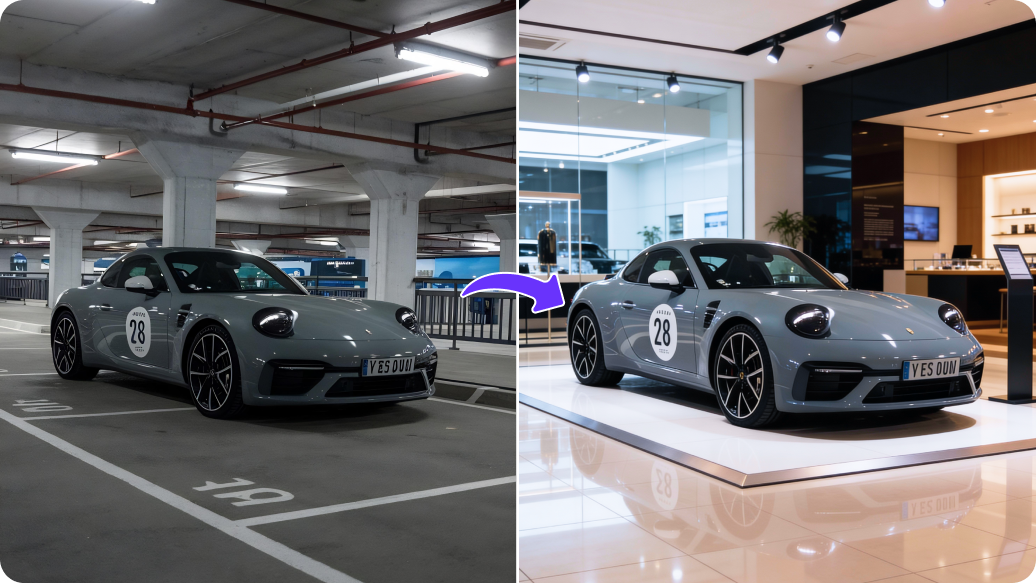
Enhancing lighting, improving colors, and refining your car photo for menus and online listings

Ready

Your enhanced car image is ready!

Edit image with AI
Get 🔥 free credits for image editing, upscaling, generation and more
Edit car photo another car photo
Generation Failed

There was some issue on our end. Please try again.

Try Again
Show case

How to edit car photos using Pixelbin?

1
Add your image
Upload your vehicle photo in JPG, PNG, or WEBP format.
2
Describe the edits
Define the changes you want to make in simple words. Include the subject, colors, lighting, style, and any other details.
3
Download the image
Preview & download the image for free, without watermarks or hidden costs.

Why use Pixelbin’s AI car photo editor software?

Multiple image formats
Upload images in popular formats such as JPG, JPEG, PNG, or WEBP.
Watermark-free exports
Download car images for free without any logos, text overlays, or watermarks.
Instant access
Edit your photos online without creating an account or adding payment information.
Secure processing
All inventory photos are handled with 100% privacy and data security.
One-click edits
Skip the hassles of manual editing and get refined outputs, ready for listings.
Image upscaling
Increase image resolution up to 8X while keeping every detail sharp and clear.

Create marketplace-ready car photos instantly

Bulk editing

Process multiple photos at once with API support to save time and improve workflow efficiency.

Feature 1
Free trials

Create up to three images each month for free and upgrade anytime for more credits or API access.

Feature 2
Fast processing speed

Generate images within seconds. Prompts are processed instantly with no manual editing required.

Feature 3
Browser based

Edit your car photos directly from a browser on any device without installing any software or mobile app.


Feature 4

AI tools by Pixelbin

Key highlights of Pixelbin’s professional car photo editing software

Benefits of using an AI car photo editor tool

Pixelbin’s AI car photo editor makes it easy to turn basic lot photos into professional listings. Here’s how the tool can help your business:

  • Faster turnaround: Fix all your daily inventory in minutes with automated bulk editing.
  • Zero manual effort: Get your cars on your website the same day they arrive by skipping slow, manual editing processes.
  • Clutter-free images: Remove distracting elements or refine backgrounds so buyers can focus only on the car.
  • Cut down on costs: Save costs on hiring expensive photo software or professional photographers.

Use cases of best online AI car photo editor tools

1. Clean up cluttered shots

Remove distracting backgrounds, signs, or objects with AI car photo editor to keep your vehicle in focus.

2. Improve poor weather photos

Show the car’s true color by reducing glare and brightening dark images.

3. Keep a consistent showroom look

Apply the same clean background across all car images for a uniform look.

4. Enhance interior images

Make your car interiors stand out and improve clarity in just a few clicks.

5. Ready for any marketplace

Resize and format images automatically to fit car listing platforms.

How to get the best results from Pixelbin?

Follow these simple tips for better results from Pixelbin’s car photo editor:

  • Upload clear car photos taken in good natural light.
  • Avoid using pre-applied filters or heavy edits before uploading.
  • Make sure the car is fully visible.
  • Write clear and detailed prompts, such as “remove background” or “enhance car color”.
  • Avoid blurry, dark, or overexposed images.
  • Use similar angles for multiple photos to maintain consistency.

FAQs

Here are some of the most common questions about our AI car photo editor free tool. If you can’t find the information you need, contact us at support@pixelbin.io or refer to our documentation for more details.

Yes, Pixelbin is free to use. You can process the tool 3 times a month for free. Beyond that, you need to purchase extra credits.
Pixelbin offers 3 credits in the free plan. To continue editing your images beyond 3 credits, create an account and buy additional credits on a pay-as-you-go basis.
Yes, you can upload images exceeding up to 10 MB, provided it is in the specified formats- WEBP, PNG, JPEG, and JPG.
No, the images look realistic and enhanced. The tool just improves brightness and removes distractions without changing how the car actually looks.
Pixelbin’s AI car photo editor supports all standard formats, such as JPEG, JPG, WEBP, and PNG.
Edit images in seconds, not hours
Get pixel-perfect results just with your words
Start editing with AI