


Support webp/jpg/jpeg/png, up to 10MB
/pixelbin_blogs/PB_2.0/Apps_New_design_graphics/AI_image_editor/Compressed_IMages/sample/erasebg-transformed_(7).webp)
/pixelbin_blogs/PB_2.0/Apps_New_design_graphics/AI_image_editor/Compressed_IMages/sample/erasebg-transformed_(8).webp)
/pixelbin_blogs/PB_2.0/Apps_New_design_graphics/AI_image_editor/Compressed_IMages/sample/erasebg-transformed_(10).webp)
AI text to photo editor
Free AI photo editor online
Edit image online with an AI Photo Editor using simple text prompts. Enhance colors, adjust styles, remove imperfections, and transform images in seconds.
/pixelbin_blogs/PB_2.0/Apps_New_design_graphics/AI_image_editor/erasebg-transformed_(12)-transformed.webp)
/pixelbin_blogs/PB_2.0/Apps_New_design_graphics/AI_image_editor/erasebg-transformed_(13)-transformed.webp)


How to edit images using Pixelbin’s AI?
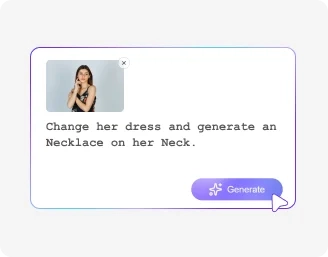
Add your image
Upload WEBP/JPG/PNG images up to 10MB, add a prompt, ratio, and select models.
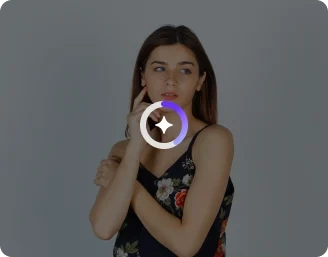
Write a prompt
Describe edits in the prompt box; Pixelbin’s AI applies changes automatically.
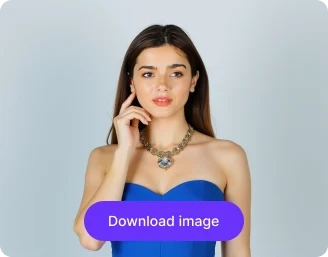
Download your image
Preview the edited image in HD, and download without further steps.
Why choose our AI Photo editor?

Animate edited photos
Turn edited photos into live AI videos and animate still images for more dynamic storytelling, social media content, and creative projects.

Multiple AI models
Choose from advanced AI models such as Nano Banana Pro, Nano Banana 2, and GPT-2 within the AI Photo Editor to generate realistic results.

Edit photos in bulk
Edit multiple photos simultaneously with a single prompt using our AI Photo editor, instead of editing each image one by one.

Upscale edited photos
Increase the resolution of edited photos for sharper, higher-quality outputs that look better across sharing, downloads, and creative use.

No Sign-Up Required
Use our AI Photo editor without creating an account or completing a registration process.

Adjust colors and tones
Fine-tune colors, brightness, contrast, and tones manually to get the best result before downloading your edited photo.
Make complex edits in seconds with our AI image editor
With Pixelbin, make quick modifications to images using AI, without the need for software downloads or manual editing.
High-quality edits
Pixelbin’s AI editor preserves the original resolution of your image while making edits, ensuring the final result looks as detailed as your uploaded version.
No app installations
You can use Pixelbin’s AI image editor online from any device (smartphone, tablet, desktop, laptop, etc.) directly from a browser, without the need for software installations or mobile app downloads.
No complicated steps
Using Pixelbin, you can make complex edits in just seconds. Simply upload your image, describe the changes, and the AI editor will automatically apply them.
Free trial for everyone
You can use Pixelbin’s AI prompt image editor for free up to three times a month. You can even download the generated images in HD, without paying anything.
/pixelbin_blogs/PB_2.0/Related_apps_tumbnail/No_app_installations-transformed.webp)
AI tools by Pixelbin
/pixelbin_blogs/PB_2.0/Related_apps_tumbnail/Thumbnail_(1)_(1)-transformed_(1).webp)
/pixelbin_blogs/PB_2.0/Related_apps_tumbnail/erasebg-transformed_-_2026-04-01T130755.340.webp)
/pixelbin_blogs/PB_2.0/Related_apps_tumbnail/AI_Image_Upscaler_(1)-transformed.webp)
/pixelbin_blogs/PB_2.0/Related_apps_tumbnail/Object_remover-transformed.webp)
AI image editor with prompt free online
With Pixelbin, you can make complex edits to images online using simple text instructions, saving you time and money. Edit colors, add or remove objects, and adjust backgrounds directly in your browser.
Benefits of using a free generative AI image editor
Using Pixelbin, you can make professional-looking edits to your images without any prior editing experience. Here are some of its benefits:
- Quick & simple process: It has a user-friendly UI with clear navigation, making edits simple.
- Reliable results: Its AI consistently interprets your text prompts to produce high-quality, accurate outputs.
- Zero distortion: Edited images have the same clarity as the original photo, free from any type of blur or distortion.
- Regular updates: Pixelbin is constantly updated to provide better results and ensure the AI editor delivers more accurate results.
- Live preview: You can see a live preview of the edited image before you choose to download it.
- No watermarks: Download your filtered image in high quality, without any distracting watermarks.
Use cases of AI based image editor platforms
Pixelbin’s free AI image editor can be used for both personal and professional needs. Here are some of the most common use cases:
1. Refine your portrait photos
Adjust the lighting, change the color of your clothing, or remove distracting people/objects from the background with just a simple prompt, using Pixelbin’s AI image editor.
2. Enhance product images
Using Pixelbin’s AI product image editor, you can make your product photos ready for eCommerce listings by modifying backgrounds, adding props to the scene, or just correcting shadows or colors.
3. Remove or modify backgrounds
Have an image where the background is extremely cluttered? With Pixelbin’s AI image background editor, you can instantly replace such backdrops with a completely different scene by giving a simple text-based prompt like “transform the background into a solid color by removing all objects”.
4. Add objects to your images
Using Pixelbin’s realistic AI image editor, you can add new elements to your photos. For example, you can type a prompt like “add some birds to the landscape” and add some detail to the image.
5. Enhance digital artwork
Digital artists and designers can use Pixelbin’s generative AI image editor to add final touches to their artwork. With just a single prompt, you can refine illustrations, adjust colors, or add certain effects without redrawing the whole thing.
How to get the best results from AI image editor free online tools?
Here are some suggestions to get the most accurate results from Pixelbin’s free AI image editor with prompt:
- Use high-resolution images for a clear output and more accurate edits.
- Write prompts that are short and direct.
- For complex changes, write prompts to make one or two edits one at a time.
- Clearly specify the object and the change you want the AI to make. For example, "Change the car to green" is more effective than "green car."
Professional AI image editing without design skills
Pixelbin’s AI photo editor helps anyone create professional-quality edits using simple text prompts — no Photoshop skills or complicated tools required.
Edit images with natural language prompts
Simply describe the changes you want, such as:
- “Remove the background”
- “Change the shirt color to black”
- “Add sunset lighting”
- “Make the image look cinematic”
The AI understands your instructions and automatically applies realistic edits in seconds.
Maintain natural image quality
Unlike traditional editing tools that may reduce quality during processing, Pixelbin preserves image sharpness, textures, lighting, and original resolution while making AI-powered modifications.
Ideal for creators, marketers, and eCommerce teams
Whether you are editing social media posts, product photos, ad creatives, portraits, or digital artwork, Pixelbin’s AI image editor helps speed up content creation while maintaining professional results.
Save time with bulk image editing and automation
Pixelbin’s AI image editor streamlines repetitive editing tasks and helps you create high-quality visuals faster using intelligent automation.
Bulk image editing with AI
Edit multiple images at once using the same prompt. This is useful for:
- Product catalog updates
- Social media creatives
- Marketing banners
- Brand consistency across campaigns
Faster content production
Instead of manually editing every image, Pixelbin automates adjustments like:
- Background replacement
- Object removal
- Color correction
- Lighting enhancement
- Style transformations
This helps creators and businesses reduce editing time significantly.
Consistent editing results
The AI applies similar visual styles and edits across multiple images, helping maintain a consistent brand appearance for websites, marketplaces, ads, and social media platforms.
FAQs
Here are some of the most common questions about our AI Image Editor Tool. If you can’t find the information you need, contact us at support@pixelbin.io or refer to our documentation for more details.


Edit images in seconds, not hours
Get pixel-perfect results just with your words
Start Editing with AI