


Support webp/jpg/jpeg/png, up to 10MB
/pixelbin_blogs/PB_2.0/Apps_New_design_graphics/Wedding_Photo/sample_images/Sample_4.webp)
Add skinny filter to photos
Online AI skinny filter
Enhance your photos with subtle, realistic slimming effects in seconds
/pixelbin_blogs/PB_2.0/Apps_New_design_graphics/Skinny_filter/slim_man.webp)
/pixelbin_blogs/PB_2.0/Apps_New_design_graphics/Skinny_filter/fat_man.webp)


How to add the skinny filter to your photo with Pixelbin?
.webp)
Add your photo
Upload your image in formats like JPEG, JPG, PNG, or WEBP to get started quickly
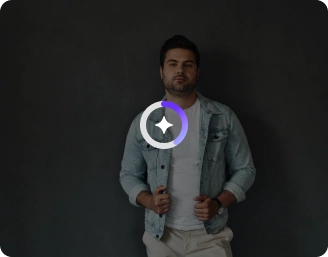
Wait for AI processing
The AI instantly analyzes your photo and applies natural-looking slimming effects automatically

Save the image
Preview the result and download your edited photo in high quality for easy use anywhere
Why choose Pixelbin’s AI skinny filter online?

Multiple image formats
Upload images in all popular formats like JPEG, JPG, PNG, or WEBP without worrying about compatibility.

Image upscaling
Enhance your photos with AI upscaling up to 2x, 4x, or 8x while keeping details sharp and clear.

Complete privacy
Your images are processed securely and are never stored, reused, or shared with any third party.

Instant previews
Use our before-and-after comparison slider to instantly see the difference between your original and edited photo.

Easy access
Start using the AI skinny filter right away with no sign-up or account required.

No watermarks
Download your final images without any logos or watermarks for a clean, professional look.
An all-in-one skinny filter for waist, arms, belly, face & more
Control how much slimming you want, from subtle touch-ups to noticeable changes, while preserving your actual looks
Browser based
Access the AI skinny filter on any browser, such as Safari, Chrome, Edge, or Firefox
Simple UI
Try AI body slimming on an easy-to-use interface, suitable for beginners and professionals alike
Selective editing
Make targeted fixes to adjust body proportions with simple prompts
HD outputs
Download your photos in high-definition quality with sharp details, clear textures, and no loss in resolution
/pixelbin_blogs/PB_2.0/Apps_New_design_graphics/Skinny_filter/graphics/Browser-based.webp)
/pixelbin_blogs/PB_2.0/Apps_Graphics/body_editor/Thumbnail_43.png)
/pixelbin_blogs/PB_2.0/Apps_Graphics/AI_abs_filter/Thumbnail_13.png)
/pixelbin_blogs/PB_2.0/Apps_Graphics/ai_fat_filter/Thumbnail_11.png)
/pixelbin_blogs/PB_2.0/Apps_New_design_graphics/muscle_generator/page_graphics/lqode7oyatv8nibpl8us.webp)
Key highlights of Pixelbin’s AI skinny filter
Benefits of the AI body slimming tool
- Slash your production costs: You can create digital brand ambassadors or "clones" of your real customers. This lets you churn out high volumes of ads without paying recurring talent fees for every single shoot.
- Test ideas in seconds: Instead of booking a studio to see how a garment fits or looks, your creative team can prototype different "looks" instantly during the early stages of a project.
- "Super-retoucher" for your team: Pixelbin’s AI skinny filter can automate the tedious parts of photo editing. What used to take a professional retoucher hours in manual software now happens almost instantly, which is a lifesaver when you have a massive product catalog to get through.
- Make it personal for your customers: You can give shoppers a "virtual try-on" experience. Letting them see how clothes might look on different body types or styling choices can be a huge boost for your engagement and sales.
- Perfect fit, every time: Sometimes a sample size doesn't fit the model perfectly on set. AI slimming lets you "pin" the clothes digitally, making the product look tailored and premium without needing a tailor physically standing there with sewing needles.
Use cases
- The aspirational preview: When you work in wellness or coaching, you can present a client with a realistic future version. It is a huge motivator when they can see a more fit counterpart of themselves, and it can make them want to join your program.
- Digital tailoring: Clothes do not always suit a model perfectly right out of the box. The traditional method of binder clipping and pinning to fit the garment to the body has been replaced with AI. Our slimming AI filter gives the product a premium and just-so-fit appearance, which actually causes people to press the buy button.
- Adjusting the camera weight: Lenses (particularly smartphones) cause distortions of proportions and make individuals appear broader than they appear in reality. With our AI skinny generator, you can make the image look like how the individual is in real life.
- Virtual try-ons: When you have a retail application, you can allow people to have a glimpse of how your clothing (such as shapewear or compression leggings) will actually flatten or thin their bodies. Providing them with that moment of reflection virtually can be the difference between a cart addition and a bounce.
- Professional branding: For corporate teams or influencers, you can use subtle shaping to clean up headshots or video content. It’s not about a total makeover; it’s about removing the "bulk" from a bad camera angle so the focus stays on the professional message instead of a double chin caused by a low tripod.
How to get the best results using Pixelbin’s AI skinny filter?
To get realistic and natural results, here are a few things you can try:
- Use a clear photo where your full body or the area you want to edit is visible
- Good lighting really helps. Dark or shadowy photos don’t give great results
- Don’t upload blurry or low-quality images; the AI won’t be able to adjust things properly
- Avoid group photos. It works best when there’s just one person in the frame
- Try not to use heavily edited or filtered pictures before uploading
- Stand straight and face the camera if possible; weird angles can give odd results
FAQs
Here are some of the most commonly asked questions about our AI skinny filter. If you still can’t find what you’re looking for, you can reach out to us at support@pixelbin.io or read our documentation for more details.

Edit images in seconds, not hours
Get pixel-perfect results just with your words
Start editing with AI