PixelBin logo
Image generator is here -   Create Now   and Claim 30% off on Pro Plans. Use code SALE30 at checkout.   Claim Discount

AI skin color & tone changer

Get the complexion you’ve always wanted without any makeup or creams.

Uploaded image
2500 chars left
Loading

AI Magic in progress
Detecting skin areas, adjusting tone, and blending naturally for realistic results

Generated Result

Your AI-generated skin tone result is ready!

Edit image with AI
Get 🔥 free credits for image editing, upscaling, generation and more
Try Another Skin Tone
Generation Failed

There was some issue on our end. Please try again.

Try Again
Show case
How to use Pixelbin’s AI skin tone generator?
1
Drop an image
Click on the + icon to drag and drop your selfie or portrait to the editor. JPEG, JPG, PNG, or WEBP - we support all formats.
2
Describe the complexion you want
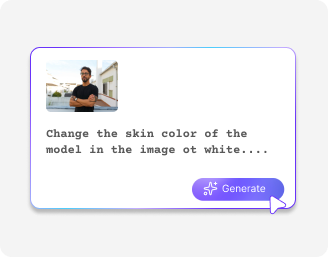
Write in simple words the exact skin tone, undertone, or effect you want, and the AI detects your skin and applies the exact tone you want.
3
Download the image
Save your image in HD quality for free, without any watermarks, logos, or added texts.
Why use Pixelbin to change your skin color online?
Centralized storage
Keep all your edited images in one place so you can access and manage them anytime without searching.
Multiple formats
Upload your photos in all popular formats, such as JPEG, JPG, PNG, or WEBP.
Image upscaling
Enhance your overall look instantly to a higher resolution while preserving all the details.
HD outputs
Save all your edits in high quality without any branding elements, ready to use for personal or professional purposes.
No sign-up needed
Start editing right away without the need to create an account or provide personal information.
Instant sharing
Copy the generated image URL and share it directly with your peers or a dermatologist.
Fix mismatched tones between your face, neck, and body easily

Even out pale, olive tan, or white skin tones quickly without spending on expensive cosmetic procedures.

Mobile friendly

Edit your photos smoothly on any phone or tablet, so you can create instant edits anytime, anywhere.

Feature 1
No app installations needed

Change your skin color directly in your browser, such as Safari, Chrome, Edge, or Firefox.
Feature 2
Full privacy

Your photos stay completely private and secure and are never shared or reused without your consent.
Feature 3
Perfect for all skins

Whether your skin is pale, olive, tan, or deep, you can achieve the tone you’ve always wanted with the AI skin color changer.

Feature 4

AI tools by Pixelbin

Key highlights of the AI skin color changer
Benefits of using the skin tone generator
  • No more guesswork: Have you ever bought a foundation that looked great in the store but turned orange or ghostly when you got home? Our AI skin color generator determines your actual skin undertones by analyzing your facial features. The AI determines your skin tone as either warm, cool, or neutral with greater precision than human eyesight, which helps you choose matching products.
  • See changes before you make them: The AI skin tone changer enables you to test different tan shades and makeup styles by providing a virtual "try-it-on" feature, without needing to use multiple products, requiring application and removal.
  • Consistency in photos: Try creating multiple variations with the same image, without manual edits.
  • Style recommendations made easy: Through our tool, you can easily perform skin tone analysis, through which you can choose optimal clothing and hair color choices for your wardrobe.
  • Inclusive and personalized: Beauty tools in earlier times provided effective results only for a limited selection of skin tones. But our AI race changer is trained to recognize and accurately represent the full spectrum of human skin. The system provides you with a personalized experience, which acknowledges and respects your individual cultural background and skin tone.
Use cases of AI skin tone generator
1. Pre-tan visualisation

Before you spend money on a spray tan or risk sun damage, you can use the AI skin tone generator to realistically deepen your skin tone. This helps you see if a darker bronze actually suits your features or if your natural shade looks better.

2. Correcting color mismatches

If your face looks lighter than your body due to sunscreen or shadows, you can use AI to sample the tone from your shoulder or chest. After that, you can apply that exact shade to your face for a balanced look.

3. Safe hair color testing

Experiment with different hair shades that interact with your complexion. You’ll know exactly which colors make you look good and which ones wash you out before you hit the salon.

4. Standardizing professional portraits

Ensure your skin tone looks identical across all your social media or business headshots. With the skin color changer, you can easily get a polished, brand identity where your complexion remains consistent regardless of when or where the photo was taken.

5. Strategic wardrobe shopping

You can use AI to virtually "drape" different clothing colors against your digital skin profile. This shows you exactly which specific shades of blue, green, or red enhance your natural skin tone, so you stop buying clothes that don't flatter you.

6. Monitoring skincare results

If you’re treating dark spots or redness, you can use AI to track subtle pigment shifts over time. It catches small improvements that your eyes might miss, giving you clear evidence of whether your expensive serums are actually working.

How can you get the best results with the AI skin color changer?

For natural-looking skin color and texture, here are a few things you need to take care of:

  • The picture you upload should be sharp and not blurry so the AI can see your skin properly.
  • Take photos in soft, even light. Shadows or harsh light can make your skin look different.
  • No heavy filters! Don’t use strong Instagram or Snapchat filters, because they can confuse the AI.
  • Use your image with a plain background, as it helps the AI to focus on your skin, not the things behind you.
  • Look straight at the camera so the AI can match your skin tone all over your face.
  • Make sure your hair, hands, or clothes aren’t covering your face or neck so the AI can work properly.
FAQs

Here are some commonly asked questions about our AI YouTube thumbnail generator. If you need more assistance, reach out to us at support@pixelbin.io or visit our documentation.

No, it’s not fully free. You get 3 free credits, which means you can only change skin color 3 times for free. After that, you’ll need to buy more credits.
Write simple words about the color you want. For example, say “light beige,” “warm tan,” “olive,” “pale pink,” or include undertones like “cool,” “warm,” or “neutral.” The clearer you are, the more accurate the result.
Yes, it can adjust uneven or patchy skin tones. The AI tries to even out the colors while keeping it natural. Good lighting in the photo helps it work better.
Yes. The AI skin tone generator changes the skin color but keeps features like freckles, moles, scars, and other details intact.
No. You just need to give short instructions, like “dramatic close-up with bold white text,” to produce a YouTube thumbnail automatically.
You can use it on group photos, but it works best with single portraits. On group images, results may be less accurate or uneven as the tool has to work on multiple bodies.
Edit images in seconds, not hours
Get pixel-perfect results just with your words
Start editing with AI