


Create AI characters with text
Free AI character generator
Generate an AI character instantly from your prompt, using Pixelbin’s web-based AI image generator - no software downloads or manual editing required.
/pixelbin_blogs/PB_2.0/Apps_New_design_graphics/ai_character_generator/anime.webp)


How to create a character with Pixelbin’s AI?
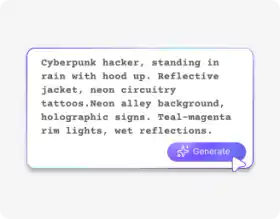
Describe your character
Write a simple text prompt to describe your character. Be specific about pose, style, clothing, expression, etc.
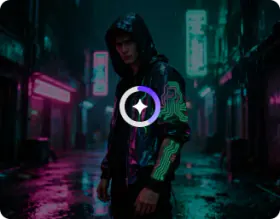
Generate the image
Click ‘Generate’ to let Pixelbin’s AI analyze your prompt & create a high-quality image of your character.
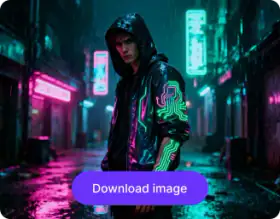
Download the output
Preview the generated image of your character, and download it in high definition at no extra cost or watermarks.
Why choose Pixelbin's online AI character generator?

No image uploads
Create digital characters from scratch without uploading any images.

Easy accessibility
Access the tool from anywhere, with an internet connection & a browser.

Smart AI editor
Turn written prompts into detailed AI characters automatically, no manual edits required.

Free HD downloads
Download your characters in HD without watermarks or extra costs.

No sign-up required
Start creating instantly without registering or entering payment details.

Copyright-free usage
Generated results are free to use for both personal & commercial purposes.
Design an AI character online in just a few clicks
Using Pixelbin, you can create photorealistic characters like anime heroes & fantasy creatures just by writing a simple prompt.
Text-to-character creation
Describe your idea, and the editor transforms it into a visually accurate AI character automatically.
Diverse artistic styles
Explore a range of styles, from modern anime and fantasy heroes to simple cartoons, and turn your imagination into a real-life image.
Monthly free trials
Create up to three AI characters for free each month, and upgrade anytime for more credits or API access.
Browser-based platform
Use the character art generator directly from your browser without downloading software or installing plugins.
/pixelbin_blogs/PB_2.0/Apps_New_design_graphics/ai_character_generator/design-01-text-to-character-creation.webp)
AI tools by Pixelbin
/pixelbin_blogs/PB_2.0/Apps_Graphics/Anime_Pfp_Maker/Anime_pfp_maker/Thumbnail.png)
/pixelbin_blogs/PB_2.0/Apps_Graphics/Pixar_filter/Graphics/Thumbnail.png)
/pixelbin_blogs/PB_2.0/Apps_Graphics/AI_Art_Generator/Thumbnail_30.png)
/pixelbin_blogs/PB_2.0/Apps_New_design_graphics/AI_Headshot_generator/thumbnail_(3).webp)
Key highlights of Pixelbin’s AI character generator from text
Benefits of using our AI character image generator
Pixelbin lets you create custom character art from text, right from your browser. Here are some of the benefits of using this tool:
- Instant character creation: Generate high-quality AI character portraits from your prompts in seconds.
- Creative freedom: You can create everything from fantasy characters to modern-day heroes.
- No technical skills required: With Pixelbin, you don't need to be an artist or a Photoshop expert to generate an AI character.
- Simple prompts: Our AI editor understands short prompts and converts your text into a realistic image accordingly.
- Cross-device support: Works on any device, including smartphones, laptops, desktops, and tablets.
- No watermarks: Download processed images in full quality without watermarks or promotional branding.
- Safe & secure: Edit your personal photos without worrying about your data being misused.
Use cases of our AI character generator free tool
Using Pixelbin, you can generate different types of AI characters for both personal and professional use cases. Here are some of the best ways to use this tool:
Design game characters
Create unique avatars, NPCs (non-player characters), or hero portraits for your video game or tabletop roleplaying game (TTRPG). Describe their class, armor, and gear to get a perfect match.
Visualize story characters
Writers and authors can use our tool to bring their novel or screenplay characters to life. Using Pixelbin, you can generate a visual reference that can help you stay inspired and describe your characters in more detail.
Create digital art & mood boards
With Pixelbin’s AI character art generator free tool, you can create base images for digital painting. Try a prompt like, "concept art for a rogue, leather armor, dark hood, holding daggers" to prototype a look quickly.
Generate marketing personas
Create visual personas for marketing campaigns or design a virtual influencer for social media. Generate professional-looking avatars for presentations to represent your target audience.
Create anime & manga fan art
Bring your fan fiction to life or design original characters in the style of your favorite shows. Use Pixelbin’s AI anime character generator to create manga fan art for forums or sharing with friends.
Generate AI-powered storyboards
Filmmakers and animators can visualize scenes by generating characters with specific expressions or poses. This helps in generating storyboards for complex narratives before production.
How to get the best results from AI character generator free online tools?
Follow these simple tips when writing your prompt for our AI editor for the best results:
- Be specific: Include style (e.g., "photograph," "3D render," "anime sketch"), hair color, clothing, background, and pose.
- Use descriptive adjectives: Words like "brave," "mysterious," "cyberpunk," or "elegant" help the AI understand the mood.
- Define the framing: Try specifying "full body shot," "head and shoulders portrait," or "profile picture" to get the composition you want.
FAQs
Here are some of the most common questions about our Character Generator AI Tool. If you can’t find the information you need, contact us at support@pixelbin.io or refer to our documentation for more details.


Edit images in seconds, not hours
Get pixel-perfect results just with your words
Start editing with AI