


Support webp/jpg/jpeg/png, up to 10MB
/pixelbin_blogs/PB_2.0/Apps_Graphics/Actor_headshot/Sample_image_1_for_actor_headshots.webp)
/pixelbin_blogs/PB_2.0/Apps_New_design_graphics/Blur_face/girl_outdoor.webp)
Add blur effect on face
Free AI blur face effect
Blur out your face in your photo to protect your identity and ensure complete anonymity in any situation.
/pixelbin_blogs/PB_2.0/Apps_New_design_graphics/Blur_face/girl_face_blur_outdoor.webp)
/pixelbin_blogs/PB_2.0/Apps_New_design_graphics/Blur_face/girl_outdoor.webp)
How to use Pixelbin’s blur face online tool?
.webp)
Add an image
Upload your portrait or selfie in all popular formats, such as JPEG, JPG, PNG, or WEBP
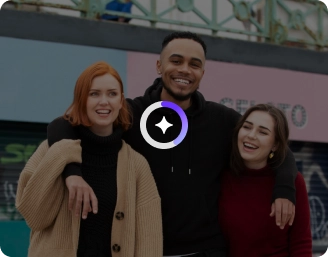
Apply the face blur effect
Pixelbin’s AI detects your face and applies the blur effect instantly
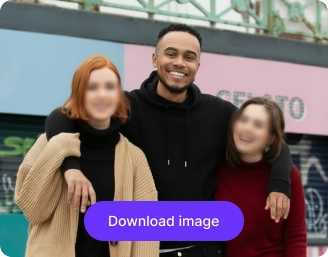
Save the image
Compare the before-and-after results and save the photo in HD quality, ready for sharing.
Why use Pixelbin’s blur face AI?

HD outputs
Maintain sharp visuals even after applying blur, so your image still looks clean and professional.

Browser-based
Use the face blur effect directly in your browser without downloading or installing anything.

Image upscaling
Enhance image resolution by up to ,8X so your final output stays clear and detailed

Asset management
Organize and manage your image easily within a system, so you can access all the information easily.

Global CDN
Load your image quickly on any device with fast and reliable global delivery.

Watermark-free exports
Get a clean output free from any branding distractions that looks fully professional.
Experiment with multiple blur effects & styles
Combine Gaussian blur, box blur, motion blur, or pixelation to match different privacy needs in one image
Keeps the subject clear
Blur unwanted areas while keeping the subject crisp and clearly in focus without disturbing the overall image
Easy-to-use interface
Navigate the blur face AI tool easily with a straightforward design built for both beginner and advanced use
Works on all devices
Enjoy smooth performance on any device without worrying about compatibility or setup
Maintains complete privacy
Your image is processed in a privacy-first environment where your data remains secure and controlled.
/pixelbin_blogs/PB_2.0/Apps_New_design_graphics/Blur_face/feature/Keeps_the_subject_clear.webp)
AI tools by Pixelbin
/pixelbin_blogs/PB_2.0/Apps_Graphics/Braces_Filter/Graphics/Thumbnail.png)
/pixelbin_blogs/PB_2.0/Apps_New_design_graphics/AI_Tools_by_Pixelbin/Age_Progression)
/pixelbin_blogs/PB_2.0/Apps_New_design_graphics/AI_Tools_by_Pixelbin/Old_Filter_(1).webp)
/pixelbin_blogs/PB_2.0/Apps_New_design_graphics/AI_Tools_by_Pixelbin/Smile_Filter)
Key highlights of Pixelbin’s AI blur face
Benefits of using the blur face effect
- Respect your privacy: The blur face AI is the simplest tool for blurring out images to prevent revealing the identities of strangers, children, and passers-by in the background by mistake.
- Stay compliant with laws: When you have a business or a YouTube channel, it helps you to obey the privacy principles (such as GDPR) to avoid running into both legal entanglements and legal penalties.
- Waste less time: Just in case you are tired of clicking and blurring each face at a time, the AI will do the tedious task in just a few seconds.
- Secure individuals in vulnerable positions: It will be a lifesaver among activists, whistleblowers, or even patients who might have to share their narratives or videos without being identified.
- Concentrate on the important elements: Adding the blur effect, you make the main person in your image pop, giving it a much cleaner, more professional look.
Use cases
- Journalism and news reporting: With our face blur tool, you can safeguard the identity of your confidential sources, whistleblowers, or people who happen to be in a sensitive location, such as a protest.
- Healthcare and telemedicine: You can comply with HIPAA with the AI tool that will automatically remove faces on medical images. This will enable you to share data safely to do research or train without jeopardizing the privacy of the patient.
- Law enforcement and public safety: Blur out faces easily before releasing evidence to the press or media without interfering with the privacy of the victims, witnesses, and other innocent persons.
- Autonomous vehicle training: In case you are working on self-driving technology, Pixelbin’s AI tool will allow you to blur multiple faces and license plates in street-level videos. This allows you to train your models with the data without breaking privacy laws such as GDPR.
- Construction and real estate: Apply a blurring effect to any pictures of your project site to include in your progress reports. This will make your company stay within the privacy regulations without holding up your workflow.
- Social media and vlogging: You can use an AI-powered app to automatically track and blur faces in your vlogs. This is perfect if you want to share family moments or public adventures while keeping your children or strangers in the background private.
How to get the most natural results with Pixelbin’s blur face AI?
In order to ensure you obtain the best results using Pixelbin, here are a few things you need to keep in mind:
- Avoid using low-resolution or blurry input images, as the AI may struggle to detect faces accurately.
- Do not overuse heavy blur or extreme pixelation, as it can make the image look unnatural.
- Avoid cluttered backgrounds with too many faces, which can affect detection precision.
- Do not place the subject too far from the camera, as small faces may not be detected properly.
- Avoid poor lighting or heavy shadows on the face, as it can reduce the accuracy of face detection and blur quality.
FAQs
Here are some of the most commonly asked questions about our AI blur face generator. If you still can’t find what you’re looking for, you can reach out to us at support@pixelbin.io or read our documentation for more details.

Edit images in seconds, not hours
Get pixel-perfect results just with your words
Start Editing with AI