


AI album cover generator
Free AI album cover generator
Turn a song title, mood board, or short prompt into cover art for singles, EPs, and albums in seconds.
/pixelbin_blogs/PB_2.0/Apps_New_design_graphics/Album_Cover_Generator/lofi.webp)


How to generate album cover art with Pixelbin
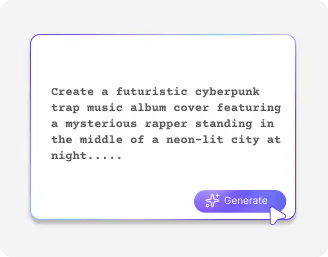
Describe your release
Enter a simple prompt that covers the genre, mood, palette, symbols, and vibes of your song, EP, or album.
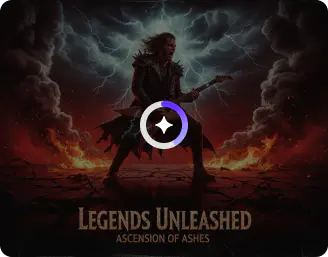
Choose the model & ratio
Try the image model that best fits your style, then pick the right image ratio based on where you want to post.
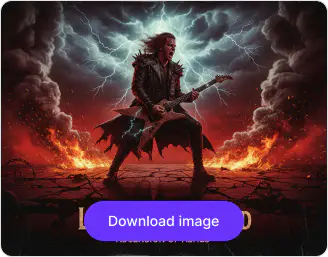
Generate & save
Click on generate, preview, and download the cover art in high definition without any watermarks.
Why use Pixelbin’s online free AI album cover generator?

Localized masking
Edit only specific parts of your image using a brush or smart select tool without changing the whole design.

Object replacement
Swap objects on your album cover, like props or background elements, using simple text prompts.

Native background isolation
Remove the existing background and place your album subject into a completely new visual theme.

Camera perspective manipulation
Adjust the angle or zoom of your album artwork to create a more dynamic and cinematic look.

High-detail resolution scaling
Enhance your AI album cover up to 8X resolution so it looks sharp across streaming platforms and prints.

Native post-processing control
Fine-tune brightness, contrast, and colors to give your album cover the perfect final finish.
Create diverse album artwork to match mood & genre
Create eye-catching visuals in 3D rendered, minimalist, surreal, retro, photorealistic, and abstract styles for streaming platforms.
Prompt-led cover creation
Design standout covers with the AI album cover generator by guiding the creative process with clear, intentional prompts.
No design background needed
Move from a rough concept to a first cover draft, even if you do not work with layers, masking, or retouching tools.
Fast concept variations
Generate multiple moods for the same release before you commit to one visual identity for social posts or launch assets.
Browser-based workflow
Access the free AI album cover generator from any browser, such as Chrome, Edge, or Firefox, with no additional software or plugins needed.
/pixelbin_blogs/PB_2.0/Apps_New_design_graphics/Album_Cover_Generator/prompt.webp)
AI tools by Pixelbin
/pixelbin_blogs/PB_2.0/Apps_New_design_graphics/Selfie_Generator/Thumbnail_(2).webp)
/pixelbin_blogs/PB_2.0/Apps_New_design_graphics/Birthday_editor/thumbnail.webp)
/pixelbin_blogs/PB_2.0/Apps_New_design_graphics/AI_outfit_generator/thumbnail__(2).webp)
/pixelbin_blogs/PB_2.0/Apps_New_design_graphics/Ai_ads_generator/adsthumbnail.webp)
Key highlights of Pixelbin’s AI album cover generator
Benefits of using an AI album cover generator
Using Pixelbin, you can move from a music idea to a visual direction much faster than a manual design-only workflow. Here are some of the biggest benefits:
• Faster creative exploration: Test multiple cover directions for the same song before choosing the final mood.
• Lower design friction: Start with a prompt instead of a blank artboard or a long creative brief.
• Style flexibility: Generate minimalist, vintage, illustrated, dreamy, gritty, or high-energy cover concepts from the same workflow.
• Useful for independent releases: Create artwork drafts with our online AI album cover generator even if you do not have an in-house designer yet.
• Easy campaign support: Generate matching visuals for cover reveals, teasers, and launch posts around the same release.
• Accessible anywhere: Work from a browser, whether you are in the studio, at home, or on the move.
Use cases of our AI album cover maker
Pixelbin’s free AI album cover generator with no sign up can support different music and audio publishing workflows. Here are a few common ways people can use it:
1. Single release cover art
Generate square artwork for Spotify, Apple Music, YouTube Music, or distributor previews by starting with a short concept and testing alternate moods quickly.
2. EP and mixtape concepts
Explore a consistent visual world across several tracks before a final designer handoff, release shoot, or packaging decision.
3. Producer beat covers
Beatmakers and sample-pack creators can create striking release art for BeatStars listings, Gumroad drops, and music-promo posts.
4. Playlist and podcast visuals
Create cover concepts for curated playlists, podcast episodes, or branded audio series that need a recognizable visual identity.
5. Artist pitch decks and pre-save campaigns
Use AI cover concepts in teasers, press kits, pre-save pages, and launch posts while the final artwork is still being refined.
6. Merch and poster inspiration
Turn a strong album cover direction into supporting references for posters, lyric videos, stage visuals, or merch mockups.
How to get the results from the best free AI album cover generator?
To get stronger album cover outputs from Pixelbin’s AI album cover generator online, keep these tips in mind while writing prompts and reviewing results:
• Mention the genre, mood, color palette, era, and visual references in one tight prompt.
• Say what the focal subject should be, such as a portrait, symbol, object, city scene, or abstract texture.
• Use square ratios first if the artwork is mainly for streaming cover art.
• Generate multiple versions of the same concept before choosing one final direction.
• Keep typography expectations realistic and plan to finalize artist name or track text in your design workflow if needed.
• Check the artwork at small preview sizes so the composition still feels strong on mobile screens.
FAQs
Edit images in seconds, not hours
Get pixel-perfect results just with your words
Start editing with AI