


Max resolution 10,000 × 10,000 px
Support webp/jpg/jpeg/png, up to 10MB
Upscale images for free
Free AI image upscaler online
Upscale low-resolution images, sharpen blurry details, and enhance photo quality with Pixelbin’s AI image upscaler. Increase image size by 2x, 4x, or 8x for product photos, portraits, social media, print, and more.
/pixelbin_blogs/PB_2.0/Apps_New_design_graphics/upscaler/67d00ba5d62f58ceb8cf7194_After.webp)
/pixelbin_blogs/PB_2.0/Apps_New_design_graphics/upscaler/67d00ba1625cd4a1e01827b2_Before.webp)
/pixelbin_blogs/PB_2.0/Apps_New_design_graphics/upscaler/67e6864fd29d7a8fd1928c61_Cute_cat.webp)
/pixelbin_blogs/PB_2.0/Apps_New_design_graphics/upscaler/67e68636cd8bb0ae7e02e5f3_A_school_girl.webp)
/pixelbin_blogs/PB_2.0/Apps_New_design_graphics/upscaler/67e6861b1814e96d4240f73f_Perfume.webp)
/pixelbin_blogs/PB_2.0/Apps_New_design_graphics/upscaler/67e685ef44f8642076041c4f_A_boy.webp)


How to use Pixelbin's AI image upscaler?
Upload image
Start by uploading your image to Pixelbin’s free AI image upscaler & image enhancer. It supports JPG, JPEG, PNG, and WEBP formats.
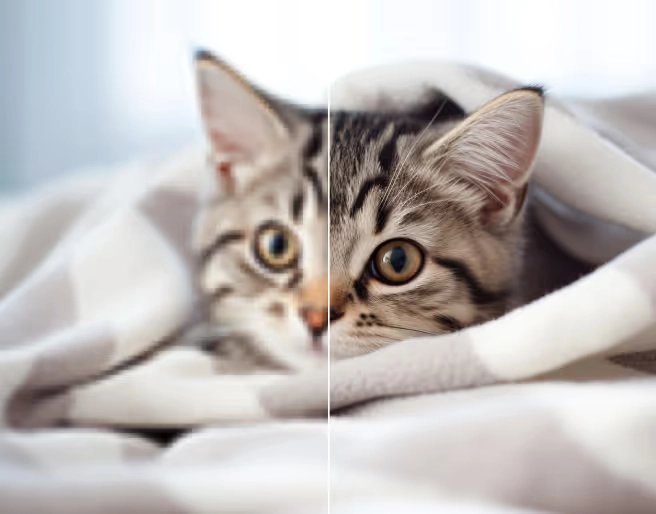
Choose upscaling
Choose your desired upscaling level, up to 2x, 4x, or upto 8x, and Pixelbin’s AI automatically enhances clarity, sharpness, and details in seconds.
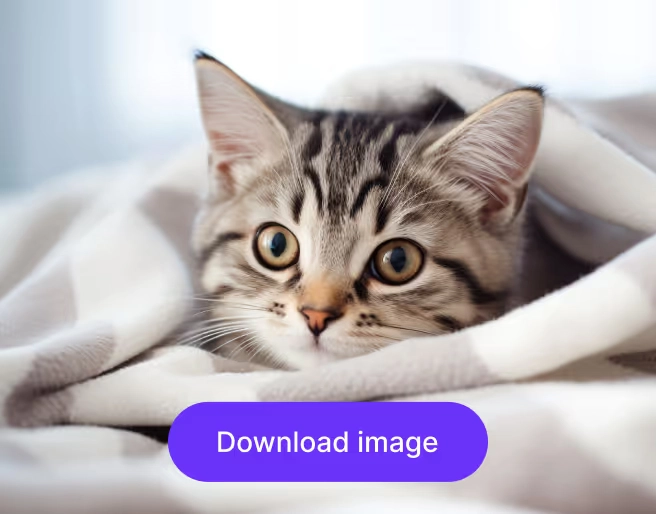
Download image
Once the upscaling is done, simply download your high-resolution image. You can also edit the output for extra touch-ups.
Why choose Pixelbin's AI image upscaler?

Multiple AI models
Multiple advanced AI models, such as Topaz Labs and Ideogram, are available to upscale images based on what works best for your photo.

2x, 4x, and 8x upscaling
Flexible upscaling options to enlarge images for social media, ecommerce, presentations, print, and other high-resolution use cases.

Convert image into video
Upscaled images can be turned into live AI videos for more engaging creative output and visual storytelling.

Batch image upscaling
Batch processing supports faster upscaling for multiple photos, product images, or creative assets in one workflow.

Edit image further
Built-in editing options help improve brightness, contrast, colors, and overall image quality after upscaling.

Multiple image formats
Supported image formats, including JPG, JPEG, PNG, and WEBP, can be upscaled directly without requiring any additional conversion steps.
Where Pixelbin’s AI image upscaler works best
Pixelbin’s AI image upscaler improves low-resolution images for both creative and professional use. Higher image quality makes visuals sharper, cleaner, and more usable across different platforms.
Print-ready image upscaling
Upscale low-resolution images for posters, brochures, flyers, presentations, and other print materials so they look sharper and hold up better at larger sizes.
Ecommerce product image enhancement
Make product photos clearer and more detailed for ecommerce listings, marketplace pages, and ads, so your products look cleaner and more professional.
Social media content creation
Improve image quality for Instagram posts, reels covers, YouTube thumbnails, banners, and other social media creatives that need crisp, eye-catching visuals.
Batch upscaling
Enhance AI-generated art, portraits, and design visuals by increasing resolution and sharpening details so they are easier to edit, share, or use in creative projects.
/pixelbin_blogs/PB_2.0/Apps_New_design_graphics/upscaler/Feature_Images/67d00c502b0f8cde8c0d1e40_Frame_2147224050.webp)
Explore AI tools by Pixelbin
/pixelbin_blogs/PB_2.0/Apps_Graphics/Clarity_Upscaler/Graphics/clarityupscaler-0_(2).webp)
/pixelbin_blogs/PB_2.0/Apps_Graphics/4k_Image_Upscaler/4k_image_upscler/Main_(1).webp)
/pixelbin_blogs/PB_2.0/Apps_Graphics/HD_Photo_converter/Graphics/main_(5).webp)
/pixelbin_blogs/PB_2.0/Apps_Graphics/Sharpen_blurry_images_with_AI/image_sharpner/Main_(1).webp)
About our AI image upscaler
Pixelbin AI Image Upscaler enhances image quality by increasing resolution while preserving sharpness, clarity, and fine details. Using advanced AI models, it intelligently reconstructs missing pixels and improves visual quality, transforming blurry, pixelated, or low-resolution images into crisp, high-definition visuals suitable for both digital and print use.
Built for designers, marketers, photographers, and businesses, the AI Image Upscaler delivers professional-grade image enhancement with accuracy and consistency. Whether you're improving product photos, marketing creatives, artwork, portraits, or archived images, it helps create clearer, more detailed results that maintain the original image's natural appearance.
Multiple AI models for image upscaling
Our AI Image Upscaler gives you access to multiple industry-leading AI models, allowing you to choose the best technology for every image.
Whether you want to increase image resolution, enhance image quality, restore old photos, sharpen product images, or create high-resolution artwork, each AI model is optimized for specific image enhancement needs. This flexibility helps you achieve professional-quality results while preserving details, textures, and natural image appearance.
From fast AI-powered upscaling to advanced photo restoration and creative image enhancement, our platform offers specialized models for every use case.
Super Resolution
Fast and reliable for everyday use. Delivers balanced improvements in clarity and detail while preserving the natural look of your images.
Topaz Labs Upscale
Designed for professional-quality results. Excels at recovering fine details and enhancing photo sharpness with impressive accuracy.
SeedVR2 Upscale
An advanced model built for challenging images. Produces rich detail, smoother textures, and improved visual fidelity in low-quality photos.
Recraft Crisp
Optimized for clean and precise outputs. Works especially well for product photography, illustrations, icons, and graphic assets.
Recraft Creative
Ideal for artistic and stylized content. Enhances images while maintaining the creative character and visual style of the original artwork.
Ideogram
Built for design-focused visuals. Great for marketing creatives, branding materials, and graphics that need a polished, professional appearance.
Enhance photo quality to 8x
Augmentez la résolution de vos images (x2, x4 ou x8) grâce à une technologie d'amélioration par IA. Choisissez la résolution la plus adaptée à vos besoins et transformez des images de basse qualité en visuels plus nets et précis, aux détails, textures et contours optimisés.
Que vous prépariez des visuels pour l'impression, amélioriez des photos de produits ou optimisiez des images pour des sites web et les réseaux sociaux, une résolution supérieure confère un rendu plus professionnel. Il vous suffit de télécharger votre image, de sélectionner la résolution souhaitée et de laisser l'IA effectuer l'amélioration en quelques secondes.
Remove JPEG artifacts with Pixelbin image upscaler
JPEG compression can often leave images with visible artifacts, blocky areas, and loss of detail. Pixelbin's Image Upscaler helps reduce these unwanted distortions while improving image clarity, making your photos look cleaner and more natural.
Simply upload your JPEG image and let our tool enhance the quality automatically. Our tool sharpens details, smooths compression artifacts, and restores a more polished appearance, helping your images look better for websites, social media, ecommerce listings, and professional projects.
Save time with batch image processing
Pixelbin supports batch image processing, allowing you to upscale and enhance multiple images in a single workflow. Instead of uploading and processing each file individually, you can handle large image collections more efficiently while maintaining consistent quality across all outputs.
API Support
Pixelbin offers API support for image upscaling, allowing developers to integrate image enhancement capabilities directly into their applications, websites, and workflows. Automate image processing tasks and deliver high-quality visuals without requiring manual uploads or edits.
Best Use Cases for AI Image Upscaling
E-commerce Product Photos
AI image upscaling helps improve product image quality by increasing resolution and enhancing fine details. Whether you're selling on Shopify, Amazon, or other marketplaces, an AI image upscaler can transform low-resolution product photos into sharp, professional-looking visuals that help boost customer confidence.
Social Media Content
Creating content for Instagram, Facebook, LinkedIn, or X? An AI image enhancer helps upscale images for social media, ensuring your visuals remain crisp and high-quality across different devices and platforms. This is especially useful when working with compressed or low-resolution images.
Print Materials and Marketing Assets
When designing posters, brochures, flyers, or banners, image quality is essential. Use an AI image upscaler online to increase image resolution for print and create high-resolution visuals that look clear and professional, even in large formats.
Creative Design and Digital Artwork
Designers and creators can use AI image upscaling to enhance digital artwork, illustrations, anime images, and graphic designs. By generating higher-resolution versions of creative assets, it's easier to reuse them for websites, presentations, advertisements, and high-definition displays.
Image Upscaler vs Image Enhancer - Know the difference
An Image Upscaler and an Image Enhancer are often used together, but they serve different purposes. An AI image upscaler primarily focuses on increasing image resolution and enlarging images while preserving details. It helps transform low-resolution images into larger, sharper versions suitable for printing, ecommerce, presentations, and high-resolution displays.
An AI image enhancer, on the other hand, focuses on improving the overall appearance of an image. It can sharpen details, reduce noise, adjust colors, improve brightness, and remove imperfections. While an image enhancer improves visual quality, an image upscaler specifically increases image size and resolution. Many modern AI tools combine both capabilities to deliver clearer, sharper, and higher-resolution images in a single workflow.
Top reason to choose Pixelbin AI image upscaler
Multiple AI Models for Greater Flexibility
Pixelbin offers multiple AI upscaling models, giving you the flexibility to choose the one that best matches your image type and quality requirements.
Upscale Images Up to 8x
Unlike many image upscaling tools that limit enlargement options, Pixelbin supports image upscaling up to 8x. This allows you to transform small, low-resolution images into high-resolution visuals.
Complete AI Photo Editing and Creation Suite
Pixelbin goes beyond image upscaling by providing a complete AI-powered creative workflow. After upscaling an image, you can edit it using simple text prompts, generate entirely new visuals with the AI Image Generator, and even convert images into engaging videos.
For example, you can create artwork with AI, upscale it for better quality, and then turn it into a video for social media, marketing campaigns, or creative projects—all within the same platform.
Frequently asked questions
Here are some commonly asked questions about our AI image upscaler. While these are a list of general queries we get from our users, if you have any specific doubt or feedback, you can connect with us via email at support@pixelbin.io or checkout our documentation guide.
Edit images in seconds, not hours
Get pixel-perfect results just with your words
Start Editing with AI