


Max resolution 10,000 × 10,000 px
Support png/webp/jpg/jpeg, up to 10MB
Convert low resolution photo to HD quality
Free Online HD Photo Converter
Convert low-resolution photos into clear, high-definition images with AI. Upscale your photos by 2x, 4x, or 8x and enhance their quality in just a few clicks.
/pixelbin_blogs/PB_2.0/Apps_New_design_graphics/upscaler/67d00ba5d62f58ceb8cf7194_After.webp)
/pixelbin_blogs/PB_2.0/Apps_New_design_graphics/upscaler/67d00ba1625cd4a1e01827b2_Before.webp)
/pixelbin_blogs/PB_2.0/Apps_New_design_graphics/upscaler/67e685ef44f8642076041c4f_A_boy.webp)
/pixelbin_blogs/PB_2.0/Apps_New_design_graphics/upscaler/67e6861b1814e96d4240f73f_Perfume.webp)
/pixelbin_blogs/PB_2.0/Apps_New_design_graphics/upscaler/67e68636cd8bb0ae7e02e5f3_A_school_girl.webp)
/pixelbin_blogs/PB_2.0/Apps_New_design_graphics/upscaler/67e6864fd29d7a8fd1928c61_Cute_cat.webp)


How To Convert A Normal Photo to HD?
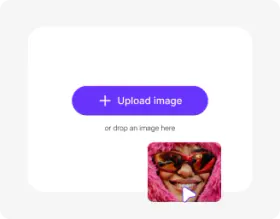
Add your image
Upload a PNG, WEBP, JPG, or JPEG picture up to 10MB and 10,000x10,000 pixels.
Select settings
Choose the AI model and select your preferred upscale factor of 2x, 4x, or 8x.
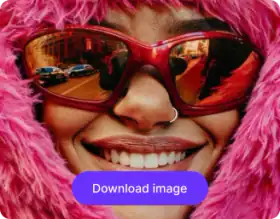
Download the output
Preview the upscaled HD output side-by-side with the original, and download it at no additional cost.
What Makes Pixelbin’s HD Photo Converter the Best Choice?

Face Restoration
Reconstructs subtle portrait elements including clear eye reflections, natural skin pore textures, and distinct hair strands in low-resolution or slightly out-of-focus faces.

JPEG Artifact Cleanup
Suppress blockiness, ringing, mosquito noise, and compression distortion before enlarging heavily compressed images.

High-Fidelity Scaling
Increases image pixel dimensions up to 8x while holding strict edge definition, natural color depth, and balanced lighting contrast.

Process Multiple Images
Use Pixelbin’s bulk-editing API to convert multiple images into HD simultaneously and save time on repetitive tasks.

Zero Compression
Processes images using high-bit-depth precision to prevent color banding or unnatural edge halos during enlargement.

Preserve Color and Lighting
Maintain the original image’s color accuracy, lighting, and visual character during HD conversion.
Convert Photos to HD and Enhance Image Clarity with AI
Instantly boost picture quality with Pixelbin’s HD photo converter. The image enlarger automatically increases resolution, sharpens blurry details, and improves clarity.
One-click HD conversion
Turn any low-quality image into a HD version in seconds. Upload your photo, and the tool enhances it automatically.
Advanced AI upscaling
Improve sharpness and detail through smart pixel enhancement instead of basic image stretching.
Free trials for everyone
Convert three images into HD for free, and upgrade anytime for more credits or API access.
No Payment Needed
Convert image into HD without entering credit card information or completing a lengthy setup process.
/pixelbin_blogs/PB_2.0/Apps_New_design_graphics/HD_photo_converter/upgrade-01-one-click-hd-conversion.webp)
AI tools by Pixelbin
/pixelbin_blogs/PB_2.0/Related_apps_tumbnail/AI_Image_Upscaler_(1)-transformed.webp)
/pixelbin_blogs/PB_2.0/Related_apps_tumbnail/Thumbnail_(1)-transformed.png)
/pixelbin_blogs/PB_2.0/Related_apps_tumbnail/Thumbnail_(18)-transformed.webp)
/pixelbin_blogs/PB_2.0/Related_apps_tumbnail/clarityupscaler-0_(4)_(2)-transformed.webp)
Convert Any Normal Photo to HD Online for Free
Benefits of using an online photo HD 1080p converter
Using Pixelbin, you can instantly upscale images using our blur photo to HD converter online free tool, without any software downloads. Here are some of its benefits:
- Instant results: Replace blurry images from your gallery with high-quality ones in a single click using online photo to HD converter.
- Sharper details: Enhance your photo’s sharpness & color depth automatically.
- No quality loss: Pixelbin’s free photo HD converter maintains the original color accuracy and lighting of the image, even after upscaling.
- No watermarks: You can download your processed image without any watermarks added.
- Cross-platform access: Pixelbin’s HD clarity photo converter can be used from any platform (Windows, Android, iOS, etc.).
- Always up to date: Pixelbin is always updated with the latest AI model to ensure you get the highest clarity results.
- Scalable for bulk edits: Forget spending hours on upscaling images one by one with Pixelbin’s API for bulk editing.
Supported Formats & Optimization Specifications
Pixelbin’s HD photo converter is built to handle standard web, mobile, and camera file types with flexible output configurations:
- Supported Input Formats: Easily upload images in JPG, JPEG, PNG, and WEBP formats.
- Max File Size Limits: 10MB raw or compressed source files. Maximum dimensions are 10,000 x 10,000 pixels.
- Flexible Scaling Multipliers: Use 2x or 4x for fast digital improvements, or up to 8x super-resolution for huge prints.
- Cross-Device Processing: Works smoothly on desktop browsers, tablets, and mobile operating systems (iOS and Android) without any plugin installations.
Practical Use Cases for Pixelbin's HD Photo Converter
1. Restore Old & Archival Photographs
Restore faded historical prints, low-resolution digital scans, or compressed family heirlooms. The AI is able to recognize facial features of the face, remove blur, and bring back the missing fine details to make old memories look sharp, clear, and freshly shot.
2. Create High-Density Files for Print-Ready Output
Turn low-resolution 72 DPI pictures into super high-resolution 300 DPI files without pixelation for large canvas prints, posters, merchandise, and desktop wallpapers.
3. Improve E-Commerce Conversion Rates
Catalog photography in high resolution builds buyer trust and drives engagement. Enhance the texture of products, fine print on labels, and increase product listings on Amazon, Shopify, and online marketplaces.
4. Upgrade Social Media & Profile Visuals
Turn casual phone photography into polished, DSLR-quality social posts. Crisp, detailed visuals grab attention instantly on competitive feeds like Instagram, LinkedIn, and Pinterest.
5. Revitalize Marketing & Digital Ad Creatives
Eliminate blurry visuals across paid display banners, hero graphics, and promotional emails. High-definition marketing assets boost visual appeal, improve brand perception, and drive higher click-through rates.
Pro Tips to Achieve Maximum Clarity from HD Converter
To get the highest quality output from Pixelbin’s automatic HD photo converter, keep these source image guidelines in mind:
- Use Original Source Files If Possible: Upload original camera files instead of heavily compressed social media transfers or multiple screenshots.
- Ensure balanced lighting Clear lighting in images will help the AI model recognize textures, lines and facial features accurately for realistic reconstruction.
- Avoid heavy pre-applied filters. AI sharpening algorithms can be confused by heavy preset filters. The cleanest results come from raw or slightly edited images.
- Select the Right Upscale Multiplier: Select 2x or 4x for standard clarity improvements, or 8x for turning small thumbnails into large-format assets.
FAQs
Here are some commonly asked questions about our HD Photo Converter Tool. If you still can’t find what you’re looking for, contact us at support@pixelbin.io


Edit images in seconds, not hours
Get pixel-perfect results just with your words
Start editing with AI