PixelBin logo
Image generator is here -   Create Now   and Claim 60% off on Pro plans. Use code PB60 at checkout.   Claim Discount

Teeth Whitening Tool

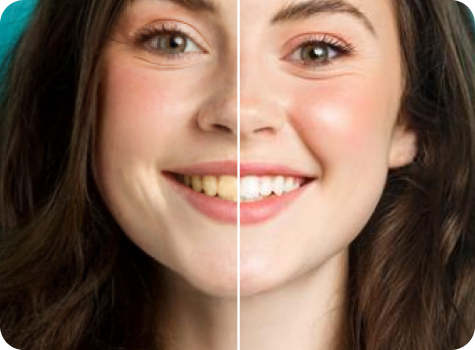
Clean up yellow or stained teeth in photos for a brighter smile.

Doctor headshot tool preview

File should be less than 10MB

or paste URL

Upload a bright, front-facing photo for accurate teeth whitening.

Before
Loading

AI Magic in progress
Whitening teeth only your photo stays the same

After

Your whitened photo is ready!

Edit image with AI
Get 🔥 free credits for image editing, upscaling, generation and more
Transform another image
Generation Failed

There was some issue on our end. Please try again.

Try Again
Show case

How to whiten teeth in photos with Pixelbin's AI editor?

1
Add your image
Paste a URL or upload your photo in JPG, JPEG, PNG, or WEBP format.
2
AI processing
Our AI editor automatically detects teeth in your photo and whitens them by removing stains without any manual editing required.
3
Download the image
Preview the edited image and download it in HD, completely free and without watermarks.

Why use Pixelbin’s free teeth whitening photo editor app?

Multiple image formats
Upload images in popular formats such as JPG, JPEG, WEBP, or PNG.
Smart AI editor
Automatically detects teeth in your photos and whitens them without manual selection.
Easy accessibility
Access the tool from any device using a browser and an internet connection.
Free HD downloads
Download your edited images in high definition without watermarks or extra costs.
No sign-up required
Use the teeth-whitening tool instantly without logging in or entering payment details.
Complete privacy
Your images are encrypted, processed securely, and never shared with anyone.

Whiten teeth in photos automatically, without any hassle

Instantly remove yellow tones and enhance your smile with AI without software downloads or manual editing.

High-quality edits

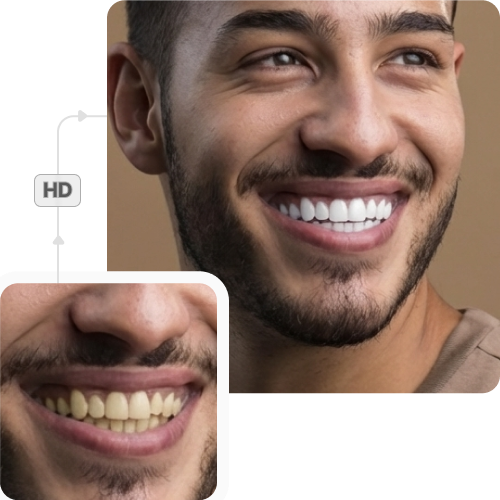
Preserve your image’s original resolution and clarity even after applying the teeth-whitening effect.

Sailling ship of sketche to image
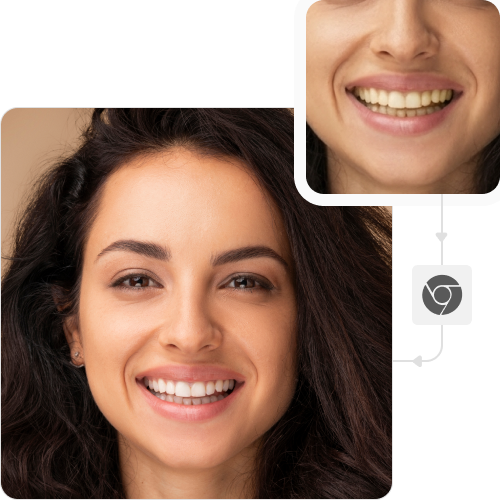
No app installations

Use the teeth-whitening editor directly from your browser on any device – no downloads or installations required.
Mountain sketch to image
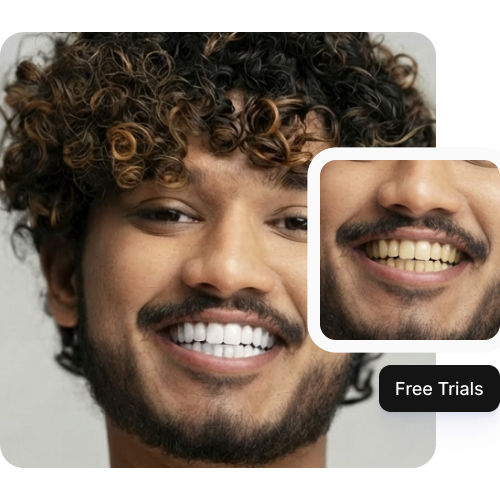
Monthly free trials

Whiten up to three photos each month for free, and upgrade anytime for more credits or API access.
Sketch hot air baloon to image generator
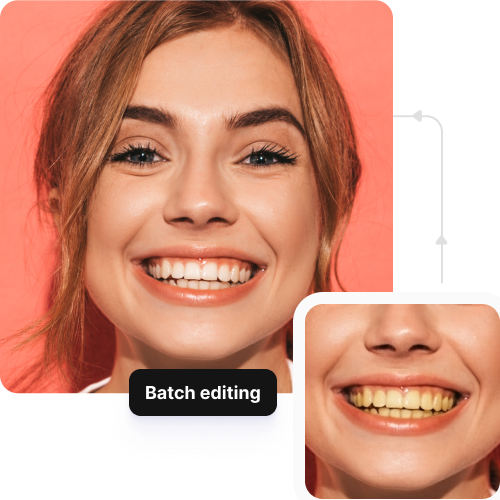
Batch editing access

Edit multiple images at once with API support to save time and streamline your workflow.
sketch to image in HD-resolution pictures

AI tools by Pixelbin

Key Highlights of the Free Online AI Teeth Whitening Tool

Benefits of using a teeth whitening photo editor app

With Pixelbin, you can instantly improve your portraits by removing unwanted stains from teeth. Here are some benefits of using this tool:

  • Realistic results: Maintain your natural tooth color while reducing discoloration for authentic, realistic results.
  • Instant smile boost: Whiten teeth instantly for a brighter, more confident look in every photo.
  • Cost-effective solution: Enjoy the benefits of a free AI photo editor without any software downloads.
  • Regular style updates: The platform frequently updates its AI models to include trending art styles and improved rendering capabilities.
  • No watermarks: Download your generated results in high quality, without any distracting watermarks.

Use cases of best teeth whitening photo editor apps

Pixelbin’s AI tool is perfect for fixing smiles in any scenario, from casual selfies to professional shoots. Here are some common ways to use it:

1. Fix your professional headshots

A bright smile makes a great first impression on LinkedIn or company websites. Use our AI photo editor to ensure your professional profile picture looks approachable.

2. Enhance dating profile pictures

Your smile is often the first thing people notice on dating apps. Make sure your profile photos show off your best, brightest smile to make a confident impression on potential matches.

3. Fix wedding & event photos

Wedding photos often involve lots of smiling, but bad lighting can sometimes make teeth look yellow. With Pixelbin’s photo editor teeth whitening tool, you can brighten the smiles of the bride, groom, or guests before sharing them.

4. Enhance social media selfies

Love your latest selfie but noticed some coffee stains on your teeth? Use our free photo editor to quickly touch up your smile before posting it to Instagram or Snapchat.

5. Restore vibrancy to old portraits

Older photographs can sometimes have color casts that make teeth look dull or yellow. Bring those memories back to life with Pixelbin by whitening the smiles naturally without damaging the retro feel of the photo.

6. Improve eCommerce model shots

Using models for product photography? A bright smile can make the product more appealing. Ensure all your model shots have consistent, radiant smiles without hours of retouching, using Pixelbin’s AI teeth whitening photo editor.

How to get the best results from photo editor teeth whitening apps?

Here are some tips to ensure the AI delivers the most accurate and radiant smiles in your photos:

  • Use photos with good lighting so the AI can clearly distinguish teeth from lips and gums.
  • Ensure the subject is smiling clearly with visible teeth for the best detection.
  • Avoid using overly blurry or heavily pixelated images, as this can affect precision.
  • Face the camera directly or at a slight angle. Extreme side profile images might be harder to process.
  • Keep the image resolution high to ensure the final whitened teeth look sharp and realistic.

FAQs

Here are some of the most common questions about our AI Teeth Whitening Photo Editor. If you can’t find the information you need, contact us at support@pixelbin.io or refer to our documentation for more details.

We offer a free plan where you can use the teeth whitening tool up to three times a month without an account. For more, simply sign up to get ten free credits, which you can use for this tool or any of our other AI apps.
No. Our photo editor with teeth whitening AI is trained to apply a subtle, natural-looking enhancement. It brightens your smile without making it look "over-edited" or forcefully recolored.
No. Pixelbin is a 100% online tool. You don’t need to download any software or app. You can access our free teeth whitening photo editor online from any device with a web browser.
Not at all. The entire process is automatic. Our free online teeth whitening photo editor finds the smile in your photo and whitens your dental setup instantly. You don't need any manual editing, brushing, or selection.
Yes, you can upload images up to 10 MB to Pixelbin’s teeth whitening photo editor free online tool as long as they’re in the mentioned file formats (JPG, JPEG, PNG, WEBP).
Edit images in seconds, not hours
Get pixel-perfect results just with your words
Start editing with AI