PixelBin logo
Image generator is here -   Create Now   and Claim 30% off on Pro Plans. Use code SALE30 at checkout.   Claim Discount

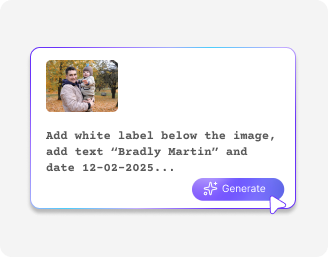
Write name and date on photo online

Label photos or documents with names and timestamps using quick text prompts.

Uploaded image
2500 chars left
Max file size 10 MB.
Loading

AI Magic in progress
Detecting photo areas, adding names/dates, enhancing clarity, and generating final output

Ready

Your edited photo with name and date is ready!

Edit image with AI
Get 🔥 free credits for image editing, upscaling, generation and more
Write name and date on another image
Generation Failed

There was some issue on our end. Please try again.

Try Again
Show case

How to add name and date on photo online with Pixelbin?

1
Add your image
Upload your image in any of the following formats: JPG, JPEG, PNG, or WEBP.
2
Type a prompt
Enter the name, date, or caption you want to add. Keep it short and simple for the best results.
3
Download the result
Preview the labeled image with the added text & download it in HD, at no extra cost or watermarks.

Why use Pixelbin’s date and name on photo online tools?

Multiple image formats
Upload images in popular formats such as JPG, JPEG, WEBP, or PNG.
No lengthy prompts
Simply enter the name and date. The tool understands your input and applies it automatically.
Fast AI rendering
Add timestamps to your images within seconds without any manual editing.
Free HD download
Download your edited images in high definition without watermarks or extra costs.
No sign-up required
Use the tool instantly without logging in or entering payment details.
Complete privacy
Your images are processed securely on protected servers and never shared with anyone.

Add clean, readable text to your photos in seconds

Easily add a name, date, or caption to your pictures for free, without software downloads or manual editing.

Smart text placement

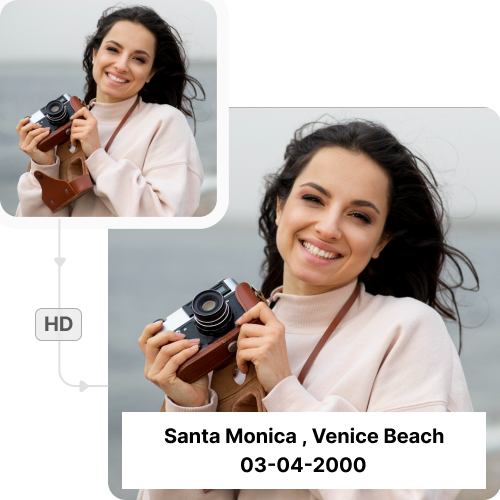
Upload your photo and enter the details. The editor adds the name and date precisely without covering the main subject.

Feature 1
Preserved photo details

Add names and dates to your photos without reducing image quality. The text is applied while keeping the original resolution intact.
Feature 2
No app installations

Access the photo editor directly from your browser on any device. No downloads or installations required.

Feature 3
Monthly free trials

Add timestamps to up to three photos each month for free and upgrade anytime for more credits or API access.

Feature 4

AI tools by Pixelbin

Add name and date on photos online

Benefits of using Pixelbin’s photo editor app

Make your photos more personalized and organized with an easy, web-based tool:

  • Unchanged picture quality: Our AI editor has a simple interface that anyone can use, regardless of their editing experience.
  • No learning curve: Get professional-quality results without expensive editing software or subscriptions.
  • Works on all your photos: Add timestamps to portraits, travel shots, product images, documents, and more.
  • No watermarks: Download your edited image in high quality, without any distracting watermarks.
  • Cross-platform compatibility: Pixelbin works smoothly whether you are using a smartphone, tablet, laptop, or desktop computer.

Use cases of our name and date on photo online free tools

Pixelbin’s free AI editor can be used for personal archives and professional documentation. Here are some common use cases:

1. Travel & vacation photos

Add the trip date or location to your favorite travel pictures. Whether it’s a beach holiday or a city tour, you can use Pixelbin to insert timestamps on your photos online to keep your memories organized and easy to revisit.

2. Baby milestones

Parents can use our AI editor to add timestamps to their child’s images to track growth month by month. Create a beautiful visual timeline where you can instantly see the age of your child in every picture.

3. Real estate documentation

Property managers can use our name and date on photo editors online to document the condition of a rental property. Stamping the date on inspection photos provides clear proof of the property's state before rentals.

4. Copyright & branding

Photographers can use Pixelbin to add captions in the form of date & time as a form of basic watermark. Identify the owner of the work and the year of creation, offering a layer of protection against misuse.

5. Insurance claims

For vehicle or property damage, you can add a name and date to your photo online to prove when the damage occurred. This is often a requirement for processing accurate insurance claims.

How to get the best results from tools to add online name and date on photos?

Here are some suggestions to ensure your text looks clear and professional using Pixelbin:

  • Ensure the image has a clear corner or empty space for the text.
  • Keep the text short and concise so it remains readable on smaller screens.
  • Upload high-resolution images to ensure the added text is sharp.
  • For multiple edits, apply text in steps instead of adding everything at once.
  • Preview the image before downloading to ensure no important details are hidden.

FAQs

Here are some of the most common questions about our Name and Date on Photo App. If you can’t find the information you need, contact us at support@pixelbin.io or refer to our documentation for more details.

Pixelbin’s free plan lets you write your name and date on photo online for up to three times per month, even without signing up. If you need more, you can sign up to get ten free credits or upgrade to a premium plan anytime for extra perks and additional credits.
Yes, you can do that simultaneously. Simply include both pieces of information in your prompt, and the tool will generate the text on your image in a single step.
Pixelbin adds your name and date to your photo online for free using advanced AI to decide the best spot to put the text on your image. It ensures that the final version with the added date and name does not look cluttered or visually confusing for the viewer.
No. Pixelbin’s tool is designed to add name and date on a photo without compressing the file or lowering the resolution. Your downloaded image will be as clear as the one you uploaded.
Absolutely. You can use the date and name on photo online apps directly through any browser. It is fully responsive and works on both Android and iOS devices without installation.
You can upload images up to 10 MB as long as they’re in the mentioned file formats (JPG, JPEG, PNG, WEBP).
Edit images in seconds, not hours
Get pixel-perfect results just with your words
Start editing with AI