


Support png/jpg/jpeg/webp, up to 10MB
/pixelbin_blogs/PB_2.0/Apps_New_design_graphics/Beard_filter_online/Beard_filter_online/happy-young-man.webp)
/pixelbin_blogs/PB_2.0/Apps_New_design_graphics/Beard_filter_online/Beard_filter_online/handsome-smiling-man-looking-with-disbelief_(1).webp)
/pixelbin_blogs/PB_2.0/Apps_New_design_graphics/Beard_filter_online/Beard_filter_online/handsome-emotional-man-isolated-gray-background.webp)
/pixelbin_blogs/PB_2.0/Apps_New_design_graphics/Beard_filter_online/Beard_filter_online/people-happiness-concept-smiling-teenage-boy-white-background.webp)
/pixelbin_blogs/PB_2.0/Apps_New_design_graphics/Beard_filter_online/Style/Soul_Patch_Beard_new)
/pixelbin_blogs/PB_2.0/Apps_New_design_graphics/Beard_filter_online/Style/Gotee_new)
/pixelbin_blogs/PB_2.0/Apps_New_design_graphics/Beard_filter_online/Style/French_Beard.webp)
/pixelbin_blogs/PB_2.0/Apps_New_design_graphics/Beard_filter_online/Style/Garibaldi_Beard.webp)
/pixelbin_blogs/PB_2.0/Apps_New_design_graphics/Beard_filter_online/Style/Chin_Strap_Beard.webp)
/pixelbin_blogs/PB_2.0/Apps_New_design_graphics/Beard_filter_online/Style/Mutton_Chops_Beard.webp)
Try different beard styles in a single click
Free AI Beard Filter Online
Experiment with different beard looks by adding realistic facial hair to your portraits and selfies.
/pixelbin_blogs/PB_2.0/Apps_New_design_graphics/Beard_filter_online/after_beard_1.webp)
/pixelbin_blogs/PB_2.0/Apps_New_design_graphics/Beard_filter_online/before_beard_1.webp)


How to use Pixelbin’s AI beard filter?
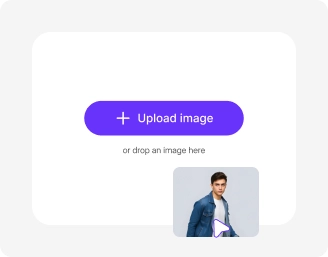
Add your image
Upload your image in any of the following formats: JPG, JPEG, WEBP, or PNG.
Choose from templates or customize
Pick a beard style or add custom instructions to apply a natural-looking beard with AI.
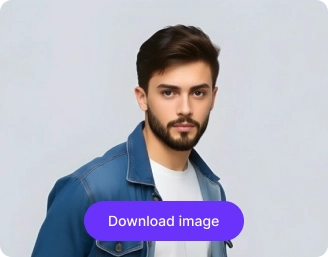
Select model, ratio & generate
Pick your model, set the aspect ratio, and click on “Apply beard” to create your image in HD. Preview and save your new look!
Why use Pixelbin’s AI beard filter app?

Automatic face detection
Let AI analyze your face from the uploaded photo, detecting the skin tone, texture, and shape for precise beard edits.

Custom frame control
Select the ideal ratio like 1:1, 4:3, 3:4, 16:9, or 9:16 so your image looks perfectly aligned wherever you share it.
.png)
Adjust brightness and contrast
Smooth out shadows and balance lighting around your jawline to make edits look clean and professional.
.png)
Correct skin tone
Match the skin tone where the beard was removed so your face looks uniform.
.png)
Various editing styles
Get fast edits with Nano Banana and achieve professional-quality results with Nano Banana Pro.

Enhance facial details
Sharpen your looks by up to 8X to maintain clarity after beard removal, while keeping your face natural.
Preview a new bearded look in just one click
Using Pixelbin, you can instantly visualize how you’d look with a beard using AI - no editing skills or software downloads needed.
Realistic beard textures
Generate natural-looking facial hair that matches your skin tone, face shape, and overall features.
Unchanged picture quality
Preserve your photo’s original resolution, detail, and sharpness even after applying the beard AI filter.
Readymade filters
Switch between Natural, Styled, or Custom beard styles to experiment with new looks.
No app installations
Use the beard generator directly from your browser on any device without downloading software or mobile apps.
/pixelbin_blogs/PB_2.0/Apps_New_design_graphics/Beard_filter_online/Beard_filter_online/Realistic_beard_textures.webp)
AI tools by Pixelbin
/pixelbin_blogs/PB_2.0/Apps_New_design_graphics/Braces_Filter/Thumbnail.webp)
/pixelbin_blogs/PB_2.0/Related_apps_tumbnail/erasebg-transformed_-_2026-04-01T130755.340.webp)
/pixelbin_blogs/PB_2.0/Apps_Graphics/curly_hair_filter/Thumbnail_36.png)
/pixelbin_blogs/PB_2.0/Apps_Graphics/AI_abs_filter/Thumbnail_13.png)
Key highlights of Pixelbin’s beard filter online free tool
Benefits of using our beard filter app
Using Pixelbin, you can add a beard filter to your photos instantly without needing Photoshop skills or heavy software. Here are some of its benefits:
- Natural-looking results: Our AI analyzes facial structure to blend the beard naturally with your jawline and skin texture.
- Instant results: Get an instant preview of how you’d look with a beard, without any hassle.
- High resolution: Generate filtered photos in HD suitable for social media profiles or pranking friends.
- Cross-platform access: You can access our AI filter from any device or operating system (Windows, Android, iOS, etc.).
- No watermarks: Apply the filter to multiple portraits simultaneously using Pixelbin’s API.
- Bulk-ready: Download your recolored images in high quality, completely watermark-free.
- Privacy-focused: Your uploaded photos are processed securely and never shared with third parties without consent.
Use cases of our free beard filter online
Pixelbin’s AI editor lets you try a beard look without any manual editing, perfect for testing styles, social media content, or creative projects. Let’s look at some common ways to use it:
1. Try a new look
Growing a beard takes time and patience, and it might not suit everyone. Use Pixelbin to see exactly how you would look with facial hair before committing to the weeks of growing or grooming it.
2. Enhance your dating profile
Want to see if a rugged look attracts more matches on dating apps? With Pixelbin, you can add a realistic beard to your selfie to present a different version of yourself and see which style gets the best responses.
3. Participate in "No Shave November"
Even if you can't grow a full beard, you can still join the trend digitally. Use our beard filter online to create content for social media challenges without actually growing facial hair.
4. Create "Age Progression" photos
Facial hair often makes men look more mature or older. Using our AI-powered filter, you can create a "future" version of yourself or a younger relative to see how they might look as they age.
5. Visualize characters for acting
Actors and cosplayers can use the tool to visualize how they would look for specific roles that require facial hair. Make better decisions about character styling without using fake beards or makeup during the planning phase.
How to get the best results from free beard filter apps?
- Upload clear portraits: Good lighting helps the AI analyze your jawline and skin texture accurately.
- Face the camera: Front-facing photos allow the beard filter AI to apply symmetry correctly.
- Keep your chin visible: Ensure your hand or clothing isn't covering your chin or jaw area.
- Use high-resolution images: High-quality photos result in more detailed and realistic hair textures.
- Avoid strong shadows: Heavy shadows can confuse the AI and make the beard look patchy.
- Keep natural expressions: A neutral face or slight smile ensures the beard sits naturally on your face.
FAQs
Here are some of the most common questions about our AI Beard Filter Tool. If you can’t find the information you need, contact us at support@pixelbin.io or refer to our documentation for more details.


Edit images in seconds, not hours
Get pixel-perfect results just with your words
Start Editing with AI