


Support png/jpg/jpeg/webp, up to 10MB
/pixelbin_blogs/PB_2.0/Apps_New_design_graphics/Action_figure/woman-street-style-outfit-looks-into-distance-pink-background-active-teen-girl-jeans-hoodie-jumping-isolated.webp)
/pixelbin_blogs/PB_2.0/Apps_New_design_graphics/Action_figure/pleased-woman-glasses-standing-street-with-phone-hand.webp)
/pixelbin_blogs/PB_2.0/Apps_New_design_graphics/Action_figure/download_(15).webp)
/pixelbin_blogs/PB_2.0/Apps_New_design_graphics/Action_figure/Jelly_Cat.webp)
/pixelbin_blogs/PB_2.0/Apps_New_design_graphics/Action_figure/Chubi.webp)
/pixelbin_blogs/PB_2.0/Apps_New_design_graphics/Action_figure/Soft_toy.webp)
/pixelbin_blogs/PB_2.0/Apps_New_design_graphics/Action_figure/Craft_Style_.webp)
/pixelbin_blogs/PB_2.0/Apps_New_design_graphics/Action_figure/Lego.webp)
/pixelbin_blogs/PB_2.0/Apps_New_design_graphics/Action_figure/Barbie.webp)
/pixelbin_blogs/PB_2.0/Apps_New_design_graphics/Action_figure/Realistic.webp)
/pixelbin_blogs/PB_2.0/Apps_New_design_graphics/Action_figure/POP_Mart.webp)
3D Action figure generator
Free AI 3D Action figure generator
Turn your selfies or portraits into collectible-style 3D action figures, without any design skills or software downloads.
/pixelbin_blogs/PB_2.0/Apps_New_design_graphics/Action_figure/download_(14).webp)
/pixelbin_blogs/PB_2.0/Apps_New_design_graphics/Action_figure/guy-hat-suit-jumps-orange-backgroundguy-hat-suit-jumps-orange-background-handsome-man-white-tee-beige-jacket-pants-dancimg-isolated-backdrop.webp)


How to create an AI action figure using Pixelbin?
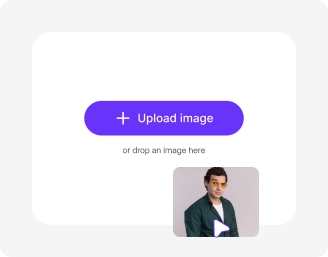
Upload image
Add your photo in WEBP, JPG, JPEG, or PNG format (up to 10MB) with a clear subject for best results.
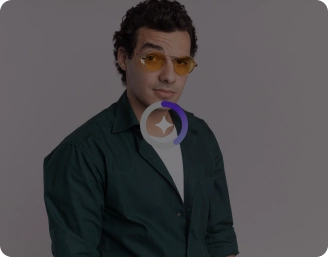
Pick style or add prompt
Choose from templates like Action Figure, LEGO, Barbie, or add custom instructions to define your 3D look.
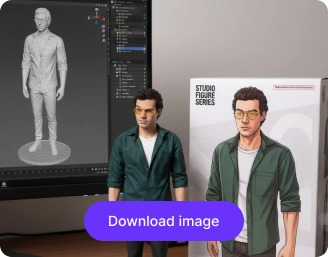
Choose model, ratio & generate
Select Nano Banana or pro, set your image ratio, then click generate to create and download your final image in HD.
Why use Pixelbin’s AI action figure generator app?

Background removal
Isolate your subject so your action figure stands out cleanly against any scene or backdrop.
Side-by-side preview
Try our interactive slider view to compare before and after results and spot every change with precision.

Designed for all platforms
Choose the perfect ratio for your needs with support for 1:1, 16:9, 9:16, 4:3, and 3:4 formats across devices and channels.

Image upscaling
Enhance your images by up to 2X, 4X, or 8X while preserving every original detail.

Object removal
Erase distracting elements or clutter from the original image to focus fully on your figure.

Color correction
Adjust tones, saturation, and hue to give your action figure a polished, vibrant appearance.
Create lifelike action figures without writing lengthy prompts
Using Pixelbin, you can make personalized AI action figures from photos, without any 3D modelling skills or writing lengthy prompts.
Easy accessibility
Access the action figure generator anytime from any device using just a web browser and an internet connection.
Prompt-free interface
Generate detailed action figure versions of your photos automatically without prompts or manual edits needed.
Batch-editing support
Create multiple action figure images at once with bulk editing, available in premium plans.
Complete privacy
Your images are encrypted, processed securely on protected servers, and never shared without consent.
/pixelbin_blogs/PB_2.0/Apps_New_design_graphics/Action_figure/Browser-based_platform.webp)
AI tools by Pixelbin
/pixelbin_blogs/PB_2.0/Apps_Graphics/Character-generator/Graphics/Thumbnail.png)
/pixelbin_blogs/PB_2.0/Related_apps_tumbnail/erasebg-transformed_-_2026-04-01T130755.340.webp)
/pixelbin_blogs/PB_2.0/Apps_Graphics/Pixar_filter/Graphics/Thumbnail.png)
/pixelbin_blogs/PB_2.0/Apps_Graphics/Ai_cartoon_Generator/Graphics/thumbnail_(16).webp)
Key highlights of Pixelbin’s AI action figure generator online free tool
Benefits of using free AI action figure generator online tools
Using Pixelbin, you can design custom action figures that look exactly like you. Here’s what makes it stand out:
- Photo-to-figure transformation: Create AI action figures instantly just by uploading a selfie or portrait.
- Hyper-realistic results: Pixelbin recreates fine textures, lighting, and shadows to give your image a genuine 3D toy look.
- No design experience: Automatically convert your image into a Bandai-style action figure, without any design or technical expertise.
- No watermarks: Download your generated action figure image in high definition without any distracting watermarks.
- Cross-platform access: Our tool is accessible from any device or operating system (Windows, Android, iOS, etc.).
Use cases of our action figure generator AI tool
With Pixelbin, you can create shareworthy, custom characters in seconds using our AI editor. Here are some of the best use cases:
1. Create custom profiles & avatars
Stand out on Instagram, TikTok, or Discord with a unique profile picture that looks like a miniature toy version of you. Using Pixelbin, you can build your personal brand in a fun way.
2. Make personalized gifts
Surprise a friend or family member, using Pixelbin’s AI action figure trend generator. Turn a photo of them into an action figure and use the image for a custom t-shirt, mug, or birthday card.
3. Design game & story assets
Quickly brainstorm and visualize 3D-style characters for your indie game, D&D campaign, or creative story. Generate multiple concepts for heroes, villains, or monsters in seconds without needing complex 3D software.
4. Create viral social media content
Jump on the AI action figure trend. Turn yourself, your friends, or even celebrities and memes into a collectible toy series. Upload different portraits or selfies and see what you will look like as action figures.
5. Visualize fictional characters
Bring characters from your book, fan-fiction, or script to life, without even using a prompt. Just upload an image, and our AI action figure generator from photo will show what your imagined hero looks like as a high-quality 3D-style model.
6. Design brand mascots
Create a unique mascot for your brand or product. Generate images of your mascot using Pixelbin in various poses or styles to use in social media posts, ads, or on your website.
How to get the best results from our AI action figure generator?
Follow these simple tips to get the best results when using our AI editor to create an action figure image:
- Use clear photos where the face is easily visible.
- Avoid using photos that are blurry or do not have good lighting.
- For best results, upload selfies and portraits that do not have much background clutter.
FAQs
Here are some of the most common questions about our AI Action Figure Generator App. If you can’t find what you’re looking for, contact us at support@pixelbin.io or check our documentation for more details.


Edit images in seconds, not hours
Get pixel-perfect results just with your words
Start editing with AI