


Support jpg/jpeg/png/webp, up to 10MB
/pixelbin_blogs/PB_2.0/Apps_New_design_graphics/sticker_generator/erasebg-transformed_(5).webp)
/pixelbin_blogs/PB_2.0/Apps_New_design_graphics/sticker_generator/erasebg-transformed_(4).webp)
/pixelbin_blogs/PB_2.0/Apps_New_design_graphics/sticker_generator/erasebg-transformed_(9).webp)
/pixelbin_blogs/PB_2.0/Apps_New_design_graphics/sticker_generator/comic_style.webp)
/pixelbin_blogs/PB_2.0/Apps_New_design_graphics/sticker_generator/outline_style.webp)
/pixelbin_blogs/PB_2.0/Apps_New_design_graphics/sticker_generator/cutout.webp)
/pixelbin_blogs/PB_2.0/Apps_New_design_graphics/sticker_generator/Pixel_art_style.webp)
/pixelbin_blogs/PB_2.0/Apps_New_design_graphics/sticker_generator/anime.webp)
AI sticker generator
Free AI sticker generator
Create custom stickers for personal, business, or social media uses with the Pixelbin AI sticker generator.
/pixelbin_blogs/PB_2.0/Apps_New_design_graphics/sticker_generator/after_1.webp)
/pixelbin_blogs/PB_2.0/Apps_New_design_graphics/sticker_generator/Before_1.webp)


Create stickers online in three easy steps
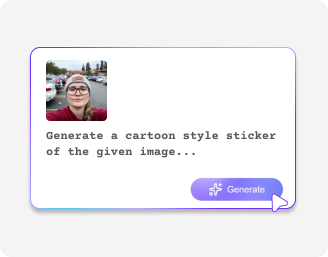
Upload your image
Click on the ‘+’ sign to upload photo in any of the following formats: JPG, JPEG, PNG, or WEBP.
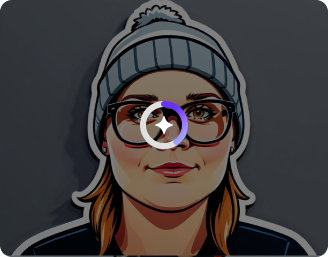
Let AI do its magic
Once uploaded, wait a few seconds for Pixelbin’s AI tool to create fun stickers from your photos.
.png)
Download your final image
As soon as your sticker is ready, you can download it in high resolution.
Why use Pixelbin’s sticker generator app?
.png)
High-resolution image
Get high-resolution stickers with Pixelbin’s sticker generator.
.png)
User-friendly
Pixelbin’s sticker generator has a user-friendly interface that makes it easy for anyone to create stickers without prior experience.

Supports multiple formats
Pixelbin supports multiple image formats, such as JPG, JPEG, PNG, and WEBP.

Safeguards privacy
Pixelbin’s sticker generator keeps your data safe without sharing any of your personal details.
.png)
Easy accessibility
You can access Pixelbin apps anytime, anywhere, as long as you have a stable internet connection.

Time-saving
Removes the hassle of manual editing, saving you time and effort.
Generate personalized stickers with Pixelbin
Pixelbin’s AI sticker generator lets you turn any image into fun stickers in just seconds.
Instant result
With the quick processing system, you can generate stickers in just a few seconds.
No skills required
Anyone can use Pixelbin’s sticker generator app without having prior knowledge or skills.
Free trial
Get your first three trials for free at pixelbin without having to sign up.
Browser-based platform
Being a browser-based system, you can access it from anywhere without having to download or install anything.
/pixelbin_blogs/PB_2.0/Apps_Graphics/AI_sticker_Generator/Artboard_1_copy_7_4x.webp)
AI tools by Pixelbin
/pixelbin_blogs/PB_2.0/Apps_Graphics/Unpixelate_Image/Graphics/Thumbnail_(13).png)
/pixelbin_blogs/PB_2.0/Apps_Graphics/Transparent_Background/Graphics/Thumbnail_(12).png)
/pixelbin_blogs/PB_2.0/Apps_New_design_graphics/AI_Tools_by_Pixelbin/AI_online_colorize_photo.webp)
/pixelbin_blogs/PB_2.0/Apps_New_design_graphics/AI_Tools_by_Pixelbin/AI_background_generator_(1).webp)
AI sticker generator highlights
What are the benefits of Pixelbin’s sticker generator app?
Stickers are a fun way to communicate and make conversations more friendly. Beyond that, Pixelbin’s sticker generator offers several other benefits as listed below:
- Instant result: Create custom stickers in seconds without having to use complicated designing tools.
- Unlimited creativity: Use different styles, colors, and graphics to bring your sticker ideas to life.
- Cost-effective: Design unique stickers without paying a professional.
- No design skills required: Create stickers your way, with no prior skills or knowledge required.
- Versatile use: Pixelbin's AI stickers are perfect for various uses across social media, event marketing, branding, and packaging, or for personal projects.
What are the use cases of Pixelbin's sticker generator app?
Create high-resolution, colorful stickers for social media and personal projects with Pixelbin's sticker generator app.
1. Social media content
Design fun, eye-catching stickers for your Instagram stories, reels, and posts.
2. Classroom & education
Create playful stickers for learning activities and rewards.
3. Personal projects
Create personalized stickers for scrapbooking, journaling, or even planning.
4. eCommerce packaging
Add branded stickers to packaging to elevate your customers' unboxing experience.
Tips for using Pixelbin's AI blur remover
Here are some simple tips to help you get the best results from Pixelbin's sticker generator:
- Use high-quality images, videos, or logos for the best output.
- Avoid using cluttered images; simple images and photos usually work best as stickers.
- Choose bright, bold colors to make your stickers stand out.
- Preview your sticker after resizing or recoloring to ensure it looks right before saving.
- Combine catchy phrases with visuals to create a stronger impact.
FAQs
We've put together a list of commonly asked questions from our community. If you still can't find what you're looking for, don't hesitate to reach out to us at support@pixelbin.io or check out our documentation for more information.


Edit images in seconds, not hours
Get pixel-perfect results just with your words
Start editing with AI