


Support webp/jpg/jpeg/png, up to 10MB
/pixelbin_blogs/PB_2.0/Apps_New_design_graphics/Pixel_art/women_(2).webp)
/pixelbin_blogs/PB_2.0/Apps_Graphics/Actor_headshot/Sample_image_1_for_actor_headshots.webp)
Pixel art generator
Free AI pixel art generator
Design unique game icons, tilesets, and backgrounds instantly without drawing a single pixel manually.
/pixelbin_blogs/PB_2.0/Apps_New_design_graphics/Pixel_art/pixel_art_iof_women.webp)
/pixelbin_blogs/PB_2.0/Apps_New_design_graphics/Pixel_art/women_(2).webp)


How to use Pixelbin’s AI Pixel art maker?
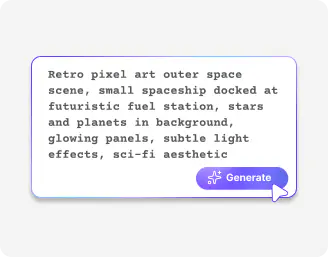
Describe your art
Type a text prompt that explains your character, game scene, object, icon, or even a full retro environment. Add details like style, color palette, pose, lighting, background, or pixel size.
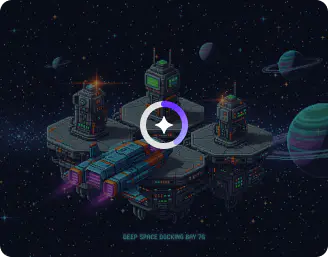
Generate the image
Click generate, and the AI will turn your text into pixel art within seconds, with clean and clear pixel details.
.webp)
Save your image
Download your finished pixel art and use it in your game, app, website, or creative project right away.
Why use Pixelbin’s AI pixel animation art generator?

HD outputs
Download high-definition pixel art with sharp details and clean edges, ready for games, apps, websites, or digital projects.

Instant sharing
Copy the generated URL and share your art instantly with your team or community.

Asset management
Organize, store, and manage all your generated sprites, characters, and game assets in one easy place, so you can access them anytime you want.

No sign-up
Start generating your avatars or characters immediately, without creating an account or filling out long forms.

Free trials
Try the AI pixel art generator at no cost to explore its features before you purchase extra credits.
.webp)
Localized prompting
Select a specific area of your image and add a targeted prompt to edit only that section, without changing the entire artwork.
Generate concept art or playable characters in seconds
Customize outfits, poses, weapons, and color themes to match your game’s world and storyline
No drawing skills
Use our AI pixel art generator to turn simple text prompts into detailed retro graphics, without any drawing experience.
Browser based
Access the pixel art generator directly from your browser with no downloads or installations required, whether you use Safari, Firefox, Chrome, or Edge.
Complete privacy
Your prompts and generated images are processed on secure servers and are never shared with anyone.
Image upscaling
Enlarge your pixel art up to 2x, 4x, or 8x while keeping edges sharp and details clean.
/pixelbin_blogs/PB_2.0/Apps_New_design_graphics/Pixel_art/no_drawing_.webp)
AI tools by Pixelbin
/pixelbin_blogs/PB_2.0/Apps_Graphics/Vignette_Effect/Graphics/Main-thumbnail.jpeg)
/pixelbin_blogs/PB_2.0/Apps_Graphics/Add_noise_to_image/Graphics/thumbnail_(4).png)
/DynamicApps/thumbnails/Headshots.png)
/pixelbin_blogs/PB_2.0/Apps_Graphics/Anime_Pfp_Maker/Anime_pfp_maker/Thumbnail.png)
Key highlights of the AI Pixel art image generator
Benefits of the AI Pixel art generator
- Create complete pixel scenes in seconds: When you need to create a character or landscape, you can complete the task within seconds by generating the entire scene instead of selecting individual squares one by one. The pixel art generator from text lets you instantly turn long, time-consuming work into a fast and fun brainstorming session.
- Enjoy total creative freedom: Turn your ideas into visuals without needing technical training or advanced design skills. The online AI pixel art generator allows you to describe what you want and instantly see your creation come to life on screen.
- Keep your momentum: The tool gives you instant design variations and different color options to spark new ideas and help you move past creative blocks quickly.
- Get professional results on a budget: You do not need expensive software or large resources to build your game world or social media visuals. With access to the pixel art AI generator at no cost, you can create high-quality graphics for your passion projects or side business.
- Maintain a unified look: Keep your icons, sprites, and assets visually consistent across your entire project. The AI helps you maintain the same style and vibe so your work looks polished, intentional, and professionally designed.
- Get ready-to-use assets: You get more than just a good-looking image. You can generate sprite sheets for animation and build tile sets without handling complex technical steps, so you can start building your project immediately.
Use cases
- Indie game development: You create unlimited game-ready assets, which include environment tiles, decorative props, and character sprite sheets. The AI pixel art animation generator enables you to create essential movement frames, which eliminate the need for hours of drawing work.
- Social media & branding: Create custom profile pictures and brand-related icons through the pixel art generator, which transforms your headshot into pixel art. The tool provides your Twitch channel, Discord server, and Twitter profile with a unified "gamer-chic" appearance that maintains your individual style.
- Prototyping & concept art: Test various design ideas before you select your ultimate visual style. The system enables you to "fail fast" by examining which character silhouettes and color palettes perform effectively during live testing. This way, you can prevent spending multiple days on art development.
- Custom merchandise & NFTs: The pixel art style works well for producing physical items like enamel pins, stickers, and cross-stitch patterns. You can create extensive digital collectible collections that maintain distinct visual identities throughout your series.
- Educational & creative hobbyism: Create custom portraits for your D&D characters on the fly without needing professional art skills.
How to get the best results using the AI pixel art generator?
The best results come from writing prompts that are both clear and simple. Here are a few tips you can try:
- Specify your exact requirements for what you want to see. The term "8-bit warrior with red armor and a sword" should be used instead of writing "warrior" as your description. The AI system requires small details because they help it to better understand your intention.
- The style and size need to be mentioned. Add something like: “create a 16x16 sprite” to get an output that meets your project requirements.
- Explain both the colors and the mood. You can use phrases like dark blue background and bright cartoon colors to direct the appearance of the image.
- Avoid introducing multiple unrelated concepts into a single statement.
- Make minor changes to your prompt after your first attempt fails because this will allow you to test again.
FAQs
Here are some of the most commonly asked questions about our AI pixel art generator. If you still can’t find what you’re looking for, you can reach out to us at support@pixelbin.io or read our documentation for more details.


Edit images in seconds, not hours
Get pixel-perfect results just with your words
Start editing with AI